
Skip to content
  • Categories
  • Recent
  • Tags
  • Popular
  • Users
  • Groups
  • Search
  • Get Qt Extensions
  • Unsolved
Collapse
Brand Logo
  1. Home
  2. Qt Development
  3. General and Desktop
  4. Any easy way to deploy an application for another pc?
Qt 6.11 is out! See what's new in the release blog

Any easy way to deploy an application for another pc?

Scheduled Pinned Locked Moved Unsolved General and Desktop
16 Posts 3 Posters 2.7k Views 2 Watching
  • Oldest to Newest
  • Newest to Oldest
  • Most Votes
Reply
  • Reply as topic
Log in to reply
This topic has been deleted. Only users with topic management privileges can see it.
  • jsulmJ jsulm

    @agmar said in Any easy way to deploy an application for another pc?:

    not available for anything below Qt6.5?

    It is available, but you need a static Qt build.

    "release does not compile, because of the qDebug i assume" - no, qDebug is for sure not an issue.

    Did you check https://doc.qt.io/qt-6/linux-deployment.html ?

    A Offline
    A Offline
    agmar
    wrote on last edited by
    #7

    @jsulm yes i have, but i assumed that it will fail because one line has an indication it might not work for Cmake:

    make clean
    PATH=/path/to/Qt/bin:$PATH
    export PATH
    qmake -config release <-------------- will work with Cmake?
    make

    jsulmJ 1 Reply Last reply
    0
    • A agmar

      @jsulm yes i have, but i assumed that it will fail because one line has an indication it might not work for Cmake:

      make clean
      PATH=/path/to/Qt/bin:$PATH
      export PATH
      qmake -config release <-------------- will work with Cmake?
      make

      jsulmJ Offline
      jsulmJ Offline
      jsulm
      Lifetime Qt Champion
      wrote on last edited by
      #8

      @agmar Sure, you can build with CMake in debug or release mode. For release mode pass -DCMAKE_BUILD_TYPE=Release to cmake.

      https://forum.qt.io/topic/113070/qt-code-of-conduct

      A 1 Reply Last reply
      0
      • jsulmJ jsulm

        @agmar Sure, you can build with CMake in debug or release mode. For release mode pass -DCMAKE_BUILD_TYPE=Release to cmake.

        A Offline
        A Offline
        agmar
        wrote on last edited by agmar
        #9

        @jsulm also, from the link you gave:

        cd /path/to/Qt
        ./configure -static -prefix /path/to/Qt <other parameters>
        make
        failed, because there is no configure file to run in the directory
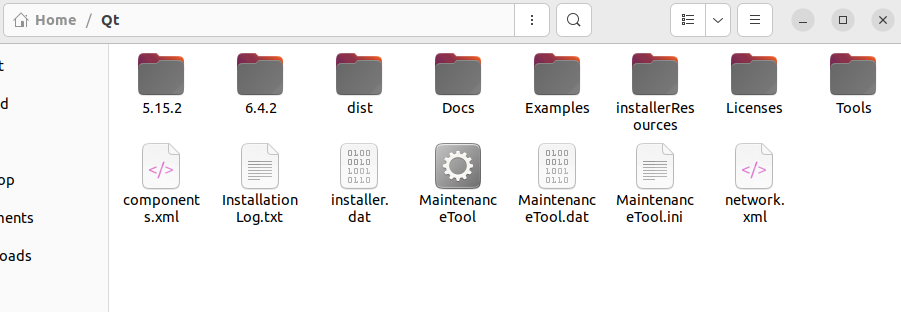
        6f93ee62-bd72-4466-8576-b37d0c1cc8c1-image.png

        jsulmJ S 2 Replies Last reply
        0
        • A agmar

          @jsulm also, from the link you gave:

          cd /path/to/Qt
          ./configure -static -prefix /path/to/Qt <other parameters>
          make
          failed, because there is no configure file to run in the directory
          6f93ee62-bd72-4466-8576-b37d0c1cc8c1-image.png

          jsulmJ Offline
          jsulmJ Offline
          jsulm
          Lifetime Qt Champion
          wrote on last edited by
          #10

          @agmar If you want to build Qt by yourself you need to get Qt source code (https://doc.qt.io/qt-6/build-sources.html). Keep in mind: it is not easy job, especially if you want to build Qt statically. And static linking also requires that you publish source code of your application if you give your software to others and they ask you to provide the code.

          https://forum.qt.io/topic/113070/qt-code-of-conduct

          A S 2 Replies Last reply
          0
          • jsulmJ jsulm

            @agmar If you want to build Qt by yourself you need to get Qt source code (https://doc.qt.io/qt-6/build-sources.html). Keep in mind: it is not easy job, especially if you want to build Qt statically. And static linking also requires that you publish source code of your application if you give your software to others and they ask you to provide the code.

            A Offline
            A Offline
            agmar
            wrote on last edited by
            #11

            @jsulm is it not the same effect as changing it in the build settings here? 0ae25d33-948d-45a9-a040-21ddbe4a0fa3-image.png or does using DCMAKE_BUILD_TYPE=Release

            have another purpose?

            jsulmJ 1 Reply Last reply
            0
            • jsulmJ jsulm

              @agmar If you want to build Qt by yourself you need to get Qt source code (https://doc.qt.io/qt-6/build-sources.html). Keep in mind: it is not easy job, especially if you want to build Qt statically. And static linking also requires that you publish source code of your application if you give your software to others and they ask you to provide the code.

              S Offline
              S Offline
              SimonSchroeder
              wrote on last edited by
              #12

              Deployment for Linux can be quite tricky. Different distributions work differently, even same distributions with different versions work differently. Lastly, even if the version is the same, the other computer might not have the right packages installed.

              In our company we are producing AppImages for this exact reason. These will package all necessary libraries into an executable AppImage. This also include Qt libraries if those are dynamically linked. Sure, this produces a large AppImage, but it works a lot more reliably.

              We use both linuxdeploy and linuxdeployqt. Otherwise I couldn't make it work properly for our software. One caveat is that you cannot use these tools if you are compiling on a recent distribution. Those tools explicitly ask to use an older version so that most currently used distributions will work.

              Here are the general steps we are using in our script:

              export VERSION=1.2.3 # this version is written somewhere in the AppImage
              rm -rf AppDir # clean up previous deployments
              ./linuxdeploy-x68_64.AppImage --appdir=AppDir --executable=release/MyApp --desktop-file=MyApp.desktop --icon-file=MyApp.svg
              ./linuxdeployqt-v8-x68_64.AppImage MyApp.desktop -qmake=/opt/QT/5.13.2/gcc_64/bin/qmake -appimage
              

              This will produce a MyApp.AppImage. You need to replace the path to your executable (release/MyApp in this example) and the path to qmake. Also a .desktop file and – if you have one – an icon file is needed (doesn't have to be SVG).

              So far, only Ubuntu 16.10 didn't play nice with our general AppImage (compiled on CentOS 7). And now Ubuntu 20 does not support the Ubuntu 16 AppImage, but works with the one from CentOS 7.

              1 Reply Last reply
              0
              • A agmar

                @jsulm is it not the same effect as changing it in the build settings here? 0ae25d33-948d-45a9-a040-21ddbe4a0fa3-image.png or does using DCMAKE_BUILD_TYPE=Release

                have another purpose?

                jsulmJ Offline
                jsulmJ Offline
                jsulm
                Lifetime Qt Champion
                wrote on last edited by
                #13

                @agmar said in Any easy way to deploy an application for another pc?:

                is it not the same effect as changing it in the build settings here?

                I was referring to

                cd /path/to/Qt
                ./configure -static -prefix /path/to/Qt <other parameters>
                make
                

                which looks like you wanted to build Qt by yourself? If you just want to build your app in release mode, then yes just select Release in QtCreator.

                https://forum.qt.io/topic/113070/qt-code-of-conduct

                A 1 Reply Last reply
                0
                • A agmar

                  @jsulm also, from the link you gave:

                  cd /path/to/Qt
                  ./configure -static -prefix /path/to/Qt <other parameters>
                  make
                  failed, because there is no configure file to run in the directory
                  6f93ee62-bd72-4466-8576-b37d0c1cc8c1-image.png

                  S Offline
                  S Offline
                  SimonSchroeder
                  wrote on last edited by
                  #14

                  @agmar said in Any easy way to deploy an application for another pc?:

                  failed, because there is no configure file to run in the directory

                  The installer by default does not install the sources. You need to install the Qt source separately (there is a checkbox in the installer). /path/to/Qt then refers to the path of the source code for a specific version of Qt.

                  1 Reply Last reply
                  0
                  • jsulmJ jsulm

                    @agmar said in Any easy way to deploy an application for another pc?:

                    is it not the same effect as changing it in the build settings here?

                    I was referring to

                    cd /path/to/Qt
                    ./configure -static -prefix /path/to/Qt <other parameters>
                    make
                    

                    which looks like you wanted to build Qt by yourself? If you just want to build your app in release mode, then yes just select Release in QtCreator.

                    A Offline
                    A Offline
                    agmar
                    wrote on last edited by
                    #15

                    @jsulm i assume that release mode means that the app can be run from the generated folder?

                    jsulmJ 1 Reply Last reply
                    0
                    • A agmar

                      @jsulm i assume that release mode means that the app can be run from the generated folder?

                      jsulmJ Offline
                      jsulmJ Offline
                      jsulm
                      Lifetime Qt Champion
                      wrote on last edited by
                      #16

                      @agmar No, it means that it does not contain debug symbols and is better optimised than debug build.

                      https://forum.qt.io/topic/113070/qt-code-of-conduct

                      1 Reply Last reply
                      0

                      • Login

                      • Login or register to search.
                      • First post
                        Last post
                      0
                      • Categories
                      • Recent
                      • Tags
                      • Popular
                      • Users
                      • Groups
                      • Search
                      • Get Qt Extensions
                      • Unsolved