
Any easy way to deploy an application for another pc?
-
@jsulm said in Any easy way to deploy an application for another pc?:
@agmar Then please tell us what exactly did you try and what did not work. Also, for which platform do you want to deploy (Windows, Mac, Linux,...)?
For example for Windows there is https://doc.qt.io/qt-6/windows-deployment.htmlto clarify, this is on a linux system using Qt4.2, Cmake...
i tried static linking, which didn't seem to work(not available for anything below Qt6.5?
finding and copying the libraries using ldd and some scripts, but the just gave links of the file, tried using rsync, didn't work
Tried changing the build configuration from debug to release and later to release with debug: release does not compile, because of the qDebug i assume, since the error messages provided no real help, release with debug still gave same dependency errors on another PC
@agmar said in Any easy way to deploy an application for another pc?:
not available for anything below Qt6.5?
It is available, but you need a static Qt build.
"release does not compile, because of the qDebug i assume" - no, qDebug is for sure not an issue.
Did you check https://doc.qt.io/qt-6/linux-deployment.html ?
-
@agmar said in Any easy way to deploy an application for another pc?:
not available for anything below Qt6.5?
It is available, but you need a static Qt build.
"release does not compile, because of the qDebug i assume" - no, qDebug is for sure not an issue.
Did you check https://doc.qt.io/qt-6/linux-deployment.html ?
-
@jsulm yes i have, but i assumed that it will fail because one line has an indication it might not work for Cmake:
make clean
PATH=/path/to/Qt/bin:$PATH
export PATH
qmake -config release <-------------- will work with Cmake?
make -
@agmar Sure, you can build with CMake in debug or release mode. For release mode pass -DCMAKE_BUILD_TYPE=Release to cmake.
-
@jsulm also, from the link you gave:
cd /path/to/Qt
./configure -static -prefix /path/to/Qt <other parameters>
make
failed, because there is no configure file to run in the directory
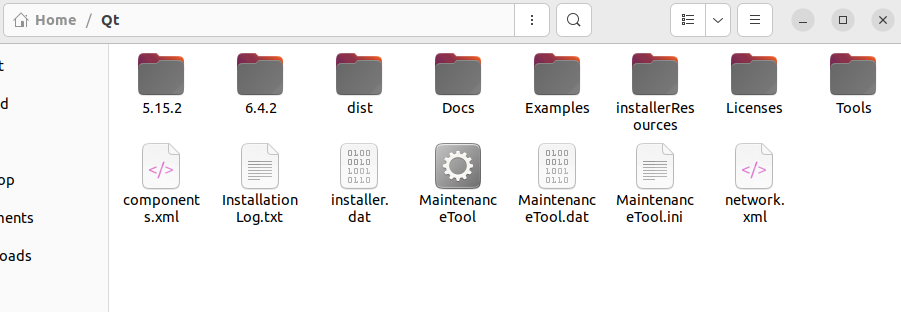
@agmar If you want to build Qt by yourself you need to get Qt source code (https://doc.qt.io/qt-6/build-sources.html). Keep in mind: it is not easy job, especially if you want to build Qt statically. And static linking also requires that you publish source code of your application if you give your software to others and they ask you to provide the code.
-
@agmar If you want to build Qt by yourself you need to get Qt source code (https://doc.qt.io/qt-6/build-sources.html). Keep in mind: it is not easy job, especially if you want to build Qt statically. And static linking also requires that you publish source code of your application if you give your software to others and they ask you to provide the code.
-
@agmar If you want to build Qt by yourself you need to get Qt source code (https://doc.qt.io/qt-6/build-sources.html). Keep in mind: it is not easy job, especially if you want to build Qt statically. And static linking also requires that you publish source code of your application if you give your software to others and they ask you to provide the code.
Deployment for Linux can be quite tricky. Different distributions work differently, even same distributions with different versions work differently. Lastly, even if the version is the same, the other computer might not have the right packages installed.
In our company we are producing AppImages for this exact reason. These will package all necessary libraries into an executable AppImage. This also include Qt libraries if those are dynamically linked. Sure, this produces a large AppImage, but it works a lot more reliably.
We use both linuxdeploy and linuxdeployqt. Otherwise I couldn't make it work properly for our software. One caveat is that you cannot use these tools if you are compiling on a recent distribution. Those tools explicitly ask to use an older version so that most currently used distributions will work.
Here are the general steps we are using in our script:
export VERSION=1.2.3 # this version is written somewhere in the AppImage
rm -rf AppDir # clean up previous deployments
./linuxdeploy-x68_64.AppImage --appdir=AppDir --executable=release/MyApp --desktop-file=MyApp.desktop --icon-file=MyApp.svg
./linuxdeployqt-v8-x68_64.AppImage MyApp.desktop -qmake=/opt/QT/5.13.2/gcc_64/bin/qmake -appimage
This will produce a
MyApp.AppImage. You need to replace the path to your executable (release/MyAppin this example) and the path to qmake. Also a .desktop file and – if you have one – an icon file is needed (doesn't have to be SVG).So far, only Ubuntu 16.10 didn't play nice with our general AppImage (compiled on CentOS 7). And now Ubuntu 20 does not support the Ubuntu 16 AppImage, but works with the one from CentOS 7.
-
@jsulm is it not the same effect as changing it in the build settings here?
 or does using DCMAKE_BUILD_TYPE=Release
have another purpose?
@agmar said in Any easy way to deploy an application for another pc?:
is it not the same effect as changing it in the build settings here?
I was referring to
cd /path/to/Qt
./configure -static -prefix /path/to/Qt <other parameters>
make
which looks like you wanted to build Qt by yourself? If you just want to build your app in release mode, then yes just select Release in QtCreator.
-
@jsulm also, from the link you gave:
cd /path/to/Qt
./configure -static -prefix /path/to/Qt <other parameters>
make
failed, because there is no configure file to run in the directory
@agmar said in Any easy way to deploy an application for another pc?:
failed, because there is no configure file to run in the directory
The installer by default does not install the sources. You need to install the Qt source separately (there is a checkbox in the installer).
/path/to/Qtthen refers to the path of the source code for a specific version of Qt. -
@agmar said in Any easy way to deploy an application for another pc?:
is it not the same effect as changing it in the build settings here?
I was referring to
cd /path/to/Qt ./configure -static -prefix /path/to/Qt <other parameters> makewhich looks like you wanted to build Qt by yourself? If you just want to build your app in release mode, then yes just select Release in QtCreator.
