Skip to content
  • Categories
  • Recent
  • Tags
  • Popular
  • Users
  • Groups
  • Search
  • Get Qt Extensions
  • Unsolved
Collapse
Brand Logo
  1. Home
  2. Qt Development
  3. Mobile and Embedded
  4. RoundButton not taking correct height setting
Qt 6.11 is out! See what's new in the release blog

RoundButton not taking correct height setting

Scheduled Pinned Locked Moved Solved Mobile and Embedded
16 Posts 2 Posters 1.8k Views 1 Watching
  • Oldest to Newest
  • Newest to Oldest
  • Most Votes
Reply
  • Reply as topic
Log in to reply
This topic has been deleted. Only users with topic management privileges can see it.
  • mzimmersM Offline
    mzimmersM Offline
    mzimmers
    wrote on last edited by mzimmers
    #4

    I cut out all the other stuff for brevity. Here's the complete custom button, if you're interested:

    // implements a round button that can support an icon and up to two lines of text. (not complete yet)
    import QtQuick
    import QtQuick.Controls
    import QtQuick.Layouts
    import Qt5Compat.GraphicalEffects
    
    import QtQuick.Controls.Material
    import QtQuick.Controls.Fusion
    
    import colors.stylesheet
    
    RoundButton {
        id: roundButton
    
        property string buttonTitle: "this should not appear"
        property string buttonDescr: ""
        property int fontSize: 16
        property color textColor: Colors.primaryText
        property color buttonColor: Colors.primaryPurple
        property color borderColor: Colors.primaryText
        property int borderWidth: 2
        property url buttonIcon: ""
    
        height: implicitHeight//implicitBackgroundHeight
        width: implicitWidth
        radius: height / 2
        leftPadding: 8
        rightPadding: leftPadding
        topPadding: 4
        bottomPadding: 4
    
        display: AbstractButton.TextBesideIcon
        icon {
            color: roundButton.textColor
            source: roundButton.buttonIcon
            height: roundButton.height * 3 / 4
        }
        text: roundButton.buttonTitle
    
        // note: this line below is an semi-documented feature,
        // https://doc.qt.io/qt-6/qml-qtquick-palette.html
        // but the alternative is to use contentItem, which
        // doesn't support an icon, so it needs a RowLayout, etc.
        // for now, this is the lesser of 2 evils.
        palette.buttonText: roundButton.textColor
    
        font {
            pixelSize: roundButton.fontSize
            weight: Font.Bold
        }
    
        background: Rectangle {
            id: buttonBackground
            height: roundButton.height
            width: roundButton.width
            anchors.centerIn: parent
            radius: height / 2
            color: pressed ? Colors.purplePressed : roundButton.buttonColor
            border.color: borderColor
            border.width: borderWidth
        }
    }
    
    1 Reply Last reply
    1
    • JoeCFDJ Offline
      JoeCFDJ Offline
      JoeCFD
      wrote on last edited by
      #5

      I see thanks.

      1 Reply Last reply
      0
      • mzimmersM Offline
        mzimmersM Offline
        mzimmers
        wrote on last edited by
        #6

        Well, I thought I had this figured out, but evidently not. Can someone tell me what is going on here?

        This code:

        import QtQuick
        import QtQuick.Controls
        import QtQuick.Layouts
        
        ApplicationWindow {
            id: mainWindow
            width: 1024
            height: 768
            visible: true
        
            ColumnLayout {
                Rectangle {
                    id: r1
                    height: 60
                    width: mainWindow.width
                    color: 'red'
        
                    RowLayout {
                        id: rowLayout
                        height: r1.height
                        width: r1.width
        
                        Button {
                            id: b1
                            height: r1.height / 2
                            text: b1.height
                        }
                    }
                }
                Rectangle {
                    id: r2
                    height: 60
                    width: mainWindow.width
                    color: 'blue'
                    Layout.alignment: Qt.AlignHCenter | Qt.AlignVCenter
                    Button {
                        id: b2
                        height: r2.height / 2
                        text: b2.height
                    }
                }
                Button {
                    id: b3
                    height: r2.height / 2 // just borrowing the height from r2.
                    text: b3.height
                }
            }
        }
        

        yields this:
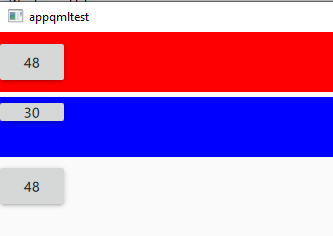
        buttons.PNG

        All buttons should be 30 pixels high (half the height of the rectangles). Buttons 1 and 3 appear as the correct height, but give a bad height value. Button 2 has the correct value, but doesn't appear correctly (not the right height).

        Can someone tell me WHAT is going on here?

        Thanks...

        1 Reply Last reply
        0
        • JoeCFDJ Offline
          JoeCFDJ Offline
          JoeCFD
          wrote on last edited by JoeCFD
          #7

          @mzimmers said in RoundButton not taking correct height setting:

          height: r1.height

          change
          height: r1.height
          to
          implicitHeight: r1.height
          will do it.

          Setting the implicit size is useful for defining components that have a preferred size based on their content.

          mzimmersM 1 Reply Last reply
          0
          • JoeCFDJ JoeCFD

            @mzimmers said in RoundButton not taking correct height setting:

            height: r1.height

            change
            height: r1.height
            to
            implicitHeight: r1.height
            will do it.

            Setting the implicit size is useful for defining components that have a preferred size based on their content.

            mzimmersM Offline
            mzimmersM Offline
            mzimmers
            wrote on last edited by
            #8

            @JoeCFD said in RoundButton not taking correct height setting:

            change
            height: r1.height
            to
            implicitHeight: r1.height
            will do it.

            I assume that change was for the RowLayout, as that's the only place with that exact line of code. It didn't change anything. If I make that change to b1 as well, b1 then looks like b2, which isn't what I want.

            Setting the implicit size is useful for defining components that have a preferred size based on their content.

            But in this case, I want to dictate the size (height) of the button. I want it to be exactly half the height of the rectangle in which it's being placed. That's why I'm not sure implicit sizes are appropriate here.

            JoeCFDJ 1 Reply Last reply
            0
            • mzimmersM mzimmers

              @JoeCFD said in RoundButton not taking correct height setting:

              change
              height: r1.height
              to
              implicitHeight: r1.height
              will do it.

              I assume that change was for the RowLayout, as that's the only place with that exact line of code. It didn't change anything. If I make that change to b1 as well, b1 then looks like b2, which isn't what I want.

              Setting the implicit size is useful for defining components that have a preferred size based on their content.

              But in this case, I want to dictate the size (height) of the button. I want it to be exactly half the height of the rectangle in which it's being placed. That's why I'm not sure implicit sizes are appropriate here.

              JoeCFDJ Offline
              JoeCFDJ Offline
              JoeCFD
              wrote on last edited by JoeCFD
              #9

              @mzimmers change all of them. I tested the change. They are all 30

              import QtQuick 2.15
              import QtQuick.Controls 2.15
              import QtQuick.Layouts 1.15
              
              ApplicationWindow {
                  id: mainWindow
                  width: 1024
                  height: 768
                  visible: true
              
                  ColumnLayout {
                      Rectangle {
                          id: r1
                          height: 60
                          width: mainWindow.width
                          color: 'red'
              
                          RowLayout {
                              id: rowLayout
              
                              Button {
                                  id: b1
                                  implicitHeight : r1.height / 2
                                  text: b1.height
                              }
                          }
                      }
              
                      Rectangle {
                          id: r2
                          height: 60
                          width: mainWindow.width
                          color: 'blue'
                          Layout.alignment: Qt.AlignHCenter | Qt.AlignVCenter
                          Button {
                              id: b2
                              implicitHeight: r2.height / 2
                              text: b2.height
                          }
                      }
              
                      Button {
                          id: b3
                          implicitHeight: r2.height / 2 // just borrowing the height from r2.
                          text: b3.height
                      }
                  }
              }
              
              mzimmersM 1 Reply Last reply
              0
              • JoeCFDJ JoeCFD

                @mzimmers change all of them. I tested the change. They are all 30

                import QtQuick 2.15
                import QtQuick.Controls 2.15
                import QtQuick.Layouts 1.15
                
                ApplicationWindow {
                    id: mainWindow
                    width: 1024
                    height: 768
                    visible: true
                
                    ColumnLayout {
                        Rectangle {
                            id: r1
                            height: 60
                            width: mainWindow.width
                            color: 'red'
                
                            RowLayout {
                                id: rowLayout
                
                                Button {
                                    id: b1
                                    implicitHeight : r1.height / 2
                                    text: b1.height
                                }
                            }
                        }
                
                        Rectangle {
                            id: r2
                            height: 60
                            width: mainWindow.width
                            color: 'blue'
                            Layout.alignment: Qt.AlignHCenter | Qt.AlignVCenter
                            Button {
                                id: b2
                                implicitHeight: r2.height / 2
                                text: b2.height
                            }
                        }
                
                        Button {
                            id: b3
                            implicitHeight: r2.height / 2 // just borrowing the height from r2.
                            text: b3.height
                        }
                    }
                }
                
                mzimmersM Offline
                mzimmersM Offline
                mzimmers
                wrote on last edited by
                #10

                @JoeCFD they say 30, but they are not half the height of the rectangles I'm placing them in:
                buttons.PNG

                That is what I'm trying to fix (plus another problem I'll bring up later).

                Thanks...

                JoeCFDJ 1 Reply Last reply
                0
                • mzimmersM mzimmers

                  @JoeCFD they say 30, but they are not half the height of the rectangles I'm placing them in:
                  buttons.PNG

                  That is what I'm trying to fix (plus another problem I'll bring up later).

                  Thanks...

                  JoeCFDJ Offline
                  JoeCFDJ Offline
                  JoeCFD
                  wrote on last edited by JoeCFD
                  #11

                  @mzimmers what do you mean?
                  r1 height is 60
                  b1 height is 60 / 2 = 30
                  my display of the button has the half height.

                  mzimmersM 1 Reply Last reply
                  0
                  • JoeCFDJ JoeCFD

                    @mzimmers what do you mean?
                    r1 height is 60
                    b1 height is 60 / 2 = 30
                    my display of the button has the half height.

                    mzimmersM Offline
                    mzimmersM Offline
                    mzimmers
                    wrote on last edited by mzimmers
                    #12

                    @JoeCFD look at my picture. The buttons don't look anywhere near half the height of the rectangles. From eyeballing it, it looks more like 1/3 the height.

                    EDIT:

                    Using a background seems to fix it (sort of). Let me play with this and I'll report back.

                    JoeCFDJ 1 Reply Last reply
                    0
                    • mzimmersM mzimmers

                      @JoeCFD look at my picture. The buttons don't look anywhere near half the height of the rectangles. From eyeballing it, it looks more like 1/3 the height.

                      EDIT:

                      Using a background seems to fix it (sort of). Let me play with this and I'll report back.

                      JoeCFDJ Offline
                      JoeCFDJ Offline
                      JoeCFD
                      wrote on last edited by
                      #13

                      @mzimmers display.png

                      mzimmersM 1 Reply Last reply
                      0
                      • JoeCFDJ JoeCFD

                        @mzimmers display.png

                        mzimmersM Offline
                        mzimmersM Offline
                        mzimmers
                        wrote on last edited by
                        #14

                        @JoeCFD interesting. I wonder why yours doesn't look like mine. What's your platform and style?

                        JoeCFDJ 1 Reply Last reply
                        0
                        • mzimmersM mzimmers

                          @JoeCFD interesting. I wonder why yours doesn't look like mine. What's your platform and style?

                          JoeCFDJ Offline
                          JoeCFDJ Offline
                          JoeCFD
                          wrote on last edited by JoeCFD
                          #15

                          @mzimmers Qt 5.15.2 on Ubuntu 18. Maybe try also
                          implicitHeight: 60

                          mzimmersM 1 Reply Last reply
                          0
                          • JoeCFDJ JoeCFD

                            @mzimmers Qt 5.15.2 on Ubuntu 18. Maybe try also
                            implicitHeight: 60

                            mzimmersM Offline
                            mzimmersM Offline
                            mzimmers
                            wrote on last edited by mzimmers
                            #16

                            @JoeCFD interesting...the problem appears to be specific to the Material style. Applying a background makes it better (though it still doesn't look quite right).

                            EDIT: I also discovered that the Material style isn't displaying the icon correctly. I'm going to close this topic and open a new one.

                            1 Reply Last reply
                            0

                            • Login

                            • Login or register to search.
                            • First post
                              Last post
                            0
                            • Categories
                            • Recent
                            • Tags
                            • Popular
                            • Users
                            • Groups
                            • Search
                            • Get Qt Extensions
                            • Unsolved