
Drag and drop into QMdiArea
-
Hi @SGaist, sorry for the looong absence, but I've been suddenly switched to another project.
I understood that I have to replace the 2 drag and drop involved widget subclassing them.
I then created 2 new classes: DragQListView and DropQMdiArea
For the new DragQListView subclass (see code below) I re implemented the mouse methods (mousePressEvent and MouseMoveEvent as well explained in the drag and drop example).
While for the other class I re implemented the dragEnterEvent and the dropEvent.
With these change I started to move to the "right direction".
Here the updated code:
        ...
        ...

	# place the list view
	self.list_data = DragQListView()
	#
	# place the mdi area
	self.mdi_area = DropQMdiArea()
	#
	# add a vertical splitter between the list view and the mdi area
	h_splitter = QSplitter(QtCore.Qt.Orientation.Horizontal)

	...
        ...

class DragQListView(QListView):
    def __init__(self):
        super().__init__()
        self.setDragEnabled(True)

    def mousePressEvent(self, event) -> None:
        # allows to drag just with the left button
        if event.buttons() == Qt.MouseButton.LeftButton:
            # save the starting mouse press point
            self.drag_start_pos = event.pos()
            return super().mousePressEvent(event)

    def mouseMoveEvent(self, event) -> None:
        if event.buttons() != Qt.MouseButton.LeftButton:
            return
        if (event.pos() - self.drag_start_pos).manhattanLength() < QApplication.startDragDistance():
            drag = QDrag(self)
            mime_data = QMimeData()
            #mime_data.setData(mimetype=mimeType, data=)
            drag.setMimeData(mime_data)
            drag.exec(Qt.DropAction.CopyAction)
            return super().mouseMoveEvent(event)


class DropQMdiArea(QMdiArea):
    def __init__(self):
        super().__init__()
        self.setAcceptDrops(True)

    def dragEnterEvent(self, event) -> None:
        event.accept()

    def dropEvent(self, event) -> None:
        event.setDropAction(Qt.DropAction.CopyAction)
        event.accept()
While I was continuing reading the doc I saw that for the Model/View there is another approach to follow.
It explains that I have to enable certain properties:
To allow items to be dragged around, certain properties of the view need to be enabled, and the items themselves must also allow dragging to occur.So I reverted my code to the previous version (like in the first post above) and I started to add "these" properties (both in model and in view), but I didn't get the same drag and drop behavior.
... ... # place the list view self.list_data = QListView(self) self.list_data.setDragEnabled(True) self.list_data.setAcceptDrops(True) self.list_data.setDropIndicatorShown(True) # # place the mdi area self.mdi_area = QMdiArea() ... ...class MyModelList(QAbstractListModel): def __init__(self, data: list, parent: QObject = None) -> None: super(MyModelList, self).__init__(parent=parent) ... ... def supportedDragActions(self) -> Qt.DropAction: return Qt.DropAction.CopyAction or Qt.DropAction.MoveActionI feel that this second approach although didn't show any "positive sign" is the right one (probably the other works for the other not Model/View design) but I can't make it work.
@SGaist could you please guide me in this step by step process to achieve the desired drag and drop?
Many thanks!
AGA -
That last approach is the correct one, custom model + view configuration.
What behaviour do you have now ?
If memory serves well, you might also need to implement the dragMoveEvent method on your target widget. -
Hi @SGaist, many thanks to answered to this.
Currently when I start to drag I don't see anything (no cursor change and no print messages - put in the methods to check if the code runs there).
When cursor goes into the mdiArea nothing change as well.I also re-implemented the dragMoveEvent while I was trying (sorry to forgot to mention) but didn't change.
So, to summarize:
- The right approach is the second (since my code is Model/View).
- The widgets don't need to be subclasses, but it is enough enable/change some properties.
To start to view "something", both the model and the view need to be correctly "set" or should I start already to see some drag and drop behavior only with a well "configured" view?
I ask you this just to understand in which direction I have to move.Since editing my demo adding the "examples code" didn't produce the desired behavior what should I change/try?
Could you please drive me through a "checklist" to verify all the basic necessary steps to enable the drag and drop?As always, many thanks! 🙏
AGA -
Hi,
fixing the model I've been able to start the view to show the drag and drop behavior that I had when I subclasses the widgets.
So, one mistake I made was on model, I forgot to re-implement the methods: supportedDragActions and flags.
@SGaist Not sure if you were referring to these or others (not in the model) but looks that these at least these are necessary to let the model support the drag and drop functionality.class MyModelList(QAbstractListModel): def __init__(self, data: list, parent: QObject = None) -> None: super(MyModelList, self).__init__(parent=parent) ... ... def supportedDragActions(self) -> Qt.DropAction: return Qt.DropAction.CopyAction def flags(self, index: QModelIndex) -> Qt.ItemFlag: flags_default = super(MyModelList, self).flags(index) if index.isValid(): return (Qt.ItemFlag.ItemIsDragEnabled | flags_default)Now I progressed up to this level (see picture below), but I still miss: to "move data" and to accept the dropped data into the mdiArea.
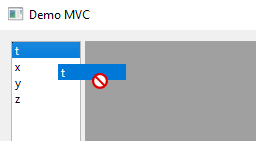
Any help would be very appreciated!
AGA -
Any chances you forget to call
setAcceptDrops(True);in your custom QMdiArea ? -
HI @SGaist ,
Both the widgets (QListView and QMdiArea) form the view.py are "configured" (not reimplemented) as:
        ...
        ...
        vbox = QVBoxLayout()
        #
        # place the list view
        self.list_data = QListView(self)
        self.list_data.setDragEnabled(True)
        self.list_data.setDropIndicatorShown(True)
        #
        # place the mdi area
        self.mdi_area = QMdiArea(self)
        self.mdi_area.setAcceptDrops(True)
        #
        # add a vertical splitter between the list view and the mdi area
        h_splitter = QSplitter(QtCore.Qt.Orientation.Horizontal)
        ...
        ...
So no, the QMdiArea has the setAcceptDrop properties.
I assume that the QMdiArea widget need to be re-implemented to achieve a minimum "functionality" since it basically doesn't do anything. is this correct? What is the minimum code should I add to "see the dropped data" (also as print)?
Before do that (re-implement the above widget) I wanted to have the "mime" working, but unfortunately I didn't find any clear explanation that helped me to understand.
To be more specific, looking on the official help page I couldn't find how to "classify" my source data. The example refers to the "plain text" but my data is a list, so in this case I don't know how to "define" the data to be passed. Should I use a meta object? In that case I didn't find a clear example.Many thanks to anyone that can help!
AGA -
Oh !
I thought you were using your custom widget based on QMdiArea. The one where you reimplemented the dragEnter, dragMove and dropEvent. It's in dragEnterEvent that you can decide whether the mime type fits your widget.
-
HI @SGaist,
to recap you suggestions:
- Drag needs to be implemented in the model.
- Drag widget (QListView) doesn't need to be re-implemented in the view; just its properties need to be set to accept drop.
- Drop doesn't need to be re-implemented in the model but only in the view.
- Drop widget (QMdiArea) does need to be re-implemented in the view with the methods: dragEnterEvent, dragMoveEvent and dropEvent.
But from the documentation looks that drop still need to be part of the model. This is the part where I was referring to. I didn't understand how to encode my data.
The goal is to plot dropped data into a graph in the QMdiArea.
Many thanks!
AGA -
Here you have minimal example for dragging an item from a QListView to a QMdiArea:
import sys

from PySide6.QtCore import Qt
from PySide6.QtGui import QStandardItemModel
from PySide6.QtGui import QStandardItem
from PySide6.QtWidgets import QApplication
from PySide6.QtWidgets import QHBoxLayout
from PySide6.QtWidgets import QLabel
from PySide6.QtWidgets import QListView
from PySide6.QtWidgets import QMdiArea
from PySide6.QtWidgets import QWidget


class DNDMdiArea(QMdiArea):
    def __init__(self, **kwargs):
        super().__init__(**kwargs)
        self.setAcceptDrops(True)

    def dragEnterEvent(self, event):
        print(event.mimeData().formats())
        event.accept()

    def dropEvent(self, event):
        data = event.mimeData().data("application/x-qstandarditemmodeldatalist")
        label = QLabel(bytes(data).decode())

        sub_window = self.addSubWindow(label)
        sub_window.setAttribute(Qt.WA_DeleteOnClose)
        sub_window.show()
        event.accept()


if __name__ == "__main__":
    app = QApplication(sys.argv)

    mdi_area = DNDMdiArea()
    list_view = QListView()
    list_view.setDragEnabled(True)
    model = QStandardItemModel()
    model.setColumnCount(1)
    model.setRowCount(5)
    model.setHorizontalHeaderLabels(["Header"])
    for i in range(model.rowCount()):
        model.setItem(i, QStandardItem(f"Item {i}"))

    list_view.setModel(model)

    widget = QWidget()
    layout = QHBoxLayout(widget)
    layout.addWidget(list_view)
    layout.addWidget(mdi_area)

    widget.show()

    sys.exit(app.exec())
There is nothing fancy here. It's just to show you the basics. You can replace the QStandardItemModel with yours.
It also shows data retrieval from mime data. -
Hi @SGaist,
Many thanks for your valuable help!
Thanks to your example I think I'm heading to the right direction.- First of all I understood that the custom mime data type it is just a label, probably was obvious to many, but not to me.
- I have to first encode (in the model) and then decode (in the view) data with the same "tools" like same mimeType, and "data container".
Now my code looks like:
view.py Here I just added some of your code, so this is not related to what I want to finally get.
class DropQMdiArea(QMdiArea):
    def __init__(self):
        super().__init__()
        self.setAcceptDrops(True)

    ...
    ...

    # this method is invoked when the mouse enters (while dragging) this (mdiArea) area
    def dragEnterEvent(self, event) -> None:
        event.accept()
        if event.mimeData().hasFormat('application/x-qstandardlist'):
            event.accept()
        else:
            event.ignore()

    # this method is invoked when the mouse drops in this (mdiArea) area
    def dropEvent(self, event) -> None:
        if event.mimeData().hasFormat('application/x-qstandardlist'):
            data = event.mimeData().data('application/x-qstandardlist')
            stream = QDataStream(data, QIODevice.OpenModeFlag.ReadOnly)

            event.accept()
        else:
            event.ignore()

        data = event.mimeData().data("application/x-qstandardlist")
        label = QLabel(bytes(data).decode())

        sub_window = self.addSubWindow(label)
        sub_window.setAttribute(QtCore.Qt.WidgetAttribute.WA_DeleteOnClose)
        sub_window.show()
model.py This doesn't work properly, in fact I still have (unfortunately for you 😅) other questions.
class MyModelList(QAbstractListModel):
    def __init__(self, data: list, parent: QObject = None) -> None:
        super(MyModelList, self).__init__(parent=parent)

        self._data = data
        ...
        ...

    def supportedDragActions(self) -> Qt.DropAction:
        return Qt.DropAction.CopyAction


    def flags(self, index: QModelIndex) -> Qt.ItemFlag:
        flags_default = super(MyModelList, self).flags(index)

        if index.isValid():
            return (Qt.ItemFlag.ItemIsDragEnabled | flags_default)


    def mimeTypes(self):
        # HThe general structure of MIME is type/subtype
        return ["application/x-qstandardlist"]

    def mimeData(self, index):
        encoded_data = QtCore.QByteArray()
        # is this stream needed?
        stream = QDataStream(encoded_data, QIODevice.OpenModeFlag.WriteOnly)
        for idx in index:
            if not idx.isValid():
                continue
            else:
                selected_row = idx.row()
                selected_list = [row[selected_row] for row in self._data]
                mime_data = QMimeData()
                mime_data.setData("application/x-qstandardlist", encoded_data)
                # if needed, how should I use it?
                stream = selected_list
I saw some (misleading?) examples where before send data I had to:
- create a QByteArray "data container".
- create a QDataStream to "transport" the previous data container.
- Is this necessary?
- Is there a "general" way to "pack" the moved data?
- I know that mime has the methods: setText(), setHtml(), ..., but I'm not sure if, in case of list, do I need to use one of those or do I need to "encapsulate" these within the stream. Examples that I found are generally text based.
- Is it correct use the setData() method on the mime object? (mime_data.setData("application/x-qstandardlist", encoded_data))
At the moment I'm not sure if data is correctly "copied" from the model to the view
Kind regards,
AGA -
You should create your own mime type(s) since they are specific to your application / data structure.
As for QDataStream, it's the easier way if you have complex data structures that cannot be represented by text.
Create the QDataStream operators for your class/struct, use them to serialize the data on the sending end and deserialize them on the receiving end.

