
Skip to content
  • Categories
  • Recent
  • Tags
  • Popular
  • Users
  • Groups
  • Search
  • Get Qt Extensions
  • Unsolved
Collapse
Brand Logo
  1. Home
  2. Qt Development
  3. General and Desktop
  4. installing GammaRay on Qt Creator 6.0.2
Qt 6.11 is out! See what's new in the release blog

installing GammaRay on Qt Creator 6.0.2

Scheduled Pinned Locked Moved Unsolved General and Desktop
33 Posts 4 Posters 6.9k Views 3 Watching
  • Oldest to Newest
  • Newest to Oldest
  • Most Votes
Reply
  • Reply as topic
Log in to reply
This topic has been deleted. Only users with topic management privileges can see it.
  • Q qcoderpro

    Does it say: inside the build folder on CMD to execute: cmake.exe -G "MinGW Makefiles" C:\Qt\6.2.3\mingw_64\bin C:\Users\ME\Desktop\KDAB-GammaRay-62bd4ed ?

    jsulmJ Offline
    jsulmJ Offline
    jsulm
    Lifetime Qt Champion
    wrote on last edited by
    #21

    @qcoderpro said in installing GammaRay on Qt Creator 6.0.2:

    C:\Qt\6.2.3\mingw_64\bin

    Why did you put it here?!
    It is as easy as:

    C:\Qt\Tools\CMake_64\bin\cmake.exe -G "MinGW Makefiles" C:\Users\ME\Desktop\KDAB-GammaRay-62bd4ed
    

    https://forum.qt.io/topic/113070/qt-code-of-conduct

    Q 1 Reply Last reply
    0
    • jsulmJ jsulm

      @qcoderpro said in installing GammaRay on Qt Creator 6.0.2:

      C:\Qt\6.2.3\mingw_64\bin

      Why did you put it here?!
      It is as easy as:

      C:\Qt\Tools\CMake_64\bin\cmake.exe -G "MinGW Makefiles" C:\Users\ME\Desktop\KDAB-GammaRay-62bd4ed
      
      Q Offline
      Q Offline
      qcoderpro
      wrote on last edited by
      #22

      @jsulm
      I have already done that: CMake Error: CMake was unable to find a build program corresponding to "MinGW Makefiles"
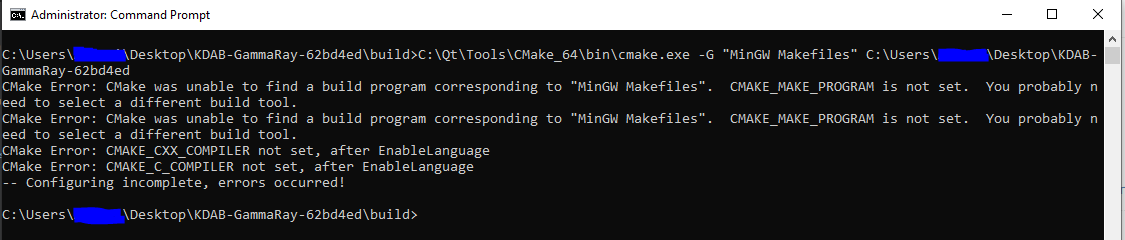
      bfg.PNG

      jsulmJ 1 Reply Last reply
      0
      • Q qcoderpro

        @jsulm
        I have already done that: CMake Error: CMake was unable to find a build program corresponding to "MinGW Makefiles"

        bfg.PNG

        jsulmJ Offline
        jsulmJ Offline
        jsulm
        Lifetime Qt Champion
        wrote on last edited by
        #23

        @qcoderpro <from the link I gave you above:

        set "PATH=c:\MinGW\mingw64\bin;%PATH%"
        

        Did you do this step?

        https://forum.qt.io/topic/113070/qt-code-of-conduct

        Q 1 Reply Last reply
        0
        • jsulmJ jsulm

          @qcoderpro <from the link I gave you above:

          set "PATH=c:\MinGW\mingw64\bin;%PATH%"
          

          Did you do this step?

          Q Offline
          Q Offline
          qcoderpro
          wrote on last edited by
          #24

          @jsulm
          I meant that in the previous steps that you asked why. I don't understand that section good enough. If it means to set the path of mingw to the %PATH% (of the System variables), that path (C:\Qt\6.2.3\mingw_64\bin) already exists there and shown in the related screenshot above.

          jsulmJ M 2 Replies Last reply
          0
          • Q qcoderpro

            @jsulm
            I meant that in the previous steps that you asked why. I don't understand that section good enough. If it means to set the path of mingw to the %PATH% (of the System variables), that path (C:\Qt\6.2.3\mingw_64\bin) already exists there and shown in the related screenshot above.

            jsulmJ Offline
            jsulmJ Offline
            jsulm
            Lifetime Qt Champion
            wrote on last edited by jsulm
            #25

            @qcoderpro This was plain wrong: cmake.exe -G "MinGW Makefiles" C:\Qt\6.2.3\mingw_64\bin C:\Users\ME\Desktop\KDAB-GammaRay-62bd4ed

            It needs to be

            cmake.exe -G "MinGW Makefiles" C:\Users\ME\Desktop\KDAB-GammaRay-62bd4ed
            

            There is really not much to it: you need to tell CMake where the source code is. That's why you need to add the path to source code folder (C:\Users\ME\Desktop\KDAB-GammaRay-62bd4ed).

            https://forum.qt.io/topic/113070/qt-code-of-conduct

            Q 1 Reply Last reply
            0
            • jsulmJ jsulm

              @qcoderpro This was plain wrong: cmake.exe -G "MinGW Makefiles" C:\Qt\6.2.3\mingw_64\bin C:\Users\ME\Desktop\KDAB-GammaRay-62bd4ed

              It needs to be

              cmake.exe -G "MinGW Makefiles" C:\Users\ME\Desktop\KDAB-GammaRay-62bd4ed
              

              There is really not much to it: you need to tell CMake where the source code is. That's why you need to add the path to source code folder (C:\Users\ME\Desktop\KDAB-GammaRay-62bd4ed).

              Q Offline
              Q Offline
              qcoderpro
              wrote on last edited by
              #26

              @jsulm

              Sorry, but this was done already. Please scroll up two posts. There I stated that and also the cmake error message! :|
              CMake Error: CMake was unable to find a build program corresponding to "MinGW Makefiles"

              jsulmJ 1 Reply Last reply
              0
              • Q qcoderpro

                @jsulm

                Sorry, but this was done already. Please scroll up two posts. There I stated that and also the cmake error message! :|
                CMake Error: CMake was unable to find a build program corresponding to "MinGW Makefiles"

                jsulmJ Offline
                jsulmJ Offline
                jsulm
                Lifetime Qt Champion
                wrote on last edited by
                #27

                @qcoderpro I suggest you start command line from MinGW and do all these buid steps there. To start MinGW command line do: press Windows key, enter "min" and you will see something with Qt and MinGW, open it.

                https://forum.qt.io/topic/113070/qt-code-of-conduct

                Q 1 Reply Last reply
                0
                • jsulmJ jsulm

                  @qcoderpro I suggest you start command line from MinGW and do all these buid steps there. To start MinGW command line do: press Windows key, enter "min" and you will see something with Qt and MinGW, open it.

                  Q Offline
                  Q Offline
                  qcoderpro
                  wrote on last edited by
                  #28

                  @jsulm
                  You mean something like:

                  Setting up environment for Qt usage...

                  C:\Qt\6.2.3\mingw_64> C:\Users\ME\Desktop\KDAB-GammaRay-62bd4ed\build cmake -G "NMake Makefiles" C:\Users\ME\Desktop\KDAB-GammaRay-62bd4ed

                  'C:\Users\ME\Desktop\KDAB-GammaRay-62bd4ed\build' is not recognized as an internal or external command,
                  operable program or batch file.

                  C:\Qt\6.2.3\mingw_64>

                  I thought the path to the build folder should also be added but it itself causes an error.

                  jsulmJ 2 Replies Last reply
                  0
                  • Q qcoderpro

                    @jsulm
                    You mean something like:

                    Setting up environment for Qt usage...

                    C:\Qt\6.2.3\mingw_64> C:\Users\ME\Desktop\KDAB-GammaRay-62bd4ed\build cmake -G "NMake Makefiles" C:\Users\ME\Desktop\KDAB-GammaRay-62bd4ed

                    'C:\Users\ME\Desktop\KDAB-GammaRay-62bd4ed\build' is not recognized as an internal or external command,
                    operable program or batch file.

                    C:\Qt\6.2.3\mingw_64>

                    I thought the path to the build folder should also be added but it itself causes an error.

                    jsulmJ Offline
                    jsulmJ Offline
                    jsulm
                    Lifetime Qt Champion
                    wrote on last edited by
                    #29

                    @qcoderpro said in installing GammaRay on Qt Creator 6.0.2:

                    You mean something like

                    No, this is not what I mean.
                    This is what I mean:

                    C:\Qt\Tools\CMake_64\bin\cmake.exe -G "MinGW Makefiles" C:\Users\ME\Desktop\KDAB-GammaRay-62bd4ed
                    

                    Please think about what you are doing.

                    1. You need to call cmake.exe using full path (C:\Qt\Tools\CMake_64\bin\cmake.exe)
                    2. You need to pass CMake this parameter: -G "MinGW Makefiles"
                    3. You also need to tell CMake where the source code is: C:\Users\ME\Desktop\KDAB-GammaRay-62bd4ed

                    https://forum.qt.io/topic/113070/qt-code-of-conduct

                    1 Reply Last reply
                    0
                    • Q qcoderpro

                      @jsulm
                      You mean something like:

                      Setting up environment for Qt usage...

                      C:\Qt\6.2.3\mingw_64> C:\Users\ME\Desktop\KDAB-GammaRay-62bd4ed\build cmake -G "NMake Makefiles" C:\Users\ME\Desktop\KDAB-GammaRay-62bd4ed

                      'C:\Users\ME\Desktop\KDAB-GammaRay-62bd4ed\build' is not recognized as an internal or external command,
                      operable program or batch file.

                      C:\Qt\6.2.3\mingw_64>

                      I thought the path to the build folder should also be added but it itself causes an error.

                      jsulmJ Offline
                      jsulmJ Offline
                      jsulm
                      Lifetime Qt Champion
                      wrote on last edited by jsulm
                      #30

                      @qcoderpro said in installing GammaRay on Qt Creator 6.0.2:

                      I thought the path to the build folder should also be added

                      No, you should be INSIDE that folder! That is why it is called "build" folder: it is the folder where you build.

                      In the link I gave you it is also shown (it assumes that build folder is created in the source code folder):

                      % mkdir build
                      % cd build
                      % cmake -G "MinGW Makefiles" ..
                      % mingw32-make
                      % mingw32-make install
                      

                      https://forum.qt.io/topic/113070/qt-code-of-conduct

                      1 Reply Last reply
                      1
                      • SGaistS Offline
                        SGaistS Offline
                        SGaist
                        Lifetime Qt Champion
                        wrote on last edited by
                        #31
                        cd C:\Users\ME\Desktop
                        mkdir build_GammaRay
                        cd build_GammaRay
                        C:\Qt\Tools\CMake_64\bin\cmake.exe -G "MinGW Makefiles" C:\Users\ME\Desktop\KDAB-GammaRay-62bd4ed
                        

                        Or

                        cd C:\Users\ME\Desktop\KDAB-GammaRay-62bd4ed
                        mkdir build
                        cd build
                        C:\Qt\Tools\CMake_64\bin\cmake.exe -G "MinGW Makefiles" ../
                        

                        Interested in AI ? www.idiap.ch
                        Please read the Qt Code of Conduct - https://forum.qt.io/topic/113070/qt-code-of-conduct

                        1 Reply Last reply
                        1
                        • Q Offline
                          Q Offline
                          qcoderpro
                          wrote on last edited by qcoderpro
                          #32

                          @SGaist

                          I've done those commands previously probably several times and posted here with their error messages.

                          Let's take your first method:

                          C:\Users\ME\Desktop>cd build_GammaRay
                          C:\Users\ME\Desktop\build_GammaRay>C:\Qt\Tools\CMake_64\bin\cmake.exe -G "MinGW Makefiles" C:\Users\ME\Desktop\KDAB-GammaRay-62bd4ed
                          CMake Error: CMake was unable to find a build program corresponding to "MinGW Makefiles".  CMAKE_MAKE_PROGRAM is not set.  You probably need to select a different build tool.
                          CMake Error: CMake was unable to find a build program corresponding to "MinGW Makefiles".  CMAKE_MAKE_PROGRAM is not set.  You probably need to select a different build tool.
                          CMake Error: CMAKE_CXX_COMPILER not set, after EnableLanguage
                          CMake Error: CMAKE_C_COMPILER not set, after EnableLanguage
                          -- Configuring incomplete, errors occurred!
                          
                          C:\Users\ME\Desktop\build_GammaRay>
                          

                          What I get in that folder is:
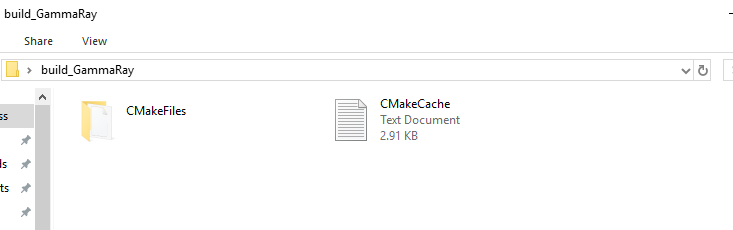
                          dsa.PNG

                          1 Reply Last reply
                          0
                          • Q qcoderpro

                            @jsulm
                            I meant that in the previous steps that you asked why. I don't understand that section good enough. If it means to set the path of mingw to the %PATH% (of the System variables), that path (C:\Qt\6.2.3\mingw_64\bin) already exists there and shown in the related screenshot above.

                            M Offline
                            M Offline
                            mchinand
                            wrote on last edited by
                            #33

                            @qcoderpro said in installing GammaRay on Qt Creator 6.0.2:

                            @jsulm
                            I meant that in the previous steps that you asked why. I don't understand that section good enough. If it means to set the path of mingw to the %PATH% (of the System variables), that path (C:\Qt\6.2.3\mingw_64\bin) already exists there and shown in the related screenshot above.

                            If you added to the system path, the changes will not take effect in terminal windows that were opened before you made the path changes. Open a new terminal after making the path changes or use `set PATH=...' in the terminals that were opened earlier.

                            1 Reply Last reply
                            0

                            • Login

                            • Login or register to search.
                            • First post
                              Last post
                            0
                            • Categories
                            • Recent
                            • Tags
                            • Popular
                            • Users
                            • Groups
                            • Search
                            • Get Qt Extensions
                            • Unsolved