Skip to content
  • Categories
  • Recent
  • Tags
  • Popular
  • Users
  • Groups
  • Search
  • Get Qt Extensions
  • Unsolved
Collapse
Brand Logo
  1. Home
  2. Qt Development
  3. General and Desktop
  4. installing GammaRay on Qt Creator 6.0.2
Qt 6.11 is out! See what's new in the release blog

installing GammaRay on Qt Creator 6.0.2

Scheduled Pinned Locked Moved Unsolved General and Desktop
33 Posts 4 Posters 6.8k Views 3 Watching
  • Oldest to Newest
  • Newest to Oldest
  • Most Votes
Reply
  • Reply as topic
Log in to reply
This topic has been deleted. Only users with topic management privileges can see it.
  • SGaistS SGaist

    Are you following this guide ?

    Q Offline
    Q Offline
    qcoderpro
    wrote on last edited by
    #5

    Do I need to build it manually?
    I found this in the install text file:

    Building on Windows with MinGW:
    Make sure you have the path to the MinGW programs in %PATH% first, for example:
    % set "PATH=c:\MinGW\mingw64\bin;%PATH%"
    Now build:
    % mkdir build
    % cd build
    % cmake -G "MinGW Makefiles" ..
    % mingw32-make
    % mingw32-make install

    1 Reply Last reply
    0
    • Q Offline
      Q Offline
      qcoderpro
      wrote on last edited by
      #6

      Have C:\Qt\6.2.3\mingw_64\bin on System Variables on Windows.
      I think

      1. I should put the extracted zip file (KDAB-GammaRay-v2.11.3-0-gf8e8373) into a directory called build somewhere on my system, for example, desktop.
      2. Then cd build (on CMD, on Windows)
      3. Then cmake -G "MinGW Makefiles",
        mingw32-make,
        mingw32-make install
        To finally install it on Qt Creator. Right?
      1 Reply Last reply
      0
      • SGaistS Offline
        SGaistS Offline
        SGaist
        Lifetime Qt Champion
        wrote on last edited by
        #7

        The build folder shall be created either in the top level of your sources or outside of the sources.

        Interested in AI ? www.idiap.ch
        Please read the Qt Code of Conduct - https://forum.qt.io/topic/113070/qt-code-of-conduct

        Q 1 Reply Last reply
        0
        • SGaistS SGaist

          The build folder shall be created either in the top level of your sources or outside of the sources.

          Q Offline
          Q Offline
          qcoderpro
          wrote on last edited by
          #8

          @SGaist
          Top level of my sources? What sources!?
          You mean my qtcuick project files? If so, I have a folder specified for those project. Should I put that into a folder called build and follow the instructions above?

          1 Reply Last reply
          0
          • SGaistS Offline
            SGaistS Offline
            SGaist
            Lifetime Qt Champion
            wrote on last edited by
            #9

            Since you are building GammaRay, the sources of GammaRay.

            Interested in AI ? www.idiap.ch
            Please read the Qt Code of Conduct - https://forum.qt.io/topic/113070/qt-code-of-conduct

            Q 1 Reply Last reply
            0
            • SGaistS SGaist

              Since you are building GammaRay, the sources of GammaRay.

              Q Offline
              Q Offline
              qcoderpro
              wrote on last edited by
              #10

              I did them but get an error about cmake:

              C:\Users\ME\Desktop\KDAB-GammaRay-62bd4ed\build>cmake -G "MinGW Makefiles"
              'cmake' is not recognized as an internal or external command,
              operable program or batch file.
              C:\Users\ME\Desktop\KDAB-GammaRay-62bd4ed\build>

              jsulmJ 1 Reply Last reply
              0
              • Q qcoderpro

                I did them but get an error about cmake:

                C:\Users\ME\Desktop\KDAB-GammaRay-62bd4ed\build>cmake -G "MinGW Makefiles"
                'cmake' is not recognized as an internal or external command,
                operable program or batch file.
                C:\Users\ME\Desktop\KDAB-GammaRay-62bd4ed\build>

                jsulmJ Offline
                jsulmJ Offline
                jsulm
                Lifetime Qt Champion
                wrote on last edited by
                #11

                @qcoderpro Then download and install CMake and make sure the folder containing cmake.exe is in your PATH

                https://forum.qt.io/topic/113070/qt-code-of-conduct

                Q 1 Reply Last reply
                0
                • jsulmJ jsulm

                  @qcoderpro Then download and install CMake and make sure the folder containing cmake.exe is in your PATH

                  Q Offline
                  Q Offline
                  qcoderpro
                  wrote on last edited by qcoderpro
                  #12

                  @jsulm
                  But I'm using CMake on Qt Creator for Qt projects. Do you mean that I should download a standalone version of CMake and install it?

                  jsulmJ 1 Reply Last reply
                  0
                  • Q qcoderpro

                    @jsulm
                    But I'm using CMake on Qt Creator for Qt projects. Do you mean that I should download a standalone version of CMake and install it?

                    jsulmJ Offline
                    jsulmJ Offline
                    jsulm
                    Lifetime Qt Champion
                    wrote on last edited by jsulm
                    #13

                    @qcoderpro If you already have CMake installed: "make sure the folder containing cmake.exe is in your PATH".
                    You can also use full path to cmake.exe to call it.

                    https://forum.qt.io/topic/113070/qt-code-of-conduct

                    Q 1 Reply Last reply
                    0
                    • jsulmJ jsulm

                      @qcoderpro If you already have CMake installed: "make sure the folder containing cmake.exe is in your PATH".
                      You can also use full path to cmake.exe to call it.

                      Q Offline
                      Q Offline
                      qcoderpro
                      wrote on last edited by
                      #14

                      @jsulm
                      I found it here: C:\Qt\Tools\CMake_64\bin\cmake.exe
                      Then added the path into System variables:
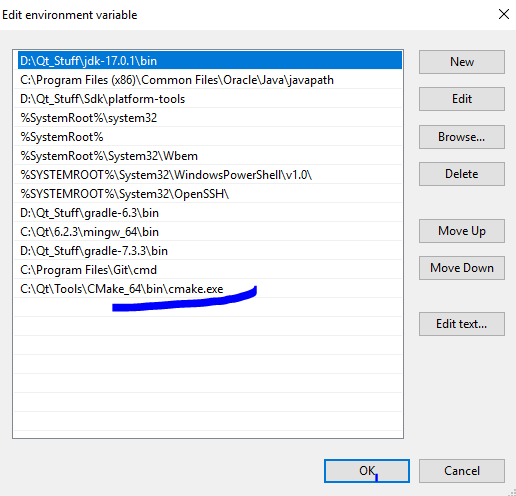
                      sdfsdf.PNG

                      But still get the error!

                      jsulmJ 1 Reply Last reply
                      0
                      • Q qcoderpro

                        @jsulm
                        I found it here: C:\Qt\Tools\CMake_64\bin\cmake.exe
                        Then added the path into System variables:
                        sdfsdf.PNG

                        But still get the error!

                        jsulmJ Offline
                        jsulmJ Offline
                        jsulm
                        Lifetime Qt Champion
                        wrote on last edited by jsulm
                        #15

                        @qcoderpro You need to add the FOLDER to PATH NOT exe!
                        After adding to PATH you need to log out and login again.
                        But you can also use full path instead.

                        https://forum.qt.io/topic/113070/qt-code-of-conduct

                        Q 1 Reply Last reply
                        1
                        • jsulmJ jsulm

                          @qcoderpro You need to add the FOLDER to PATH NOT exe!
                          After adding to PATH you need to log out and login again.
                          But you can also use full path instead.

                          Q Offline
                          Q Offline
                          qcoderpro
                          wrote on last edited by
                          #16

                          @jsulm
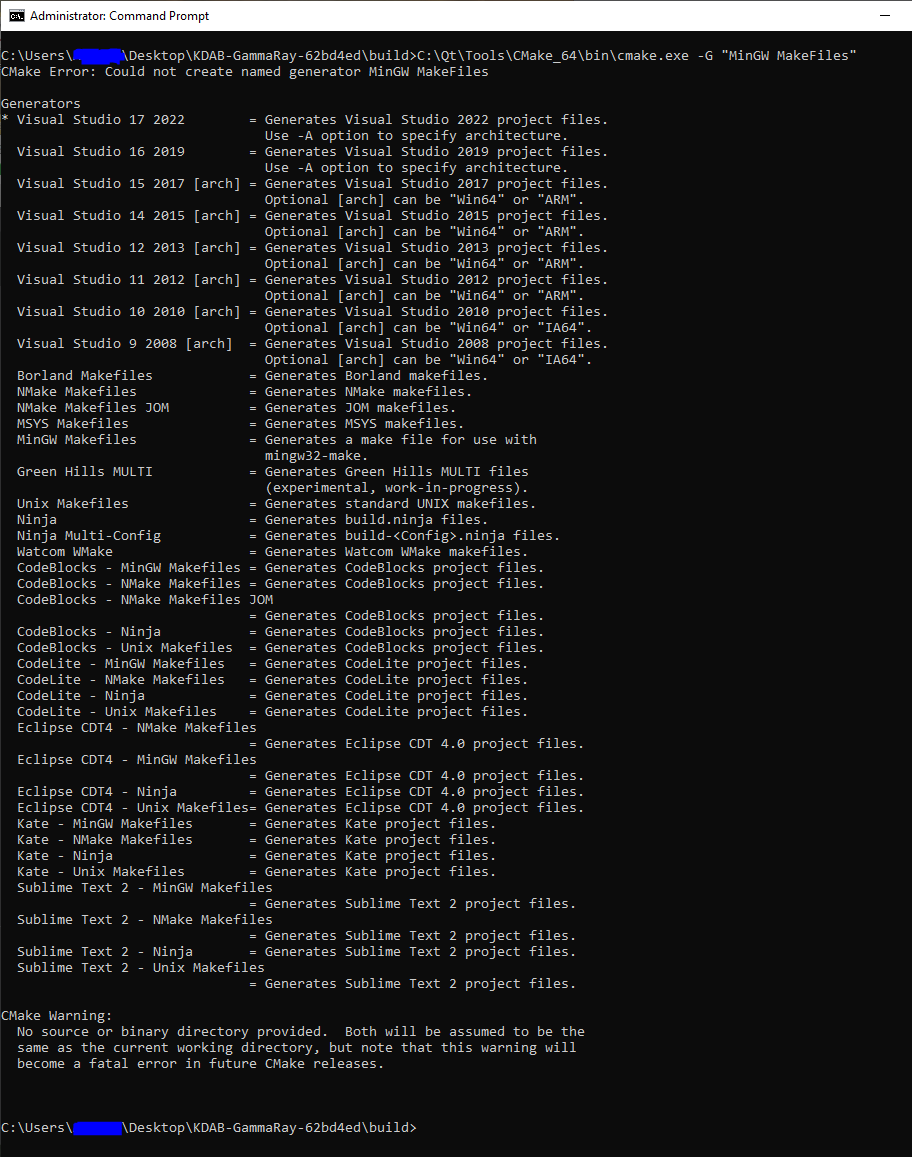
                          Could not create named generator MinGW Makefiles

                          fdsf.PNG

                          jsulmJ 1 Reply Last reply
                          0
                          • Q qcoderpro

                            @jsulm
                            Could not create named generator MinGW Makefiles

                            fdsf.PNG

                            jsulmJ Offline
                            jsulmJ Offline
                            jsulm
                            Lifetime Qt Champion
                            wrote on last edited by
                            #17

                            @qcoderpro said in installing GammaRay on Qt Creator 6.0.2:

                            MinGW Makefiles

                            You use "MinGW MakeFiles", but it needs to be "MinGW Makefiles" as you can see from CMake output...

                            https://forum.qt.io/topic/113070/qt-code-of-conduct

                            Q 1 Reply Last reply
                            0
                            • jsulmJ jsulm

                              @qcoderpro said in installing GammaRay on Qt Creator 6.0.2:

                              MinGW Makefiles

                              You use "MinGW MakeFiles", but it needs to be "MinGW Makefiles" as you can see from CMake output...

                              Q Offline
                              Q Offline
                              qcoderpro
                              wrote on last edited by qcoderpro
                              #18

                              @jsulm
                              Should we add a CMakeLists.txt fild into the build folder already!?

                              C:\Users\ME\Desktop\KDAB-GammaRay-62bd4ed\build>C:\Qt\Tools\CMake_64\bin\cmake.exe -G "MinGW Makefiles"
                              CMake Warning:

                              No source or binary directory provided. Both will be assumed to be the
                              same as the current working directory, but note that this warning will
                              become a fatal error in future CMake releases.

                              CMake Error: The source directory "C:/Users/ME/Desktop/KDAB-GammaRay-62bd4ed/build" does not appear to contain CMakeLists.txt.
                              Specify --help for usage, or press the help button on the CMake GUI.

                              C:\Users\ME\Desktop\KDAB-GammaRay-62bd4ed\build>

                              jsulmJ 1 Reply Last reply
                              0
                              • Q qcoderpro

                                @jsulm
                                Should we add a CMakeLists.txt fild into the build folder already!?

                                C:\Users\ME\Desktop\KDAB-GammaRay-62bd4ed\build>C:\Qt\Tools\CMake_64\bin\cmake.exe -G "MinGW Makefiles"
                                CMake Warning:

                                No source or binary directory provided. Both will be assumed to be the
                                same as the current working directory, but note that this warning will
                                become a fatal error in future CMake releases.

                                CMake Error: The source directory "C:/Users/ME/Desktop/KDAB-GammaRay-62bd4ed/build" does not appear to contain CMakeLists.txt.
                                Specify --help for usage, or press the help button on the CMake GUI.

                                C:\Users\ME\Desktop\KDAB-GammaRay-62bd4ed\build>

                                jsulmJ Offline
                                jsulmJ Offline
                                jsulm
                                Lifetime Qt Champion
                                wrote on last edited by
                                #19

                                @qcoderpro You also need to provide the source folder, try:

                                cmake -G "MinGW Makefiles" PATH_TO_SOURCEFOLDER
                                

                                This is also explained here: https://github.com/KDAB/GammaRay/blob/master/INSTALL.md

                                https://forum.qt.io/topic/113070/qt-code-of-conduct

                                Q 1 Reply Last reply
                                0
                                • jsulmJ jsulm

                                  @qcoderpro You also need to provide the source folder, try:

                                  cmake -G "MinGW Makefiles" PATH_TO_SOURCEFOLDER
                                  

                                  This is also explained here: https://github.com/KDAB/GammaRay/blob/master/INSTALL.md

                                  Q Offline
                                  Q Offline
                                  qcoderpro
                                  wrote on last edited by
                                  #20

                                  Does it say: inside the build folder on CMD to execute: cmake.exe -G "MinGW Makefiles" C:\Qt\6.2.3\mingw_64\bin C:\Users\ME\Desktop\KDAB-GammaRay-62bd4ed ?

                                  jsulmJ 1 Reply Last reply
                                  0
                                  • Q qcoderpro

                                    Does it say: inside the build folder on CMD to execute: cmake.exe -G "MinGW Makefiles" C:\Qt\6.2.3\mingw_64\bin C:\Users\ME\Desktop\KDAB-GammaRay-62bd4ed ?

                                    jsulmJ Offline
                                    jsulmJ Offline
                                    jsulm
                                    Lifetime Qt Champion
                                    wrote on last edited by
                                    #21

                                    @qcoderpro said in installing GammaRay on Qt Creator 6.0.2:

                                    C:\Qt\6.2.3\mingw_64\bin

                                    Why did you put it here?!
                                    It is as easy as:

                                    C:\Qt\Tools\CMake_64\bin\cmake.exe -G "MinGW Makefiles" C:\Users\ME\Desktop\KDAB-GammaRay-62bd4ed
                                    

                                    https://forum.qt.io/topic/113070/qt-code-of-conduct

                                    Q 1 Reply Last reply
                                    0
                                    • jsulmJ jsulm

                                      @qcoderpro said in installing GammaRay on Qt Creator 6.0.2:

                                      C:\Qt\6.2.3\mingw_64\bin

                                      Why did you put it here?!
                                      It is as easy as:

                                      C:\Qt\Tools\CMake_64\bin\cmake.exe -G "MinGW Makefiles" C:\Users\ME\Desktop\KDAB-GammaRay-62bd4ed
                                      
                                      Q Offline
                                      Q Offline
                                      qcoderpro
                                      wrote on last edited by
                                      #22

                                      @jsulm
                                      I have already done that: CMake Error: CMake was unable to find a build program corresponding to "MinGW Makefiles"
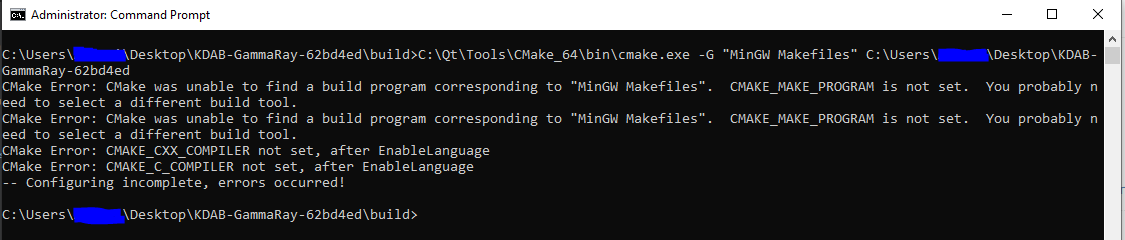
                                      bfg.PNG

                                      jsulmJ 1 Reply Last reply
                                      0
                                      • Q qcoderpro

                                        @jsulm
                                        I have already done that: CMake Error: CMake was unable to find a build program corresponding to "MinGW Makefiles"

                                        bfg.PNG

                                        jsulmJ Offline
                                        jsulmJ Offline
                                        jsulm
                                        Lifetime Qt Champion
                                        wrote on last edited by
                                        #23

                                        @qcoderpro <from the link I gave you above:

                                        set "PATH=c:\MinGW\mingw64\bin;%PATH%"
                                        

                                        Did you do this step?

                                        https://forum.qt.io/topic/113070/qt-code-of-conduct

                                        Q 1 Reply Last reply
                                        0
                                        • jsulmJ jsulm

                                          @qcoderpro <from the link I gave you above:

                                          set "PATH=c:\MinGW\mingw64\bin;%PATH%"
                                          

                                          Did you do this step?

                                          Q Offline
                                          Q Offline
                                          qcoderpro
                                          wrote on last edited by
                                          #24

                                          @jsulm
                                          I meant that in the previous steps that you asked why. I don't understand that section good enough. If it means to set the path of mingw to the %PATH% (of the System variables), that path (C:\Qt\6.2.3\mingw_64\bin) already exists there and shown in the related screenshot above.

                                          jsulmJ M 2 Replies Last reply
                                          0

                                          • Login

                                          • Login or register to search.
                                          • First post
                                            Last post
                                          0
                                          • Categories
                                          • Recent
                                          • Tags
                                          • Popular
                                          • Users
                                          • Groups
                                          • Search
                                          • Get Qt Extensions
                                          • Unsolved