Skip to content
  • Categories
  • Recent
  • Tags
  • Popular
  • Users
  • Groups
  • Search
  • Get Qt Extensions
  • Unsolved
Collapse
Brand Logo
  1. Home
  2. Qt Development
  3. General and Desktop
  4. Deleting row from QTableWidget and from Sqlite database
Qt 6.11 is out! See what's new in the release blog

Deleting row from QTableWidget and from Sqlite database

Scheduled Pinned Locked Moved Solved General and Desktop
71 Posts 6 Posters 51.6k Views 2 Watching
  • Oldest to Newest
  • Newest to Oldest
  • Most Votes
Reply
  • Reply as topic
Log in to reply
This topic has been deleted. Only users with topic management privileges can see it.
  • M mchinand

    @Risver said in Deleting row from QTableWidget and from Sqlite database:

    The QT version is 5.0.2

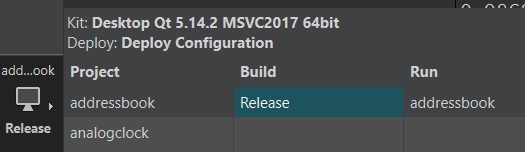
    I'm guessing 5.0.2 is/was your QtCreator version (the IDE) not the version of Qt. Look at the 'Kit' you are using, it will say what version of Qt you are using.
    c90cabe5-42d8-4ef6-876c-9efebc4c592b-image.png

    R Offline
    R Offline
    Risver
    wrote on last edited by
    #28

    @mchinand
    Yes you're right.

    JonBJ 1 Reply Last reply
    0
    • Christian EhrlicherC Christian Ehrlicher

      querymodel->removeRow(addressId, 1);

      model->removeRows(row, 1);

      removeRow() != removeRows()

      R Offline
      R Offline
      Risver
      wrote on last edited by
      #29

      @Christian-Ehrlicher said in Deleting row from QTableWidget and from Sqlite database:

      querymodel->removeRow(addressId, 1);

      model->removeRows(row, 1);

      removeRow() != removeRows()

      Thank You Christian, now i have no errors, but it is not removing.

      JonBJ 1 Reply Last reply
      0
      • R Risver

        @mchinand
        Yes you're right.

        JonBJ Offline
        JonBJ Offline
        JonB
        wrote on last edited by
        #30

        @Risver
        @Christian-Ehrlicher's comment above is why your line querymodel->removeRow(addressId, 1); is generating an error. Look at the two different methods he has given you links to.

        1 Reply Last reply
        0
        • R Risver

          @Christian-Ehrlicher said in Deleting row from QTableWidget and from Sqlite database:

          querymodel->removeRow(addressId, 1);

          model->removeRows(row, 1);

          removeRow() != removeRows()

          Thank You Christian, now i have no errors, but it is not removing.

          JonBJ Offline
          JonBJ Offline
          JonB
          wrote on last edited by
          #31

          @Risver said in Deleting row from QTableWidget and from Sqlite database:

          Thank You Christian, now i have no errors, but it is not removing.

          Start by showing us your new line, because we don't know which of the two methods you changed to using and what parameters you gave it.

          R 1 Reply Last reply
          0
          • JonBJ JonB

            @Risver said in Deleting row from QTableWidget and from Sqlite database:

            Thank You Christian, now i have no errors, but it is not removing.

            Start by showing us your new line, because we don't know which of the two methods you changed to using and what parameters you gave it.

            R Offline
            R Offline
            Risver
            wrote on last edited by
            #32

            @JonB said in Deleting row from QTableWidget and from Sqlite database:

            @Risver said in Deleting row from QTableWidget and from Sqlite database:

            Thank You Christian, now i have no errors, but it is not removing.

            Start by showing us your new line, because we don't know which of the two methods you changed to using and what parameters you gave it.

            i've changed only this one:

            void MainWindow::on_remove_clicked()
            {
                if (ui->tableView->selectionModel()->hasSelection())
                {
                    int addressId = ui->tableView->selectionModel()->currentIndex().row();
                    querymodel->removeRows(addressId, 1);
                }
            }
            
            JonBJ 1 Reply Last reply
            0
            • R Risver

              @JonB said in Deleting row from QTableWidget and from Sqlite database:

              @Risver said in Deleting row from QTableWidget and from Sqlite database:

              Thank You Christian, now i have no errors, but it is not removing.

              Start by showing us your new line, because we don't know which of the two methods you changed to using and what parameters you gave it.

              i've changed only this one:

              void MainWindow::on_remove_clicked()
              {
                  if (ui->tableView->selectionModel()->hasSelection())
                  {
                      int addressId = ui->tableView->selectionModel()->currentIndex().row();
                      querymodel->removeRows(addressId, 1);
                  }
              }
              
              JonBJ Offline
              JonBJ Offline
              JonB
              wrote on last edited by
              #33

              @Risver

              qDebug() << querymodel->rowCount();
              qDebug() << querymodel->removeRows(addressId, 1);
              qDebug() << querymodel->rowCount();
              
              R 1 Reply Last reply
              1
              • JonBJ JonB

                @Risver

                qDebug() << querymodel->rowCount();
                qDebug() << querymodel->removeRows(addressId, 1);
                qDebug() << querymodel->rowCount();
                
                R Offline
                R Offline
                Risver
                wrote on last edited by
                #34

                @JonB said in Deleting row from QTableWidget and from Sqlite database:

                @Risver

                qDebug() << querymodel->rowCount();
                qDebug() << querymodel->removeRows(addressId, 1);
                qDebug() << querymodel->rowCount();
                

                The rowCount is always 3 and the removeRows is false.

                1 Reply Last reply
                0
                • Christian EhrlicherC Online
                  Christian EhrlicherC Online
                  Christian Ehrlicher
                  Lifetime Qt Champion
                  wrote on last edited by
                  #35

                  Does your table has a primary key? Otherwise removing will not work.

                  Qt Online Installer direct download: https://download.qt.io/official_releases/online_installers/
                  Visit the Qt Academy at https://academy.qt.io/catalog

                  R JonBJ 2 Replies Last reply
                  0
                  • Christian EhrlicherC Christian Ehrlicher

                    Does your table has a primary key? Otherwise removing will not work.

                    R Offline
                    R Offline
                    Risver
                    wrote on last edited by
                    #36

                    @Christian-Ehrlicher said in Deleting row from QTableWidget and from Sqlite database:

                    Does your table has a primary key? Otherwise removing will not work.

                    Yes, it has.

                    1 Reply Last reply
                    0
                    • Christian EhrlicherC Christian Ehrlicher

                      Does your table has a primary key? Otherwise removing will not work.

                      JonBJ Offline
                      JonBJ Offline
                      JonB
                      wrote on last edited by JonB
                      #37

                      @Christian-Ehrlicher said in Deleting row from QTableWidget and from Sqlite database:

                      Does your table has a primary key? Otherwise removing will not work.

                      That's very interesting. I assume we're talking about a SQL table model here? I looked through the docs (briefly) but did not see any mention of this requirement, is it documented?

                      R 1 Reply Last reply
                      0
                      • JonBJ JonB

                        @Christian-Ehrlicher said in Deleting row from QTableWidget and from Sqlite database:

                        Does your table has a primary key? Otherwise removing will not work.

                        That's very interesting. I assume we're talking about a SQL table model here? I looked through the docs (briefly) but did not see any mention of this requirement, is it documented?

                        R Offline
                        R Offline
                        Risver
                        wrote on last edited by
                        #38

                        @JonB said in Deleting row from QTableWidget and from Sqlite database:

                        @Christian-Ehrlicher said in Deleting row from QTableWidget and from Sqlite database:

                        Does your table has a primary key? Otherwise removing will not work.

                        That's very interesting. I assume we're talking about a SQL table model here? I looked through the docs (briefly) but did not see any mention of this requirement, is it documented?

                        f7d18cb5-d2c3-44e2-ab9d-adbcc725c397-image.png
                        That is how my SQL Table looks.

                        JonBJ 1 Reply Last reply
                        0
                        • R Risver

                          @JonB said in Deleting row from QTableWidget and from Sqlite database:

                          @Christian-Ehrlicher said in Deleting row from QTableWidget and from Sqlite database:

                          Does your table has a primary key? Otherwise removing will not work.

                          That's very interesting. I assume we're talking about a SQL table model here? I looked through the docs (briefly) but did not see any mention of this requirement, is it documented?

                          f7d18cb5-d2c3-44e2-ab9d-adbcc725c397-image.png
                          That is how my SQL Table looks.

                          JonBJ Offline
                          JonBJ Offline
                          JonB
                          wrote on last edited by JonB
                          #39

                          @Risver

                          qDebug() << querymodel->removeRows(addressId, 1);
                          

                          Please add qDebug() << addressId, we need to make sure what that is, just in case.....

                          R 1 Reply Last reply
                          1
                          • JonBJ JonB

                            @Risver

                            qDebug() << querymodel->removeRows(addressId, 1);
                            

                            Please add qDebug() << addressId, we need to make sure what that is, just in case.....

                            R Offline
                            R Offline
                            Risver
                            wrote on last edited by Risver
                            #40

                            @JonB said in Deleting row from QTableWidget and from Sqlite database:

                            @Risver

                            qDebug() << querymodel->removeRows(addressId, 1);
                            

                            Please add qDebug() << addressId, we need to make sure what that is, just in case.....

                            It is a variable to store the selected row, for example when i select the first row, it returns 0.
                            I checked this and its working fine

                            JonBJ 1 Reply Last reply
                            0
                            • R Risver

                              @JonB said in Deleting row from QTableWidget and from Sqlite database:

                              @Risver

                              qDebug() << querymodel->removeRows(addressId, 1);
                              

                              Please add qDebug() << addressId, we need to make sure what that is, just in case.....

                              It is a variable to store the selected row, for example when i select the first row, it returns 0.
                              I checked this and its working fine

                              JonBJ Offline
                              JonBJ Offline
                              JonB
                              wrote on last edited by JonB
                              #41

                              @Risver
                              OK, so independent of your selection querymodel->removeRows(0, 1); fails to remove the first row? We can then rule out anything to do with the UI or the selection.

                              R 2 Replies Last reply
                              1
                              • JonBJ JonB

                                @Risver
                                OK, so independent of your selection querymodel->removeRows(0, 1); fails to remove the first row? We can then rule out anything to do with the UI or the selection.

                                R Offline
                                R Offline
                                Risver
                                wrote on last edited by
                                #42

                                @JonB
                                Exactly.

                                JonBJ 1 Reply Last reply
                                0
                                • JonBJ JonB

                                  @Risver
                                  OK, so independent of your selection querymodel->removeRows(0, 1); fails to remove the first row? We can then rule out anything to do with the UI or the selection.

                                  R Offline
                                  R Offline
                                  Risver
                                  wrote on last edited by
                                  #43

                                  @JonB said in Deleting row from QTableWidget and from Sqlite database:

                                  @Risver
                                  OK, so independent of your selection querymodel->removeRows(0, 1); fails to remove the first row? We can then rule out anything to do with the UI or the selection.

                                  Do you have something specific in mind ?

                                  1 Reply Last reply
                                  0
                                  • R Risver

                                    @JonB
                                    Exactly.

                                    JonBJ Offline
                                    JonBJ Offline
                                    JonB
                                    wrote on last edited by JonB
                                    #44

                                    @Risver
                                    Hang on. Does QSqlQueryModel allow any removing it all? It's a query, it won't/shouldn't do anything to the database for sure.

                                    [Yep, I'm sure, QSqlQueryModel is a read only model, you can't remove rows from it.]

                                    If you are wanting to alter the underlying the database table, I think you should be using QSqlTableModel instead?

                                    I leave this to you, or @Christian-Ehrlicher, now, as I'm done for the week :)

                                    R 1 Reply Last reply
                                    2
                                    • JonBJ JonB

                                      @Risver
                                      Hang on. Does QSqlQueryModel allow any removing it all? It's a query, it won't/shouldn't do anything to the database for sure.

                                      [Yep, I'm sure, QSqlQueryModel is a read only model, you can't remove rows from it.]

                                      If you are wanting to alter the underlying the database table, I think you should be using QSqlTableModel instead?

                                      I leave this to you, or @Christian-Ehrlicher, now, as I'm done for the week :)

                                      R Offline
                                      R Offline
                                      Risver
                                      wrote on last edited by
                                      #45

                                      @JonB said in Deleting row from QTableWidget and from Sqlite database:

                                      @Risver
                                      Hang on. Does QSqlQueryModel allow any removing it all? It's a query, it won't/shouldn't do anything to the database for sure.

                                      [Yep, I'm sure, QSqlQueryModel is a read only model, you can't remove rows from it.]

                                      If you are wanting to alter the underlying the database table, I think you should be using QSqlTableModel instead?

                                      I leave this to you, or @Christian-Ehrlicher, now, as I'm done for the week :)

                                      Okay, thank You, I will try to use QSqlTableModel.

                                      1 Reply Last reply
                                      0
                                      • R Offline
                                        R Offline
                                        Risver
                                        wrote on last edited by Risver
                                        #46

                                        I've changed the QSqlQueryModel into QSqlTableModel and everything is working !
                                        Thank you all ! :)

                                        I have one more question - how can i refresh the table at the current time ?
                                        8201cec4-25b6-4066-a082-31ebafd7efaf-image.png

                                        Done it !

                                        1 Reply Last reply
                                        0
                                        • R Offline
                                          R Offline
                                          Risver
                                          wrote on last edited by
                                          #47

                                          I have one more question - can i get data from column and replace these with other data ?

                                          1 Reply Last reply
                                          0

                                          • Login

                                          • Login or register to search.
                                          • First post
                                            Last post
                                          0
                                          • Categories
                                          • Recent
                                          • Tags
                                          • Popular
                                          • Users
                                          • Groups
                                          • Search
                                          • Get Qt Extensions
                                          • Unsolved