
Skip to content
  • Categories
  • Recent
  • Tags
  • Popular
  • Users
  • Groups
  • Search
  • Get Qt
  • Unsolved
Collapse
Brand Logo
  1. Home
  2. Qt Development
  3. General and Desktop
  4. Deleting row from QTableWidget and from Sqlite database
Qt 6.11 is out! See what's new in the release blog

Deleting row from QTableWidget and from Sqlite database

Scheduled Pinned Locked Moved Solved General and Desktop
71 Posts 6 Posters 91.1k Views 2 Watching
  • Oldest to Newest
  • Newest to Oldest
  • Most Votes
Reply
  • Reply as topic
Log in to reply
This topic has been deleted. Only users with topic management privileges can see it.
  • jsulmJ jsulm

    @Risver said in Deleting row from QTableWidget and from Sqlite database:

    QT version is 5.0.2

    Check the documentation for removeRows() in that Qt version.
    Probably it has a different signature.

    Is there a reason why you're using such an ancient version?

    R Offline
    R Offline
    Risver
    wrote on last edited by
    #19

    @jsulm said in Deleting row from QTableWidget and from Sqlite database:

    Is there a reason why you're using such an ancient version?

    I just installed it a while time ago.

    JonBJ 1 Reply Last reply
    0
    • R Risver

      @jsulm said in Deleting row from QTableWidget and from Sqlite database:

      Is there a reason why you're using such an ancient version?

      I just installed it a while time ago.

      JonBJ Offline
      JonBJ Offline
      JonB
      wrote on last edited by
      #20

      @Risver said in Deleting row from QTableWidget and from Sqlite database:

      I just installed it a while time ago.

      Before you spend any more time on this. Qt5 is already up to 5.15, unless you have some deep reason for wanting 5.0 I would uninstall and get such an up-to-date version.

      R 1 Reply Last reply
      1
      • JonBJ JonB

        @Risver said in Deleting row from QTableWidget and from Sqlite database:

        I just installed it a while time ago.

        Before you spend any more time on this. Qt5 is already up to 5.15, unless you have some deep reason for wanting 5.0 I would uninstall and get such an up-to-date version.

        R Offline
        R Offline
        Risver
        wrote on last edited by
        #21

        @JonB
        I can just upgrade Qt to v6 and see if it works

        JonBJ 1 Reply Last reply
        0
        • R Risver

          @JonB
          I can just upgrade Qt to v6 and see if it works

          JonBJ Offline
          JonBJ Offline
          JonB
          wrote on last edited by
          #22

          @Risver
          You can indeed, though my personal preference would be to take the latest Qt5.x release. I still see too many issues with Qt6, not to mention that I think they still have not ported all modules, depends what bits you will be using.

          However, my learned colleagues may disagree and advise you to go for Qt6, i don't know....

          R 1 Reply Last reply
          1
          • JonBJ JonB

            @Risver
            You can indeed, though my personal preference would be to take the latest Qt5.x release. I still see too many issues with Qt6, not to mention that I think they still have not ported all modules, depends what bits you will be using.

            However, my learned colleagues may disagree and advise you to go for Qt6, i don't know....

            R Offline
            R Offline
            Risver
            wrote on last edited by Risver
            #23

            @JonB
            I'm installing Qt 6 for now, i will check if everything works. If it won't i will install Qt 5.15

            Okay, I configured the project in the new Qt and i still have the same error.

            jsulmJ 1 Reply Last reply
            0
            • R Risver

              @JonB
              I'm installing Qt 6 for now, i will check if everything works. If it won't i will install Qt 5.15

              Okay, I configured the project in the new Qt and i still have the same error.

              jsulmJ Offline
              jsulmJ Offline
              jsulm
              Lifetime Qt Champion
              wrote on last edited by jsulm
              #24

              @Risver said in Deleting row from QTableWidget and from Sqlite database:

              I configured the project in the new Qt and i still have the same error.

              And you are sure you're building with Qt6 now?
              And did you do a complete rebuild?

              https://forum.qt.io/topic/113070/qt-code-of-conduct

              R 1 Reply Last reply
              1
              • jsulmJ jsulm

                @Risver said in Deleting row from QTableWidget and from Sqlite database:

                I configured the project in the new Qt and i still have the same error.

                And you are sure you're building with Qt6 now?
                And did you do a complete rebuild?

                R Offline
                R Offline
                Risver
                wrote on last edited by Risver
                #25

                @jsulm said in Deleting row from QTableWidget and from Sqlite database:

                @Risver said in Deleting row from QTableWidget and from Sqlite database:

                I configured the project in the new Qt and i still have the same error.

                And you are sure you're building with Qt6 now?
                And did you do a complete rebuild?

                Yes i'm sure i building with Qt6, but i'm not sure how can i complete rebuild the project.
                found this. Still have error

                1 Reply Last reply
                0
                • R Risver

                  @jsulm

                  void MainWindow::on_remove_clicked()
                  {
                  
                      if (ui->tableView->selectionModel()->hasSelection())
                      {
                          int addressId = ui->tableView->selectionModel()->currentIndex().row();
                          querymodel->removeRow(addressId, 1);
                          qDebug() << addressId;
                      }
                  }


                  The QT version is 5.0.2

                  M Offline
                  M Offline
                  mchinand
                  wrote on last edited by
                  #26

                  @Risver said in Deleting row from QTableWidget and from Sqlite database:

                  The QT version is 5.0.2

                  I'm guessing 5.0.2 is/was your QtCreator version (the IDE) not the version of Qt. Look at the 'Kit' you are using, it will say what version of Qt you are using.
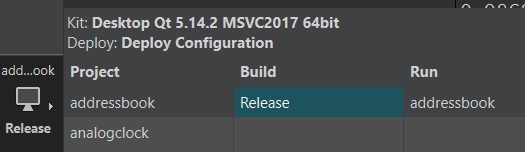
                  c90cabe5-42d8-4ef6-876c-9efebc4c592b-image.png

                  R 1 Reply Last reply
                  0
                  • Christian EhrlicherC Offline
                    Christian EhrlicherC Offline
                    Christian Ehrlicher
                    Lifetime Qt Champion
                    wrote on last edited by
                    #27

                    querymodel->removeRow(addressId, 1);

                    model->removeRows(row, 1);

                    removeRow() != removeRows()

                    Qt Online Installer direct download: https://download.qt.io/official_releases/online_installers/
                    Visit the Qt Academy at https://academy.qt.io/catalog

                    R 1 Reply Last reply
                    1
                    • M mchinand

                      @Risver said in Deleting row from QTableWidget and from Sqlite database:

                      The QT version is 5.0.2

                      I'm guessing 5.0.2 is/was your QtCreator version (the IDE) not the version of Qt. Look at the 'Kit' you are using, it will say what version of Qt you are using.

                      c90cabe5-42d8-4ef6-876c-9efebc4c592b-image.png

                      R Offline
                      R Offline
                      Risver
                      wrote on last edited by
                      #28

                      @mchinand
                      Yes you're right.

                      JonBJ 1 Reply Last reply
                      0
                      • Christian EhrlicherC Christian Ehrlicher

                        querymodel->removeRow(addressId, 1);

                        model->removeRows(row, 1);

                        removeRow() != removeRows()

                        R Offline
                        R Offline
                        Risver
                        wrote on last edited by
                        #29

                        @Christian-Ehrlicher said in Deleting row from QTableWidget and from Sqlite database:

                        querymodel->removeRow(addressId, 1);

                        model->removeRows(row, 1);

                        removeRow() != removeRows()

                        Thank You Christian, now i have no errors, but it is not removing.

                        JonBJ 1 Reply Last reply
                        0
                        • R Risver

                          @mchinand
                          Yes you're right.

                          JonBJ Offline
                          JonBJ Offline
                          JonB
                          wrote on last edited by
                          #30

                          @Risver
                          @Christian-Ehrlicher's comment above is why your line querymodel->removeRow(addressId, 1); is generating an error. Look at the two different methods he has given you links to.

                          1 Reply Last reply
                          0
                          • R Risver

                            @Christian-Ehrlicher said in Deleting row from QTableWidget and from Sqlite database:

                            querymodel->removeRow(addressId, 1);

                            model->removeRows(row, 1);

                            removeRow() != removeRows()

                            Thank You Christian, now i have no errors, but it is not removing.

                            JonBJ Offline
                            JonBJ Offline
                            JonB
                            wrote on last edited by
                            #31

                            @Risver said in Deleting row from QTableWidget and from Sqlite database:

                            Thank You Christian, now i have no errors, but it is not removing.

                            Start by showing us your new line, because we don't know which of the two methods you changed to using and what parameters you gave it.

                            R 1 Reply Last reply
                            0
                            • JonBJ JonB

                              @Risver said in Deleting row from QTableWidget and from Sqlite database:

                              Thank You Christian, now i have no errors, but it is not removing.

                              Start by showing us your new line, because we don't know which of the two methods you changed to using and what parameters you gave it.

                              R Offline
                              R Offline
                              Risver
                              wrote on last edited by
                              #32

                              @JonB said in Deleting row from QTableWidget and from Sqlite database:

                              @Risver said in Deleting row from QTableWidget and from Sqlite database:

                              Thank You Christian, now i have no errors, but it is not removing.

                              Start by showing us your new line, because we don't know which of the two methods you changed to using and what parameters you gave it.

                              i've changed only this one:

                              void MainWindow::on_remove_clicked()
                              {
                                  if (ui->tableView->selectionModel()->hasSelection())
                                  {
                                      int addressId = ui->tableView->selectionModel()->currentIndex().row();
                                      querymodel->removeRows(addressId, 1);
                                  }
                              }
                              
                              JonBJ 1 Reply Last reply
                              0
                              • R Risver

                                @JonB said in Deleting row from QTableWidget and from Sqlite database:

                                @Risver said in Deleting row from QTableWidget and from Sqlite database:

                                Thank You Christian, now i have no errors, but it is not removing.

                                Start by showing us your new line, because we don't know which of the two methods you changed to using and what parameters you gave it.

                                i've changed only this one:

                                void MainWindow::on_remove_clicked()
                                {
                                    if (ui->tableView->selectionModel()->hasSelection())
                                    {
                                        int addressId = ui->tableView->selectionModel()->currentIndex().row();
                                        querymodel->removeRows(addressId, 1);
                                    }
                                }
                                
                                JonBJ Offline
                                JonBJ Offline
                                JonB
                                wrote on last edited by
                                #33

                                @Risver

                                qDebug() << querymodel->rowCount();
                                qDebug() << querymodel->removeRows(addressId, 1);
                                qDebug() << querymodel->rowCount();
                                
                                R 1 Reply Last reply
                                1
                                • JonBJ JonB

                                  @Risver

                                  qDebug() << querymodel->rowCount();
                                  qDebug() << querymodel->removeRows(addressId, 1);
                                  qDebug() << querymodel->rowCount();
                                  
                                  R Offline
                                  R Offline
                                  Risver
                                  wrote on last edited by
                                  #34

                                  @JonB said in Deleting row from QTableWidget and from Sqlite database:

                                  @Risver

                                  qDebug() << querymodel->rowCount();
                                  qDebug() << querymodel->removeRows(addressId, 1);
                                  qDebug() << querymodel->rowCount();
                                  

                                  The rowCount is always 3 and the removeRows is false.

                                  1 Reply Last reply
                                  0
                                  • Christian EhrlicherC Offline
                                    Christian EhrlicherC Offline
                                    Christian Ehrlicher
                                    Lifetime Qt Champion
                                    wrote on last edited by
                                    #35

                                    Does your table has a primary key? Otherwise removing will not work.

                                    Qt Online Installer direct download: https://download.qt.io/official_releases/online_installers/
                                    Visit the Qt Academy at https://academy.qt.io/catalog

                                    R JonBJ 2 Replies Last reply
                                    0
                                    • Christian EhrlicherC Christian Ehrlicher

                                      Does your table has a primary key? Otherwise removing will not work.

                                      R Offline
                                      R Offline
                                      Risver
                                      wrote on last edited by
                                      #36

                                      @Christian-Ehrlicher said in Deleting row from QTableWidget and from Sqlite database:

                                      Does your table has a primary key? Otherwise removing will not work.

                                      Yes, it has.

                                      1 Reply Last reply
                                      0
                                      • Christian EhrlicherC Christian Ehrlicher

                                        Does your table has a primary key? Otherwise removing will not work.

                                        JonBJ Offline
                                        JonBJ Offline
                                        JonB
                                        wrote on last edited by JonB
                                        #37

                                        @Christian-Ehrlicher said in Deleting row from QTableWidget and from Sqlite database:

                                        Does your table has a primary key? Otherwise removing will not work.

                                        That's very interesting. I assume we're talking about a SQL table model here? I looked through the docs (briefly) but did not see any mention of this requirement, is it documented?

                                        R 1 Reply Last reply
                                        0
                                        • JonBJ JonB

                                          @Christian-Ehrlicher said in Deleting row from QTableWidget and from Sqlite database:

                                          Does your table has a primary key? Otherwise removing will not work.

                                          That's very interesting. I assume we're talking about a SQL table model here? I looked through the docs (briefly) but did not see any mention of this requirement, is it documented?

                                          R Offline
                                          R Offline
                                          Risver
                                          wrote on last edited by
                                          #38

                                          @JonB said in Deleting row from QTableWidget and from Sqlite database:

                                          @Christian-Ehrlicher said in Deleting row from QTableWidget and from Sqlite database:

                                          Does your table has a primary key? Otherwise removing will not work.

                                          That's very interesting. I assume we're talking about a SQL table model here? I looked through the docs (briefly) but did not see any mention of this requirement, is it documented?

                                          f7d18cb5-d2c3-44e2-ab9d-adbcc725c397-image.png
                                          That is how my SQL Table looks.

                                          JonBJ 1 Reply Last reply
                                          0

                                          • Login

                                          • Login or register to search.
                                          • First post
                                            Last post
                                          0
                                          • Categories
                                          • Recent
                                          • Tags
                                          • Popular
                                          • Users
                                          • Groups
                                          • Search
                                          • Get Qt
                                          • Unsolved