Skip to content
  • Categories
  • Recent
  • Tags
  • Popular
  • Users
  • Groups
  • Search
  • Get Qt Extensions
  • Unsolved
Collapse
Brand Logo
  1. Home
  2. Qt Development
  3. General and Desktop
  4. TableLayout in the centralwindow
Qt 6.11 is out! See what's new in the release blog

TableLayout in the centralwindow

Scheduled Pinned Locked Moved Unsolved General and Desktop
21 Posts 5 Posters 7.6k Views 1 Watching
  • Oldest to Newest
  • Newest to Oldest
  • Most Votes
Reply
  • Reply as topic
Log in to reply
This topic has been deleted. Only users with topic management privileges can see it.
  • Swati777999S Swati777999

    Hi All,

    I want to know how to create a table layout in the central window without using .ui file and also be able to add items to it .

    Any help will be appreciated!

    jsulmJ Offline
    jsulmJ Offline
    jsulm
    Lifetime Qt Champion
    wrote on last edited by
    #2

    @Swati777999 said in TableLayout in the centralwindow:

    I want to know how to create a table layout in the central window

    How about setting https://doc.qt.io/qt-5/qgridlayout.html as layout on your central widget?
    https://doc.qt.io/qt-5/qtwidgets-layouts-basiclayouts-example.html shows how to use it and how to add widgets to it.

    https://forum.qt.io/topic/113070/qt-code-of-conduct

    Swati777999S 1 Reply Last reply
    3
    • Swati777999S Swati777999

      Hi All,

      I want to know how to create a table layout in the central window without using .ui file and also be able to add items to it .

      Any help will be appreciated!

      JonBJ Offline
      JonBJ Offline
      JonB
      wrote on last edited by JonB
      #3

      @Swati777999
      QMainWindow::setCentralWidget(QWidget *widget) with just a plain QWidget you create, then set your desired layout on that widget, probably a QGridLayout if that is what you mean by "TableLayout". Or a QTableView/QTableWidget for your central widget if that is what you mean by "TableLayout".

      Swati777999S 2 Replies Last reply
      3
      • JonBJ JonB

        @Swati777999
        QMainWindow::setCentralWidget(QWidget *widget) with just a plain QWidget you create, then set your desired layout on that widget, probably a QGridLayout if that is what you mean by "TableLayout". Or a QTableView/QTableWidget for your central widget if that is what you mean by "TableLayout".

        Swati777999S Offline
        Swati777999S Offline
        Swati777999
        wrote on last edited by
        #4

        @JonB Table_View.PNG
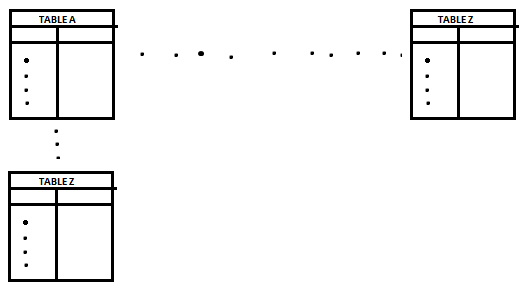
        I'm focussing on drawing something like this for inputting values.

        This table forms a unit of the bigger display as shown below.
        TABLE_Result_display.PNG

        I Hope that I described my requirements more clearly.

        “ In order to be irreplaceable, one must always be different” – Coco Chanel

        1 Reply Last reply
        0
        • jsulmJ jsulm

          @Swati777999 said in TableLayout in the centralwindow:

          I want to know how to create a table layout in the central window

          How about setting https://doc.qt.io/qt-5/qgridlayout.html as layout on your central widget?
          https://doc.qt.io/qt-5/qtwidgets-layouts-basiclayouts-example.html shows how to use it and how to add widgets to it.

          Swati777999S Offline
          Swati777999S Offline
          Swati777999
          wrote on last edited by
          #5

          @jsulm
          I get this message with my existing code. I don't understand what it exactly means.

          "QWidget::setLayout: Attempting to set QLayout "" on MainWindow "", which already has a layout"

          “ In order to be irreplaceable, one must always be different” – Coco Chanel

          1 Reply Last reply
          0
          • JonBJ JonB

            @Swati777999
            QMainWindow::setCentralWidget(QWidget *widget) with just a plain QWidget you create, then set your desired layout on that widget, probably a QGridLayout if that is what you mean by "TableLayout". Or a QTableView/QTableWidget for your central widget if that is what you mean by "TableLayout".

            Swati777999S Offline
            Swati777999S Offline
            Swati777999
            wrote on last edited by
            #6

            @JonB
            I used
            centralWidget()->setLayout(layout); instead of
            this ->setLayout(monitorGLayout);

            At least, I can see something working but the newest layout overlaps the existing layout with the following message
            QWidget::setLayout: Attempting to set QLayout "" on QWidget "", when the QLayout already has a parent
            flashing on the screen of Application output.

            I don't understand how this syntax is able to reflect changes - centralWidget()->setLayout(layout);

            “ In order to be irreplaceable, one must always be different” – Coco Chanel

            Thank YouT 1 Reply Last reply
            0
            • Swati777999S Swati777999

              @JonB
              I used
              centralWidget()->setLayout(layout); instead of
              this ->setLayout(monitorGLayout);

              At least, I can see something working but the newest layout overlaps the existing layout with the following message
              QWidget::setLayout: Attempting to set QLayout "" on QWidget "", when the QLayout already has a parent
              flashing on the screen of Application output.

              I don't understand how this syntax is able to reflect changes - centralWidget()->setLayout(layout);

              Thank YouT Offline
              Thank YouT Offline
              Thank You
              wrote on last edited by Thank You
              #7

              @Swati777999
              As @JonB said

              QMainWindow::setCentralWidget(QWidget *widget) with just a plain QWidget you create,

              • Create a widget suppose "myWidget"
              • Create a layout
              • Add other widgets to the layout
              • Set layout to myWidget
              • set myWidget as centralWidget
              QWidget *myWidget = new QWidget();
              QGridLayout *tableLayout = new QGridLayout();
              
              
              // suppose you want to add button to it 
              /  https://doc.qt.io/qt-5/qgridlayout.html#addWidget-1 
              
              QPushButton * button = new QPushButton("hello");
              tableLayout->addWidget(button,0,0);
              
              
              myWidget->setLayout(tableLayout);
              QMainWindow::setCentralWidget(myWidget);
              

              Let's make QT free or It will go forever

              TRUE AND FALSE <3

              Swati777999S 1 Reply Last reply
              1
              • Thank YouT Thank You

                @Swati777999
                As @JonB said

                QMainWindow::setCentralWidget(QWidget *widget) with just a plain QWidget you create,

                • Create a widget suppose "myWidget"
                • Create a layout
                • Add other widgets to the layout
                • Set layout to myWidget
                • set myWidget as centralWidget
                QWidget *myWidget = new QWidget();
                QGridLayout *tableLayout = new QGridLayout();
                
                
                // suppose you want to add button to it 
                /  https://doc.qt.io/qt-5/qgridlayout.html#addWidget-1 
                
                QPushButton * button = new QPushButton("hello");
                tableLayout->addWidget(button,0,0);
                
                
                myWidget->setLayout(tableLayout);
                QMainWindow::setCentralWidget(myWidget);
                
                Swati777999S Offline
                Swati777999S Offline
                Swati777999
                wrote on last edited by
                #8

                @Thank-You

                Thanks for your answer.

                My task is to show a table (which is just a view).

                You've added an interactive widget to your layout which is a push-button but I just want to display the table in the format shown above. How can that be achieved?

                “ In order to be irreplaceable, one must always be different” – Coco Chanel

                jsulmJ Thank YouT 2 Replies Last reply
                0
                • Swati777999S Swati777999

                  @Thank-You

                  Thanks for your answer.

                  My task is to show a table (which is just a view).

                  You've added an interactive widget to your layout which is a push-button but I just want to display the table in the format shown above. How can that be achieved?

                  jsulmJ Offline
                  jsulmJ Offline
                  jsulm
                  Lifetime Qt Champion
                  wrote on last edited by
                  #9

                  @Swati777999 said in TableLayout in the centralwindow:

                  How can that be achieved?

                  Using https://doc.qt.io/qt-5/qtablewidget.html or https://doc.qt.io/qt-5/qtableview.html maybe?

                  https://forum.qt.io/topic/113070/qt-code-of-conduct

                  1 Reply Last reply
                  0
                  • Swati777999S Swati777999

                    @Thank-You

                    Thanks for your answer.

                    My task is to show a table (which is just a view).

                    You've added an interactive widget to your layout which is a push-button but I just want to display the table in the format shown above. How can that be achieved?

                    Thank YouT Offline
                    Thank YouT Offline
                    Thank You
                    wrote on last edited by
                    #10

                    @Swati777999
                    In place of QPushButton just use either QTableView or QTableWidget and edit the positions of rows and columns in addWidget(widget, Row, Column)
                    Widget can be anything like table , button , label anything. So you can create instance of it and just put it in place of widget something like

                    tableLayout->addWidget(firstTable,0,0);
                    tableLayout->addWidget(secondTable,2,0);
                    tableLayout->addWidget(thirdTable,0,2);
                    

                    where firstTable secondTable and thirdTable are your tables

                    Just One tip:
                    If you are working with simple data then choosing QTableWidget would be easier and if you are working with some big data and want to use model then go for QTableView

                    https://doc.qt.io/qt-5/qtablewidget.html
                    https://doc.qt.io/qt-5/qtableview.html

                    Let's make QT free or It will go forever

                    TRUE AND FALSE <3

                    Swati777999S 2 Replies Last reply
                    1
                    • Thank YouT Thank You

                      @Swati777999
                      In place of QPushButton just use either QTableView or QTableWidget and edit the positions of rows and columns in addWidget(widget, Row, Column)
                      Widget can be anything like table , button , label anything. So you can create instance of it and just put it in place of widget something like

                      tableLayout->addWidget(firstTable,0,0);
                      tableLayout->addWidget(secondTable,2,0);
                      tableLayout->addWidget(thirdTable,0,2);
                      

                      where firstTable secondTable and thirdTable are your tables

                      Just One tip:
                      If you are working with simple data then choosing QTableWidget would be easier and if you are working with some big data and want to use model then go for QTableView

                      https://doc.qt.io/qt-5/qtablewidget.html
                      https://doc.qt.io/qt-5/qtableview.html

                      Swati777999S Offline
                      Swati777999S Offline
                      Swati777999
                      wrote on last edited by
                      #11

                      @Thank-You

                      Thanks, it helped me for creating a basic layout.

                      I am now trying for the view of the table; like resizing and making division for creating rows and columns.

                      “ In order to be irreplaceable, one must always be different” – Coco Chanel

                      1 Reply Last reply
                      0
                      • Thank YouT Thank You

                        @Swati777999
                        In place of QPushButton just use either QTableView or QTableWidget and edit the positions of rows and columns in addWidget(widget, Row, Column)
                        Widget can be anything like table , button , label anything. So you can create instance of it and just put it in place of widget something like

                        tableLayout->addWidget(firstTable,0,0);
                        tableLayout->addWidget(secondTable,2,0);
                        tableLayout->addWidget(thirdTable,0,2);
                        

                        where firstTable secondTable and thirdTable are your tables

                        Just One tip:
                        If you are working with simple data then choosing QTableWidget would be easier and if you are working with some big data and want to use model then go for QTableView

                        https://doc.qt.io/qt-5/qtablewidget.html
                        https://doc.qt.io/qt-5/qtableview.html

                        Swati777999S Offline
                        Swati777999S Offline
                        Swati777999
                        wrote on last edited by
                        #12

                        @Thank-You

                        for making the size of the table to fit to the size of the widget, I used the following
                        myWidget->adjustSize();

                        but it does not produce the result

                        “ In order to be irreplaceable, one must always be different” – Coco Chanel

                        jsulmJ 1 Reply Last reply
                        0
                        • Swati777999S Swati777999

                          @Thank-You

                          for making the size of the table to fit to the size of the widget, I used the following
                          myWidget->adjustSize();

                          but it does not produce the result

                          jsulmJ Offline
                          jsulmJ Offline
                          jsulm
                          Lifetime Qt Champion
                          wrote on last edited by
                          #13

                          @Swati777999 Did you put myWidget in a layout?

                          https://forum.qt.io/topic/113070/qt-code-of-conduct

                          Swati777999S 1 Reply Last reply
                          0
                          • jsulmJ jsulm

                            @Swati777999 Did you put myWidget in a layout?

                            Swati777999S Offline
                            Swati777999S Offline
                            Swati777999
                            wrote on last edited by
                            #14

                            @jsulm No
                            I have used QMainWindow::setCentralWidget(myWidget);

                            “ In order to be irreplaceable, one must always be different” – Coco Chanel

                            Thank YouT 1 Reply Last reply
                            0
                            • Swati777999S Swati777999

                              @jsulm No
                              I have used QMainWindow::setCentralWidget(myWidget);

                              Thank YouT Offline
                              Thank YouT Offline
                              Thank You
                              wrote on last edited by Thank You
                              #15

                              @Swati777999

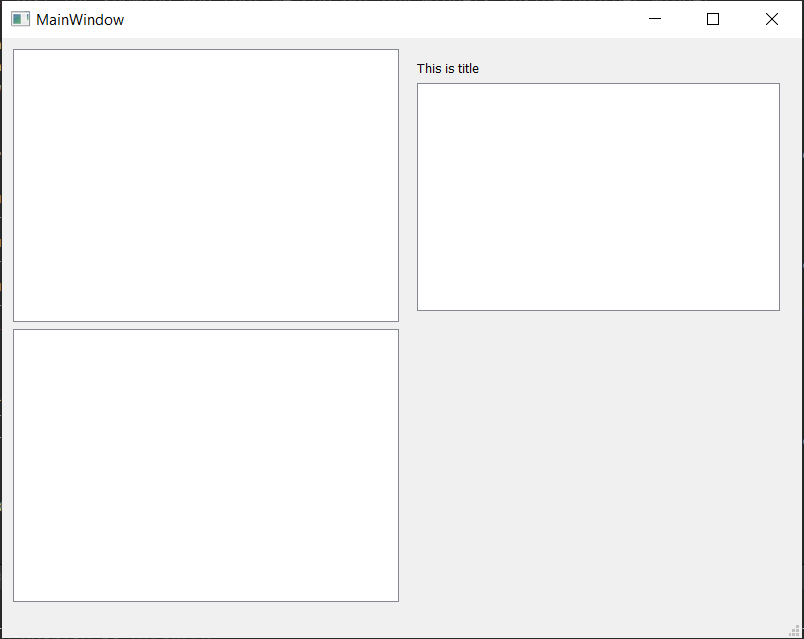
                              This is final output you are gonna see
                              8dad7ff5-d84f-4d4b-a3be-e69d763fbf2d-image.png
                              mainwindow.h

                              #ifndef MAINWINDOW_H
                              #define MAINWINDOW_H
                              
                              #include <QMainWindow>
                              #include<QTableWidget>
                              #include<QGridLayout>
                              #include<QVBoxLayout>
                              #include<QLabel>


                              QT_BEGIN_NAMESPACE
                              namespace Ui { class MainWindow; }
                              QT_END_NAMESPACE
                              
                              class MainWindow : public QMainWindow
                              {
                                  Q_OBJECT
                              
                              public:
                                  MainWindow(QWidget *parent = nullptr);
                                  ~MainWindow();
                              
                              private:
                                  Ui::MainWindow *ui;
                                  QWidget *myWidget;
                                  QGridLayout *tableLayout;
                                  QTableWidget *firstTable, *secondTable,*thirdTable;
                                  QWidget *compoundWidget;
                                  QVBoxLayout *compoundLayout;
                                  QLabel *titleOfCompound;
                              };
                              #endif // MAINWINDOW_H


                              mainwindow.cpp

                              #include "mainwindow.h"
                              #include "ui_mainwindow.h"
                              
                              MainWindow::MainWindow(QWidget *parent)
                                  : QMainWindow(parent)
                                  , ui(new Ui::MainWindow)
                              {
                                  ui->setupUi(this);
                              
                                  myWidget = new QWidget();
                                  // this is our main widget which we will set as central widget
                                  tableLayout = new QGridLayout();
                                  // this is layout for our myWidget which is like grid as it's name suggests
                              
                                  firstTable = new QTableWidget();
                                  secondTable = new QTableWidget();
                                  thirdTable = new QTableWidget();
                                  // these are just basic tables which are also widgets.
                              
                              
                                  compoundWidget = new QWidget();
                                  // compoundWidget is also a widget but we will add more widgets inside it. In this case we are inserting table and label
                                  compoundLayout = new QVBoxLayout(compoundWidget);
                                  // This is layout for compoundWidget
                              
                                  titleOfCompound = new QLabel("This is title");
                                  // this is just for showing you that we can put any widgets inside another widget
                              
                                  compoundLayout->addWidget(titleOfCompound);
                                  compoundLayout->addWidget(thirdTable);
                                  // this puts table and title to compoundWidget
                              
                                  compoundWidget->setLayout(compoundLayout);
                                  // this sets compoundLayout to compoundWidget : Remember we have added two widgets in compoundLayout so they will be shown
                              
                                  tableLayout->addWidget(firstTable,0,0);
                                  // we want first table to be at first so row = 0 ; column =0;
                                  tableLayout->addWidget(secondTable,2,0);
                                  // we want second table to be at left bottom so row = 2; column =0; // we can use any number. If there aren't widgets in middle it will adapt
                                  tableLayout->addWidget(compoundWidget,0,2);
                                  // we want compoundWidget consisting (label and table) binded by compound Layout to be at right so row = 0; column = 2;
                                  myWidget->setLayout(tableLayout);
                                  //setting main layout to our myWidget
                              
                                  setCentralWidget(myWidget);
                                  // now setting that myWidget as our central or main widget
                                  // if we remove this line nothing will show up which means we are telling QMainWindow to set this as centralWidget
                              // You will not be able to see anything if you forget to add layout because we have added all our widget to layout
                              
                              
                              }
                              
                              MainWindow::~MainWindow()
                              {
                                  delete ui;
                              }
                              

                              If you remove to set centralwidget then it will result in this
                              f84e7a13-061d-4a9a-aa74-ccbd7d9d527c-image.png

                              I haven't touched main.cpp

                              See this image
                              a2caacff-ec11-49b9-a13d-b87f134efa17-image.png

                              If this couldn't help you understand I can't

                              Let's make QT free or It will go forever

                              TRUE AND FALSE <3

                              Swati777999S 1 Reply Last reply
                              4
                              • Thank YouT Thank You

                                @Swati777999

                                This is final output you are gonna see
                                8dad7ff5-d84f-4d4b-a3be-e69d763fbf2d-image.png
                                mainwindow.h

                                #ifndef MAINWINDOW_H
                                #define MAINWINDOW_H
                                
                                #include <QMainWindow>
                                #include<QTableWidget>
                                #include<QGridLayout>
                                #include<QVBoxLayout>
                                #include<QLabel>


                                QT_BEGIN_NAMESPACE
                                namespace Ui { class MainWindow; }
                                QT_END_NAMESPACE
                                
                                class MainWindow : public QMainWindow
                                {
                                    Q_OBJECT
                                
                                public:
                                    MainWindow(QWidget *parent = nullptr);
                                    ~MainWindow();
                                
                                private:
                                    Ui::MainWindow *ui;
                                    QWidget *myWidget;
                                    QGridLayout *tableLayout;
                                    QTableWidget *firstTable, *secondTable,*thirdTable;
                                    QWidget *compoundWidget;
                                    QVBoxLayout *compoundLayout;
                                    QLabel *titleOfCompound;
                                };
                                #endif // MAINWINDOW_H


                                mainwindow.cpp

                                #include "mainwindow.h"
                                #include "ui_mainwindow.h"
                                
                                MainWindow::MainWindow(QWidget *parent)
                                    : QMainWindow(parent)
                                    , ui(new Ui::MainWindow)
                                {
                                    ui->setupUi(this);
                                
                                    myWidget = new QWidget();
                                    // this is our main widget which we will set as central widget
                                    tableLayout = new QGridLayout();
                                    // this is layout for our myWidget which is like grid as it's name suggests
                                
                                    firstTable = new QTableWidget();
                                    secondTable = new QTableWidget();
                                    thirdTable = new QTableWidget();
                                    // these are just basic tables which are also widgets.
                                
                                
                                    compoundWidget = new QWidget();
                                    // compoundWidget is also a widget but we will add more widgets inside it. In this case we are inserting table and label
                                    compoundLayout = new QVBoxLayout(compoundWidget);
                                    // This is layout for compoundWidget
                                
                                    titleOfCompound = new QLabel("This is title");
                                    // this is just for showing you that we can put any widgets inside another widget
                                
                                    compoundLayout->addWidget(titleOfCompound);
                                    compoundLayout->addWidget(thirdTable);
                                    // this puts table and title to compoundWidget
                                
                                    compoundWidget->setLayout(compoundLayout);
                                    // this sets compoundLayout to compoundWidget : Remember we have added two widgets in compoundLayout so they will be shown
                                
                                    tableLayout->addWidget(firstTable,0,0);
                                    // we want first table to be at first so row = 0 ; column =0;
                                    tableLayout->addWidget(secondTable,2,0);
                                    // we want second table to be at left bottom so row = 2; column =0; // we can use any number. If there aren't widgets in middle it will adapt
                                    tableLayout->addWidget(compoundWidget,0,2);
                                    // we want compoundWidget consisting (label and table) binded by compound Layout to be at right so row = 0; column = 2;
                                    myWidget->setLayout(tableLayout);
                                    //setting main layout to our myWidget
                                
                                    setCentralWidget(myWidget);
                                    // now setting that myWidget as our central or main widget
                                    // if we remove this line nothing will show up which means we are telling QMainWindow to set this as centralWidget
                                // You will not be able to see anything if you forget to add layout because we have added all our widget to layout
                                
                                
                                }
                                
                                MainWindow::~MainWindow()
                                {
                                    delete ui;
                                }
                                

                                If you remove to set centralwidget then it will result in this
                                f84e7a13-061d-4a9a-aa74-ccbd7d9d527c-image.png

                                I haven't touched main.cpp

                                See this image
                                a2caacff-ec11-49b9-a13d-b87f134efa17-image.png

                                If this couldn't help you understand I can't

                                Swati777999S Offline
                                Swati777999S Offline
                                Swati777999
                                wrote on last edited by
                                #16

                                @Thank-You

                                Thank you so much. such an elaborate explanation!! I appreciate your efforts in explaining the concept.

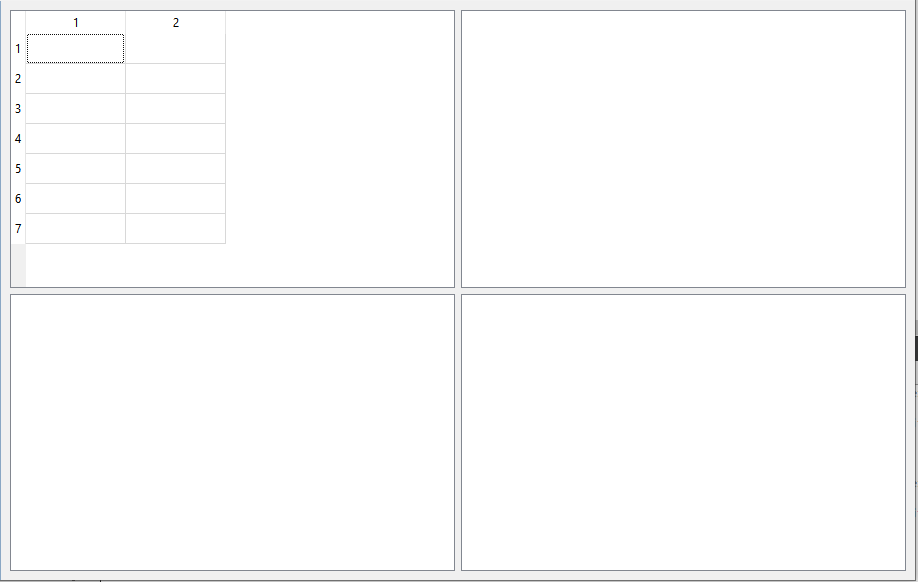
                                I reached up to this by following your logic. Now, I've to resize the table inside the widget at (0,0) to its size and I've used QTableWidget to draw the table, so can't use resizeColumnToContents(int column) for resizing. Any suggestion for this change?
                                ResizingTable_in_Widgets.PNG

                                “ In order to be irreplaceable, one must always be different” – Coco Chanel

                                Christian EhrlicherC Thank YouT 2 Replies Last reply
                                0
                                • Swati777999S Swati777999

                                  @Thank-You

                                  Thank you so much. such an elaborate explanation!! I appreciate your efforts in explaining the concept.

                                  I reached up to this by following your logic. Now, I've to resize the table inside the widget at (0,0) to its size and I've used QTableWidget to draw the table, so can't use resizeColumnToContents(int column) for resizing. Any suggestion for this change?

                                  ResizingTable_in_Widgets.PNG

                                  Christian EhrlicherC Offline
                                  Christian EhrlicherC Offline
                                  Christian Ehrlicher
                                  Lifetime Qt Champion
                                  wrote on last edited by
                                  #17

                                  @Swati777999 said in TableLayout in the centralwindow:

                                  so can't use resizeColumnToContents(int column) for resizing.

                                  Why? QTableWidget derives from QTableView: https://doc.qt.io/qt-5/qtableview.html#resizeColumnToContents

                                  Qt Online Installer direct download: https://download.qt.io/official_releases/online_installers/
                                  Visit the Qt Academy at https://academy.qt.io/catalog

                                  Swati777999S 1 Reply Last reply
                                  0
                                  • Swati777999S Swati777999

                                    @Thank-You

                                    Thank you so much. such an elaborate explanation!! I appreciate your efforts in explaining the concept.

                                    I reached up to this by following your logic. Now, I've to resize the table inside the widget at (0,0) to its size and I've used QTableWidget to draw the table, so can't use resizeColumnToContents(int column) for resizing. Any suggestion for this change?

                                    ResizingTable_in_Widgets.PNG

                                    Thank YouT Offline
                                    Thank YouT Offline
                                    Thank You
                                    wrote on last edited by
                                    #18

                                    @Swati777999

                                    https://forum.qt.io/topic/26799/qtablewidget-shrink-to-fit/10
                                    I guess you will get your answer here.
                                    Don't use TableWidget for big datas. Just use it for learning purpose. It's so much functionality in tableview

                                    Let's make QT free or It will go forever

                                    TRUE AND FALSE <3

                                    1 Reply Last reply
                                    0
                                    • Christian EhrlicherC Christian Ehrlicher

                                      @Swati777999 said in TableLayout in the centralwindow:

                                      so can't use resizeColumnToContents(int column) for resizing.

                                      Why? QTableWidget derives from QTableView: https://doc.qt.io/qt-5/qtableview.html#resizeColumnToContents

                                      Swati777999S Offline
                                      Swati777999S Offline
                                      Swati777999
                                      wrote on last edited by
                                      #19

                                      @Christian-Ehrlicher I don't know, it gives an error in my code when I use it for QTableWidget.

                                      “ In order to be irreplaceable, one must always be different” – Coco Chanel

                                      jsulmJ Thank YouT 2 Replies Last reply
                                      0
                                      • Swati777999S Swati777999

                                        @Christian-Ehrlicher I don't know, it gives an error in my code when I use it for QTableWidget.

                                        jsulmJ Offline
                                        jsulmJ Offline
                                        jsulm
                                        Lifetime Qt Champion
                                        wrote on last edited by
                                        #20

                                        @Swati777999 said in TableLayout in the centralwindow:

                                        it gives an error

                                        Post the error and code causing it...

                                        https://forum.qt.io/topic/113070/qt-code-of-conduct

                                        1 Reply Last reply
                                        2
                                        • Swati777999S Swati777999

                                          @Christian-Ehrlicher I don't know, it gives an error in my code when I use it for QTableWidget.

                                          Thank YouT Offline
                                          Thank YouT Offline
                                          Thank You
                                          wrote on last edited by
                                          #21

                                          @Swati777999
                                          If that is not fully related to the original question posting another question would be helpful to newcomers.

                                          I use it for QTableWidget.

                                          QTableWidget or QTableView

                                          Let's make QT free or It will go forever

                                          TRUE AND FALSE <3

                                          1 Reply Last reply
                                          1

                                          • Login

                                          • Login or register to search.
                                          • First post
                                            Last post
                                          0
                                          • Categories
                                          • Recent
                                          • Tags
                                          • Popular
                                          • Users
                                          • Groups
                                          • Search
                                          • Get Qt Extensions
                                          • Unsolved