
Skip to content
  • Categories
  • Recent
  • Tags
  • Popular
  • Users
  • Groups
  • Search
  • Get Qt Extensions
  • Unsolved
Collapse
Brand Logo
  1. Home
  2. Qt Development
  3. Mobile and Embedded
  4. video doesn't display on LCD screen
Qt 6.11 is out! See what's new in the release blog

video doesn't display on LCD screen

Scheduled Pinned Locked Moved Unsolved Mobile and Embedded
24 Posts 2 Posters 11.4k Views 1 Watching
  • Oldest to Newest
  • Newest to Oldest
  • Most Votes
Reply
  • Reply as topic
Log in to reply
This topic has been deleted. Only users with topic management privileges can see it.
  • SGaistS Offline
    SGaistS Offline
    SGaist
    Lifetime Qt Champion
    wrote on last edited by
    #7

    Sorry, the name of the sink was wrong it's qmlglsink.

    The QtMultimedia backend for Linux uses GStreamer, hower it has used it way before the qmlglsink existed and also it supports both the widgets and quick modules.

    That said, it has no idea of any accelerated plugins like NXP is providing, hence using a custom pipeline is likely the best way to achieve what you want to do. The qmlglsink is part of the good plugin package of GStreamer however I don't remember in which version it has been made available so you should check that.

    Interested in AI ? www.idiap.ch
    Please read the Qt Code of Conduct - https://forum.qt.io/topic/113070/qt-code-of-conduct

    1 Reply Last reply
    0
    • J Offline
      J Offline
      Jeffff
      wrote on last edited by
      #8

      Thank you @SGaist .
      Then I try to search my QtMultimedia by objdump:
      7076d2d3-41b2-45d6-8fe5-38c00484cd01-image.png
      It seems that this QtMultimedia doesn't use gstreamer. Also I searched my directory, no "qmlglsink" was found.
      The QT version 5.10.1 is installed on this board. I really lost my direction.

      1 Reply Last reply
      0
      • SGaistS Offline
        SGaistS Offline
        SGaist
        Lifetime Qt Champion
        wrote on last edited by
        #9

        You are mixing things here.

        QtMultimedia does not link to GStreamer. Its Linux plugin will be.
        qmlglsink is part of GStreamer, but I don't remember since which version and it's part of one of the plugin packages of GStreamer.

        Interested in AI ? www.idiap.ch
        Please read the Qt Code of Conduct - https://forum.qt.io/topic/113070/qt-code-of-conduct

        1 Reply Last reply
        0
        • J Offline
          J Offline
          Jeffff
          wrote on last edited by
          #10

          I havn't found the "qmlglsink" plugin in my gstreamer1.0. Do you mean it is a must to use this plugin if we want to play video in QT?

          -sh-4.4# gst-inspect-1.0 | grep sink
          imxipu:  imxipuvideosink: Freescale IPU video sink
          tcp:  tcpclientsink: TCP client sink
          tcp:  tcpserversink: TCP server sink
          tcp:  multifdsink: Multi filedescriptor sink
          tcp:  multisocketsink: Multi socket sink
          rtspclientsink:  rtspclientsink: RTSP RECORD client
          imxv4l2video:  imxv4l2videosink: V4L2 CSI Video Sink
          imxpxp:  imxpxpvideosink: Freescale PxP video sink
          alsa:  alsasink: Audio sink (ALSA)
          imxg2d:  imxg2dvideosink: Freescale G2D video sink
          soup:  souphttpclientsink: HTTP client sink
          udp:  udpsink: UDP packet sender
          udp:  multiudpsink: UDP packet sender
          udp:  dynudpsink: UDP packet sender
          ximagesink:  ximagesink: Video sink
          debug:  testsink: Test plugin
          gio:  giosink: GIO sink
          gio:  giostreamsink: GIO stream sink
          playback:  playsink: Player Sink
          autodetect:  autovideosink: Auto video sink
          autodetect:  autoaudiosink: Auto audio sink
          imxeglvivsink:  imxeglvivsink: Freescale EGL video sink
          coreelements:  fakesink: Fake Sink
          coreelements:  fdsink: Filedescriptor Sink
          coreelements:  filesink: File Sink
          xvimagesink:  xvimagesink: Video sink
          -sh-4.4# 
          
          
          1 Reply Last reply
          0
          • SGaistS Offline
            SGaistS Offline
            SGaist
            Lifetime Qt Champion
            wrote on last edited by
            #11

            Which GStreamer version do you have ?

            It's not mandatory but it might be easier to use with your custom pipeline.

            Interested in AI ? www.idiap.ch
            Please read the Qt Code of Conduct - https://forum.qt.io/topic/113070/qt-code-of-conduct

            1 Reply Last reply
            0
            • J Offline
              J Offline
              Jeffff
              wrote on last edited by Jeffff
              #12

              Hi @SGaist , I found some log after I enable the qtmultimedia log by referring to: https://community.nxp.com/t5/i-MX-Processors-Knowledge-Base/How-to-use-qtmultimedia-QML-with-Gstreamer-1-0/ta-p/1118006
              Here is the log that might be related:

              qt.multimedia.video: source is VideoProducer(0x1930a08)
              qt.multimedia.video: found videonode plugin "egl" 0x1941b90
              qt.multimedia.video: found videonode plugin "imx6" 0x194cd20
              qt.multimedia.video: media object is QObject(0x0)
              qml: mainVideoProducer: onCompleted
              Opening device: /dev/video1 
              Cam Image Size: QSize(1280, 720)
              qt.multimedia.video: Video surface format: QVideoSurfaceFormat(Format_RGB32, QSize(1280, 720), viewport=QRect(0,0 1280x720), pixelAspectRatio=QSize(1, 1), handleType=NoHandle, yCbCrColorSpace=YCbCr_Undefined)
                  handleType = QVariant(QAbstractVideoBuffer::HandleType, )
                  pixelFormat = QVariant(QVideoFrame::PixelFormat, )
                  frameSize = QVariant(QSize, QSize(1280, 720))
                  frameWidth = QVariant(int, 1280)
                  viewport = QVariant(QRect, QRect(0,0 1280x720))
                  scanLineDirection = QVariant(QVideoSurfaceFormat::Direction, )
                  frameRate = QVariant(double, 0)
                  pixelAspectRatio = QVariant(QSize, QSize(1, 1))
                  sizeHint = QVariant(QSize, QSize(1280, 720))
                  yCbCrColorSpace = QVariant(QVideoSurfaceFormat::YCbCrColorSpace, )
                  mirrored = QVariant(bool, false) all supported formats: (Format_ARGB32, Format_RGB32, Format_RGB565, Format_BGRA32, Format_BGR32, Format_YUV420P, Format_YV12, Format_UYVY, Format_YUYV, Format_NV12, Format_NV21, Format_YUV420P, Format_YV12, Format_NV12, Format_NV21, Format_UYVY, Format_YUYV, Format_RGB32, Format_ARGB32, Format_BGR32, Format_BGRA32, Format_RGB565)
              qt.multimedia.video: updatePaintNode: Video node created. Handle type: NoHandle  Supported formats for the handle by this node: (Format_ARGB32, Format_RGB32, Format_RGB565, Format_BGRA32, Format_BGR32, Format_YUV420P, Format_YV12, Format_UYVY, Format_YUYV, Format_NV12, Format_NV21)
              

              On the other hand, if I run the "qmlvideo" which plays the video file. it is OK to play that video(avi format), and here is the log:

              qt.multimedia.video: Video surface format: QVideoSurfaceFormat(Format_YUV420P, QSize(1920, 1080), viewport=QRect(0,0 1920x1080), pixelAspectRatio=QSize(1, 1), handleType=NoHandle, yCbCrColorSpace=YCbCr_Undefined)
                  handleType = QVariant(QAbstractVideoBuffer::HandleType, )
                  pixelFormat = QVariant(QVideoFrame::PixelFormat, )
                  frameSize = QVariant(QSize, QSize(1920, 1080))
                  frameWidth = QVariant(int, 1920)
                  viewport = QVariant(QRect, QRect(0,0 1920x1080))
                  scanLineDirection = QVariant(QVideoSurfaceFormat::Direction, )
                  frameRate = QVariant(double, 30)
                  pixelAspectRatio = QVariant(QSize, QSize(1, 1))
                  sizeHint = QVariant(QSize, QSize(1920, 1080))
                  yCbCrColorSpace = QVariant(QVideoSurfaceFormat::YCbCrColorSpace, )
                  mirrored = QVariant(bool, false) all supported formats: (Format_ARGB32, Format_RGB32, Format_RGB565, Format_BGRA32, Format_BGR32, Format_YUV420P, Format_YV12, Format_UYVY, Format_YUYV, Format_NV12, Format_NV21, Format_YUV420P, Format_YV12, Format_NV12, Format_NV21, Format_UYVY, Format_YUYV, Format_RGB32, Format_ARGB32, Format_BGR32, Format_BGRA32, Format_RGB565)
              qt.multimedia.video: updatePaintNode: Video node created. Handle type: NoHandle  Supported formats for the handle by this node: (Format_ARGB32, Format_RGB32, Format_RGB565, Format_BGRA32, Format_BGR32, Format_YUV420P, Format_YV12, Format_UYVY, Format_YUYV, Format_NV12, Format_NV21)
              

              I notice that the frameRate is different, but in my side, I just feed the image one by one. And I have no idea how to set "frame rate". So any Idea what is wrong?

              1 Reply Last reply
              0
              • SGaistS Offline
                SGaistS Offline
                SGaist
                Lifetime Qt Champion
                wrote on last edited by
                #13

                How are you feeding your pipeline ?

                Interested in AI ? www.idiap.ch
                Please read the Qt Code of Conduct - https://forum.qt.io/topic/113070/qt-code-of-conduct

                1 Reply Last reply
                0
                • J Offline
                  J Offline
                  Jeffff
                  wrote on last edited by Jeffff
                  #14

                  Seems that I cannot upload my source code here. It is pretty simple, first I use opencv to capture a image, and emit the frame.

                      forever{
                          try {
                              if (!normal_video.isOpened()) {
                                  continue;
                              }
                              cv::Mat normal_frame;
                              normal_video >> normal_frame;
                              emit updateCameraFrame(normal_frame.clone());
                          } 
                  

                  Then in another thread, the frame is handled:

                  void VideoManager::frameReceived(const cv::Mat &frame) {
                      if(mRunning){
                          cv::Mat image(frame);
                          mCameraProducer->updateFrame(Mat2QImage(image));
                      }
                  }
                  ......
                  void VideoProducer::updateFrame(QImage image)
                  {
                      if(image.size() != mFormat.frameSize())
                      {
                          qDebug() << "newSize: " << image.size();
                          closeSurface();
                          mFormat = QVideoSurfaceFormat( image.size(), QVideoFrame::PixelFormat::Format_RGB32);
                          mSurface->start(mFormat);
                      }
                      mSurface->present( QVideoFrame( image ) );
                  }
                  

                  As shown above, everything is working unless last step: mSurface->present(), which cannot really present the image/video on screen.

                  1 Reply Last reply
                  0
                  • SGaistS Offline
                    SGaistS Offline
                    SGaist
                    Lifetime Qt Champion
                    wrote on last edited by
                    #15

                    @Jeffff said in video doesn't display on LCD screen:

                    VideoProducer

                    Is that one in a different thread than the main thread ?

                    Interested in AI ? www.idiap.ch
                    Please read the Qt Code of Conduct - https://forum.qt.io/topic/113070/qt-code-of-conduct

                    1 Reply Last reply
                    0
                    • J Offline
                      J Offline
                      Jeffff
                      wrote on last edited by
                      #16

                      Yes, sure. video capturing and displaying are 2 different threads, they are sync by signal.

                      1 Reply Last reply
                      0
                      • SGaistS Offline
                        SGaistS Offline
                        SGaist
                        Lifetime Qt Champion
                        wrote on last edited by
                        #17

                        That I understood, my question is: does the displaying happen in the main thread of your application ? Not a secondary thread that you created.

                        Interested in AI ? www.idiap.ch
                        Please read the Qt Code of Conduct - https://forum.qt.io/topic/113070/qt-code-of-conduct

                        1 Reply Last reply
                        0
                        • J Offline
                          J Offline
                          Jeffff
                          wrote on last edited by
                          #18

                          Yes, it is the main thread of my application. As I've mentioned at the beginning, the same code can run on my Ubuntu.

                          1 Reply Last reply
                          0
                          • SGaistS Offline
                            SGaistS Offline
                            SGaist
                            Lifetime Qt Champion
                            wrote on last edited by
                            #19

                            @Jeffff said in video doesn't display on LCD screen:

                            multimedia.video: media object is QObject(0x0)

                            This one looks pretty odd and is likely related to your 0 frame rate.

                            Can you test with a minimal QVideoWidget to compare ?

                            Interested in AI ? www.idiap.ch
                            Please read the Qt Code of Conduct - https://forum.qt.io/topic/113070/qt-code-of-conduct

                            1 Reply Last reply
                            0
                            • J Offline
                              J Offline
                              Jeffff
                              wrote on last edited by Jeffff
                              #20

                              I did some test by qmlvideo sample App, which runs good on same imx6 board. As qmlvideo runs smoothly, it means my running environment is good.
                              On the other hand, I found that if I use small resolution image frame(such as 480*270), it is working. All frames are display on preset windows(800*480), obviously, it should be gstreamer which enlarges the frame. The very weird thing is that other large resolutions, such as (640*360, 1280*720, 1920*1080), are not OK to be displayed, in replace, the area keeps dark.
                              With the logging enabled , I can also find the gstreamer plugin inserted as below figure shows even though video cannot be displayed.
                              7e2d9dad-38cd-4e3f-b8da-1e207af3e174-image.png

                              1 Reply Last reply
                              0
                              • J Offline
                                J Offline
                                Jeffff
                                wrote on last edited by
                                #21

                                For my own app and the qmlvideo app, I also dump their lib dependency as below:
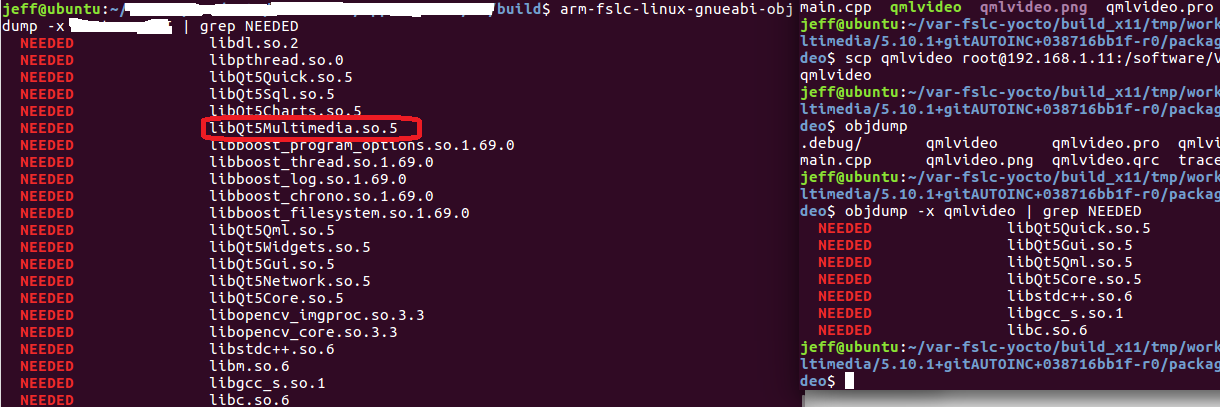
                                e412ac39-a3b6-4070-9f16-3b438617981d-image.png
                                file:///mnt/hgfs/Share/Screenshot%20from%202021-12-01%2023-30-58.png
                                Another strange part to me: the Qt5Multimediea appears in my app, while it doesn't appear in qmlvideo example. As I described before, my app cannot display video frame, while qmlvideo can display...

                                1 Reply Last reply
                                0
                                • SGaistS Offline
                                  SGaistS Offline
                                  SGaist
                                  Lifetime Qt Champion
                                  wrote on last edited by
                                  #22

                                  @Jeffff said in video doesn't display on LCD screen:

                                  qmlvideo

                                  Can you give a link to that example ?

                                  Interested in AI ? www.idiap.ch
                                  Please read the Qt Code of Conduct - https://forum.qt.io/topic/113070/qt-code-of-conduct

                                  J 1 Reply Last reply
                                  0
                                  • SGaistS SGaist

                                    @Jeffff said in video doesn't display on LCD screen:

                                    qmlvideo

                                    Can you give a link to that example ?

                                    J Offline
                                    J Offline
                                    Jeffff
                                    wrote on last edited by Jeffff
                                    #23

                                    @SGaist
                                    Sorry I cannot get your idea.
                                    The link here guides me to get the "qmlvideo" app. I havn't change any code of this app, it should be the original sample code of using QtMultimedia.

                                    1 Reply Last reply
                                    0
                                    • SGaistS Offline
                                      SGaistS Offline
                                      SGaist
                                      Lifetime Qt Champion
                                      wrote on last edited by
                                      #24

                                      Ok, the sample does not link to the QtMultimedia library directly because it does not use it directly as is your C++ application.

                                      The QVideoWidget class, if memory serves well does not support the same number of formats as the QtQuick Video item.

                                      Interested in AI ? www.idiap.ch
                                      Please read the Qt Code of Conduct - https://forum.qt.io/topic/113070/qt-code-of-conduct

                                      1 Reply Last reply
                                      0

                                      • Login

                                      • Login or register to search.
                                      • First post
                                        Last post
                                      0
                                      • Categories
                                      • Recent
                                      • Tags
                                      • Popular
                                      • Users
                                      • Groups
                                      • Search
                                      • Get Qt Extensions
                                      • Unsolved