Skip to content
  • Categories
  • Recent
  • Tags
  • Popular
  • Users
  • Groups
  • Search
  • Get Qt
  • Unsolved
Collapse
Brand Logo
  1. Home
  2. Qt Development
  3. General and Desktop
  4. How to pass the parameters between the SIGNAL and SLOTS
Qt 6.12 LTS is out! See what's new in the release blog

How to pass the parameters between the SIGNAL and SLOTS

Scheduled Pinned Locked Moved Solved General and Desktop
45 Posts 3 Posters 37.6k Views 1 Watching
  • Oldest to Newest
  • Newest to Oldest
  • Most Votes
Reply
  • Reply as topic
Log in to reply
This topic has been deleted. Only users with topic management privileges can see it.
  • A Offline
    A Offline
    Alex42
    wrote on last edited by
    #22

    i'm sorry, i have a lot of classe , methode and line of code, and there is interaction between them with QTimer , Mathematique fonction ...etc , for this i can't to post all my code

    mrjjM 1 Reply Last reply
    0
    • A Alex42

      i'm sorry, i have a lot of classe , methode and line of code, and there is interaction between them with QTimer , Mathematique fonction ...etc , for this i can't to post all my code

      mrjjM Offline
      mrjjM Offline
      mrjj
      Lifetime Qt Champion
      wrote on last edited by
      #23

      @Alex42
      Thats ok.
      I will make a fast example and if that just works, you can have it and have a look.
      Maybe we can find out what the difference it. :)

      1 Reply Last reply
      0
      • A Offline
        A Offline
        Alex42
        wrote on last edited by
        #24

        OK , thank you

        1 Reply Last reply
        0
        • mrjjM Offline
          mrjjM Offline
          mrjj
          Lifetime Qt Champion
          wrote on last edited by
          #25

          hi
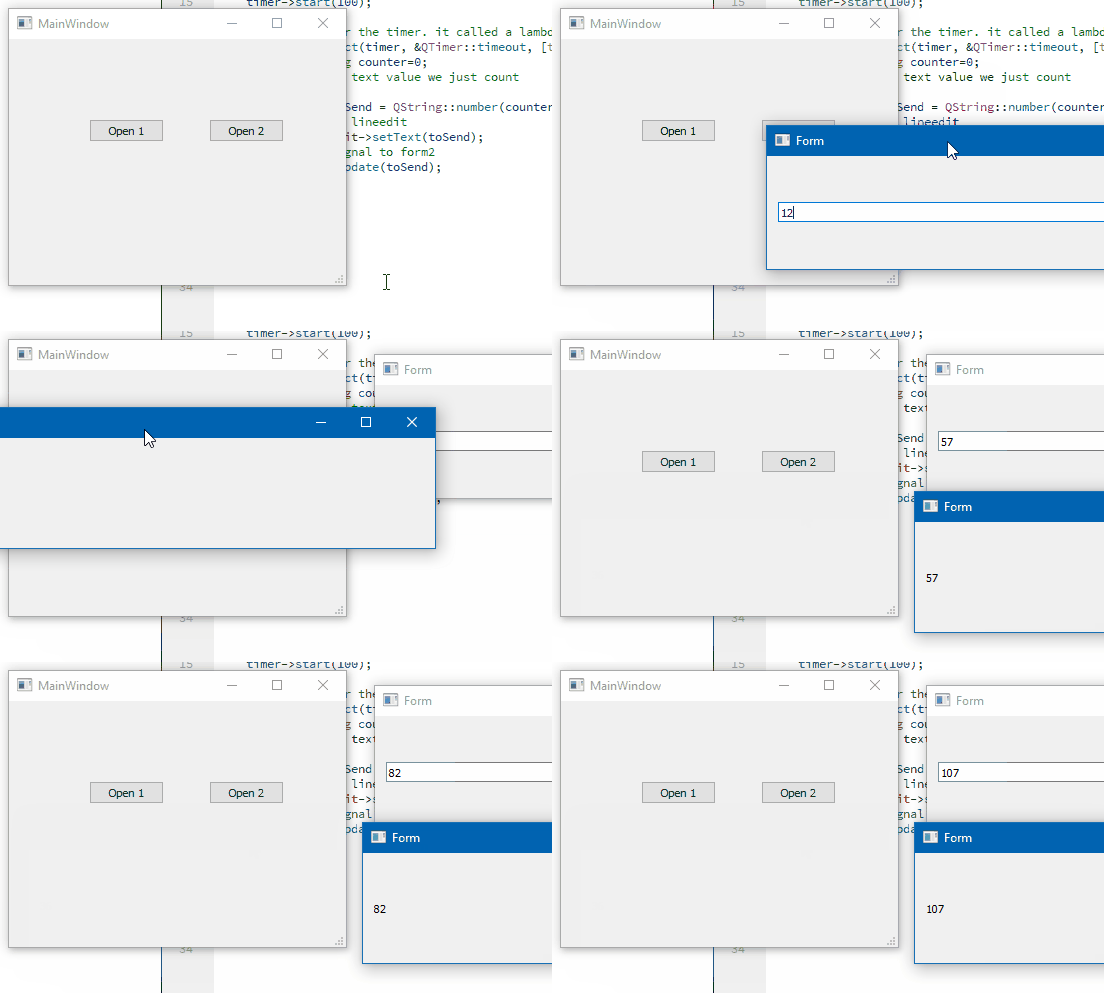
          Seems to work fine even with a 100 MS timer so should work for you too.

          Can you please try ?

          https://www.dropbox.com/s/l8go4t71unosl05/CrossTalk.zip?dl=0
          alt text

          1 Reply Last reply
          2
          • A Offline
            A Offline
            Alex42
            wrote on last edited by
            #26

            ok , can you show me your code please ;

            mrjjM 1 Reply Last reply
            0
            • A Alex42

              ok , can you show me your code please ;

              mrjjM Offline
              mrjjM Offline
              mrjj
              Lifetime Qt Champion
              wrote on last edited by mrjj
              #27

              @Alex42
              The dropbox link is the full project you can just run.
              If not allowed to use dropbox is there any other such service you are allowed to use ?
              (you don't have to register. just press the download and you should get zip file)

              1 Reply Last reply
              0
              • A Offline
                A Offline
                Alex42
                wrote on last edited by
                #28

                ok, ok ,
                when I try it all alone, (with only the QTimer ) it works very well, (like your exemple )
                but when i try my real interface it does not work

                you know ?
                my first QlineEdit (1 forme ) containe the result of the calculaions (which makes calculates each 1000ms) whithe this fonction ```

                i show you how the calcualte_3() fonction do

                void Mesure :: calculate_3 ()
                {
                
                    S++;
                
                    if (S>0)
                    {
                    emit newtextChanged_1(mence->text());  /// works
                
                    double  Val13=ui->lineEdit_13->text().toInt();
                    double  Val14=ui->lineEdit_14->text().toInt();
                    double  Val15=ui->lineEdit_15->text().toInt();
                    double  Val16=ui->lineEdit_16->text().toInt();
                double  V1,V2, V3 ,V4, V5, V6,V7;
                    int P=ui->spinBox_1->value();
                      switch (P) {
                      case 2 :
                          if ( Val0 <Val1)
                          {
                
                               ui->lineEdit_17->setText(QString::number(Val9));
                              // mence->setText(QString::number(Val9));
                                  }
                          else if ( ((Val0>Val1) && (Val0<Val2)) || (Val0>2))
                          {
                               // V1 = Val0* Val10/Val2;
                              V1= Val10 * (Val0 - Val1)/(Val2-Val1) +Val9 *(Val2-Val0)/(Val2-Val1);
                
                                  ui->lineEdit_17->setText(QString::number(V1));
                                //  mence->setText(QString::number(V1));
                          }
                
                          break;
                    case 3:
                          if ( ((Val0>Val2) && (Val0<Val3))|| (Val0>Val3) )
                          {
                
                            V2 = Val11 * (Val0 - Val2)/(Val3-Val2) +Val10 *(Val3-Val0)/(Val3-Val2);
                             //V2 = Val12 * (Val0-Val2/Val3-Val2) + Val10 * (Val3-Val0/Val3-Val2);
                
                           ui->lineEdit_17->setText(QString::number(V2));
                           //mence->setText(QString::number(V2));
                
                          } else if (Val0<Val2)
                          {
                              V1= Val10 * (Val0 - Val1)/(Val2-Val1) +Val9 *(Val2-Val0)/(Val2-Val1);
                              ui->lineEdit_17->setText(QString::number(V1));
                             // mence->setText(QString::number(V1));
                
                          }
                          break;
                          /*
                           else if (Val0>Val1 && Val0 <Val2 &&Val0 < Val3 ) {
                
                             // V3 = (Val10 * (Val3-Val0) - Val11 * (Val2-Val0))/(Val3-Val2);
                              //ui->lineEdit_17->setText(QString::number(V3));
                               V1 = Val0* Val10/Val2;
                              ui->lineEdit_17->setText(QString::number(V1));
                      } else if (  Val0 > Val3)
                               {


                             V4= ((Val0 - Val2)* Val11 - Val10 * (Val0-Val3))/ (Val3-Val2) ;
                             ui->lineEdit_17->setText(QString::number(V4));
                          }
                        */
                          break;
                      case 4 :
                          if (((Val0 > Val3) && (Val0 <Val4) )||(Val0>Val4))
                          {
                              V3 = Val12 * (Val0-Val3)/(Val4-Val3) +Val11 * (Val4-Val0)/(Val4-Val3);
                              ui->lineEdit_17->setText(QString::number(V3));
                            //  mence->setText(QString::number(V3));
                          } else if ((Val0>Val2) && (Val0 <Val3))
                
                and this fonction is update withe the Qtimer lik this connection 
                

                connect (timer, SIGNAL (timeout()), this ,SLOT (calculate_3()));

                mrjjM 1 Reply Last reply
                0
                • A Alex42

                  ok, ok ,
                  when I try it all alone, (with only the QTimer ) it works very well, (like your exemple )
                  but when i try my real interface it does not work

                  you know ?
                  my first QlineEdit (1 forme ) containe the result of the calculaions (which makes calculates each 1000ms) whithe this fonction ```

                  i show you how the calcualte_3() fonction do

                  void Mesure :: calculate_3 ()
                  {
                  
                      S++;
                  
                      if (S>0)
                      {
                      emit newtextChanged_1(mence->text());  /// works
                  
                      double  Val13=ui->lineEdit_13->text().toInt();
                      double  Val14=ui->lineEdit_14->text().toInt();
                      double  Val15=ui->lineEdit_15->text().toInt();
                      double  Val16=ui->lineEdit_16->text().toInt();
                  double  V1,V2, V3 ,V4, V5, V6,V7;
                      int P=ui->spinBox_1->value();
                        switch (P) {
                        case 2 :
                            if ( Val0 <Val1)
                            {
                  
                                 ui->lineEdit_17->setText(QString::number(Val9));
                                // mence->setText(QString::number(Val9));
                                    }
                            else if ( ((Val0>Val1) && (Val0<Val2)) || (Val0>2))
                            {
                                 // V1 = Val0* Val10/Val2;
                                V1= Val10 * (Val0 - Val1)/(Val2-Val1) +Val9 *(Val2-Val0)/(Val2-Val1);
                  
                                    ui->lineEdit_17->setText(QString::number(V1));
                                  //  mence->setText(QString::number(V1));
                            }
                  
                            break;
                      case 3:
                            if ( ((Val0>Val2) && (Val0<Val3))|| (Val0>Val3) )
                            {
                  
                              V2 = Val11 * (Val0 - Val2)/(Val3-Val2) +Val10 *(Val3-Val0)/(Val3-Val2);
                               //V2 = Val12 * (Val0-Val2/Val3-Val2) + Val10 * (Val3-Val0/Val3-Val2);
                  
                             ui->lineEdit_17->setText(QString::number(V2));
                             //mence->setText(QString::number(V2));
                  
                            } else if (Val0<Val2)
                            {
                                V1= Val10 * (Val0 - Val1)/(Val2-Val1) +Val9 *(Val2-Val0)/(Val2-Val1);
                                ui->lineEdit_17->setText(QString::number(V1));
                               // mence->setText(QString::number(V1));
                  
                            }
                            break;
                            /*
                             else if (Val0>Val1 && Val0 <Val2 &&Val0 < Val3 ) {
                  
                               // V3 = (Val10 * (Val3-Val0) - Val11 * (Val2-Val0))/(Val3-Val2);
                                //ui->lineEdit_17->setText(QString::number(V3));
                                 V1 = Val0* Val10/Val2;
                                ui->lineEdit_17->setText(QString::number(V1));
                        } else if (  Val0 > Val3)
                                 {


                               V4= ((Val0 - Val2)* Val11 - Val10 * (Val0-Val3))/ (Val3-Val2) ;
                               ui->lineEdit_17->setText(QString::number(V4));
                            }
                          */
                            break;
                        case 4 :
                            if (((Val0 > Val3) && (Val0 <Val4) )||(Val0>Val4))
                            {
                                V3 = Val12 * (Val0-Val3)/(Val4-Val3) +Val11 * (Val4-Val0)/(Val4-Val3);
                                ui->lineEdit_17->setText(QString::number(V3));
                              //  mence->setText(QString::number(V3));
                            } else if ((Val0>Val2) && (Val0 <Val3))
                  
                  and this fonction is update withe the Qtimer lik this connection 
                  

                  connect (timer, SIGNAL (timeout()), this ,SLOT (calculate_3()));

                  mrjjM Offline
                  mrjjM Offline
                  mrjj
                  Lifetime Qt Champion
                  wrote on last edited by
                  #29

                  @Alex42

                  Hi
                  In the code you shown, you call
                  emit newtextChanged_1(mence->text());
                  in the top and that seems to work.

                  But I don't see you call
                  emit after any of the calculations?

                  It will send a copy of the text so you have to do it after you have put it into mence->setText.

                  so if you don't have it, you need the emit to be at the end of the function.

                  1 Reply Last reply
                  0
                  • A Offline
                    A Offline
                    Alex42
                    wrote on last edited by
                    #30

                    i'm tried to emit the signal at the beginning and at the end of this function but without success

                    1 Reply Last reply
                    0
                    • A Offline
                      A Offline
                      Alex42
                      wrote on last edited by
                      #31

                      i will try to emit the signal every time i do a calculation in this fonction

                      1 Reply Last reply
                      0
                      • A Offline
                        A Offline
                        Alex42
                        wrote on last edited by
                        #32

                        @Alex42 said in How to pass the parameters between the SIGNAL and SLOTS:

                        i will try to emit the signal every time i do a calculation in this fonction

                        i'm trying to emit the signal every time i do a calculation in this fonction but without success

                        case 2 :
                                  if ( Val0 <Val1)
                                  {
                        
                                       ui->lineEdit_17->setText(QString::number(Val9));
                             mence->setText(QString::number(Val9));
                                       emit newtextChanged_1(mence->text());
                                          }
                                  else if ( ((Val0>Val1) && (Val0<Val2)) || (Val0>2))
                                  {
                                       // V1 = Val0* Val10/Val2;
                                      V1= Val10 * (Val0 - Val1)/(Val2-Val1) +Val9 *(Val2-Val0)/(Val2-Val1);
                        
                                          ui->lineEdit_17->setText(QString::number(V1));
                                          emit newtextChanged_1(mence->text());
                                         mence->setText(QString::number(V1));
                                  }
                        
                        1 Reply Last reply
                        0
                        • A Offline
                          A Offline
                          Alex42
                          wrote on last edited by
                          #33

                          incredible , when i try this he work very will

                          void Mesure  :: calculate_3 ()
                          {
                              S++;
                          
                          
                               emit newtextChanged_1(QString::number (S));
                          }
                          

                          but withe this signal he want to work

                             emit newtextChanged_1(mence ->text());
                          
                          mrjjM 1 Reply Last reply
                          0
                          • A Alex42

                            incredible , when i try this he work very will

                            void Mesure  :: calculate_3 ()
                            {
                                S++;
                            
                            
                                 emit newtextChanged_1(QString::number (S));
                            }
                            

                            but withe this signal he want to work

                               emit newtextChanged_1(mence ->text());
                            
                            mrjjM Offline
                            mrjjM Offline
                            mrjj
                            Lifetime Qt Champion
                            wrote on last edited by mrjj
                            #34

                            @Alex42

                            Ok.
                            I was wondering one thing.
                            All your other linedits are in the UI
                            but mence
                            is not

                            Do you have 2 of them for some reason ?
                            so there is also the
                            ui->mence ?

                            Why is mence not in the UI.
                            Do you insert it from code to the fom?

                            1 Reply Last reply
                            1
                            • A Offline
                              A Offline
                              Alex42
                              wrote on last edited by
                              #35

                              @mrjj ,it's a good question, i coded mence (QlineEdit) with a hand , because , ui->lineEdit_17 ->text () he doesn't work, for this i created mence -> text() ,
                              but the bothe not want to work

                              1 Reply Last reply
                              0
                              • A Offline
                                A Offline
                                Alex42
                                wrote on last edited by
                                #36

                                the ui->lineEdit_17->text() ,and mence ->text() , it's the same thing , just one coded with a hand , and auther coder with Qt creator Form (Ui)

                                J.HilkJ 1 Reply Last reply
                                0
                                • A Alex42

                                  the ui->lineEdit_17->text() ,and mence ->text() , it's the same thing , just one coded with a hand , and auther coder with Qt creator Form (Ui)

                                  J.HilkJ Offline
                                  J.HilkJ Offline
                                  J.Hilk
                                  Moderators
                                  wrote on last edited by
                                  #37

                                  @Alex42
                                  I'm sure, that if you do:

                                  void Mesure  :: calculate_3 ()
                                  {
                                      S++;
                                  
                                      mence->setText(QString::number (S));
                                       emit newtextChanged_1(mence->text());
                                  }
                                  

                                  it will work just as well as

                                  void Mesure  :: calculate_3 ()
                                  {
                                      S++;
                                  
                                  
                                       emit newtextChanged_1(QString::number (S));
                                  }
                                  

                                  somewhere you're setting your mence->text to 0

                                  I good point to start the debugger and step through your code line by line, btw.


                                  Be aware of the Qt Code of Conduct, when posting : https://forum.qt.io/topic/113070/qt-code-of-conduct


                                  Q: What's that?
                                  A: It's blue light.
                                  Q: What does it do?
                                  A: It turns blue.

                                  1 Reply Last reply
                                  0
                                  • A Offline
                                    A Offline
                                    Alex42
                                    wrote on last edited by
                                    #38

                                    @J-Hilk , thank you for your response , yes i don't any probleme with your code ( it works very will )

                                    but the probleme it's when i try to transmete the real values ,
                                    are you understande that the real valueu it's not number S ?

                                    J.HilkJ 1 Reply Last reply
                                    0
                                    • A Offline
                                      A Offline
                                      Alex42
                                      wrote on last edited by
                                      #39

                                      as i mentioned below, my edited QLine (mence ->text(), OR, ui->lineEdite_17->text()) contains scientific calculation results which change every 1000ms

                                      1 Reply Last reply
                                      0
                                      • A Alex42

                                        @J-Hilk , thank you for your response , yes i don't any probleme with your code ( it works very will )

                                        but the probleme it's when i try to transmete the real values ,
                                        are you understande that the real valueu it's not number S ?

                                        J.HilkJ Offline
                                        J.HilkJ Offline
                                        J.Hilk
                                        Moderators
                                        wrote on last edited by J.Hilk
                                        #40

                                        @Alex42 said in How to pass the parameters between the SIGNAL and SLOTS:

                                        are you understande that the real valueu it's not number S ?

                                        I do, do you realise, that mence is not the problem here ?

                                        on a hinge: try the following:

                                        //V1= Val10 * (Val0 - Val1)/(Val2-Val1) +Val9 *(Val2-Val0)/(Val2-Val1);
                                        mence->setText(QString::number( ( Val10 * (Val0 - Val1)/static_cast<double>(Val2-Val1) +Val9 *(Val2-Val0)/static_cast<double>(Val2-Val1) ) ));;
                                        

                                        Be aware of the Qt Code of Conduct, when posting : https://forum.qt.io/topic/113070/qt-code-of-conduct


                                        Q: What's that?
                                        A: It's blue light.
                                        Q: What does it do?
                                        A: It turns blue.

                                        1 Reply Last reply
                                        0
                                        • A Offline
                                          A Offline
                                          Alex42
                                          wrote on last edited by
                                          #41

                                          @J-Hilk said in How to pass the parameters between the SIGNAL and SLOTS:

                                          //V1= Val10 * (Val0 - Val1)/(Val2-Val1) +Val9 *(Val2-Val0)/(Val2-Val1);
                                          mence->setText(QString::number( ( Val10 * (Val0 - Val1)/static_cast<double>(Val2-Val1) +Val9 *(Val2-Val0)/static_cast<double>(Val2-Val1) ) ));;

                                          it's the same problem

                                          1 Reply Last reply
                                          0

                                          • Login

                                          • Login or register to search.
                                          • First post
                                            Last post
                                          0
                                          • Categories
                                          • Recent
                                          • Tags
                                          • Popular
                                          • Users
                                          • Groups
                                          • Search
                                          • Get Qt
                                          • Unsolved