Skip to content
  • Categories
  • Recent
  • Tags
  • Popular
  • Users
  • Groups
  • Search
  • Get Qt Extensions
  • Unsolved
Collapse
Brand Logo
  1. Home
  2. Qt Development
  3. General and Desktop
  4. How to pass the parameters between the SIGNAL and SLOTS

How to pass the parameters between the SIGNAL and SLOTS

Scheduled Pinned Locked Moved Solved General and Desktop
45 Posts 3 Posters 15.2k Views 1 Watching
  • Oldest to Newest
  • Newest to Oldest
  • Most Votes
Reply
  • Reply as topic
Log in to reply
This topic has been deleted. Only users with topic management privileges can see it.
  • A Alex42

    yes exactly what i want , befor i tried this and works very well ,
    but the probleme is in the second interface i can't receve this data ![alt text](d1227136-64f2-4151-9673-f2de8d04d62e-Capture.PNG image url)
    ( in the seconde interface i receve only 0( the fiste values) , i can't receive the values when is chenged

    mrjjM Offline
    mrjjM Offline
    mrjj
    Lifetime Qt Champion
    wrote on last edited by
    #16

    @Alex42

    So in interface 2, you only see the "0" and never "12222" etc ?

    But you could send "hello" and other string ?
    That I cant explain. seems impossible.

    Just so I understand.

    You have a main window and 2 buttons. Each button opens a new Form/window and
    form1 has a timer or something that makes a lineEdit count/set some value.
    This value you try to emit to form2 when calculate_3 is called ?

    1 Reply Last reply
    0
    • A Offline
      A Offline
      Alex42
      wrote on last edited by
      #17

      @mrjj said in How to pass the parameters between the SIGNAL and SLOTS:

      So in interface 2, you only see the "0" and never "12222" etc ?

      So in interface 2, you only see the "0" and never "12222" etc ? yes exactly
      But you could send "hello" and other string ? yes i can send hello
      You have a main window and 2 buttons. Each button opens a new Form/window and
      form1 has a timer or something that makes a lineEdit count/set some value.
      This value you try to emit to form2 when calculate_3 is called ? exactly what i want to do

      mrjjM 1 Reply Last reply
      0
      • A Alex42

        @mrjj said in How to pass the parameters between the SIGNAL and SLOTS:

        So in interface 2, you only see the "0" and never "12222" etc ?

        So in interface 2, you only see the "0" and never "12222" etc ? yes exactly
        But you could send "hello" and other string ? yes i can send hello
        You have a main window and 2 buttons. Each button opens a new Form/window and
        form1 has a timer or something that makes a lineEdit count/set some value.
        This value you try to emit to form2 when calculate_3 is called ? exactly what i want to do

        mrjjM Offline
        mrjjM Offline
        mrjj
        Lifetime Qt Champion
        wrote on last edited by
        #18

        @Alex42
        Ok. how is the LineEdit updated ?
        a Qtimer ?

        1 Reply Last reply
        0
        • A Offline
          A Offline
          Alex42
          wrote on last edited by
          #19

          yes a Qtimer

          mrjjM 1 Reply Last reply
          0
          • A Alex42

            yes a Qtimer

            mrjjM Offline
            mrjjM Offline
            mrjj
            Lifetime Qt Champion
            wrote on last edited by
            #20

            @Alex42

            Ok. hang on for 20 mins. Ill try myself as it does seem strange :)

            1 Reply Last reply
            0
            • A Offline
              A Offline
              Alex42
              wrote on last edited by
              #21

              @mrjj said in How to pass the parameters between the SIGNAL and SLOTS:

              Ok. hang on for 20 mins. Ill try myself as it does seem strange :)

              ok thank you very match for your helpe

              1 Reply Last reply
              0
              • A Offline
                A Offline
                Alex42
                wrote on last edited by
                #22

                i'm sorry, i have a lot of classe , methode and line of code, and there is interaction between them with QTimer , Mathematique fonction ...etc , for this i can't to post all my code

                mrjjM 1 Reply Last reply
                0
                • A Alex42

                  i'm sorry, i have a lot of classe , methode and line of code, and there is interaction between them with QTimer , Mathematique fonction ...etc , for this i can't to post all my code

                  mrjjM Offline
                  mrjjM Offline
                  mrjj
                  Lifetime Qt Champion
                  wrote on last edited by
                  #23

                  @Alex42
                  Thats ok.
                  I will make a fast example and if that just works, you can have it and have a look.
                  Maybe we can find out what the difference it. :)

                  1 Reply Last reply
                  0
                  • A Offline
                    A Offline
                    Alex42
                    wrote on last edited by
                    #24

                    OK , thank you

                    1 Reply Last reply
                    0
                    • mrjjM Offline
                      mrjjM Offline
                      mrjj
                      Lifetime Qt Champion
                      wrote on last edited by
                      #25

                      hi
                      Seems to work fine even with a 100 MS timer so should work for you too.

                      Can you please try ?

                      https://www.dropbox.com/s/l8go4t71unosl05/CrossTalk.zip?dl=0
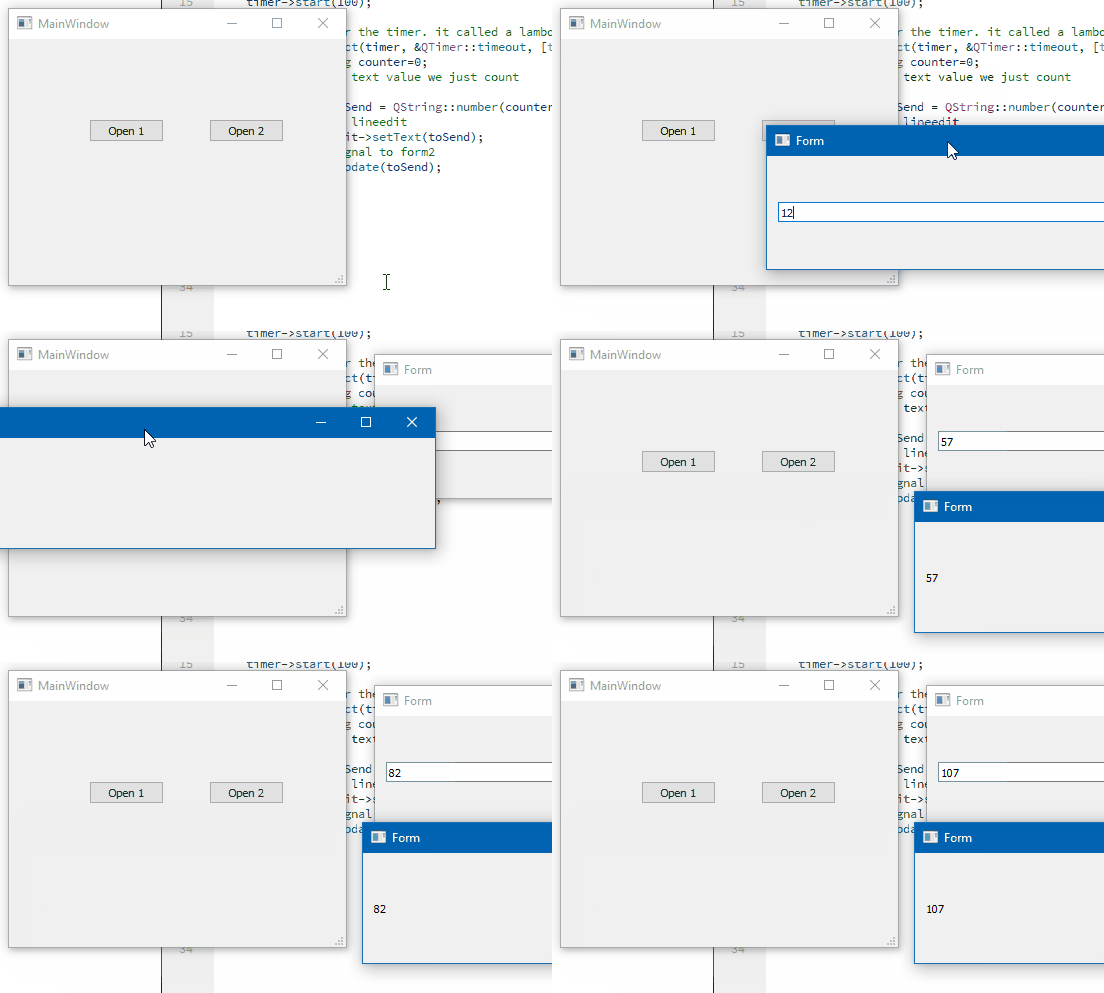
                      alt text

                      1 Reply Last reply
                      2
                      • A Offline
                        A Offline
                        Alex42
                        wrote on last edited by
                        #26

                        ok , can you show me your code please ;

                        mrjjM 1 Reply Last reply
                        0
                        • A Alex42

                          ok , can you show me your code please ;

                          mrjjM Offline
                          mrjjM Offline
                          mrjj
                          Lifetime Qt Champion
                          wrote on last edited by mrjj
                          #27

                          @Alex42
                          The dropbox link is the full project you can just run.
                          If not allowed to use dropbox is there any other such service you are allowed to use ?
                          (you don't have to register. just press the download and you should get zip file)

                          1 Reply Last reply
                          0
                          • A Offline
                            A Offline
                            Alex42
                            wrote on last edited by
                            #28

                            ok, ok ,
                            when I try it all alone, (with only the QTimer ) it works very well, (like your exemple )
                            but when i try my real interface it does not work

                            you know ?
                            my first QlineEdit (1 forme ) containe the result of the calculaions (which makes calculates each 1000ms) whithe this fonction ```

                            i show you how the calcualte_3() fonction do

                            void Mesure :: calculate_3 ()
                            {
                            
                                S++;
                            
                                if (S>0)
                                {
                                emit newtextChanged_1(mence->text());  /// works
                            
                                double  Val13=ui->lineEdit_13->text().toInt();
                                double  Val14=ui->lineEdit_14->text().toInt();
                                double  Val15=ui->lineEdit_15->text().toInt();
                                double  Val16=ui->lineEdit_16->text().toInt();
                            double  V1,V2, V3 ,V4, V5, V6,V7;
                                int P=ui->spinBox_1->value();
                                  switch (P) {
                                  case 2 :
                                      if ( Val0 <Val1)
                                      {
                            
                                           ui->lineEdit_17->setText(QString::number(Val9));
                                          // mence->setText(QString::number(Val9));
                                              }
                                      else if ( ((Val0>Val1) && (Val0<Val2)) || (Val0>2))
                                      {
                                           // V1 = Val0* Val10/Val2;
                                          V1= Val10 * (Val0 - Val1)/(Val2-Val1) +Val9 *(Val2-Val0)/(Val2-Val1);
                            
                                              ui->lineEdit_17->setText(QString::number(V1));
                                            //  mence->setText(QString::number(V1));
                                      }
                            
                                      break;
                                case 3:
                                      if ( ((Val0>Val2) && (Val0<Val3))|| (Val0>Val3) )
                                      {
                            
                                        V2 = Val11 * (Val0 - Val2)/(Val3-Val2) +Val10 *(Val3-Val0)/(Val3-Val2);
                                         //V2 = Val12 * (Val0-Val2/Val3-Val2) + Val10 * (Val3-Val0/Val3-Val2);
                            
                                       ui->lineEdit_17->setText(QString::number(V2));
                                       //mence->setText(QString::number(V2));
                            
                                      } else if (Val0<Val2)
                                      {
                                          V1= Val10 * (Val0 - Val1)/(Val2-Val1) +Val9 *(Val2-Val0)/(Val2-Val1);
                                          ui->lineEdit_17->setText(QString::number(V1));
                                         // mence->setText(QString::number(V1));
                            
                                      }
                                      break;
                                      /*
                                       else if (Val0>Val1 && Val0 <Val2 &&Val0 < Val3 ) {
                            
                                         // V3 = (Val10 * (Val3-Val0) - Val11 * (Val2-Val0))/(Val3-Val2);
                                          //ui->lineEdit_17->setText(QString::number(V3));
                                           V1 = Val0* Val10/Val2;
                                          ui->lineEdit_17->setText(QString::number(V1));
                                  } else if (  Val0 > Val3)
                                           {


                                         V4= ((Val0 - Val2)* Val11 - Val10 * (Val0-Val3))/ (Val3-Val2) ;
                                         ui->lineEdit_17->setText(QString::number(V4));
                                      }
                                    */
                                      break;
                                  case 4 :
                                      if (((Val0 > Val3) && (Val0 <Val4) )||(Val0>Val4))
                                      {
                                          V3 = Val12 * (Val0-Val3)/(Val4-Val3) +Val11 * (Val4-Val0)/(Val4-Val3);
                                          ui->lineEdit_17->setText(QString::number(V3));
                                        //  mence->setText(QString::number(V3));
                                      } else if ((Val0>Val2) && (Val0 <Val3))
                            
                            and this fonction is update withe the Qtimer lik this connection 
                            

                            connect (timer, SIGNAL (timeout()), this ,SLOT (calculate_3()));

                            mrjjM 1 Reply Last reply
                            0
                            • A Alex42

                              ok, ok ,
                              when I try it all alone, (with only the QTimer ) it works very well, (like your exemple )
                              but when i try my real interface it does not work

                              you know ?
                              my first QlineEdit (1 forme ) containe the result of the calculaions (which makes calculates each 1000ms) whithe this fonction ```

                              i show you how the calcualte_3() fonction do

                              void Mesure :: calculate_3 ()
                              {
                              
                                  S++;
                              
                                  if (S>0)
                                  {
                                  emit newtextChanged_1(mence->text());  /// works
                              
                                  double  Val13=ui->lineEdit_13->text().toInt();
                                  double  Val14=ui->lineEdit_14->text().toInt();
                                  double  Val15=ui->lineEdit_15->text().toInt();
                                  double  Val16=ui->lineEdit_16->text().toInt();
                              double  V1,V2, V3 ,V4, V5, V6,V7;
                                  int P=ui->spinBox_1->value();
                                    switch (P) {
                                    case 2 :
                                        if ( Val0 <Val1)
                                        {
                              
                                             ui->lineEdit_17->setText(QString::number(Val9));
                                            // mence->setText(QString::number(Val9));
                                                }
                                        else if ( ((Val0>Val1) && (Val0<Val2)) || (Val0>2))
                                        {
                                             // V1 = Val0* Val10/Val2;
                                            V1= Val10 * (Val0 - Val1)/(Val2-Val1) +Val9 *(Val2-Val0)/(Val2-Val1);
                              
                                                ui->lineEdit_17->setText(QString::number(V1));
                                              //  mence->setText(QString::number(V1));
                                        }
                              
                                        break;
                                  case 3:
                                        if ( ((Val0>Val2) && (Val0<Val3))|| (Val0>Val3) )
                                        {
                              
                                          V2 = Val11 * (Val0 - Val2)/(Val3-Val2) +Val10 *(Val3-Val0)/(Val3-Val2);
                                           //V2 = Val12 * (Val0-Val2/Val3-Val2) + Val10 * (Val3-Val0/Val3-Val2);
                              
                                         ui->lineEdit_17->setText(QString::number(V2));
                                         //mence->setText(QString::number(V2));
                              
                                        } else if (Val0<Val2)
                                        {
                                            V1= Val10 * (Val0 - Val1)/(Val2-Val1) +Val9 *(Val2-Val0)/(Val2-Val1);
                                            ui->lineEdit_17->setText(QString::number(V1));
                                           // mence->setText(QString::number(V1));
                              
                                        }
                                        break;
                                        /*
                                         else if (Val0>Val1 && Val0 <Val2 &&Val0 < Val3 ) {
                              
                                           // V3 = (Val10 * (Val3-Val0) - Val11 * (Val2-Val0))/(Val3-Val2);
                                            //ui->lineEdit_17->setText(QString::number(V3));
                                             V1 = Val0* Val10/Val2;
                                            ui->lineEdit_17->setText(QString::number(V1));
                                    } else if (  Val0 > Val3)
                                             {


                                           V4= ((Val0 - Val2)* Val11 - Val10 * (Val0-Val3))/ (Val3-Val2) ;
                                           ui->lineEdit_17->setText(QString::number(V4));
                                        }
                                      */
                                        break;
                                    case 4 :
                                        if (((Val0 > Val3) && (Val0 <Val4) )||(Val0>Val4))
                                        {
                                            V3 = Val12 * (Val0-Val3)/(Val4-Val3) +Val11 * (Val4-Val0)/(Val4-Val3);
                                            ui->lineEdit_17->setText(QString::number(V3));
                                          //  mence->setText(QString::number(V3));
                                        } else if ((Val0>Val2) && (Val0 <Val3))
                              
                              and this fonction is update withe the Qtimer lik this connection 
                              

                              connect (timer, SIGNAL (timeout()), this ,SLOT (calculate_3()));

                              mrjjM Offline
                              mrjjM Offline
                              mrjj
                              Lifetime Qt Champion
                              wrote on last edited by
                              #29

                              @Alex42

                              Hi
                              In the code you shown, you call
                              emit newtextChanged_1(mence->text());
                              in the top and that seems to work.

                              But I don't see you call
                              emit after any of the calculations?

                              It will send a copy of the text so you have to do it after you have put it into mence->setText.

                              so if you don't have it, you need the emit to be at the end of the function.

                              1 Reply Last reply
                              0
                              • A Offline
                                A Offline
                                Alex42
                                wrote on last edited by
                                #30

                                i'm tried to emit the signal at the beginning and at the end of this function but without success

                                1 Reply Last reply
                                0
                                • A Offline
                                  A Offline
                                  Alex42
                                  wrote on last edited by
                                  #31

                                  i will try to emit the signal every time i do a calculation in this fonction

                                  1 Reply Last reply
                                  0
                                  • A Offline
                                    A Offline
                                    Alex42
                                    wrote on last edited by
                                    #32

                                    @Alex42 said in How to pass the parameters between the SIGNAL and SLOTS:

                                    i will try to emit the signal every time i do a calculation in this fonction

                                    i'm trying to emit the signal every time i do a calculation in this fonction but without success

                                    case 2 :
                                              if ( Val0 <Val1)
                                              {
                                    
                                                   ui->lineEdit_17->setText(QString::number(Val9));
                                         mence->setText(QString::number(Val9));
                                                   emit newtextChanged_1(mence->text());
                                                      }
                                              else if ( ((Val0>Val1) && (Val0<Val2)) || (Val0>2))
                                              {
                                                   // V1 = Val0* Val10/Val2;
                                                  V1= Val10 * (Val0 - Val1)/(Val2-Val1) +Val9 *(Val2-Val0)/(Val2-Val1);
                                    
                                                      ui->lineEdit_17->setText(QString::number(V1));
                                                      emit newtextChanged_1(mence->text());
                                                     mence->setText(QString::number(V1));
                                              }
                                    
                                    1 Reply Last reply
                                    0
                                    • A Offline
                                      A Offline
                                      Alex42
                                      wrote on last edited by
                                      #33

                                      incredible , when i try this he work very will

                                      void Mesure  :: calculate_3 ()
                                      {
                                          S++;
                                      
                                      
                                           emit newtextChanged_1(QString::number (S));
                                      }
                                      

                                      but withe this signal he want to work

                                         emit newtextChanged_1(mence ->text());
                                      
                                      mrjjM 1 Reply Last reply
                                      0
                                      • A Alex42

                                        incredible , when i try this he work very will

                                        void Mesure  :: calculate_3 ()
                                        {
                                            S++;
                                        
                                        
                                             emit newtextChanged_1(QString::number (S));
                                        }
                                        

                                        but withe this signal he want to work

                                           emit newtextChanged_1(mence ->text());
                                        
                                        mrjjM Offline
                                        mrjjM Offline
                                        mrjj
                                        Lifetime Qt Champion
                                        wrote on last edited by mrjj
                                        #34

                                        @Alex42

                                        Ok.
                                        I was wondering one thing.
                                        All your other linedits are in the UI
                                        but mence
                                        is not

                                        Do you have 2 of them for some reason ?
                                        so there is also the
                                        ui->mence ?

                                        Why is mence not in the UI.
                                        Do you insert it from code to the fom?

                                        1 Reply Last reply
                                        1
                                        • A Offline
                                          A Offline
                                          Alex42
                                          wrote on last edited by
                                          #35

                                          @mrjj ,it's a good question, i coded mence (QlineEdit) with a hand , because , ui->lineEdit_17 ->text () he doesn't work, for this i created mence -> text() ,
                                          but the bothe not want to work

                                          1 Reply Last reply
                                          0

                                          • Login

                                          • Login or register to search.
                                          • First post
                                            Last post
                                          0
                                          • Categories
                                          • Recent
                                          • Tags
                                          • Popular
                                          • Users
                                          • Groups
                                          • Search
                                          • Get Qt Extensions
                                          • Unsolved