Skip to content
  • Categories
  • Recent
  • Tags
  • Popular
  • Users
  • Groups
  • Search
  • Get Qt Extensions
  • Unsolved
Collapse
Brand Logo
  1. Home
  2. Qt Development
  3. General and Desktop
  4. Layout issue
Qt 6.11 is out! See what's new in the release blog

Layout issue

Scheduled Pinned Locked Moved Solved General and Desktop
31 Posts 4 Posters 9.4k Views 2 Watching
  • Oldest to Newest
  • Newest to Oldest
  • Most Votes
Reply
  • Reply as topic
Log in to reply
This topic has been deleted. Only users with topic management privileges can see it.
  • JonBJ JonB

    @SPlatten
    I don't run Designer but it's there on the toolbar. Horizontal & vertical stretchers. They look like blue stretches when you place them. They should end up generating

    vertLayout.addStretch()
    

    I think/assume. void QBoxLayout::addStretch(int stretch = 0).

    Pl45m4P Offline
    Pl45m4P Offline
    Pl45m4
    wrote on last edited by
    #19

    @JonB

    Spacers not stretch :)
    Stretch is the stretch factor to stretch a layout item over multiple layout "slots"


    If debugging is the process of removing software bugs, then programming must be the process of putting them in.

    ~E. W. Dijkstra

    JonBJ 1 Reply Last reply
    0
    • Pl45m4P Pl45m4

      @JonB

      Spacers not stretch :)
      Stretch is the stretch factor to stretch a layout item over multiple layout "slots"

      JonBJ Offline
      JonBJ Offline
      JonB
      wrote on last edited by JonB
      #20

      @Pl45m4
      I have written what I thought it was. I thought spacers were fixed size. Anyway whichever you say! It's some blue thing in Designer :) The link I gave for addStretch() states:

      Adds a stretchable space (a QSpacerItem) with zero minimum size and stretch factor stretch to the end of this box layout.

      Isn't that it?

      1 Reply Last reply
      1
      • JonBJ JonB

        @SPlatten
        I don't run Designer but it's there on the toolbar. Horizontal & vertical stretchers. They look like blue stretches when you place them. They should end up generating

        vertLayout.addStretch()
        

        I think/assume. void QBoxLayout::addStretch(int stretch = 0).

        SPlattenS Offline
        SPlattenS Offline
        SPlatten
        wrote on last edited by SPlatten
        #21

        @JonB I'm running version 5.9.2 of Qt Designer, there is no stretchers...Spacers there is thank you @Pl45m4 , but I don't want to spacer things out stretch is the correct terminology just don't see it.

        I have now modified the source adding a call to:

        mpui->pvtloMain->addStretch(1);
        

        Ok, now with this its different, the whilespace between the QHBoxLayout layout and QGridLayout is now gone and when resizing the grid layout moves with the window, unlike before when it stayed anchored to the bottom, however its still not right because its not "stretching" the content, instead is moves up the window with space under the layout not occupied.

        Just to be absolutely clear I don't want space, I want the content of the QGridLayout to resize as the container is dragged. In the same way it already does when dragging out horizontally.

        Kind Regards,
        Sy

        JonBJ 1 Reply Last reply
        0
        • SPlattenS SPlatten

          @JonB I'm running version 5.9.2 of Qt Designer, there is no stretchers...Spacers there is thank you @Pl45m4 , but I don't want to spacer things out stretch is the correct terminology just don't see it.

          I have now modified the source adding a call to:

          mpui->pvtloMain->addStretch(1);
          

          Ok, now with this its different, the whilespace between the QHBoxLayout layout and QGridLayout is now gone and when resizing the grid layout moves with the window, unlike before when it stayed anchored to the bottom, however its still not right because its not "stretching" the content, instead is moves up the window with space under the layout not occupied.

          Just to be absolutely clear I don't want space, I want the content of the QGridLayout to resize as the container is dragged. In the same way it already does when dragging out horizontally.

          JonBJ Offline
          JonBJ Offline
          JonB
          wrote on last edited by JonB
          #22

          @SPlatten said in Layout issue:

          Just to be absolutely clear I don't want space, I want the content of the QGridLayout to resize as the container is dragged.

          I had no idea that was what you wanted. That's why I asked each time.

          So I think you need to set the grid layout (as a whole, not an individual row) to occupy as much height as possible. Now is that what you want?

          SPlattenS 1 Reply Last reply
          0
          • JonBJ JonB

            @SPlatten said in Layout issue:

            Just to be absolutely clear I don't want space, I want the content of the QGridLayout to resize as the container is dragged.

            I had no idea that was what you wanted. That's why I asked each time.

            So I think you need to set the grid layout (as a whole, not an individual row) to occupy as much height as possible. Now is that what you want?

            SPlattenS Offline
            SPlattenS Offline
            SPlatten
            wrote on last edited by
            #23

            @JonB , ok, please elaborate, its sounds like thats what I need, how do I do that?

            Kind Regards,
            Sy

            JonBJ J.HilkJ 2 Replies Last reply
            0
            • SPlattenS SPlatten

              @JonB , ok, please elaborate, its sounds like thats what I need, how do I do that?

              JonBJ Offline
              JonBJ Offline
              JonB
              wrote on last edited by JonB
              #24

              @SPlatten
              Dunno, I just play till I get what I want :) At least we finally seem to be agreeing about what that is!

              Don't you have to set the grid in the vertical layout to expand its height as much as possible?

              Is QBoxLayout::addLayout(QLayout *layout, int stretch = 0) what is wanted? With a non-0 stretch.

              Otherwise maybe @Pl45m4 can state what is wanted here?

              SPlattenS 1 Reply Last reply
              0
              • SPlattenS SPlatten

                @JonB , ok, please elaborate, its sounds like thats what I need, how do I do that?

                J.HilkJ Offline
                J.HilkJ Offline
                J.Hilk
                Moderators
                wrote on last edited by
                #25

                @SPlatten

                assuming:

                MainWindow              QMainWindow
                  pvtloMain             QVBoxLayout
                    phzloTop            QHBoxLayout
                      cboTraineeToView  QComboBox
                      lblTtoV           QLabel
                      pbtnAdmin         QPushButton
                      pbtnBeginSession  QPushButton
                      pbtnEndSession    QPushButton
                      pbtnSearch        QPushButton
                    pgrdloContent       QGridLayout
                

                pvtloMain->setStretch(0, 0);
                pvtloMain->setStretch(1, 1);

                that makes phzloTop take up as little space as possible and pgrdloContent as much as possible


                Be aware of the Qt Code of Conduct, when posting : https://forum.qt.io/topic/113070/qt-code-of-conduct


                Q: What's that?
                A: It's blue light.
                Q: What does it do?
                A: It turns blue.

                SPlattenS 1 Reply Last reply
                0
                • J.HilkJ J.Hilk

                  @SPlatten

                  assuming:

                  MainWindow              QMainWindow
                    pvtloMain             QVBoxLayout
                      phzloTop            QHBoxLayout
                        cboTraineeToView  QComboBox
                        lblTtoV           QLabel
                        pbtnAdmin         QPushButton
                        pbtnBeginSession  QPushButton
                        pbtnEndSession    QPushButton
                        pbtnSearch        QPushButton
                      pgrdloContent       QGridLayout
                  

                  pvtloMain->setStretch(0, 0);
                  pvtloMain->setStretch(1, 1);

                  that makes phzloTop take up as little space as possible and pgrdloContent as much as possible

                  SPlattenS Offline
                  SPlattenS Offline
                  SPlatten
                  wrote on last edited by
                  #26

                  @J-Hilk , I've removed both of those lines and the result is the same, they did nothing.

                  Kind Regards,
                  Sy

                  J.HilkJ 1 Reply Last reply
                  0
                  • JonBJ JonB

                    @SPlatten
                    Dunno, I just play till I get what I want :) At least we finally seem to be agreeing about what that is!

                    Don't you have to set the grid in the vertical layout to expand its height as much as possible?

                    Is QBoxLayout::addLayout(QLayout *layout, int stretch = 0) what is wanted? With a non-0 stretch.

                    Otherwise maybe @Pl45m4 can state what is wanted here?

                    SPlattenS Offline
                    SPlattenS Offline
                    SPlatten
                    wrote on last edited by
                    #27

                    @JonB The QGridLayout is added to the QVBoxLayout in the designer, I cannot set the layoutRowStretch property, trying to set it to 1, it goes right back to 0 after I press enter.

                    Kind Regards,
                    Sy

                    JonBJ 1 Reply Last reply
                    0
                    • SPlattenS SPlatten

                      @JonB The QGridLayout is added to the QVBoxLayout in the designer, I cannot set the layoutRowStretch property, trying to set it to 1, it goes right back to 0 after I press enter.

                      JonBJ Offline
                      JonBJ Offline
                      JonB
                      wrote on last edited by JonB
                      #28

                      @SPlatten
                      My last attempt, because I'm going out, and someone who knows designer better than me can doubtless say.

                      The stretch needs to be set on the layout items added to the enclosing vboxlayout. That (the vboxlayout) has stretch factors doesn't it, or not? Temporarily put a stretch of 1 for its first first item, the hbox, and a stretch of 100 for its second item, the gridlayout? That's probably not fully right but does it do what you want? Else I don't know which way to do it.

                      SPlattenS 1 Reply Last reply
                      0
                      • SPlattenS SPlatten

                        @J-Hilk , I've removed both of those lines and the result is the same, they did nothing.

                        J.HilkJ Offline
                        J.HilkJ Offline
                        J.Hilk
                        Moderators
                        wrote on last edited by
                        #29

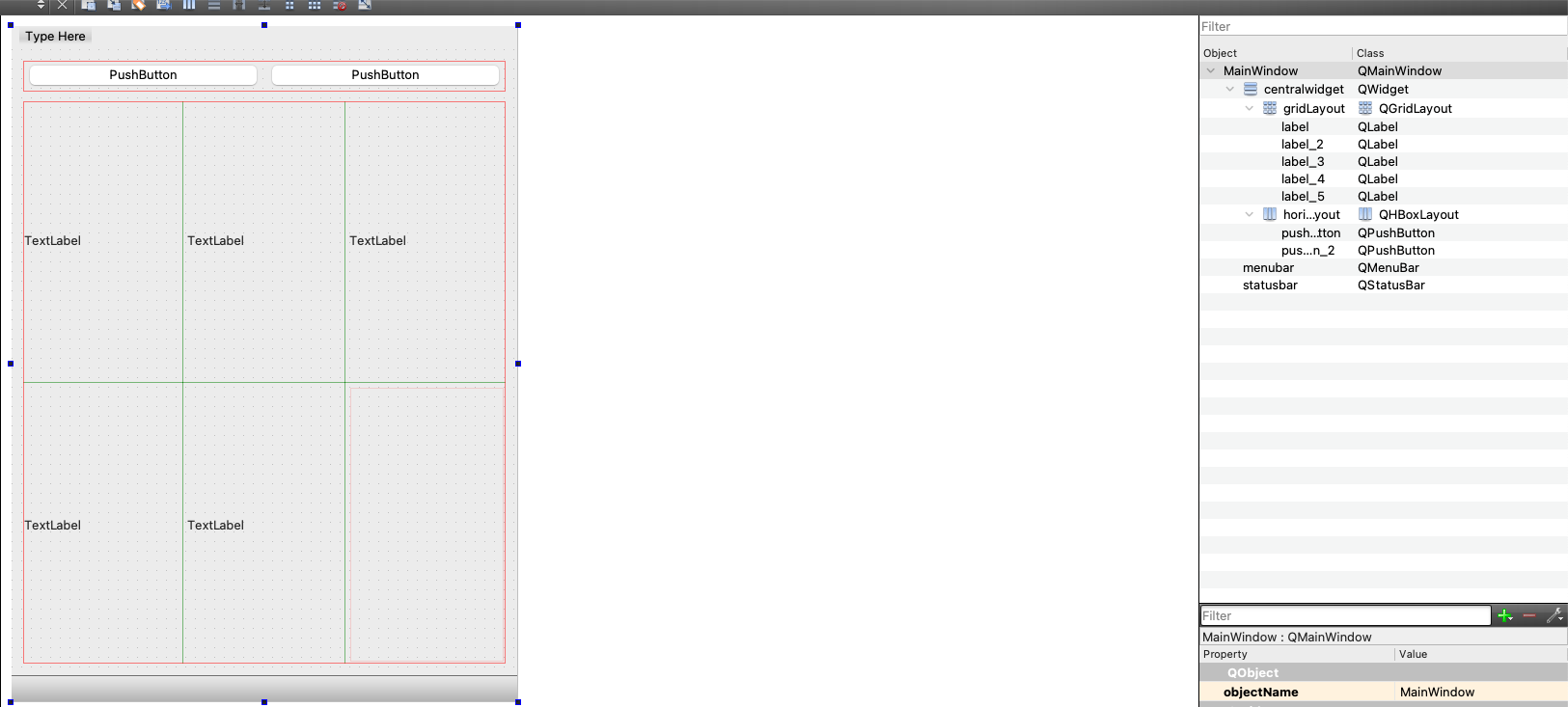
                        @SPlatten than they layouts or widgets are otherwise constraint

                        did you set max height of the Gridlayout ? or the sizepolicy to fixed ?

                        because a default arrangement works as intended:
                        10570056-aaf9-476f-82cc-716c36e5f2b8-image.png


                        Be aware of the Qt Code of Conduct, when posting : https://forum.qt.io/topic/113070/qt-code-of-conduct


                        Q: What's that?
                        A: It's blue light.
                        Q: What does it do?
                        A: It turns blue.

                        JonBJ 1 Reply Last reply
                        1
                        • J.HilkJ J.Hilk

                          @SPlatten than they layouts or widgets are otherwise constraint

                          did you set max height of the Gridlayout ? or the sizepolicy to fixed ?

                          because a default arrangement works as intended:

                          10570056-aaf9-476f-82cc-716c36e5f2b8-image.png

                          JonBJ Offline
                          JonBJ Offline
                          JonB
                          wrote on last edited by
                          #30

                          @J-Hilk
                          Thank you for rescuing me here! I leave you to deal further with the question ;-)

                          1 Reply Last reply
                          1
                          • JonBJ JonB

                            @SPlatten
                            My last attempt, because I'm going out, and someone who knows designer better than me can doubtless say.

                            The stretch needs to be set on the layout items added to the enclosing vboxlayout. That (the vboxlayout) has stretch factors doesn't it, or not? Temporarily put a stretch of 1 for its first first item, the hbox, and a stretch of 100 for its second item, the gridlayout? That's probably not fully right but does it do what you want? Else I don't know which way to do it.

                            SPlattenS Offline
                            SPlattenS Offline
                            SPlatten
                            wrote on last edited by SPlatten
                            #31

                            @JonB, the QVboxLayout has the property layoutStretch with I've changed from 0,0 to 1,100.

                            Thats the puzzle solved! It works perfectly, thank you for your help and support.

                            Kind Regards,
                            Sy

                            1 Reply Last reply
                            1

                            • Login

                            • Login or register to search.
                            • First post
                              Last post
                            0
                            • Categories
                            • Recent
                            • Tags
                            • Popular
                            • Users
                            • Groups
                            • Search
                            • Get Qt Extensions
                            • Unsolved