
Skip to content
  • Categories
  • Recent
  • Tags
  • Popular
  • Users
  • Groups
  • Search
  • Get Qt Extensions
  • Unsolved
Collapse
Brand Logo
  1. Home
  2. Qt Development
  3. Qt for Python
  4. Connect to mongoDB and display data in table
Qt 6.11 is out! See what's new in the release blog

Connect to mongoDB and display data in table

Scheduled Pinned Locked Moved Unsolved Qt for Python
14 Posts 4 Posters 3.3k Views 2 Watching
  • Oldest to Newest
  • Newest to Oldest
  • Most Votes
Reply
  • Reply as topic
Log in to reply
This topic has been deleted. Only users with topic management privileges can see it.
  • P Offline
    P Offline
    praneshpk
    wrote on last edited by
    #1

    Hi everyone,
    I am creating an application that connects to MongoDB and displays the data in table view/ table widget. I am able to get the data and convert it to a dataframe using a pushbutton. but not able to view the data. here is my code,

        self.retranslateUi(MainWindow)
        QtCore.QMetaObject.connectSlotsByName(MainWindow)
        self.pushButton.clicked.connect(self.button_click)
        self.table.clicked.connect(self.returndata)
    
    def retranslateUi(self, MainWindow):
        _translate = QtCore.QCoreApplication.translate
        MainWindow.setWindowTitle(_translate("MainWindow", "MainWindow"))
        self.pushButton.setText(_translate("MainWindow", "PushButton"))
    
    
    @pyqtSlot( )
    def button_click(self):
        client = MongoClient("mongodb://localhost:27017/", username="sunadmin", password="sunpassword")
        db = client['mail_test']
        test = db.mail_test
        test = pd,DataFrame(list(test.find()))
        print(test)
    
    @pyqtSlot( )
    def returndata(self):
        test = self.table.text()
    
    jsulmJ 1 Reply Last reply
    0
    • P praneshpk

      Hi everyone,
      I am creating an application that connects to MongoDB and displays the data in table view/ table widget. I am able to get the data and convert it to a dataframe using a pushbutton. but not able to view the data. here is my code,

          self.retranslateUi(MainWindow)
          QtCore.QMetaObject.connectSlotsByName(MainWindow)
          self.pushButton.clicked.connect(self.button_click)
          self.table.clicked.connect(self.returndata)
      
      def retranslateUi(self, MainWindow):
          _translate = QtCore.QCoreApplication.translate
          MainWindow.setWindowTitle(_translate("MainWindow", "MainWindow"))
          self.pushButton.setText(_translate("MainWindow", "PushButton"))
      
      
      @pyqtSlot( )
      def button_click(self):
          client = MongoClient("mongodb://localhost:27017/", username="sunadmin", password="sunpassword")
          db = client['mail_test']
          test = db.mail_test
          test = pd,DataFrame(list(test.find()))
          print(test)
      
      @pyqtSlot( )
      def returndata(self):
          test = self.table.text()
      
      jsulmJ Offline
      jsulmJ Offline
      jsulm
      Lifetime Qt Champion
      wrote on last edited by
      #2

      @praneshpk said in Connect to mongoDB and display data in table:

      not able to view the data

      What does that mean? Where are you showing the data?

      https://forum.qt.io/topic/113070/qt-code-of-conduct

      1 Reply Last reply
      0
      • P Offline
        P Offline
        praneshpk
        wrote on last edited by
        #3

        I need to show data in tablewidget, for which the function is table

        JonBJ 1 Reply Last reply
        0
        • P praneshpk

          I need to show data in tablewidget, for which the function is table

          JonBJ Online
          JonBJ Online
          JonB
          wrote on last edited by JonB
          #4

          @praneshpk
          So if you want to use a QTableWidget you would need to copy the returned data into the appropriate items.

          Usually a QTableView is a better choice if you have your own data model. QTableWidget has its own internal model which you cannot change.

          test = pd,DataFrame(list(test.find()))
          

          I am not familiar that Python has this syntax? [I thought the parentheses for tuples were mandatory.] And what is pd anyway since it's not declared? [This may not matter now.]

          1 Reply Last reply
          1
          • P Offline
            P Offline
            praneshpk
            wrote on last edited by
            #5

            python is fine. What I am asking is how to display some text in tableview when button is pressed

            JonBJ 1 Reply Last reply
            0
            • P praneshpk

              python is fine. What I am asking is how to display some text in tableview when button is pressed

              JonBJ Online
              JonBJ Online
              JonB
              wrote on last edited by JonB
              #6

              @praneshpk
              Look at QTableView Class and (particularly) Model/View Programming for your choices and examples.

              Only you know how the data/model returned by, say, DataFrame(list(test.find())) looks.

              1 Reply Last reply
              3
              • P Offline
                P Offline
                praneshpk
                wrote on last edited by
                #7

                It is working. Thanks.
                Now I'm able to get data from MongoDB and display it in table view. But the size is not adjusted.
                I have attached the code and screenshot. I have tried resizing. It is not working

                    self.tableView.setSizeAdjustPolicy(QtWidgets.QAbstractScrollArea.AdjustToContents)
                    self.tableView.resizeRowsToContents()
                    self.tableView.resizeColumnsToContents()
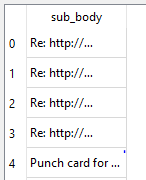
                

                74673ded-2cc4-4626-b1c1-cf545f8f8d99-image.png

                JonBJ 1 Reply Last reply
                0
                • P praneshpk

                  It is working. Thanks.
                  Now I'm able to get data from MongoDB and display it in table view. But the size is not adjusted.
                  I have attached the code and screenshot. I have tried resizing. It is not working

                      self.tableView.setSizeAdjustPolicy(QtWidgets.QAbstractScrollArea.AdjustToContents)
                      self.tableView.resizeRowsToContents()
                      self.tableView.resizeColumnsToContents()
                  

                  74673ded-2cc4-4626-b1c1-cf545f8f8d99-image.png

                  JonBJ Online
                  JonBJ Online
                  JonB
                  wrote on last edited by
                  #8

                  @praneshpk
                  I don't know about setSizeAdjustPolicy(QtWidgets.QAbstractScrollArea.AdjustToContents), that is to do with the tableview as a whole. I don't think I have ever used that. resizeColumnsToContents() ought work. But when do you call it? Must be after the table data is shown. I assume your whole table has enough room, and you're just trying to resize a column within it; or does your whole table need expanding to fit that column?

                  1 Reply Last reply
                  3
                  • P Offline
                    P Offline
                    praneshpk
                    wrote on last edited by
                    #9

                    Whole table has fixed size and contents are not visible, I need to resize so that I can see the contents easily.

                    1 Reply Last reply
                    0
                    • SGaistS Offline
                      SGaistS Offline
                      SGaist
                      Lifetime Qt Champion
                      wrote on last edited by
                      #10

                      Hi,

                      Is your table view inside a layout ?

                      Interested in AI ? www.idiap.ch
                      Please read the Qt Code of Conduct - https://forum.qt.io/topic/113070/qt-code-of-conduct

                      1 Reply Last reply
                      2
                      • P Offline
                        P Offline
                        praneshpk
                        wrote on last edited by
                        #11

                        No, it is inside stacked pages widget

                        1 Reply Last reply
                        0
                        • P Offline
                          P Offline
                          praneshpk
                          wrote on last edited by
                          #12

                          I'm getting contents in a fixed size, I need this to be changed manually or dynamically.

                          def button_click(self):
                              client = MongoClient("mongodb://localhost:27017/", username="sunadmin", password="sunpassword")
                              db = client['mail_test']
                              collection = db.mail_test
                              df = pd.DataFrame(list(collection.find()))
                              df = df.filter(["sub_body"])
                              print(df)
                          
                              model = PandasModel(df)
                              self.tableView.setModel(model)
                          

                          and the model file is ,

                          from PyQt5 import QtCore
                          import pandas as pd
                          
                          class PandasModel(QtCore.QAbstractTableModel): 
                              def __init__(self, df = pd.DataFrame(), parent=None): 
                                  QtCore.QAbstractTableModel.__init__(self, parent=parent)
                                  self._df = df
                          
                              def headerData(self, section, orientation, role=QtCore.Qt.DisplayRole):
                                  if role != QtCore.Qt.DisplayRole:
                                      return QtCore.QVariant()
                          
                                  if orientation == QtCore.Qt.Horizontal:
                                      try:
                                          return self._df.columns.tolist()[section]
                                      except (IndexError, ):
                                          return QtCore.QVariant()
                                  elif orientation == QtCore.Qt.Vertical:
                                      try:
                                          # return self.df.index.tolist()
                                          return self._df.index.tolist()[section]
                                      except (IndexError, ):
                                          return QtCore.QVariant()
                          
                              def data(self, index, role=QtCore.Qt.DisplayRole):
                                  if role != QtCore.Qt.DisplayRole:
                                      return QtCore.QVariant()
                          
                                  if not index.isValid():
                                      return QtCore.QVariant()
                          
                                  return QtCore.QVariant(str(self._df.iloc[index.row(), index.column()]))
                          
                              def setData(self, index, value, role):
                                  row = self._df.index[index.row()]
                                  col = self._df.columns[index.column()]
                                  if hasattr(value, 'toPyObject'):
                                      # PyQt4 gets a QVariant
                                      value = value.toPyObject()
                                  else:
                                      # PySide gets an unicode
                                      dtype = self._df[col].dtype
                                      if dtype != object:
                                          value = None if value == '' else dtype.type(value)
                                  self._df.set_value(row, col, value)
                                  return True
                          
                              def rowCount(self, parent=QtCore.QModelIndex()): 
                                  return len(self._df.index)
                          
                              def columnCount(self, parent=QtCore.QModelIndex()): 
                                  return len(self._df.columns)
                          
                              def sort(self, column, order):
                                  colname = self._df.columns.tolist()[column]
                                  self.layoutAboutToBeChanged.emit()
                                  self._df.sort_values(colname, ascending= order == QtCore.Qt.AscendingOrder, inplace=True)
                                  self._df.reset_index(inplace=True, drop=True)
                                  self.layoutChanged.emit()
                          
                          JonBJ 1 Reply Last reply
                          0
                          • P praneshpk

                            I'm getting contents in a fixed size, I need this to be changed manually or dynamically.

                            def button_click(self):
                                client = MongoClient("mongodb://localhost:27017/", username="sunadmin", password="sunpassword")
                                db = client['mail_test']
                                collection = db.mail_test
                                df = pd.DataFrame(list(collection.find()))
                                df = df.filter(["sub_body"])
                                print(df)
                            
                                model = PandasModel(df)
                                self.tableView.setModel(model)
                            

                            and the model file is ,

                            from PyQt5 import QtCore
                            import pandas as pd
                            
                            class PandasModel(QtCore.QAbstractTableModel): 
                                def __init__(self, df = pd.DataFrame(), parent=None): 
                                    QtCore.QAbstractTableModel.__init__(self, parent=parent)
                                    self._df = df
                            
                                def headerData(self, section, orientation, role=QtCore.Qt.DisplayRole):
                                    if role != QtCore.Qt.DisplayRole:
                                        return QtCore.QVariant()
                            
                                    if orientation == QtCore.Qt.Horizontal:
                                        try:
                                            return self._df.columns.tolist()[section]
                                        except (IndexError, ):
                                            return QtCore.QVariant()
                                    elif orientation == QtCore.Qt.Vertical:
                                        try:
                                            # return self.df.index.tolist()
                                            return self._df.index.tolist()[section]
                                        except (IndexError, ):
                                            return QtCore.QVariant()
                            
                                def data(self, index, role=QtCore.Qt.DisplayRole):
                                    if role != QtCore.Qt.DisplayRole:
                                        return QtCore.QVariant()
                            
                                    if not index.isValid():
                                        return QtCore.QVariant()
                            
                                    return QtCore.QVariant(str(self._df.iloc[index.row(), index.column()]))
                            
                                def setData(self, index, value, role):
                                    row = self._df.index[index.row()]
                                    col = self._df.columns[index.column()]
                                    if hasattr(value, 'toPyObject'):
                                        # PyQt4 gets a QVariant
                                        value = value.toPyObject()
                                    else:
                                        # PySide gets an unicode
                                        dtype = self._df[col].dtype
                                        if dtype != object:
                                            value = None if value == '' else dtype.type(value)
                                    self._df.set_value(row, col, value)
                                    return True
                            
                                def rowCount(self, parent=QtCore.QModelIndex()): 
                                    return len(self._df.index)
                            
                                def columnCount(self, parent=QtCore.QModelIndex()): 
                                    return len(self._df.columns)
                            
                                def sort(self, column, order):
                                    colname = self._df.columns.tolist()[column]
                                    self.layoutAboutToBeChanged.emit()
                                    self._df.sort_values(colname, ascending= order == QtCore.Qt.AscendingOrder, inplace=True)
                                    self._df.reset_index(inplace=True, drop=True)
                                    self.layoutChanged.emit()
                            
                            JonBJ Online
                            JonBJ Online
                            JonB
                            wrote on last edited by
                            #13

                            @praneshpk said in Connect to mongoDB and display data in table:

                            I'm getting contents in a fixed size, I need this to be changed manually or dynamically.

                            All of the stuff you show is for the model. Sizing is dealt with by the view. Whatever you want/need to do about that should be in the QTableView.

                            1 Reply Last reply
                            1
                            • P Offline
                              P Offline
                              praneshpk
                              wrote on last edited by
                              #14
                              This post is deleted!
                              1 Reply Last reply
                              0

                              • Login

                              • Login or register to search.
                              • First post
                                Last post
                              0
                              • Categories
                              • Recent
                              • Tags
                              • Popular
                              • Users
                              • Groups
                              • Search
                              • Get Qt Extensions
                              • Unsolved