
Skip to content
  • Categories
  • Recent
  • Tags
  • Popular
  • Users
  • Groups
  • Search
  • Get Qt Extensions
  • Unsolved
Collapse
Brand Logo
  1. Home
  2. Qt Development
  3. Mobile and Embedded
  4. Qt 5 for Android widgets on window of Qt Creator appear small on AVD
Qt 6.11 is out! See what's new in the release blog

Qt 5 for Android widgets on window of Qt Creator appear small on AVD

Scheduled Pinned Locked Moved Solved Mobile and Embedded
4 Posts 3 Posters 463 Views 1 Watching
  • Oldest to Newest
  • Newest to Oldest
  • Most Votes
Reply
  • Reply as topic
Log in to reply
This topic has been deleted. Only users with topic management privileges can see it.
  • S Offline
    S Offline
    Sun__
    wrote on last edited by Sun__
    #1

    Can be seen from dialog.ui that the widgets (QDialogButtonBox) are of readable size
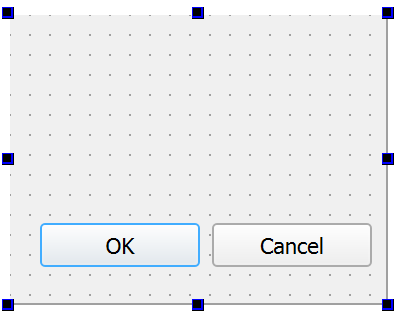
    368c5644-90d2-45c5-bc0b-89afd89edcac-image.png

    but when they are on AVD, they appear so small
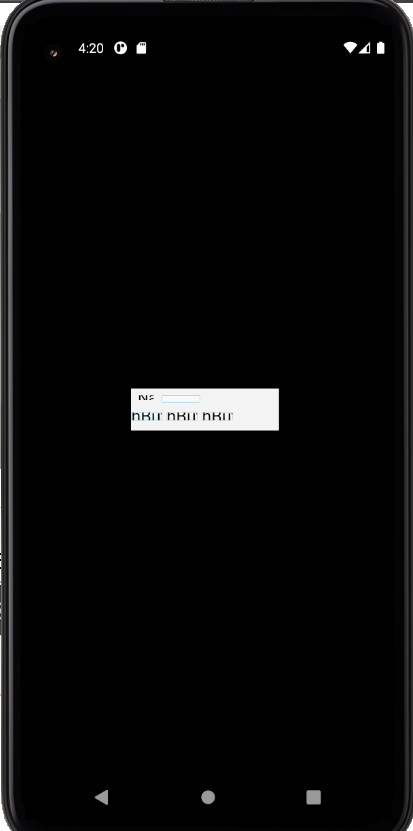
    7be81e93-b3c6-4aad-8e36-94fb64ed1915-image.png

    Prevoiusly with widgets like QPushButton, I could make widgets look bigger on AVD by right-clicking the dialog then choosing Layout but this does not work with QDialogButtonBox

    What should I do such that widgets can appear appropriately-sized?

    jsulmJ J.HilkJ 2 Replies Last reply
    0
    • S Sun__

      Can be seen from dialog.ui that the widgets (QDialogButtonBox) are of readable size
      368c5644-90d2-45c5-bc0b-89afd89edcac-image.png

      but when they are on AVD, they appear so small
      7be81e93-b3c6-4aad-8e36-94fb64ed1915-image.png

      Prevoiusly with widgets like QPushButton, I could make widgets look bigger on AVD by right-clicking the dialog then choosing Layout but this does not work with QDialogButtonBox

      What should I do such that widgets can appear appropriately-sized?

      jsulmJ Offline
      jsulmJ Offline
      jsulm
      Lifetime Qt Champion
      wrote on last edited by
      #2
      This post is deleted!
      1 Reply Last reply
      0
      • S Sun__

        Can be seen from dialog.ui that the widgets (QDialogButtonBox) are of readable size
        368c5644-90d2-45c5-bc0b-89afd89edcac-image.png

        but when they are on AVD, they appear so small
        7be81e93-b3c6-4aad-8e36-94fb64ed1915-image.png

        Prevoiusly with widgets like QPushButton, I could make widgets look bigger on AVD by right-clicking the dialog then choosing Layout but this does not work with QDialogButtonBox

        What should I do such that widgets can appear appropriately-sized?

        J.HilkJ Offline
        J.HilkJ Offline
        J.Hilk
        Moderators
        wrote on last edited by
        #3

        @Sun__ seems like default width and height are off ?

        what happens when you resize(manually) the dialog box after showing?


        Be aware of the Qt Code of Conduct, when posting : https://forum.qt.io/topic/113070/qt-code-of-conduct


        Q: What's that?
        A: It's blue light.
        Q: What does it do?
        A: It turns blue.

        1 Reply Last reply
        0
        • S Offline
          S Offline
          Sun__
          wrote on last edited by
          #4

          Hi @J-Hilk, thanks for your reply! The dialog cant be manually resized on the emulator.

          My Qt Creator crashed and after I somehow got it working again, the widgets look fine now
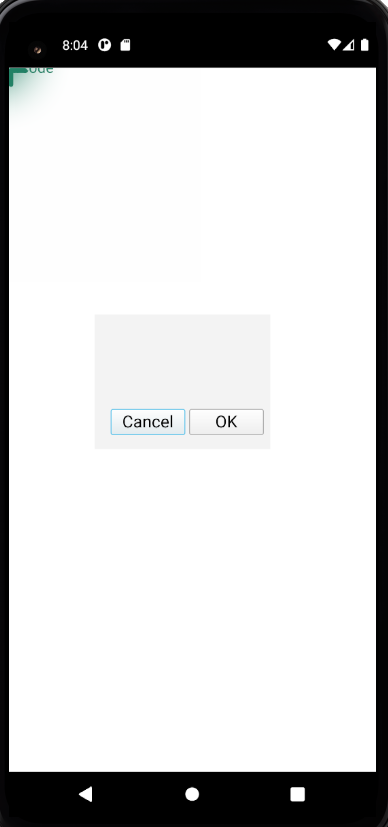
          19b88eca-63cd-49ba-b99a-3dfa3068d721-image.png
          I tried testing with push buttons too and they are fine.

          I did not change any size property or any part of the code, it just somehow gave a different result. I guess I'll treat is as something that went wrong behind the scenes.

          1 Reply Last reply
          0

          • Login

          • Login or register to search.
          • First post
            Last post
          0
          • Categories
          • Recent
          • Tags
          • Popular
          • Users
          • Groups
          • Search
          • Get Qt Extensions
          • Unsolved