Skip to content
  • Categories
  • Recent
  • Tags
  • Popular
  • Users
  • Groups
  • Search
  • Get Qt Extensions
  • Unsolved
Collapse
Brand Logo
  1. Home
  2. Qt Development
  3. General and Desktop
  4. qmake error - QT Creator 3.1.1 (opensource)
Qt 6.11 is out! See what's new in the release blog

qmake error - QT Creator 3.1.1 (opensource)

Scheduled Pinned Locked Moved Unsolved General and Desktop
21 Posts 4 Posters 1.9k Views
  • Oldest to Newest
  • Newest to Oldest
  • Most Votes
Reply
  • Reply as topic
Log in to reply
This topic has been deleted. Only users with topic management privileges can see it.
  • VRoninV Offline
    VRoninV Offline
    VRonin
    wrote on last edited by
    #6

    looks like it's working, let's try running it manually.
    in cmd, type

    C:\Qt\Qt5.3.0\5.3\mingw482_32\bin\qtenv2.bat
    cd C:\Users\nnathaniel\Downloads\hello\hello
    qmake
    mingw32-make
    

    "La mort n'est rien, mais vivre vaincu et sans gloire, c'est mourir tous les jours"
    ~Napoleon Bonaparte

    On a crusade to banish setIndexWidget() from the holy land of Qt

    N 1 Reply Last reply
    0
    • VRoninV VRonin

      looks like it's working, let's try running it manually.
      in cmd, type

      C:\Qt\Qt5.3.0\5.3\mingw482_32\bin\qtenv2.bat
      cd C:\Users\nnathaniel\Downloads\hello\hello
      qmake
      mingw32-make
      
      N Offline
      N Offline
      ntn7
      wrote on last edited by
      #7

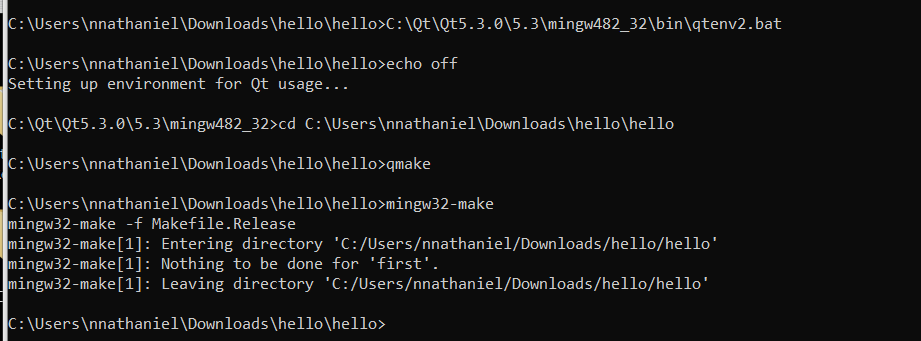
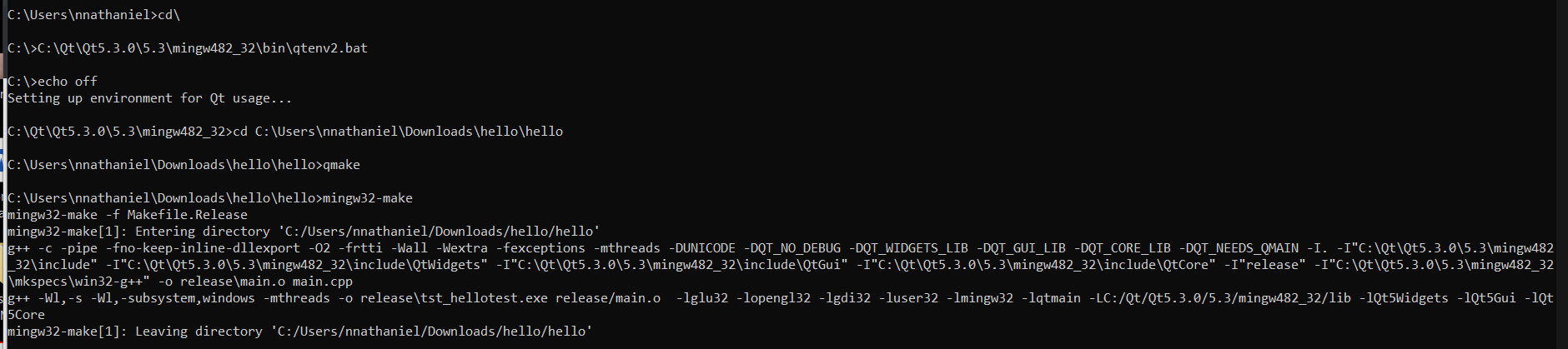
      @VRonin ran it twice (wasn't sure i did it right the first time).

      9ab17270-17b0-4cde-89b9-f0524fc5cbb0-image.png

      3f6462df-b85e-49e1-b017-b2917c570f6c-image.png

      I really appreciate your assistance here... (I will be offline for a couple of hours)

      1 Reply Last reply
      0
      • VRoninV Offline
        VRoninV Offline
        VRonin
        wrote on last edited by VRonin
        #8

        Looks like it compiled succesfully, do you have tst_hellotest.exe somewhere in your project folder?

        "La mort n'est rien, mais vivre vaincu et sans gloire, c'est mourir tous les jours"
        ~Napoleon Bonaparte

        On a crusade to banish setIndexWidget() from the holy land of Qt

        N 1 Reply Last reply
        0
        • VRoninV VRonin

          Looks like it compiled succesfully, do you have tst_hellotest.exe somewhere in your project folder?

          N Offline
          N Offline
          ntn7
          wrote on last edited by
          #9

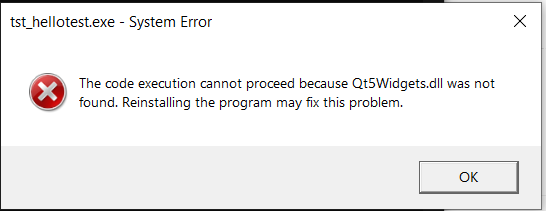
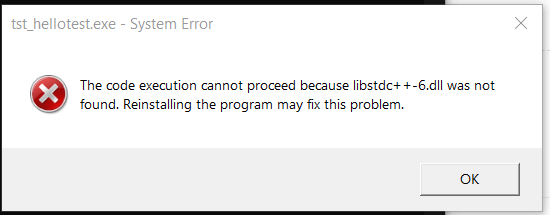
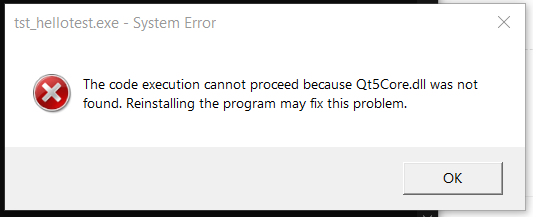
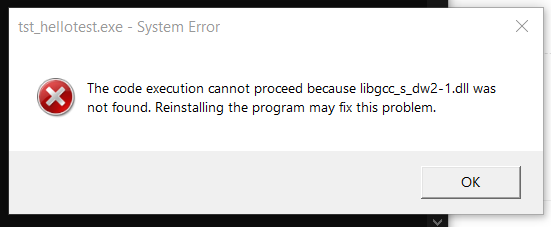
          @VRonin apologies for the delayed response. I do have that .exe file and when i try to run it i get the below errors:
          1b16633a-e871-4724-91e7-9b0788fcebde-image.png

          32e8ebad-ba38-490c-bcc5-ecc21bf15941-image.png

          a8987bc3-b4ee-4cd9-a07e-4fcd5b1600d1-image.png

          9384d656-7877-466c-84a9-4411546cacd9-image.png

          1 Reply Last reply
          0
          • VRoninV Offline
            VRoninV Offline
            VRonin
            wrote on last edited by
            #10

            don't double click it, run it from the console (replace Path\To\Executable with the path to tst_hellotest.exe.

            C:\Qt\Qt5.3.0\5.3\mingw482_32\bin\qtenv2.bat
            cd Path\To\Executable\tst_hellotest.exe
            

            In any case this proves you can compile a program with qmake/mingw32-make so try opening the project with Qt Creator again

            "La mort n'est rien, mais vivre vaincu et sans gloire, c'est mourir tous les jours"
            ~Napoleon Bonaparte

            On a crusade to banish setIndexWidget() from the holy land of Qt

            N 1 Reply Last reply
            0
            • VRoninV VRonin

              don't double click it, run it from the console (replace Path\To\Executable with the path to tst_hellotest.exe.

              C:\Qt\Qt5.3.0\5.3\mingw482_32\bin\qtenv2.bat
              cd Path\To\Executable\tst_hellotest.exe
              

              In any case this proves you can compile a program with qmake/mingw32-make so try opening the project with Qt Creator again

              N Offline
              N Offline
              ntn7
              wrote on last edited by
              #11

              @VRonin I've run it via the console and that works.

              Tried again via Qt creator and get the same error as before
              13:01:47: Running steps for project hello...
              13:01:47: Could not start process "C:\Qt\Qt5.3.0\5.3\mingw482_32\bin\qmake.exe" C:\Users\nnathaniel\Downloads\hello\hello\hello.pro -r -spec win32-g++ "CONFIG+=debug"
              Error while building/deploying project hello (kit: Desktop)
              When executing step 'qmake'
              13:01:47: Elapsed time: 00:00.

              J.HilkJ 1 Reply Last reply
              0
              • N ntn7

                @VRonin I've run it via the console and that works.

                Tried again via Qt creator and get the same error as before
                13:01:47: Running steps for project hello...
                13:01:47: Could not start process "C:\Qt\Qt5.3.0\5.3\mingw482_32\bin\qmake.exe" C:\Users\nnathaniel\Downloads\hello\hello\hello.pro -r -spec win32-g++ "CONFIG+=debug"
                Error while building/deploying project hello (kit: Desktop)
                When executing step 'qmake'
                13:01:47: Elapsed time: 00:00.

                J.HilkJ Offline
                J.HilkJ Offline
                J.Hilk
                Moderators
                wrote on last edited by
                #12

                @ntn7 what kit is selected, when you run it from QtCreator, the auto detected one or the manual one?


                Be aware of the Qt Code of Conduct, when posting : https://forum.qt.io/topic/113070/qt-code-of-conduct


                Q: What's that?
                A: It's blue light.
                Q: What does it do?
                A: It turns blue.

                N 1 Reply Last reply
                0
                • J.HilkJ J.Hilk

                  @ntn7 what kit is selected, when you run it from QtCreator, the auto detected one or the manual one?

                  N Offline
                  N Offline
                  ntn7
                  wrote on last edited by
                  #13

                  @J-Hilk Hi, below are the kit details that are being used. this is what was setup by default, i haven't changed this.
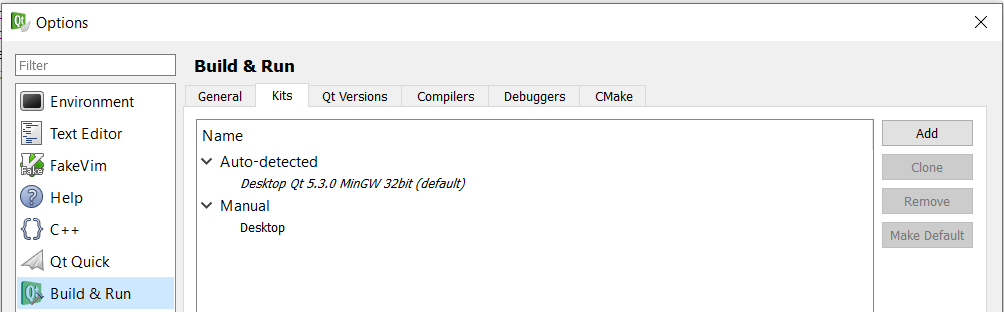
                  b5ba1c7f-c26e-4bd2-9772-f455509921ac-image.png

                  jsulmJ 1 Reply Last reply
                  0
                  • N ntn7

                    @J-Hilk Hi, below are the kit details that are being used. this is what was setup by default, i haven't changed this.

                    b5ba1c7f-c26e-4bd2-9772-f455509921ac-image.png

                    jsulmJ Offline
                    jsulmJ Offline
                    jsulm
                    Lifetime Qt Champion
                    wrote on last edited by
                    #14

                    @ntn7 You did not answer the question. As you can see there are 2 Kits, so which one do you use?

                    https://forum.qt.io/topic/113070/qt-code-of-conduct

                    N 1 Reply Last reply
                    1
                    • jsulmJ jsulm

                      @ntn7 You did not answer the question. As you can see there are 2 Kits, so which one do you use?

                      N Offline
                      N Offline
                      ntn7
                      wrote on last edited by
                      #15

                      @jsulm is this the detail you looking for? :|
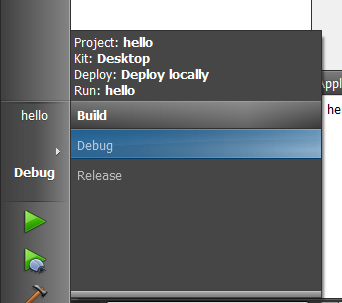
                      6d00c5a2-1d55-43b2-bd82-506b88a6829e-image.png

                      if not, please will you point me to the right direction and I'll provide whats needed

                      jsulmJ 1 Reply Last reply
                      1
                      • N ntn7

                        @jsulm is this the detail you looking for? :|

                        6d00c5a2-1d55-43b2-bd82-506b88a6829e-image.png

                        if not, please will you point me to the right direction and I'll provide whats needed

                        jsulmJ Offline
                        jsulmJ Offline
                        jsulm
                        Lifetime Qt Champion
                        wrote on last edited by
                        #16

                        @ntn7 @J-Hilk So, it's the manually added Kit

                        https://forum.qt.io/topic/113070/qt-code-of-conduct

                        J.HilkJ N 2 Replies Last reply
                        1
                        • jsulmJ jsulm

                          @ntn7 @J-Hilk So, it's the manually added Kit

                          J.HilkJ Offline
                          J.HilkJ Offline
                          J.Hilk
                          Moderators
                          wrote on last edited by J.Hilk
                          #17

                          @jsulm alright
                          @ntn7

                          so change it to the auto generated kit, who knows what settings the manual kit has.

                          on the left hand side in the menu bar the top most icons, there's (above the question mark) the project tab.

                          select that, enable the auto detection kit, and try compiling and running again


                          Be aware of the Qt Code of Conduct, when posting : https://forum.qt.io/topic/113070/qt-code-of-conduct


                          Q: What's that?
                          A: It's blue light.
                          Q: What does it do?
                          A: It turns blue.

                          1 Reply Last reply
                          0
                          • jsulmJ jsulm

                            @ntn7 @J-Hilk So, it's the manually added Kit

                            N Offline
                            N Offline
                            ntn7
                            wrote on last edited by
                            #18

                            @jsulm I'm not sure how that was created but after removing it, it works now.
                            Thank you all for your assistance @VRonin @J-Hilk
                            Apologies for the extremely basic question :|

                            jsulmJ 1 Reply Last reply
                            2
                            • N ntn7

                              @jsulm I'm not sure how that was created but after removing it, it works now.
                              Thank you all for your assistance @VRonin @J-Hilk
                              Apologies for the extremely basic question :|

                              jsulmJ Offline
                              jsulmJ Offline
                              jsulm
                              Lifetime Qt Champion
                              wrote on last edited by
                              #19

                              @ntn7 said in qmake error - QT Creator 3.1.1 (opensource):

                              after removing it

                              You don't have to remove it, you can easily switch between different Kits

                              https://forum.qt.io/topic/113070/qt-code-of-conduct

                              1 Reply Last reply
                              0
                              • N Offline
                                N Offline
                                ntn7
                                wrote on last edited by ntn7
                                #20

                                ok, I really am a little lost now... I've changed the location of the above project and I receive the error again... I've checked the kit thats being used and its only the one referenced above.

                                4743ed42-f6a8-444d-8c8a-98de7c2114d8-image.png

                                what am i doing wrong? :(
                                am i perhaps building this incorrectly?

                                jsulmJ 1 Reply Last reply
                                0
                                • N ntn7

                                  ok, I really am a little lost now... I've changed the location of the above project and I receive the error again... I've checked the kit thats being used and its only the one referenced above.

                                  4743ed42-f6a8-444d-8c8a-98de7c2114d8-image.png

                                  what am i doing wrong? :(
                                  am i perhaps building this incorrectly?
                                  jsulmJ Offline
                                  jsulmJ Offline
                                  jsulm
                                  Lifetime Qt Champion
                                  wrote on last edited by
                                  #21

                                  @ntn7 Are the paths to qmake.exe and hello.pro correct?

                                  https://forum.qt.io/topic/113070/qt-code-of-conduct

                                  1 Reply Last reply
                                  0

                                  • Login

                                  • Login or register to search.
                                  • First post
                                    Last post
                                  0
                                  • Categories
                                  • Recent
                                  • Tags
                                  • Popular
                                  • Users
                                  • Groups
                                  • Search
                                  • Get Qt Extensions
                                  • Unsolved