
Skip to content
  • Categories
  • Recent
  • Tags
  • Popular
  • Users
  • Groups
  • Search
  • Get Qt Extensions
  • Unsolved
Collapse
Brand Logo
  1. Home
  2. Qt Development
  3. General and Desktop
  4. QT Creator problem with kits
Qt 6.11 is out! See what's new in the release blog

QT Creator problem with kits

Scheduled Pinned Locked Moved Solved General and Desktop
11 Posts 2 Posters 1.8k Views 1 Watching
  • Oldest to Newest
  • Newest to Oldest
  • Most Votes
Reply
  • Reply as topic
Log in to reply
This topic has been deleted. Only users with topic management privileges can see it.
  • F ForeverNoob

    Hello,

    Just installed QT Creator on Linux Mint 20.1 Cinnamon, and I'm not able to config my project. There seems to be a problem with Kits configuration - in Options/Kits the Qt Versions tab had a yellow question mark next to the single entry entry:

    QT Versions.png

    Not sure what to do here. Help will be appreciated.

    TIA

    jsulmJ Offline
    jsulmJ Offline
    jsulm
    Lifetime Qt Champion
    wrote on last edited by
    #2

    @ForeverNoob Put mouse cursor over the yellow icon and see what the pop-up message tells you

    https://forum.qt.io/topic/113070/qt-code-of-conduct

    F 1 Reply Last reply
    0
    • jsulmJ jsulm

      @ForeverNoob Put mouse cursor over the yellow icon and see what the pop-up message tells you

      F Offline
      F Offline
      ForeverNoob
      wrote on last edited by
      #3

      @jsulm The yellow pop-up is in the screenshot.

      jsulmJ 1 Reply Last reply
      0
      • F ForeverNoob

        @jsulm The yellow pop-up is in the screenshot.

        jsulmJ Offline
        jsulmJ Offline
        jsulm
        Lifetime Qt Champion
        wrote on last edited by
        #4

        @ForeverNoob I don't mean yellow pup-up, I mean the yellow icon with exclamation mark (yellow triangle). Put mouse cursor there, then a pop-up will appear.

        https://forum.qt.io/topic/113070/qt-code-of-conduct

        F 1 Reply Last reply
        0
        • jsulmJ jsulm

          @ForeverNoob I don't mean yellow pup-up, I mean the yellow icon with exclamation mark (yellow triangle). Put mouse cursor there, then a pop-up will appear.

          F Offline
          F Offline
          ForeverNoob
          wrote on last edited by
          #5

          @jsulm Mouse pointer on yellow tiangle, exact same pop-up.

          Screenshot from 2021-03-22 12-20-37.png

          jsulmJ 1 Reply Last reply
          0
          • F ForeverNoob

            @jsulm Mouse pointer on yellow tiangle, exact same pop-up.

            Screenshot from 2021-03-22 12-20-37.png

            jsulmJ Offline
            jsulmJ Offline
            jsulm
            Lifetime Qt Champion
            wrote on last edited by
            #6

            @ForeverNoob I see "No qmlscene installed" - do you use qmlscene in your project?
            Can you also show the actual Kit you want to use? The problem can be something else, not Qt.

            https://forum.qt.io/topic/113070/qt-code-of-conduct

            F 1 Reply Last reply
            0
            • jsulmJ jsulm

              @ForeverNoob I see "No qmlscene installed" - do you use qmlscene in your project?
              Can you also show the actual Kit you want to use? The problem can be something else, not Qt.

              F Offline
              F Offline
              ForeverNoob
              wrote on last edited by
              #7

              @jsulm said in QT Creator problem with kits:

              qmlscene

              I'm not sure what qmlscene is, so probably I don't use it.
              I use the default Desktop kit:
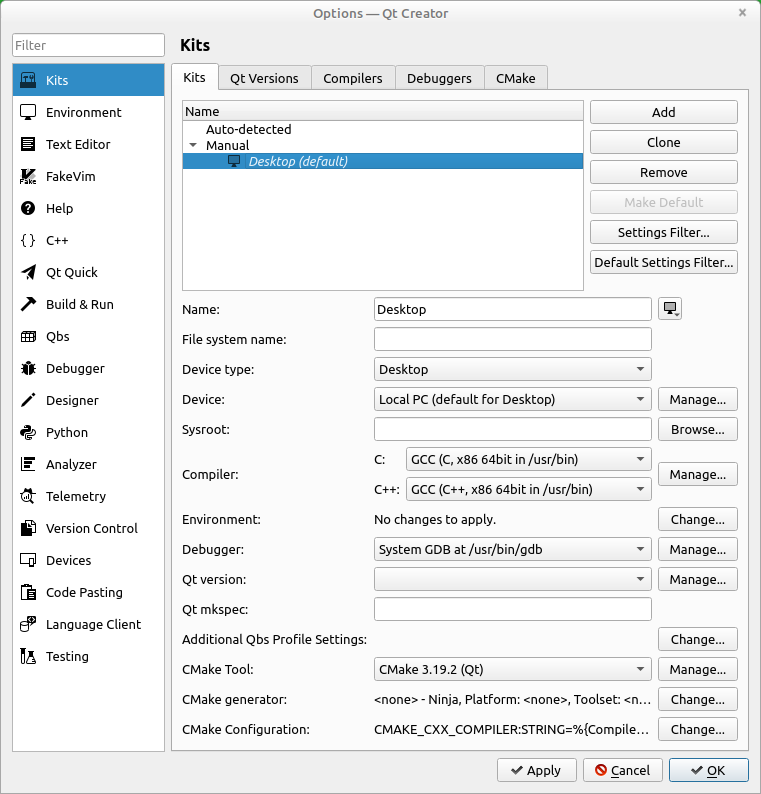
              Screenshot from 2021-03-22 12-38-55.png

              jsulmJ 1 Reply Last reply
              0
              • F ForeverNoob

                @jsulm said in QT Creator problem with kits:

                qmlscene

                I'm not sure what qmlscene is, so probably I don't use it.
                I use the default Desktop kit:

                Screenshot from 2021-03-22 12-38-55.png

                jsulmJ Offline
                jsulmJ Offline
                jsulm
                Lifetime Qt Champion
                wrote on last edited by
                #8

                @ForeverNoob "Qt version" is not set...

                https://forum.qt.io/topic/113070/qt-code-of-conduct

                F 1 Reply Last reply
                0
                • jsulmJ jsulm

                  @ForeverNoob "Qt version" is not set...

                  F Offline
                  F Offline
                  ForeverNoob
                  wrote on last edited by
                  #9

                  @jsulm Changed it to "Qt 5.12.8 (qt5)" which was the only value in the drop-down list. The yellow triangangle in QtVersions is still there, still can't run the project.

                  jsulmJ 1 Reply Last reply
                  0
                  • F ForeverNoob

                    @jsulm Changed it to "Qt 5.12.8 (qt5)" which was the only value in the drop-down list. The yellow triangangle in QtVersions is still there, still can't run the project.

                    jsulmJ Offline
                    jsulmJ Offline
                    jsulm
                    Lifetime Qt Champion
                    wrote on last edited by
                    #10

                    @ForeverNoob said in QT Creator problem with kits:

                    still can't run the project.

                    Please provide more informations. What exactly does not work? Configuring the project? Building? Running? Any error messages?

                    https://forum.qt.io/topic/113070/qt-code-of-conduct

                    F 1 Reply Last reply
                    0
                    • jsulmJ jsulm

                      @ForeverNoob said in QT Creator problem with kits:

                      still can't run the project.

                      Please provide more informations. What exactly does not work? Configuring the project? Building? Running? Any error messages?

                      F Offline
                      F Offline
                      ForeverNoob
                      wrote on last edited by
                      #11

                      @jsulm It started working now. Looks like I had to close and re-open the project. Thanks a lot for your help.

                      1 Reply Last reply
                      0

                      • Login

                      • Login or register to search.
                      • First post
                        Last post
                      0
                      • Categories
                      • Recent
                      • Tags
                      • Popular
                      • Users
                      • Groups
                      • Search
                      • Get Qt Extensions
                      • Unsolved