
Skip to content
  • Categories
  • Recent
  • Tags
  • Popular
  • Users
  • Groups
  • Search
  • Get Qt Extensions
  • Unsolved
Collapse
Brand Logo
  1. Home
  2. Qt Development
  3. General and Desktop
  4. QT Creator problem with kits
Forum Updated to NodeBB v4.3 + New Features

QT Creator problem with kits

Scheduled Pinned Locked Moved Solved General and Desktop
11 Posts 2 Posters 1.3k Views 1 Watching
  • Oldest to Newest
  • Newest to Oldest
  • Most Votes
Reply
  • Reply as topic
Log in to reply
This topic has been deleted. Only users with topic management privileges can see it.
  • F Offline
    F Offline
    ForeverNoob
    wrote on last edited by
    #1

    Hello,

    Just installed QT Creator on Linux Mint 20.1 Cinnamon, and I'm not able to config my project. There seems to be a problem with Kits configuration - in Options/Kits the Qt Versions tab had a yellow question mark next to the single entry entry:

    QT Versions.png

    Not sure what to do here. Help will be appreciated.

    TIA

    jsulmJ 1 Reply Last reply
    0
    • F ForeverNoob

      Hello,

      Just installed QT Creator on Linux Mint 20.1 Cinnamon, and I'm not able to config my project. There seems to be a problem with Kits configuration - in Options/Kits the Qt Versions tab had a yellow question mark next to the single entry entry:

      QT Versions.png

      Not sure what to do here. Help will be appreciated.

      TIA

      jsulmJ Online
      jsulmJ Online
      jsulm
      Lifetime Qt Champion
      wrote on last edited by
      #2

      @ForeverNoob Put mouse cursor over the yellow icon and see what the pop-up message tells you

      https://forum.qt.io/topic/113070/qt-code-of-conduct

      F 1 Reply Last reply
      0
      • jsulmJ jsulm

        @ForeverNoob Put mouse cursor over the yellow icon and see what the pop-up message tells you

        F Offline
        F Offline
        ForeverNoob
        wrote on last edited by
        #3

        @jsulm The yellow pop-up is in the screenshot.

        jsulmJ 1 Reply Last reply
        0
        • F ForeverNoob

          @jsulm The yellow pop-up is in the screenshot.

          jsulmJ Online
          jsulmJ Online
          jsulm
          Lifetime Qt Champion
          wrote on last edited by
          #4

          @ForeverNoob I don't mean yellow pup-up, I mean the yellow icon with exclamation mark (yellow triangle). Put mouse cursor there, then a pop-up will appear.

          https://forum.qt.io/topic/113070/qt-code-of-conduct

          F 1 Reply Last reply
          0
          • jsulmJ jsulm

            @ForeverNoob I don't mean yellow pup-up, I mean the yellow icon with exclamation mark (yellow triangle). Put mouse cursor there, then a pop-up will appear.

            F Offline
            F Offline
            ForeverNoob
            wrote on last edited by
            #5

            @jsulm Mouse pointer on yellow tiangle, exact same pop-up.

            Screenshot from 2021-03-22 12-20-37.png

            jsulmJ 1 Reply Last reply
            0
            • F ForeverNoob

              @jsulm Mouse pointer on yellow tiangle, exact same pop-up.

              Screenshot from 2021-03-22 12-20-37.png

              jsulmJ Online
              jsulmJ Online
              jsulm
              Lifetime Qt Champion
              wrote on last edited by
              #6

              @ForeverNoob I see "No qmlscene installed" - do you use qmlscene in your project?
              Can you also show the actual Kit you want to use? The problem can be something else, not Qt.

              https://forum.qt.io/topic/113070/qt-code-of-conduct

              F 1 Reply Last reply
              0
              • jsulmJ jsulm

                @ForeverNoob I see "No qmlscene installed" - do you use qmlscene in your project?
                Can you also show the actual Kit you want to use? The problem can be something else, not Qt.

                F Offline
                F Offline
                ForeverNoob
                wrote on last edited by
                #7

                @jsulm said in QT Creator problem with kits:

                qmlscene

                I'm not sure what qmlscene is, so probably I don't use it.
                I use the default Desktop kit:
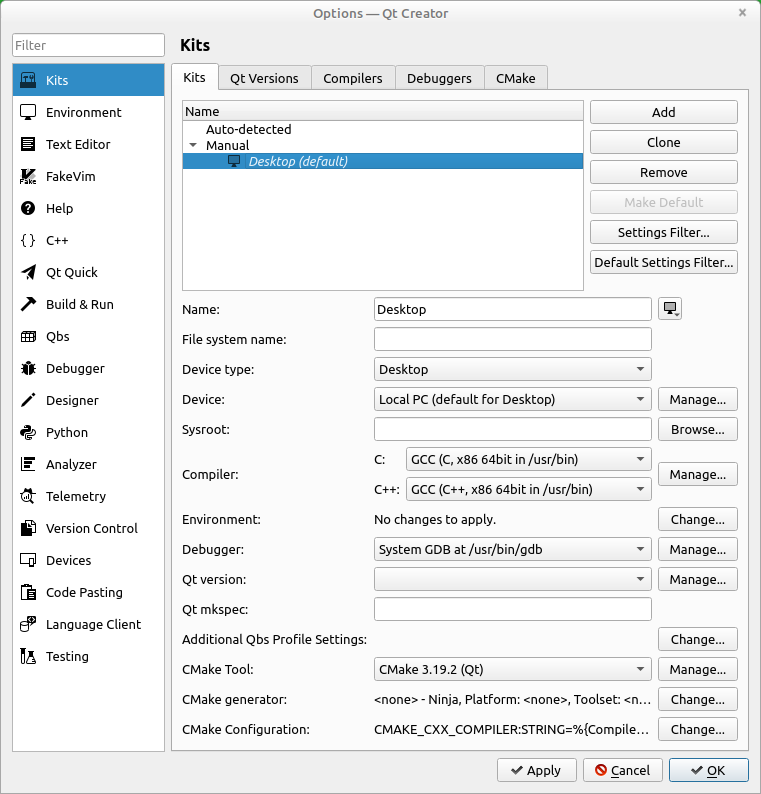
                Screenshot from 2021-03-22 12-38-55.png

                jsulmJ 1 Reply Last reply
                0
                • F ForeverNoob

                  @jsulm said in QT Creator problem with kits:

                  qmlscene

                  I'm not sure what qmlscene is, so probably I don't use it.
                  I use the default Desktop kit:

                  Screenshot from 2021-03-22 12-38-55.png

                  jsulmJ Online
                  jsulmJ Online
                  jsulm
                  Lifetime Qt Champion
                  wrote on last edited by
                  #8

                  @ForeverNoob "Qt version" is not set...

                  https://forum.qt.io/topic/113070/qt-code-of-conduct

                  F 1 Reply Last reply
                  0
                  • jsulmJ jsulm

                    @ForeverNoob "Qt version" is not set...

                    F Offline
                    F Offline
                    ForeverNoob
                    wrote on last edited by
                    #9

                    @jsulm Changed it to "Qt 5.12.8 (qt5)" which was the only value in the drop-down list. The yellow triangangle in QtVersions is still there, still can't run the project.

                    jsulmJ 1 Reply Last reply
                    0
                    • F ForeverNoob

                      @jsulm Changed it to "Qt 5.12.8 (qt5)" which was the only value in the drop-down list. The yellow triangangle in QtVersions is still there, still can't run the project.

                      jsulmJ Online
                      jsulmJ Online
                      jsulm
                      Lifetime Qt Champion
                      wrote on last edited by
                      #10

                      @ForeverNoob said in QT Creator problem with kits:

                      still can't run the project.

                      Please provide more informations. What exactly does not work? Configuring the project? Building? Running? Any error messages?

                      https://forum.qt.io/topic/113070/qt-code-of-conduct

                      F 1 Reply Last reply
                      0
                      • jsulmJ jsulm

                        @ForeverNoob said in QT Creator problem with kits:

                        still can't run the project.

                        Please provide more informations. What exactly does not work? Configuring the project? Building? Running? Any error messages?

                        F Offline
                        F Offline
                        ForeverNoob
                        wrote on last edited by
                        #11

                        @jsulm It started working now. Looks like I had to close and re-open the project. Thanks a lot for your help.

                        1 Reply Last reply
                        0

                        • Login

                        • Login or register to search.
                        • First post
                          Last post
                        0
                        • Categories
                        • Recent
                        • Tags
                        • Popular
                        • Users
                        • Groups
                        • Search
                        • Get Qt Extensions
                        • Unsolved