Skip to content
  • Categories
  • Recent
  • Tags
  • Popular
  • Users
  • Groups
  • Search
  • Get Qt Extensions
  • Unsolved
Collapse
Brand Logo
  1. Home
  2. Qt Development
  3. General and Desktop
  4. Memory Leak in Qt 4.10.0
Forum Updated to NodeBB v4.3 + New Features

Memory Leak in Qt 4.10.0

Scheduled Pinned Locked Moved Solved General and Desktop
30 Posts 6 Posters 4.2k Views 1 Watching
  • Oldest to Newest
  • Newest to Oldest
  • Most Votes
Reply
  • Reply as topic
Log in to reply
This topic has been deleted. Only users with topic management privileges can see it.
  • N Offline
    N Offline
    ndiwan
    wrote on last edited by
    #1

    HI All,

    I am getting memory leak in my c++ code written in Qt 4.10.0.
    I am not Sure where the leak is.
    I correct few things like doing cleanup whenever using setFont. Also confirmed that all dynamic memory allocations are getting cleaned in destructor.
    Now I am not ure where the issue is. Could you please help me with how I can detect memory leak.

    Thanks
    Nitin

    JonBJ J.HilkJ 2 Replies Last reply
    0
    • N ndiwan

      HI All,

      I am getting memory leak in my c++ code written in Qt 4.10.0.
      I am not Sure where the leak is.
      I correct few things like doing cleanup whenever using setFont. Also confirmed that all dynamic memory allocations are getting cleaned in destructor.
      Now I am not ure where the issue is. Could you please help me with how I can detect memory leak.

      Thanks
      Nitin

      JonBJ Offline
      JonBJ Offline
      JonB
      wrote on last edited by
      #2

      @ndiwan
      Use valgrind to detect memory leakages.

      1 Reply Last reply
      1
      • N ndiwan

        HI All,

        I am getting memory leak in my c++ code written in Qt 4.10.0.
        I am not Sure where the leak is.
        I correct few things like doing cleanup whenever using setFont. Also confirmed that all dynamic memory allocations are getting cleaned in destructor.
        Now I am not ure where the issue is. Could you please help me with how I can detect memory leak.

        Thanks
        Nitin

        J.HilkJ Online
        J.HilkJ Online
        J.Hilk
        Moderators
        wrote on last edited by
        #3

        @ndiwan there is no such thing as Qt 4.10.0


        Be aware of the Qt Code of Conduct, when posting : https://forum.qt.io/topic/113070/qt-code-of-conduct


        Q: What's that?
        A: It's blue light.
        Q: What does it do?
        A: It turns blue.

        1 Reply Last reply
        1
        • N Offline
          N Offline
          ndiwan
          wrote on last edited by ndiwan
          #4

          Thanks For Reply.
          valgrind_Qt.JPG bolded text

          Attached is the valgrid plugin in my Qt creator. Do I need to use this. Sorry but I am new in Qt.
          It say External Application.

          Thanks

          jsulmJ 1 Reply Last reply
          0
          • N ndiwan

            Thanks For Reply.
            valgrind_Qt.JPG bolded text

            Attached is the valgrid plugin in my Qt creator. Do I need to use this. Sorry but I am new in Qt.
            It say External Application.

            Thanks

            jsulmJ Offline
            jsulmJ Offline
            jsulm
            Lifetime Qt Champion
            wrote on last edited by
            #5

            @ndiwan said in Memory Leak in Qt 4.10.0:

            Do I need to use this.

            Yes, the "Valgrind Memory Analyzer"

            https://forum.qt.io/topic/113070/qt-code-of-conduct

            1 Reply Last reply
            1
            • N Offline
              N Offline
              ndiwan
              wrote on last edited by J.Hilk
              #6

              Thanks.
              Do you find any issue here relelated to memory leak in my paintEvent:

              void CSkateRetarder::paintEvent(QPaintEvent * )
              {
                  QPainter painter(this);
                  painter.setRenderHint(QPainter::Antialiasing);
                  QPainterPath m_SelectedPath = QPainterPath();
                  m_SelectedPath.addRect(0,0, getRectWidth()+10, getRectHeight()+10);
                  QPen pen = QPen(m_qcRetarderColor,2);
                  QFont::cleanup();
                  QFont font("Arial", 10);
                  font.setBold(true);
                  painter.setFont(font);
                  painter.setPen(pen);
              
                  if(m_state == SKATE_POS_OPEN || m_state == SKATE_POS_OOC_OPEN || (m_state == SKATE_POS_COMM_LOST && m_PrevState == -1) || m_PrevState == SKATE_POS_OPEN || m_PrevState == SKATE_POS_OOC_OPEN)
                  {
                      painter.setBrush(QBrush(Qt::transparent));
                      QPainterPath path;
                      path.addRoundedRect(QRectF(5, 5, getRectWidth(), getRectHeight()), 5, 5);
                      painter.drawPath(path);
                      painter.setBrush(QBrush(m_qcRetarderColor));
                      QPainterPath upperCurve;
                      upperCurve.moveTo(10, 5);
                      upperCurve.lineTo(getRectWidth(), 5);
                      upperCurve.lineTo(getRectWidth()-5, 10);
                      upperCurve.lineTo(getRectWidth()-10, 5);
                      upperCurve.lineTo(getRectWidth()-15, 10);
                      upperCurve.lineTo(getRectWidth()-20, 5);
                      upperCurve.lineTo(getRectWidth()-25, 10);
                      upperCurve.lineTo(getRectWidth()-30, 5);
                      upperCurve.lineTo(getRectWidth()-35, 10);
                      upperCurve.lineTo(getRectWidth()-40, 5);
                      upperCurve.lineTo(getRectWidth()-45, 10);
                      upperCurve.lineTo(getRectWidth()-50, 5);
                      painter.drawPath(upperCurve);
                      QPainterPath lowerCurve;
                      lowerCurve.moveTo(10, getRectHeight()+5);
                      lowerCurve.lineTo(getRectWidth(), getRectHeight()+5);
                      lowerCurve.lineTo(getRectWidth()-5, getRectHeight());
                      lowerCurve.lineTo(getRectWidth()-10, getRectHeight()+5);
                      lowerCurve.lineTo(getRectWidth()-15, getRectHeight());
                      lowerCurve.lineTo(getRectWidth()-20, getRectHeight()+5);
                      lowerCurve.lineTo(getRectWidth()-25, getRectHeight());
                      lowerCurve.lineTo(getRectWidth()-30, getRectHeight()+5);
                      lowerCurve.lineTo(getRectWidth()-35, getRectHeight());
                      lowerCurve.lineTo(getRectWidth()-40, getRectHeight()+5);
                      lowerCurve.lineTo(getRectWidth()-45, getRectHeight());
                      lowerCurve.lineTo(getRectWidth()-50, getRectHeight()+5);
                      painter.drawPath(lowerCurve);
                      painter.setBackgroundMode(Qt::TransparentMode);
                      painter.setPen(QPen(Qt::white, 2));
                      painter.drawText(5,5, getRectWidth(), getRectHeight(), Qt::AlignHCenter | Qt::AlignVCenter, "OPEN");
                  }
                  else if(m_state == SKATE_POS_CLOSE || m_state == SKATE_POS_OOC_CLOSE || m_PrevState == SKATE_POS_CLOSE || m_PrevState == SKATE_POS_OOC_CLOSE)
                  {
                      painter.setBrush(QBrush(m_qcRetarderColor));
                      QPainterPath path;
                      path.addRoundedRect(QRectF(5, 10, getRectWidth(), getRectHeight()-10), 5, 5);
                      painter.drawPath(path);
                      painter.setBackgroundMode(Qt::TransparentMode);
                      painter.setPen(QPen(Qt::white, 2));
                      QPainterPath MiddleLine;
                      MiddleLine.moveTo(5, getRectHeight()/2+5);
                      MiddleLine.lineTo(10, getRectHeight()/2);
                      MiddleLine.lineTo(15, getRectHeight()/2+10);
                      MiddleLine.lineTo(20, getRectHeight()/2);
                      MiddleLine.lineTo(25, getRectHeight()/2+10);
                      MiddleLine.lineTo(30, getRectHeight()/2);
                      MiddleLine.lineTo(35, getRectHeight()/2+10);
                      MiddleLine.lineTo(40, getRectHeight()/2);
                      MiddleLine.lineTo(45, getRectHeight()/2+10);
                      MiddleLine.lineTo(50, getRectHeight()/2);
                      MiddleLine.lineTo(55, getRectHeight()/2+10);
                      MiddleLine.lineTo(60, getRectHeight()/2);
                      MiddleLine.lineTo(65, getRectHeight()/2+5);
                      painter.drawPath(MiddleLine);
                  }
                  else
                  {
                      painter.setBrush(QBrush(Qt::transparent));
                      QPainterPath path;
                      path.addRoundedRect(QRectF(5, 5, getRectWidth(), getRectHeight()), 5, 5);
                      painter.drawPath(path);
                      painter.setBrush(QBrush(m_qcRetarderColor));
                      QPainterPath upperCurve;
                      upperCurve.moveTo(10, 5);
                      upperCurve.lineTo(getRectWidth(), 5);
                      upperCurve.lineTo(getRectWidth()-5, 10);
                      upperCurve.lineTo(getRectWidth()-10, 5);
                      upperCurve.lineTo(getRectWidth()-15, 10);
                      upperCurve.lineTo(getRectWidth()-20, 5);
                      upperCurve.lineTo(getRectWidth()-25, 10);
                      upperCurve.lineTo(getRectWidth()-30, 5);
                      upperCurve.lineTo(getRectWidth()-35, 10);
                      upperCurve.lineTo(getRectWidth()-40, 5);
                      upperCurve.lineTo(getRectWidth()-45, 10);
                      upperCurve.lineTo(getRectWidth()-50, 5);
                      painter.drawPath(upperCurve);
                      QPainterPath lowerCurve;
                      lowerCurve.moveTo(10, getRectHeight()+5);
                      lowerCurve.lineTo(getRectWidth(), getRectHeight()+5);
                      lowerCurve.lineTo(getRectWidth()-5, getRectHeight());
                      lowerCurve.lineTo(getRectWidth()-10, getRectHeight()+5);
                      lowerCurve.lineTo(getRectWidth()-15, getRectHeight());
                      lowerCurve.lineTo(getRectWidth()-20, getRectHeight()+5);
                      lowerCurve.lineTo(getRectWidth()-25, getRectHeight());
                      lowerCurve.lineTo(getRectWidth()-30, getRectHeight()+5);
                      lowerCurve.lineTo(getRectWidth()-35, getRectHeight());
                      lowerCurve.lineTo(getRectWidth()-40, getRectHeight()+5);
                      lowerCurve.lineTo(getRectWidth()-45, getRectHeight());
                      lowerCurve.lineTo(getRectWidth()-50, getRectHeight()+5);
                      painter.drawPath(lowerCurve);
                      painter.setBackgroundMode(Qt::TransparentMode);
                      painter.setPen(QPen(Qt::white, 2));
              
                  }
                  if(m_isHighlight)
                  {
                      painter.setBrush(Qt::transparent);
                      painter.setPen(QPen(Qt::green,3));
                      painter.drawPath(m_SelectedPath);
                  }
                  if(m_isPulse)
                  {
                      painter.setBrush(Qt::transparent);
                      painter.setPen(QPen(Qt::yellow,3));
                      painter.drawPath(m_SelectedPath);
                  }
                  QRect rect = m_SelectedPath.boundingRect().toRect();
                  QRegion Mask(rect);
                  setMask(Mask);
                  QFont::cleanup();
                  painter.end();
              }
              

              Edit: added code tags, to make it readable [jhilk]

              jsulmJ 1 Reply Last reply
              0
              • N ndiwan

                Thanks.
                Do you find any issue here relelated to memory leak in my paintEvent:

                void CSkateRetarder::paintEvent(QPaintEvent * )
                {
                    QPainter painter(this);
                    painter.setRenderHint(QPainter::Antialiasing);
                    QPainterPath m_SelectedPath = QPainterPath();
                    m_SelectedPath.addRect(0,0, getRectWidth()+10, getRectHeight()+10);
                    QPen pen = QPen(m_qcRetarderColor,2);
                    QFont::cleanup();
                    QFont font("Arial", 10);
                    font.setBold(true);
                    painter.setFont(font);
                    painter.setPen(pen);
                
                    if(m_state == SKATE_POS_OPEN || m_state == SKATE_POS_OOC_OPEN || (m_state == SKATE_POS_COMM_LOST && m_PrevState == -1) || m_PrevState == SKATE_POS_OPEN || m_PrevState == SKATE_POS_OOC_OPEN)
                    {
                        painter.setBrush(QBrush(Qt::transparent));
                        QPainterPath path;
                        path.addRoundedRect(QRectF(5, 5, getRectWidth(), getRectHeight()), 5, 5);
                        painter.drawPath(path);
                        painter.setBrush(QBrush(m_qcRetarderColor));
                        QPainterPath upperCurve;
                        upperCurve.moveTo(10, 5);
                        upperCurve.lineTo(getRectWidth(), 5);
                        upperCurve.lineTo(getRectWidth()-5, 10);
                        upperCurve.lineTo(getRectWidth()-10, 5);
                        upperCurve.lineTo(getRectWidth()-15, 10);
                        upperCurve.lineTo(getRectWidth()-20, 5);
                        upperCurve.lineTo(getRectWidth()-25, 10);
                        upperCurve.lineTo(getRectWidth()-30, 5);
                        upperCurve.lineTo(getRectWidth()-35, 10);
                        upperCurve.lineTo(getRectWidth()-40, 5);
                        upperCurve.lineTo(getRectWidth()-45, 10);
                        upperCurve.lineTo(getRectWidth()-50, 5);
                        painter.drawPath(upperCurve);
                        QPainterPath lowerCurve;
                        lowerCurve.moveTo(10, getRectHeight()+5);
                        lowerCurve.lineTo(getRectWidth(), getRectHeight()+5);
                        lowerCurve.lineTo(getRectWidth()-5, getRectHeight());
                        lowerCurve.lineTo(getRectWidth()-10, getRectHeight()+5);
                        lowerCurve.lineTo(getRectWidth()-15, getRectHeight());
                        lowerCurve.lineTo(getRectWidth()-20, getRectHeight()+5);
                        lowerCurve.lineTo(getRectWidth()-25, getRectHeight());
                        lowerCurve.lineTo(getRectWidth()-30, getRectHeight()+5);
                        lowerCurve.lineTo(getRectWidth()-35, getRectHeight());
                        lowerCurve.lineTo(getRectWidth()-40, getRectHeight()+5);
                        lowerCurve.lineTo(getRectWidth()-45, getRectHeight());
                        lowerCurve.lineTo(getRectWidth()-50, getRectHeight()+5);
                        painter.drawPath(lowerCurve);
                        painter.setBackgroundMode(Qt::TransparentMode);
                        painter.setPen(QPen(Qt::white, 2));
                        painter.drawText(5,5, getRectWidth(), getRectHeight(), Qt::AlignHCenter | Qt::AlignVCenter, "OPEN");
                    }
                    else if(m_state == SKATE_POS_CLOSE || m_state == SKATE_POS_OOC_CLOSE || m_PrevState == SKATE_POS_CLOSE || m_PrevState == SKATE_POS_OOC_CLOSE)
                    {
                        painter.setBrush(QBrush(m_qcRetarderColor));
                        QPainterPath path;
                        path.addRoundedRect(QRectF(5, 10, getRectWidth(), getRectHeight()-10), 5, 5);
                        painter.drawPath(path);
                        painter.setBackgroundMode(Qt::TransparentMode);
                        painter.setPen(QPen(Qt::white, 2));
                        QPainterPath MiddleLine;
                        MiddleLine.moveTo(5, getRectHeight()/2+5);
                        MiddleLine.lineTo(10, getRectHeight()/2);
                        MiddleLine.lineTo(15, getRectHeight()/2+10);
                        MiddleLine.lineTo(20, getRectHeight()/2);
                        MiddleLine.lineTo(25, getRectHeight()/2+10);
                        MiddleLine.lineTo(30, getRectHeight()/2);
                        MiddleLine.lineTo(35, getRectHeight()/2+10);
                        MiddleLine.lineTo(40, getRectHeight()/2);
                        MiddleLine.lineTo(45, getRectHeight()/2+10);
                        MiddleLine.lineTo(50, getRectHeight()/2);
                        MiddleLine.lineTo(55, getRectHeight()/2+10);
                        MiddleLine.lineTo(60, getRectHeight()/2);
                        MiddleLine.lineTo(65, getRectHeight()/2+5);
                        painter.drawPath(MiddleLine);
                    }
                    else
                    {
                        painter.setBrush(QBrush(Qt::transparent));
                        QPainterPath path;
                        path.addRoundedRect(QRectF(5, 5, getRectWidth(), getRectHeight()), 5, 5);
                        painter.drawPath(path);
                        painter.setBrush(QBrush(m_qcRetarderColor));
                        QPainterPath upperCurve;
                        upperCurve.moveTo(10, 5);
                        upperCurve.lineTo(getRectWidth(), 5);
                        upperCurve.lineTo(getRectWidth()-5, 10);
                        upperCurve.lineTo(getRectWidth()-10, 5);
                        upperCurve.lineTo(getRectWidth()-15, 10);
                        upperCurve.lineTo(getRectWidth()-20, 5);
                        upperCurve.lineTo(getRectWidth()-25, 10);
                        upperCurve.lineTo(getRectWidth()-30, 5);
                        upperCurve.lineTo(getRectWidth()-35, 10);
                        upperCurve.lineTo(getRectWidth()-40, 5);
                        upperCurve.lineTo(getRectWidth()-45, 10);
                        upperCurve.lineTo(getRectWidth()-50, 5);
                        painter.drawPath(upperCurve);
                        QPainterPath lowerCurve;
                        lowerCurve.moveTo(10, getRectHeight()+5);
                        lowerCurve.lineTo(getRectWidth(), getRectHeight()+5);
                        lowerCurve.lineTo(getRectWidth()-5, getRectHeight());
                        lowerCurve.lineTo(getRectWidth()-10, getRectHeight()+5);
                        lowerCurve.lineTo(getRectWidth()-15, getRectHeight());
                        lowerCurve.lineTo(getRectWidth()-20, getRectHeight()+5);
                        lowerCurve.lineTo(getRectWidth()-25, getRectHeight());
                        lowerCurve.lineTo(getRectWidth()-30, getRectHeight()+5);
                        lowerCurve.lineTo(getRectWidth()-35, getRectHeight());
                        lowerCurve.lineTo(getRectWidth()-40, getRectHeight()+5);
                        lowerCurve.lineTo(getRectWidth()-45, getRectHeight());
                        lowerCurve.lineTo(getRectWidth()-50, getRectHeight()+5);
                        painter.drawPath(lowerCurve);
                        painter.setBackgroundMode(Qt::TransparentMode);
                        painter.setPen(QPen(Qt::white, 2));
                
                    }
                    if(m_isHighlight)
                    {
                        painter.setBrush(Qt::transparent);
                        painter.setPen(QPen(Qt::green,3));
                        painter.drawPath(m_SelectedPath);
                    }
                    if(m_isPulse)
                    {
                        painter.setBrush(Qt::transparent);
                        painter.setPen(QPen(Qt::yellow,3));
                        painter.drawPath(m_SelectedPath);
                    }
                    QRect rect = m_SelectedPath.boundingRect().toRect();
                    QRegion Mask(rect);
                    setMask(Mask);
                    QFont::cleanup();
                    painter.end();
                }
                

                Edit: added code tags, to make it readable [jhilk]

                jsulmJ Offline
                jsulmJ Offline
                jsulm
                Lifetime Qt Champion
                wrote on last edited by
                #7

                @ndiwan said in Memory Leak in Qt 4.10.0:

                m_SelectedPath.addRect(0,0, getRectWidth()+10, getRectHeight()+10);

                Do you ever remove rects from m_SelectedPath?

                https://forum.qt.io/topic/113070/qt-code-of-conduct

                1 Reply Last reply
                2
                • N Offline
                  N Offline
                  ndiwan
                  wrote on last edited by
                  #8

                  No. How to remove rect from QPainterPath ?

                  Thanks

                  jsulmJ J.HilkJ 2 Replies Last reply
                  0
                  • N ndiwan

                    No. How to remove rect from QPainterPath ?

                    Thanks

                    jsulmJ Offline
                    jsulmJ Offline
                    jsulm
                    Lifetime Qt Champion
                    wrote on last edited by
                    #9

                    @ndiwan Why do you actually add a rect each time paintEvent is called?

                    https://forum.qt.io/topic/113070/qt-code-of-conduct

                    1 Reply Last reply
                    0
                    • N ndiwan

                      No. How to remove rect from QPainterPath ?

                      Thanks

                      J.HilkJ Online
                      J.HilkJ Online
                      J.Hilk
                      Moderators
                      wrote on last edited by
                      #10

                      @ndiwan should actually not be necessary , m_SelectedPath is, despite its name, a local (scoped) variable:

                      void CSkateRetarder::paintEvent(QPaintEvent * )
                      {
                         QPainter painter(this);
                         painter.setRenderHint(QPainter::Antialiasing);
                         QPainterPath m_SelectedPath = QPainterPath();
                         m_SelectedPath.addRect(0,0, getRectWidth()+10, getRectHeight()+10);
                      ...
                      

                      so it should get cleaned up when the function returns


                      Be aware of the Qt Code of Conduct, when posting : https://forum.qt.io/topic/113070/qt-code-of-conduct


                      Q: What's that?
                      A: It's blue light.
                      Q: What does it do?
                      A: It turns blue.

                      jsulmJ 1 Reply Last reply
                      1
                      • J.HilkJ J.Hilk

                        @ndiwan should actually not be necessary , m_SelectedPath is, despite its name, a local (scoped) variable:

                        void CSkateRetarder::paintEvent(QPaintEvent * )
                        {
                           QPainter painter(this);
                           painter.setRenderHint(QPainter::Antialiasing);
                           QPainterPath m_SelectedPath = QPainterPath();
                           m_SelectedPath.addRect(0,0, getRectWidth()+10, getRectHeight()+10);
                        ...
                        

                        so it should get cleaned up when the function returns

                        jsulmJ Offline
                        jsulmJ Offline
                        jsulm
                        Lifetime Qt Champion
                        wrote on last edited by
                        #11

                        @J-Hilk Ah, you're right, didn't notice this.

                        https://forum.qt.io/topic/113070/qt-code-of-conduct

                        1 Reply Last reply
                        0
                        • N Offline
                          N Offline
                          ndiwan
                          wrote on last edited by
                          #12

                          I am drawing a rectangular widget. That's why addign rectangle. Did you still see any memory leakage related issue in paintEvent ?
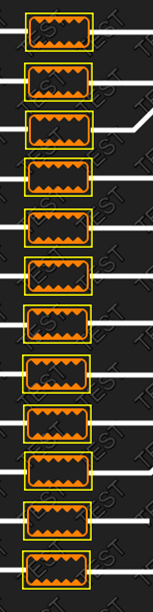
                          b4ed0abc-7f6f-463e-a0f9-35dc9ab9f05a-image.png

                          Thanks

                          jsulmJ 1 Reply Last reply
                          0
                          • N ndiwan

                            I am drawing a rectangular widget. That's why addign rectangle. Did you still see any memory leakage related issue in paintEvent ?

                            b4ed0abc-7f6f-463e-a0f9-35dc9ab9f05a-image.png

                            Thanks

                            jsulmJ Offline
                            jsulmJ Offline
                            jsulm
                            Lifetime Qt Champion
                            wrote on last edited by
                            #13

                            @ndiwan said in Memory Leak in Qt 4.10.0:

                            Did you still see any memory leakage related issue in paintEvent ?

                            No
                            Did you run Valgrind as suggested to find memory leaks?

                            https://forum.qt.io/topic/113070/qt-code-of-conduct

                            1 Reply Last reply
                            0
                            • N Offline
                              N Offline
                              ndiwan
                              wrote on last edited by ndiwan
                              #14

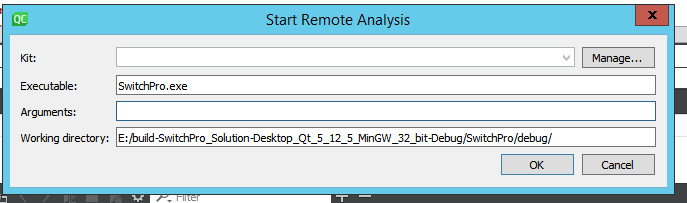
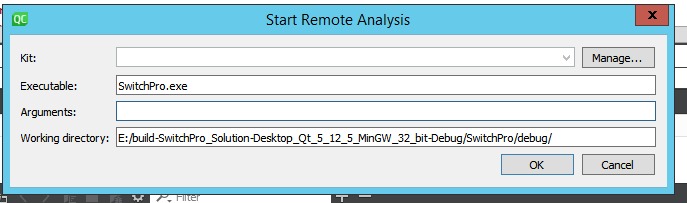
                              Sorry, But I am not sure how to use that in Window Qt. I know ho to use valgrind in Linux
                              664e751d-baa5-408f-b9a4-c36d0fd2e186-image.png

                              001ebda1-77b7-4300-971e-9fc77764337b-image.png

                              Actually my application runs with a login dialog. Do I need to provided user id and passoword in arguments here ?
                              Also kit drop down is diable.

                              Thanks

                              jsulmJ 1 Reply Last reply
                              0
                              • N ndiwan

                                Sorry, But I am not sure how to use that in Window Qt. I know ho to use valgrind in Linux

                                664e751d-baa5-408f-b9a4-c36d0fd2e186-image.png

                                001ebda1-77b7-4300-971e-9fc77764337b-image.png

                                Actually my application runs with a login dialog. Do I need to provided user id and passoword in arguments here ?
                                Also kit drop down is diable.

                                Thanks

                                jsulmJ Offline
                                jsulmJ Offline
                                jsulm
                                Lifetime Qt Champion
                                wrote on last edited by
                                #15

                                @ndiwan said in Memory Leak in Qt 4.10.0:

                                Do I need to provided user id and passoword in arguments here ?

                                No

                                "Also kit drop down is diable" - what do you mean?

                                https://forum.qt.io/topic/113070/qt-code-of-conduct

                                1 Reply Last reply
                                0
                                • N Offline
                                  N Offline
                                  ndiwan
                                  wrote on last edited by
                                  #16

                                  Kit dropdown is disable.

                                  Thansks

                                  jsulmJ 1 Reply Last reply
                                  0
                                  • N ndiwan

                                    Kit dropdown is disable.

                                    Thansks

                                    jsulmJ Offline
                                    jsulmJ Offline
                                    jsulm
                                    Lifetime Qt Champion
                                    wrote on last edited by
                                    #17

                                    @ndiwan said in Memory Leak in Qt 4.10.0:

                                    Kit dropdown is disable

                                    This is the same what I asked about. Can you please explain what dropdown you mean? Maybe a screen-shot?

                                    https://forum.qt.io/topic/113070/qt-code-of-conduct

                                    1 Reply Last reply
                                    0
                                    • N Offline
                                      N Offline
                                      ndiwan
                                      wrote on last edited by
                                      #18

                                      b19325b7-e01a-4bcb-b0c0-4aeeefc8247a-image.png

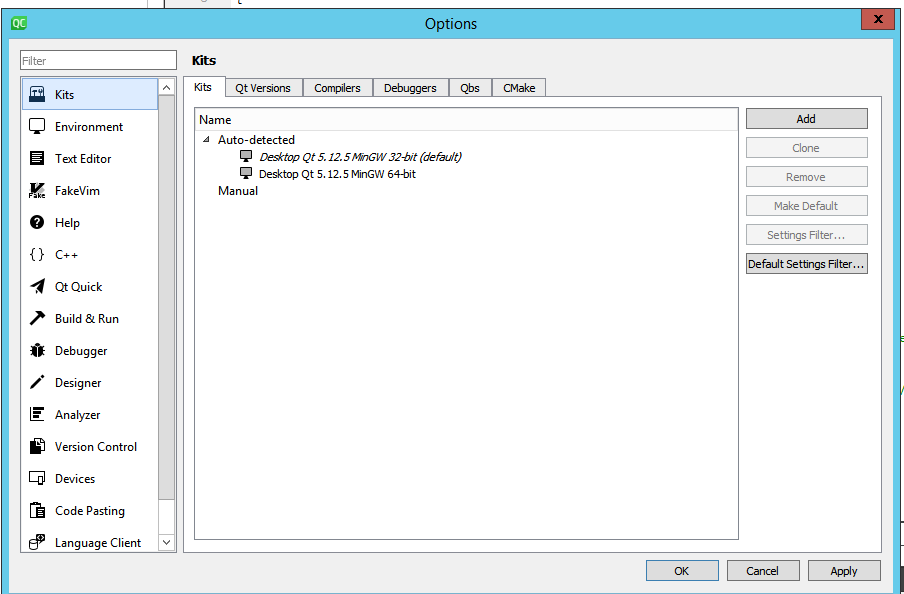
                                      In the above screenshot Kit combo dropdown is disable. If I click manage , I can see this:

                                      10ef1a27-cc0e-4834-8a40-c26bb764504e-image.png

                                      jsulmJ 1 Reply Last reply
                                      0
                                      • N ndiwan

                                        b19325b7-e01a-4bcb-b0c0-4aeeefc8247a-image.png

                                        In the above screenshot Kit combo dropdown is disable. If I click manage , I can see this:

                                        10ef1a27-cc0e-4834-8a40-c26bb764504e-image.png

                                        jsulmJ Offline
                                        jsulmJ Offline
                                        jsulm
                                        Lifetime Qt Champion
                                        wrote on last edited by
                                        #19

                                        @ndiwan Do you have Valgrind? Check in Analyzer/Valgrind. You need to set the path to Valgrind executable.

                                        https://forum.qt.io/topic/113070/qt-code-of-conduct

                                        Christian EhrlicherC 1 Reply Last reply
                                        0
                                        • jsulmJ jsulm

                                          @ndiwan Do you have Valgrind? Check in Analyzer/Valgrind. You need to set the path to Valgrind executable.

                                          Christian EhrlicherC Online
                                          Christian EhrlicherC Online
                                          Christian Ehrlicher
                                          Lifetime Qt Champion
                                          wrote on last edited by
                                          #20

                                          @jsulm Since when does valgrind run on windows?

                                          Qt Online Installer direct download: https://download.qt.io/official_releases/online_installers/
                                          Visit the Qt Academy at https://academy.qt.io/catalog

                                          jsulmJ JonBJ 2 Replies Last reply
                                          2

                                          • Login

                                          • Login or register to search.
                                          • First post
                                            Last post
                                          0
                                          • Categories
                                          • Recent
                                          • Tags
                                          • Popular
                                          • Users
                                          • Groups
                                          • Search
                                          • Get Qt Extensions
                                          • Unsolved