Memory Leak in Qt 4.10.0
-
@ndiwan should actually not be necessary ,
m_SelectedPathis, despite its name, a local (scoped) variable:void CSkateRetarder::paintEvent(QPaintEvent * ) { QPainter painter(this); painter.setRenderHint(QPainter::Antialiasing); QPainterPath m_SelectedPath = QPainterPath(); m_SelectedPath.addRect(0,0, getRectWidth()+10, getRectHeight()+10); ...so it should get cleaned up when the function returns
Be aware of the Qt Code of Conduct, when posting : https://forum.qt.io/topic/113070/qt-code-of-conduct
Q: What's that?
A: It's blue light.
Q: What does it do?
A: It turns blue. -
@ndiwan should actually not be necessary ,
m_SelectedPathis, despite its name, a local (scoped) variable:void CSkateRetarder::paintEvent(QPaintEvent * ) { QPainter painter(this); painter.setRenderHint(QPainter::Antialiasing); QPainterPath m_SelectedPath = QPainterPath(); m_SelectedPath.addRect(0,0, getRectWidth()+10, getRectHeight()+10); ...so it should get cleaned up when the function returns
@J-Hilk Ah, you're right, didn't notice this.
-
I am drawing a rectangular widget. That's why addign rectangle. Did you still see any memory leakage related issue in paintEvent ?

Thanks
@ndiwan said in Memory Leak in Qt 4.10.0:
Did you still see any memory leakage related issue in paintEvent ?
No
Did you run Valgrind as suggested to find memory leaks? -
-
Sorry, But I am not sure how to use that in Window Qt. I know ho to use valgrind in Linux
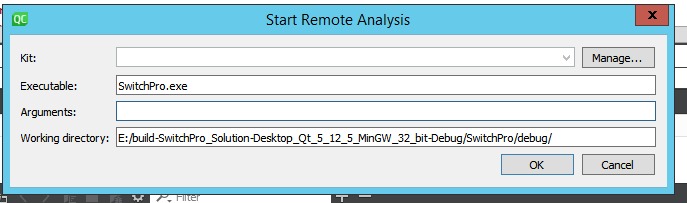

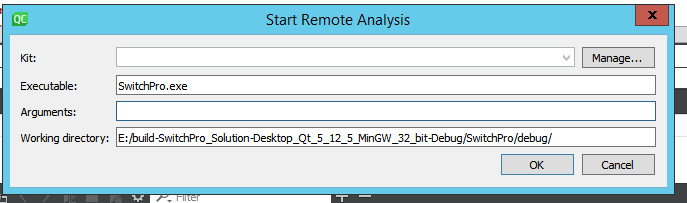
Actually my application runs with a login dialog. Do I need to provided user id and passoword in arguments here ?
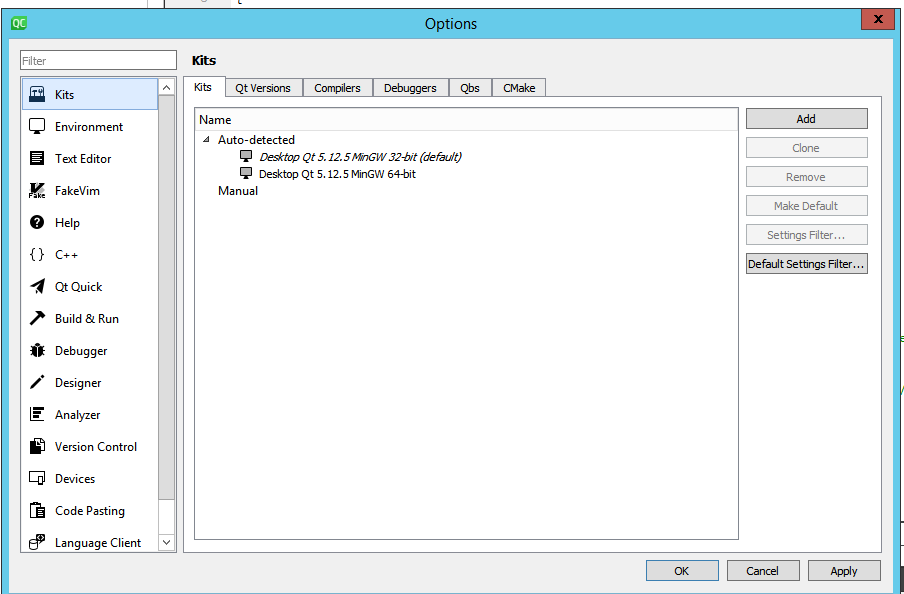
Also kit drop down is diable.Thanks
@ndiwan said in Memory Leak in Qt 4.10.0:
Do I need to provided user id and passoword in arguments here ?
No
"Also kit drop down is diable" - what do you mean?
-
@ndiwan said in Memory Leak in Qt 4.10.0:
Kit dropdown is disable
This is the same what I asked about. Can you please explain what dropdown you mean? Maybe a screen-shot?
-
@ndiwan Do you have Valgrind? Check in Analyzer/Valgrind. You need to set the path to Valgrind executable.
-
@ndiwan Do you have Valgrind? Check in Analyzer/Valgrind. You need to set the path to Valgrind executable.
@jsulm Since when does valgrind run on windows?
Qt Online Installer direct download: https://download.qt.io/official_releases/online_installers/
Visit the Qt Academy at https://academy.qt.io/catalog -
@jsulm Since when does valgrind run on windows?
@Christian-Ehrlicher Ah, Windows. Well, since never :-)
-
@jsulm Since when does valgrind run on windows?
@Christian-Ehrlicher said in Memory Leak in Qt 4.10.0:
Since when does valgrind run on windows?
I am the person who originally replied to @ndiwan 's "Could you please help me with how I can detect memory leak." with "Use
valgrindto detect memory leakages."I read the question carefully and nowhere did it mention using Windows. One of my pet bug-bears is if questioners cannot tell you what OS they are on for a question of this kind, why should I guess they are under Windows? Other OS people tell you what they are on, why do Windows users think people ought know they are on Windows...?
-
@ndiwan said in Memory Leak in Qt 4.10.0:
So How I can check memory leakage in Qt Creator running on Windows 10 ?
I would imagine it would depend on what compiler you have chosen to use, which we don't know....
-
@Christian-Ehrlicher said in Memory Leak in Qt 4.10.0:
Since when does valgrind run on windows?
I am the person who originally replied to @ndiwan 's "Could you please help me with how I can detect memory leak." with "Use
valgrindto detect memory leakages."I read the question carefully and nowhere did it mention using Windows. One of my pet bug-bears is if questioners cannot tell you what OS they are on for a question of this kind, why should I guess they are under Windows? Other OS people tell you what they are on, why do Windows users think people ought know they are on Windows...?
@JonB said in Memory Leak in Qt 4.10.0:
why do Windows users think people ought know they are on Windows...?
I don't know.
And yes - my answer would also be - use valgrind or any other proper leak checker tool and how to you know that there is a memleak at all? -
On Windows, it may be a good idea to use Visual Studio + Qt plugin. Visual Studio is a powerful tool and has memory check functions for C++ code.
https://docs.microsoft.com/en-us/visualstudio/debugger/finding-memory-leaks-using-the-crt-library?view=vs-2019 -
https://www.albertgao.xyz/2016/09/28/how-to-use-valgrind-on-windows/
I came across this, but never tried it by myself. Strongly recommend to use VS. -
On Windows, it may be a good idea to use Visual Studio + Qt plugin. Visual Studio is a powerful tool and has memory check functions for C++ code.
https://docs.microsoft.com/en-us/visualstudio/debugger/finding-memory-leaks-using-the-crt-library?view=vs-2019