Skip to content
  • Categories
  • Recent
  • Tags
  • Popular
  • Users
  • Groups
  • Search
  • Get Qt Extensions
  • Unsolved
Collapse
Brand Logo
  1. Home
  2. Qt Development
  3. General and Desktop
  4. QSystemTrayIcon, change behavior
Qt 6.11 is out! See what's new in the release blog

QSystemTrayIcon, change behavior

Scheduled Pinned Locked Moved Unsolved General and Desktop
17 Posts 3 Posters 1.7k Views 2 Watching
  • Oldest to Newest
  • Newest to Oldest
  • Most Votes
Reply
  • Reply as topic
Log in to reply
This topic has been deleted. Only users with topic management privileges can see it.
  • H Offline
    H Offline
    hbatalha
    wrote on last edited by
    #1

    I just learned how use the QSystemTrayIcon, however it works in a way that is not exactly what I want.

    This is the code(snippet) that I am using :

    void MainWindow::on_button_clicked()
    {
    // tray is declared in the class and initialized with the icon in the constructor
        tray->show();         
             
       tray->showMessage("A test", "this has proved to be working", QSystemTrayIcon::NoIcon );
             
       / tray->setVisible(false);
             
    }            
    

    With this code the tray is shown as expected but after the tray disappears the icon stay here:
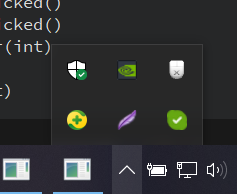
    Screenshot_1.png

    which is something I don't want since it has no use there(didn't set any contextmenu)

    If after I showMessage() I set the tray to invisible it removes the icon from there but the notification won't stay in the notification area.

    Is there a way to change this behavior?

    1 Reply Last reply
    0
    • SGaistS Offline
      SGaistS Offline
      SGaist
      Lifetime Qt Champion
      wrote on last edited by
      #2

      Hi,

      A tray icon does not necessarily have a contextual menu, it might also just provide some information.

      Your situation is not really clear.

      What do you want from your system tray icon ?

      Interested in AI ? www.idiap.ch
      Please read the Qt Code of Conduct - https://forum.qt.io/topic/113070/qt-code-of-conduct

      H 1 Reply Last reply
      2
      • SGaistS SGaist

        Hi,

        A tray icon does not necessarily have a contextual menu, it might also just provide some information.

        Your situation is not really clear.

        What do you want from your system tray icon ?

        H Offline
        H Offline
        hbatalha
        wrote on last edited by
        #3

        @SGaist thanks for the quick reply

        What do you want from your system tray icon ?

        Screenshot_2.png

        This is the message it shows.

        After this message disappears, the icon I set for the tray continues here:
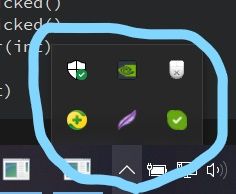
        InkedScreenshot_1_LI.jpg

        I don't want that.
        I can set the visibility to false after showMessage() but then, the message won't stay in the notification area.

        I hope I made the question clear.

        1 Reply Last reply
        0
        • SGaistS Offline
          SGaistS Offline
          SGaist
          Lifetime Qt Champion
          wrote on last edited by
          #4

          So you just want the notification but not the icon ?

          Interested in AI ? www.idiap.ch
          Please read the Qt Code of Conduct - https://forum.qt.io/topic/113070/qt-code-of-conduct

          H 1 Reply Last reply
          1
          • SGaistS SGaist

            So you just want the notification but not the icon ?

            H Offline
            H Offline
            hbatalha
            wrote on last edited by
            #5

            @SGaist sorry for the late reply

            So you just want the notification but not the icon ?

            yes, and I want the notification to stay in the notification area

            1 Reply Last reply
            0
            • SGaistS Offline
              SGaistS Offline
              SGaist
              Lifetime Qt Champion
              wrote on last edited by
              #6

              Then you might have to pilfer the backend code of QSystemTrayIcon since you have no use of it beside the notification part.

              Interested in AI ? www.idiap.ch
              Please read the Qt Code of Conduct - https://forum.qt.io/topic/113070/qt-code-of-conduct

              H 2 Replies Last reply
              0
              • SGaistS SGaist

                Then you might have to pilfer the backend code of QSystemTrayIcon since you have no use of it beside the notification part.

                H Offline
                H Offline
                hbatalha
                wrote on last edited by
                #7

                @SGaist

                Then you might have to pilfer the backend code of QSystemTrayIcon since you have no use of it beside the notification part.

                Where do I find the code?

                Christian EhrlicherC 1 Reply Last reply
                0
                • H hbatalha

                  @SGaist

                  Then you might have to pilfer the backend code of QSystemTrayIcon since you have no use of it beside the notification part.

                  Where do I find the code?

                  Christian EhrlicherC Online
                  Christian EhrlicherC Online
                  Christian Ehrlicher
                  Lifetime Qt Champion
                  wrote on last edited by
                  #8

                  In the git repo or e.g. here: https://code.woboq.org/qt5/qtbase/src/widgets/util/qsystemtrayicon.cpp.html

                  Qt Online Installer direct download: https://download.qt.io/official_releases/online_installers/
                  Visit the Qt Academy at https://academy.qt.io/catalog

                  H 1 Reply Last reply
                  1
                  • Christian EhrlicherC Christian Ehrlicher

                    In the git repo or e.g. here: https://code.woboq.org/qt5/qtbase/src/widgets/util/qsystemtrayicon.cpp.html

                    H Offline
                    H Offline
                    hbatalha
                    wrote on last edited by
                    #9

                    @Christian-Ehrlicher thank you
                    Is there any step by step on how to build it from source, or in which category here in the forum can I post a question?

                    1 Reply Last reply
                    0
                    • Christian EhrlicherC Online
                      Christian EhrlicherC Online
                      Christian Ehrlicher
                      Lifetime Qt Champion
                      wrote on last edited by
                      #10

                      Why do you want to compile Qt5 now?
                      See https://doc.qt.io/qt-5/build-sources.html

                      Qt Online Installer direct download: https://download.qt.io/official_releases/online_installers/
                      Visit the Qt Academy at https://academy.qt.io/catalog

                      H 2 Replies Last reply
                      0
                      • Christian EhrlicherC Christian Ehrlicher

                        Why do you want to compile Qt5 now?
                        See https://doc.qt.io/qt-5/build-sources.html

                        H Offline
                        H Offline
                        hbatalha
                        wrote on last edited by
                        #11

                        @Christian-Ehrlicher just out of curiosity

                        1 Reply Last reply
                        0
                        • SGaistS SGaist

                          Then you might have to pilfer the backend code of QSystemTrayIcon since you have no use of it beside the notification part.

                          H Offline
                          H Offline
                          hbatalha
                          wrote on last edited by
                          #12

                          @SGaist

                          What exactly did you mean by "pilfer the backend "? Should I remove some code?

                          SGaistS 1 Reply Last reply
                          0
                          • Christian EhrlicherC Christian Ehrlicher

                            Why do you want to compile Qt5 now?
                            See https://doc.qt.io/qt-5/build-sources.html

                            H Offline
                            H Offline
                            hbatalha
                            wrote on last edited by
                            #13

                            @Christian-Ehrlicher or https://doc.qt.io/qt-6/windows-building.html

                            1 Reply Last reply
                            0
                            • H hbatalha

                              @SGaist

                              What exactly did you mean by "pilfer the backend "? Should I remove some code?

                              SGaistS Offline
                              SGaistS Offline
                              SGaist
                              Lifetime Qt Champion
                              wrote on last edited by
                              #14

                              @hbatalha said in QSystemTrayIcon, change behavior:

                              @SGaist

                              What exactly did you mean by "pilfer the backend "? Should I remove some code?

                              No, you should get some inspiration from it.

                              Interested in AI ? www.idiap.ch
                              Please read the Qt Code of Conduct - https://forum.qt.io/topic/113070/qt-code-of-conduct

                              H 1 Reply Last reply
                              0
                              • SGaistS SGaist

                                @hbatalha said in QSystemTrayIcon, change behavior:

                                @SGaist

                                What exactly did you mean by "pilfer the backend "? Should I remove some code?

                                No, you should get some inspiration from it.

                                H Offline
                                H Offline
                                hbatalha
                                wrote on last edited by
                                #15

                                @SGaist
                                I don't see how that will help me achieve what I want, I went through the code in @Christian-Ehrlicher 's link but couldn't find anything that would help me, I might be missing some things.

                                1 Reply Last reply
                                0
                                • SGaistS Offline
                                  SGaistS Offline
                                  SGaist
                                  Lifetime Qt Champion
                                  wrote on last edited by
                                  #16

                                  You have to do some more spelunking and go to the backend side of things to get the Windows specific implementation.

                                  Interested in AI ? www.idiap.ch
                                  Please read the Qt Code of Conduct - https://forum.qt.io/topic/113070/qt-code-of-conduct

                                  H 1 Reply Last reply
                                  0
                                  • SGaistS SGaist

                                    You have to do some more spelunking and go to the backend side of things to get the Windows specific implementation.

                                    H Offline
                                    H Offline
                                    hbatalha
                                    wrote on last edited by
                                    #17

                                    @SGaist I will try

                                    1 Reply Last reply
                                    0

                                    • Login

                                    • Login or register to search.
                                    • First post
                                      Last post
                                    0
                                    • Categories
                                    • Recent
                                    • Tags
                                    • Popular
                                    • Users
                                    • Groups
                                    • Search
                                    • Get Qt Extensions
                                    • Unsolved