Skip to content
  • Categories
  • Recent
  • Tags
  • Popular
  • Users
  • Groups
  • Search
  • Get Qt Extensions
  • Unsolved
Collapse
Brand Logo
  1. Home
  2. Qt Development
  3. General and Desktop
  4. How to delete dots from QWidget?
Qt 6.11 is out! See what's new in the release blog

How to delete dots from QWidget?

Scheduled Pinned Locked Moved Solved General and Desktop
18 Posts 2 Posters 2.0k Views 1 Watching
  • Oldest to Newest
  • Newest to Oldest
  • Most Votes
Reply
  • Reply as topic
Log in to reply
This topic has been deleted. Only users with topic management privileges can see it.
  • T Offline
    T Offline
    TomNow99
    wrote on last edited by TomNow99
    #1

    Hi,

    I have QComboBox with QTableView on it and with model with QStandardItems. It looks like this:

    alex.png

    Selected item ( here "Alex" ) has dots around the cell. I would like to delete that dots. A few days ago I asked about it in other QWidget ( no QComboBox / QTableView ). Someone wrote that I should use "widget->setFocusPolicy(Qt::NoFocus)" and in that other widget it was a solution. Here I try it:

            myComboBox->setFocusPolicy(Qt::NoFocus);
            tableView->setFocusPolicy(Qt::NoFocus);
    

    but it doesn't work.

    So how Can I delete this dots ( focus )?

    EDIT:
    I think I find a good solution (Mikhail Zimka's solution with delegate ). Solution with css doesn't work for me.

    https://stackoverflow.com/questions/9044570/qt-qtablewidgets-gray-dotted-border-around-a-selected-cell

    1 Reply Last reply
    0
    • T TomNow99

      Why I can't do:

       if ( myOption.state & QStyle::State_Selected )
            myOption.state &= ~QStyle::State_Selected;
      

      in initStyleOption?

      Yes that code works in paint() method for me too.

      mrjjM Offline
      mrjjM Offline
      mrjj
      Lifetime Qt Champion
      wrote on last edited by mrjj
      #9

      Hi

      • Why I can't do in initStyleOption?

      I dont think its called for all changes in selection etc so
      it must be handled in paint.

      I was wrong. This also works. ( with no paint() )

      void FocusControlDelegate::initStyleOption(QStyleOptionViewItem *option,
                                                 const QModelIndex &index) const
      {
              option->state = option->state & ~QStyle::State_HasFocus;
              option->state &= ~QStyle::State_Selected;
              QStyledItemDelegate::initStyleOption(option, index);
      }
      
      1 Reply Last reply
      3
      • mrjjM Offline
        mrjjM Offline
        mrjj
        Lifetime Qt Champion
        wrote on last edited by
        #2

        Hi
        The delegate is a fine solution if no focus or stylesheet dont fit.

        1 Reply Last reply
        2
        • T Offline
          T Offline
          TomNow99
          wrote on last edited by TomNow99
          #3

          @mrjj Can you explain me ( I'm looking onMikhail Zimka' solution from link ) why I have to write:

              if(!f_focus_border_enabled && option->state & QStyle::State_HasFocus)
              {
                  option->state = option->state & ~QStyle::State_HasFocus;
              }
          

          ?

          When I delete that lines, so my initStyleOption() method look like this:

          void FocusControlDelegate::initStyleOption(QStyleOptionViewItem *option, const QModelIndex &index) const {
              QStyledItemDelegate::initStyleOption(option, index);
          }
          

          everything is ok - I don't see any dots.

          And extra question:

          Can you explain me why I can't write in initStyleOption() method:

              if(option->state & QStyle::State_Selected)
              {
                  option->state = option->state & ~QStyle::State_Selected;
              }
          

          Of course I can and I can compile this code, but I still see selections.

          mrjjM 1 Reply Last reply
          0
          • T TomNow99

            @mrjj Can you explain me ( I'm looking onMikhail Zimka' solution from link ) why I have to write:

                if(!f_focus_border_enabled && option->state & QStyle::State_HasFocus)
                {
                    option->state = option->state & ~QStyle::State_HasFocus;
                }
            

            ?

            When I delete that lines, so my initStyleOption() method look like this:

            void FocusControlDelegate::initStyleOption(QStyleOptionViewItem *option, const QModelIndex &index) const {
                QStyledItemDelegate::initStyleOption(option, index);
            }
            

            everything is ok - I don't see any dots.

            And extra question:

            Can you explain me why I can't write in initStyleOption() method:

                if(option->state & QStyle::State_Selected)
                {
                    option->state = option->state & ~QStyle::State_Selected;
                }
            

            Of course I can and I can compile this code, but I still see selections.

            mrjjM Offline
            mrjjM Offline
            mrjj
            Lifetime Qt Champion
            wrote on last edited by mrjj
            #4

            @TomNow99
            Hi
            The first code just uses a flag f_focus_border_enabled to allow to turn on/off this functionality

            if(option->state & QStyle::State_Selected)
               {
                   option->state = option->state & ~QStyle::State_Selected;
               }
            

            will just always remove the State_Selected with no flag.

            Its odd if it doesn't work for you. Do you have stylesheets put on it ?

            update: tested the code and it works here
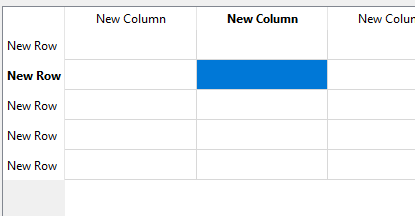
            alt text

            1 Reply Last reply
            2
            • T Offline
              T Offline
              TomNow99
              wrote on last edited by TomNow99
              #5

              @mrjj Thank you for answer.

              1. I see that flag - f_focus_border_enabled. But when I look at my code: it is always false - I don't change it using setFocusBorderEnabled() or something else. So I always go to if condition, so I always do:
              option->state = option->state & ~QStyle::State_HasFocus;
              

              And I would like to know what will be when I delete this line, so from code:

              void FocusControlDelegate::initStyleOption(QStyleOptionViewItem *option, const QModelIndex &index) const {
                  QStyledItemDelegate::initStyleOption(option, index);
                  if(!f_focus_border_enabled && option->state & QStyle::State_HasFocus)
                  {
                      option->state = option->state & ~QStyle::State_HasFocus;
                  }
              }
              

              I have now:

              void FocusControlDelegate::initStyleOption(QStyleOptionViewItem *option, const QModelIndex &index) const {
                  QStyledItemDelegate::initStyleOption(option, index);
              }
              

              And I don't see any changes ( in the first and in the second code I don't see any dots ). And my question: why?

              1. Now I would like to delete selections ( blue rectangle in your picture ), which will be for example when I move cursor to the cell. I thought that I can do something simillar and my code is:
              void FocusControlDelegate::initStyleOption(QStyleOptionViewItem *option, const QModelIndex &index) const {
                  QStyledItemDelegate::initStyleOption(option, index);
                  if(!f_focus_border_enabled && option->state & QStyle::State_HasFocus)
                  {
                      option->state = option->state & ~QStyle::State_HasFocus;
                  }
              
                  if(option->state & QStyle::State_Selected)
                  {
                      option->state = option->state & ~QStyle::State_Selected;
                  }
              }
              

              But it doesn't works. I still see blue select rectangle. I don't have any styleSheets.

              mrjjM 1 Reply Last reply
              0
              • T TomNow99

                @mrjj Thank you for answer.

                1. I see that flag - f_focus_border_enabled. But when I look at my code: it is always false - I don't change it using setFocusBorderEnabled() or something else. So I always go to if condition, so I always do:
                option->state = option->state & ~QStyle::State_HasFocus;
                

                And I would like to know what will be when I delete this line, so from code:

                void FocusControlDelegate::initStyleOption(QStyleOptionViewItem *option, const QModelIndex &index) const {
                    QStyledItemDelegate::initStyleOption(option, index);
                    if(!f_focus_border_enabled && option->state & QStyle::State_HasFocus)
                    {
                        option->state = option->state & ~QStyle::State_HasFocus;
                    }
                }
                

                I have now:

                void FocusControlDelegate::initStyleOption(QStyleOptionViewItem *option, const QModelIndex &index) const {
                    QStyledItemDelegate::initStyleOption(option, index);
                }
                

                And I don't see any changes ( in the first and in the second code I don't see any dots ). And my question: why?

                1. Now I would like to delete selections ( blue rectangle in your picture ), which will be for example when I move cursor to the cell. I thought that I can do something simillar and my code is:
                void FocusControlDelegate::initStyleOption(QStyleOptionViewItem *option, const QModelIndex &index) const {
                    QStyledItemDelegate::initStyleOption(option, index);
                    if(!f_focus_border_enabled && option->state & QStyle::State_HasFocus)
                    {
                        option->state = option->state & ~QStyle::State_HasFocus;
                    }
                
                    if(option->state & QStyle::State_Selected)
                    {
                        option->state = option->state & ~QStyle::State_Selected;
                    }
                }
                

                But it doesn't works. I still see blue select rectangle. I don't have any styleSheets.

                mrjjM Offline
                mrjjM Offline
                mrjj
                Lifetime Qt Champion
                wrote on last edited by mrjj
                #6

                Hi
                Very odd

                void FocusControlDelegate::initStyleOption(QStyleOptionViewItem *option, const QModelIndex &index) const {
                    QStyledItemDelegate::initStyleOption(option, index);
                }
                

                still show the dots for me. ( as expected)

                Are you sure it works for you just as this ?

                Anyway, you can remove the blue selection like this (simply dont paint it)

                void FocusControlDelegate::paint(QPainter *painter, const QStyleOptionViewItem &option,
                                                 const QModelIndex &index) const
                {
                    QStyleOptionViewItem myOption = QStyleOptionViewItem(option);
                    myOption.state &= ~QStyle::State_Selected;
                    QStyledItemDelegate::paint( painter, myOption, index );
                }
                
                1 Reply Last reply
                0
                • mrjjM Offline
                  mrjjM Offline
                  mrjj
                  Lifetime Qt Champion
                  wrote on last edited by
                  #7

                  hi
                  This works for me to remove both dots and blue

                  void FocusControlDelegate::initStyleOption(QStyleOptionViewItem *option,
                                                             const QModelIndex &index) const
                  {   
                          option->state = option->state & ~QStyle::State_HasFocus;
                          QStyledItemDelegate::initStyleOption(option, index);
                  }
                  
                  void FocusControlDelegate::paint(QPainter *painter, const QStyleOptionViewItem &option,
                                                   const QModelIndex &index) const
                  {
                      QStyleOptionViewItem myOption = QStyleOptionViewItem(option);
                      if ( myOption.state & QStyle::State_Selected )
                        myOption.state &= ~QStyle::State_Selected;
                  
                      QStyledItemDelegate::paint( painter, myOption, index );
                  }
                  
                  
                  1 Reply Last reply
                  0
                  • T Offline
                    T Offline
                    TomNow99
                    wrote on last edited by
                    #8

                    Why I can't do:

                     if ( myOption.state & QStyle::State_Selected )
                          myOption.state &= ~QStyle::State_Selected;
                    

                    in initStyleOption?

                    Yes that code works in paint() method for me too.

                    mrjjM 1 Reply Last reply
                    0
                    • T TomNow99

                      Why I can't do:

                       if ( myOption.state & QStyle::State_Selected )
                            myOption.state &= ~QStyle::State_Selected;
                      

                      in initStyleOption?

                      Yes that code works in paint() method for me too.

                      mrjjM Offline
                      mrjjM Offline
                      mrjj
                      Lifetime Qt Champion
                      wrote on last edited by mrjj
                      #9

                      Hi

                      • Why I can't do in initStyleOption?

                      I dont think its called for all changes in selection etc so
                      it must be handled in paint.

                      I was wrong. This also works. ( with no paint() )

                      void FocusControlDelegate::initStyleOption(QStyleOptionViewItem *option,
                                                                 const QModelIndex &index) const
                      {
                              option->state = option->state & ~QStyle::State_HasFocus;
                              option->state &= ~QStyle::State_Selected;
                              QStyledItemDelegate::initStyleOption(option, index);
                      }
                      
                      1 Reply Last reply
                      3
                      • T Offline
                        T Offline
                        TomNow99
                        wrote on last edited by
                        #10

                        @mrjj It doesn't work :(

                        I create very simple code:

                        #include "selectionkillerdelegate.h"
                        
                        SelectionKillerDelegate::SelectionKillerDelegate()
                        {
                        
                        }
                        
                        void SelectionKillerDelegate::initStyleOption(QStyleOptionViewItem *option, const QModelIndex &index) const
                        {
                            option->state = option->state & ~QStyle::State_HasFocus;
                            option->state &= ~QStyle::State_Selected;
                            QStyledItemDelegate::initStyleOption(option, index);
                        }
                        
                        #include <QScrollBar>
                        #include <QFocusEvent>
                        #include <windows.h>
                        #include <QStandardItem>
                        #include "selectionkillerdelegate.h"
                        #include <QStandardItemModel>
                        #include <QCoreApplication>
                        myComboBox::myComboBox(QWidget *parent): QComboBox(parent)
                        {
                            QStandardItemModel *model = new QStandardItemModel;
                        
                            QStandardItem *item = new QStandardItem("dsadsa");
                        
                            SelectionKillerDelegate *delegate = new SelectionKillerDelegate;
                        
                            model->setItem(0,0,item);
                        
                           item = new QStandardItem("32");
                        
                            model->setItem(1,0,item);
                        
                            item = new QStandardItem("53");
                        
                            model->setItem(2,0,item);
                        
                            item = new QStandardItem("7564");
                        
                            model->setItem(3,0,item);
                            setItemDelegate(delegate);
                            setModel(model);
                        }
                        

                        When I do

                            setItemDelegate(delegate); // that my Delegate
                        

                        or

                            setItemDelegate(new QStyledItemDelegate());
                        

                        effect is the same: I don't see dots, but see selects.

                        mrjjM 1 Reply Last reply
                        0
                        • T TomNow99

                          @mrjj It doesn't work :(

                          I create very simple code:

                          #include "selectionkillerdelegate.h"
                          
                          SelectionKillerDelegate::SelectionKillerDelegate()
                          {
                          
                          }
                          
                          void SelectionKillerDelegate::initStyleOption(QStyleOptionViewItem *option, const QModelIndex &index) const
                          {
                              option->state = option->state & ~QStyle::State_HasFocus;
                              option->state &= ~QStyle::State_Selected;
                              QStyledItemDelegate::initStyleOption(option, index);
                          }
                          
                          #include <QScrollBar>
                          #include <QFocusEvent>
                          #include <windows.h>
                          #include <QStandardItem>
                          #include "selectionkillerdelegate.h"
                          #include <QStandardItemModel>
                          #include <QCoreApplication>
                          myComboBox::myComboBox(QWidget *parent): QComboBox(parent)
                          {
                              QStandardItemModel *model = new QStandardItemModel;
                          
                              QStandardItem *item = new QStandardItem("dsadsa");
                          
                              SelectionKillerDelegate *delegate = new SelectionKillerDelegate;
                          
                              model->setItem(0,0,item);
                          
                             item = new QStandardItem("32");
                          
                              model->setItem(1,0,item);
                          
                              item = new QStandardItem("53");
                          
                              model->setItem(2,0,item);
                          
                              item = new QStandardItem("7564");
                          
                              model->setItem(3,0,item);
                              setItemDelegate(delegate);
                              setModel(model);
                          }
                          

                          When I do

                              setItemDelegate(delegate); // that my Delegate
                          

                          or

                              setItemDelegate(new QStyledItemDelegate());
                          

                          effect is the same: I don't see dots, but see selects.

                          mrjjM Offline
                          mrjjM Offline
                          mrjj
                          Lifetime Qt Champion
                          wrote on last edited by mrjj
                          #11

                          @TomNow99
                          Hi
                          Hmm, this is a combobox, right ?
                          Not a Table as i test with.

                          But it does call the delegate code right ?
                          So you can use the paint() vesion and it should work ?

                          Just to be sure its this light blue selection ?
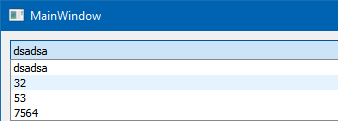
                          alt text
                          Oh that is not the blue selection, its a hover effect.
                          The delegate does remove blue selection with he paint() \o/

                          1 Reply Last reply
                          0
                          • T Offline
                            T Offline
                            TomNow99
                            wrote on last edited by
                            #12

                            @mrjj Yes, I was talking and still talk about QComboBox.

                            I did test.

                            My results:

                            delegate.png

                            On the right I have QComboBox without delegate. And here we can see dots around item, and blue select rectangle.

                            On the left i have QComboBox with delegate but QStyledItemDelegate:

                            setItemDelegate(new QStyledItemDelegate());
                            

                            So I don't subclass QStyledItemDelegate, but use QT QStyledDelegate. Result? No dots, no select rectangle, only hover rectangle.

                            So I don't need any method like initStyleOption and paint to delete dots and select rectangle?

                            How Can I delete that hover rectangle?

                            mrjjM 1 Reply Last reply
                            0
                            • T TomNow99

                              @mrjj Yes, I was talking and still talk about QComboBox.

                              I did test.

                              My results:

                              delegate.png

                              On the right I have QComboBox without delegate. And here we can see dots around item, and blue select rectangle.

                              On the left i have QComboBox with delegate but QStyledItemDelegate:

                              setItemDelegate(new QStyledItemDelegate());
                              

                              So I don't subclass QStyledItemDelegate, but use QT QStyledDelegate. Result? No dots, no select rectangle, only hover rectangle.

                              So I don't need any method like initStyleOption and paint to delete dots and select rectangle?

                              How Can I delete that hover rectangle?

                              mrjjM Offline
                              mrjjM Offline
                              mrjj
                              Lifetime Qt Champion
                              wrote on last edited by mrjj
                              #13

                              Hi
                              Hmm, you are right. simply giving it a plain QStyledItemDelegate
                              also removes both dots and selection colors.
                              That was pretty lucky :)

                              I dont know. Using stylesheet has side effects and on Windows it ignores palette.
                              https://stackoverflow.com/questions/37765673/changing-hover-style-for-qcombobox

                              1 Reply Last reply
                              0
                              • T Offline
                                T Offline
                                TomNow99
                                wrote on last edited by
                                #14

                                @mrjj I thought about css. Do you know any delegate way?

                                Something like:

                                option->state = option->state & ~QStyle::State_HASHOVER;
                                

                                Big letters because this doesn't exists ;)

                                mrjjM 1 Reply Last reply
                                0
                                • T TomNow99

                                  @mrjj I thought about css. Do you know any delegate way?

                                  Something like:

                                  option->state = option->state & ~QStyle::State_HASHOVER;
                                  

                                  Big letters because this doesn't exists ;)

                                  mrjjM Offline
                                  mrjjM Offline
                                  mrjj
                                  Lifetime Qt Champion
                                  wrote on last edited by
                                  #15

                                  @TomNow99

                                  Hi
                                  It seems that

                                  void FocusControlDelegate::initStyleOption(QStyleOptionViewItem *option,
                                                                             const QModelIndex &index) const
                                  {
                                      option->state = option->state & ~QStyle::State_HasFocus;
                                      option->state &= ~QStyle::State_Selected;
                                  
                                      option->state &= ~QStyle::State_MouseOver;
                                  
                                      QStyledItemDelegate::initStyleOption(option, index);
                                  }


                                  does the trick.

                                  1 Reply Last reply
                                  2
                                  • T Offline
                                    T Offline
                                    TomNow99
                                    wrote on last edited by
                                    #16

                                    @mrjj Wow. Perfect! Thank you! :)

                                    mrjjM 1 Reply Last reply
                                    0
                                    • T TomNow99

                                      @mrjj Wow. Perfect! Thank you! :)

                                      mrjjM Offline
                                      mrjjM Offline
                                      mrjj
                                      Lifetime Qt Champion
                                      wrote on last edited by
                                      #17

                                      @TomNow99
                                      Np.
                                      I did
                                      qDebug() << option->state;
                                      to see what state was being used and State_MouseOver seemed promising :)

                                      1 Reply Last reply
                                      0
                                      • T Offline
                                        T Offline
                                        TomNow99
                                        wrote on last edited by
                                        #18

                                        @mrjj I have other question ( I ask to many questions to better understand delegate ). I would like to use that subclass of QStyledItemDelegate, but now I would like to see dots and selections ( QStyledItemDelegate removes dots and selection colors ). How? I check:

                                                std::cout<<index.row();
                                                if(option.state & QStyle::State_Selected)
                                                    std::cout<<"selected";
                                                if(option.state & QStyle::State_HasFocus)
                                                    std::cout<<"focus";
                                        

                                        and I see that item, which I hover give me text "selected" and "focus".

                                        So I would like to use subclass of QStyledItemDelegate and have dots and selections colors.

                                        1 Reply Last reply
                                        0

                                        • Login

                                        • Login or register to search.
                                        • First post
                                          Last post
                                        0
                                        • Categories
                                        • Recent
                                        • Tags
                                        • Popular
                                        • Users
                                        • Groups
                                        • Search
                                        • Get Qt Extensions
                                        • Unsolved