Skip to content
  • Categories
  • Recent
  • Tags
  • Popular
  • Users
  • Groups
  • Search
  • Get Qt Extensions
  • Unsolved
Collapse
Brand Logo
  1. Home
  2. Qt Development
  3. General and Desktop
  4. How to delete dots from QWidget?
Qt 6.11 is out! See what's new in the release blog

How to delete dots from QWidget?

Scheduled Pinned Locked Moved Solved General and Desktop
18 Posts 2 Posters 3.6k Views 1 Watching
  • Oldest to Newest
  • Newest to Oldest
  • Most Votes
Reply
  • Reply as topic
Log in to reply
This topic has been deleted. Only users with topic management privileges can see it.
  • mrjjM Offline
    mrjjM Offline
    mrjj
    Lifetime Qt Champion
    wrote on last edited by
    #7

    hi
    This works for me to remove both dots and blue

    void FocusControlDelegate::initStyleOption(QStyleOptionViewItem *option,
                                               const QModelIndex &index) const
    {   
            option->state = option->state & ~QStyle::State_HasFocus;
            QStyledItemDelegate::initStyleOption(option, index);
    }
    
    void FocusControlDelegate::paint(QPainter *painter, const QStyleOptionViewItem &option,
                                     const QModelIndex &index) const
    {
        QStyleOptionViewItem myOption = QStyleOptionViewItem(option);
        if ( myOption.state & QStyle::State_Selected )
          myOption.state &= ~QStyle::State_Selected;
    
        QStyledItemDelegate::paint( painter, myOption, index );
    }
    
    
    1 Reply Last reply
    0
    • T Offline
      T Offline
      TomNow99
      wrote on last edited by
      #8

      Why I can't do:

       if ( myOption.state & QStyle::State_Selected )
            myOption.state &= ~QStyle::State_Selected;
      

      in initStyleOption?

      Yes that code works in paint() method for me too.

      mrjjM 1 Reply Last reply
      0
      • T TomNow99

        Why I can't do:

         if ( myOption.state & QStyle::State_Selected )
              myOption.state &= ~QStyle::State_Selected;
        

        in initStyleOption?

        Yes that code works in paint() method for me too.

        mrjjM Offline
        mrjjM Offline
        mrjj
        Lifetime Qt Champion
        wrote on last edited by mrjj
        #9

        Hi

        • Why I can't do in initStyleOption?

        I dont think its called for all changes in selection etc so
        it must be handled in paint.

        I was wrong. This also works. ( with no paint() )

        void FocusControlDelegate::initStyleOption(QStyleOptionViewItem *option,
                                                   const QModelIndex &index) const
        {
                option->state = option->state & ~QStyle::State_HasFocus;
                option->state &= ~QStyle::State_Selected;
                QStyledItemDelegate::initStyleOption(option, index);
        }
        
        1 Reply Last reply
        3
        • T Offline
          T Offline
          TomNow99
          wrote on last edited by
          #10

          @mrjj It doesn't work :(

          I create very simple code:

          #include "selectionkillerdelegate.h"
          
          SelectionKillerDelegate::SelectionKillerDelegate()
          {
          
          }
          
          void SelectionKillerDelegate::initStyleOption(QStyleOptionViewItem *option, const QModelIndex &index) const
          {
              option->state = option->state & ~QStyle::State_HasFocus;
              option->state &= ~QStyle::State_Selected;
              QStyledItemDelegate::initStyleOption(option, index);
          }
          
          #include <QScrollBar>
          #include <QFocusEvent>
          #include <windows.h>
          #include <QStandardItem>
          #include "selectionkillerdelegate.h"
          #include <QStandardItemModel>
          #include <QCoreApplication>
          myComboBox::myComboBox(QWidget *parent): QComboBox(parent)
          {
              QStandardItemModel *model = new QStandardItemModel;
          
              QStandardItem *item = new QStandardItem("dsadsa");
          
              SelectionKillerDelegate *delegate = new SelectionKillerDelegate;
          
              model->setItem(0,0,item);
          
             item = new QStandardItem("32");
          
              model->setItem(1,0,item);
          
              item = new QStandardItem("53");
          
              model->setItem(2,0,item);
          
              item = new QStandardItem("7564");
          
              model->setItem(3,0,item);
              setItemDelegate(delegate);
              setModel(model);
          }
          

          When I do

              setItemDelegate(delegate); // that my Delegate
          

          or

              setItemDelegate(new QStyledItemDelegate());
          

          effect is the same: I don't see dots, but see selects.

          mrjjM 1 Reply Last reply
          0
          • T TomNow99

            @mrjj It doesn't work :(

            I create very simple code:

            #include "selectionkillerdelegate.h"
            
            SelectionKillerDelegate::SelectionKillerDelegate()
            {
            
            }
            
            void SelectionKillerDelegate::initStyleOption(QStyleOptionViewItem *option, const QModelIndex &index) const
            {
                option->state = option->state & ~QStyle::State_HasFocus;
                option->state &= ~QStyle::State_Selected;
                QStyledItemDelegate::initStyleOption(option, index);
            }
            
            #include <QScrollBar>
            #include <QFocusEvent>
            #include <windows.h>
            #include <QStandardItem>
            #include "selectionkillerdelegate.h"
            #include <QStandardItemModel>
            #include <QCoreApplication>
            myComboBox::myComboBox(QWidget *parent): QComboBox(parent)
            {
                QStandardItemModel *model = new QStandardItemModel;
            
                QStandardItem *item = new QStandardItem("dsadsa");
            
                SelectionKillerDelegate *delegate = new SelectionKillerDelegate;
            
                model->setItem(0,0,item);
            
               item = new QStandardItem("32");
            
                model->setItem(1,0,item);
            
                item = new QStandardItem("53");
            
                model->setItem(2,0,item);
            
                item = new QStandardItem("7564");
            
                model->setItem(3,0,item);
                setItemDelegate(delegate);
                setModel(model);
            }
            

            When I do

                setItemDelegate(delegate); // that my Delegate
            

            or

                setItemDelegate(new QStyledItemDelegate());
            

            effect is the same: I don't see dots, but see selects.

            mrjjM Offline
            mrjjM Offline
            mrjj
            Lifetime Qt Champion
            wrote on last edited by mrjj
            #11

            @TomNow99
            Hi
            Hmm, this is a combobox, right ?
            Not a Table as i test with.

            But it does call the delegate code right ?
            So you can use the paint() vesion and it should work ?

            Just to be sure its this light blue selection ?
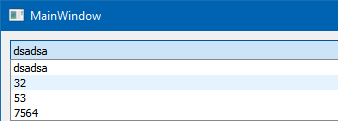
            alt text
            Oh that is not the blue selection, its a hover effect.
            The delegate does remove blue selection with he paint() \o/

            1 Reply Last reply
            0
            • T Offline
              T Offline
              TomNow99
              wrote on last edited by
              #12

              @mrjj Yes, I was talking and still talk about QComboBox.

              I did test.

              My results:

              delegate.png

              On the right I have QComboBox without delegate. And here we can see dots around item, and blue select rectangle.

              On the left i have QComboBox with delegate but QStyledItemDelegate:

              setItemDelegate(new QStyledItemDelegate());
              

              So I don't subclass QStyledItemDelegate, but use QT QStyledDelegate. Result? No dots, no select rectangle, only hover rectangle.

              So I don't need any method like initStyleOption and paint to delete dots and select rectangle?

              How Can I delete that hover rectangle?

              mrjjM 1 Reply Last reply
              0
              • T TomNow99

                @mrjj Yes, I was talking and still talk about QComboBox.

                I did test.

                My results:

                delegate.png

                On the right I have QComboBox without delegate. And here we can see dots around item, and blue select rectangle.

                On the left i have QComboBox with delegate but QStyledItemDelegate:

                setItemDelegate(new QStyledItemDelegate());
                

                So I don't subclass QStyledItemDelegate, but use QT QStyledDelegate. Result? No dots, no select rectangle, only hover rectangle.

                So I don't need any method like initStyleOption and paint to delete dots and select rectangle?

                How Can I delete that hover rectangle?

                mrjjM Offline
                mrjjM Offline
                mrjj
                Lifetime Qt Champion
                wrote on last edited by mrjj
                #13

                Hi
                Hmm, you are right. simply giving it a plain QStyledItemDelegate
                also removes both dots and selection colors.
                That was pretty lucky :)

                I dont know. Using stylesheet has side effects and on Windows it ignores palette.
                https://stackoverflow.com/questions/37765673/changing-hover-style-for-qcombobox

                1 Reply Last reply
                0
                • T Offline
                  T Offline
                  TomNow99
                  wrote on last edited by
                  #14

                  @mrjj I thought about css. Do you know any delegate way?

                  Something like:

                  option->state = option->state & ~QStyle::State_HASHOVER;
                  

                  Big letters because this doesn't exists ;)

                  mrjjM 1 Reply Last reply
                  0
                  • T TomNow99

                    @mrjj I thought about css. Do you know any delegate way?

                    Something like:

                    option->state = option->state & ~QStyle::State_HASHOVER;
                    

                    Big letters because this doesn't exists ;)

                    mrjjM Offline
                    mrjjM Offline
                    mrjj
                    Lifetime Qt Champion
                    wrote on last edited by
                    #15

                    @TomNow99

                    Hi
                    It seems that

                    void FocusControlDelegate::initStyleOption(QStyleOptionViewItem *option,
                                                               const QModelIndex &index) const
                    {
                        option->state = option->state & ~QStyle::State_HasFocus;
                        option->state &= ~QStyle::State_Selected;
                    
                        option->state &= ~QStyle::State_MouseOver;
                    
                        QStyledItemDelegate::initStyleOption(option, index);
                    }


                    does the trick.

                    1 Reply Last reply
                    2
                    • T Offline
                      T Offline
                      TomNow99
                      wrote on last edited by
                      #16

                      @mrjj Wow. Perfect! Thank you! :)

                      mrjjM 1 Reply Last reply
                      0
                      • T TomNow99

                        @mrjj Wow. Perfect! Thank you! :)

                        mrjjM Offline
                        mrjjM Offline
                        mrjj
                        Lifetime Qt Champion
                        wrote on last edited by
                        #17

                        @TomNow99
                        Np.
                        I did
                        qDebug() << option->state;
                        to see what state was being used and State_MouseOver seemed promising :)

                        1 Reply Last reply
                        0
                        • T Offline
                          T Offline
                          TomNow99
                          wrote on last edited by
                          #18

                          @mrjj I have other question ( I ask to many questions to better understand delegate ). I would like to use that subclass of QStyledItemDelegate, but now I would like to see dots and selections ( QStyledItemDelegate removes dots and selection colors ). How? I check:

                                  std::cout<<index.row();
                                  if(option.state & QStyle::State_Selected)
                                      std::cout<<"selected";
                                  if(option.state & QStyle::State_HasFocus)
                                      std::cout<<"focus";
                          

                          and I see that item, which I hover give me text "selected" and "focus".

                          So I would like to use subclass of QStyledItemDelegate and have dots and selections colors.

                          1 Reply Last reply
                          0

                          • Login

                          • Login or register to search.
                          • First post
                            Last post
                          0
                          • Categories
                          • Recent
                          • Tags
                          • Popular
                          • Users
                          • Groups
                          • Search
                          • Get Qt Extensions
                          • Unsolved