
How to delete dots from QWidget?
-
@mrjj Thank you for answer.
- I see that flag - f_focus_border_enabled. But when I look at my code: it is always false - I don't change it using setFocusBorderEnabled() or something else. So I always go to if condition, so I always do:
option->state = option->state & ~QStyle::State_HasFocus;And I would like to know what will be when I delete this line, so from code:
void FocusControlDelegate::initStyleOption(QStyleOptionViewItem *option, const QModelIndex &index) const {
    QStyledItemDelegate::initStyleOption(option, index);
    if(!f_focus_border_enabled && option->state & QStyle::State_HasFocus)
    {
        option->state = option->state & ~QStyle::State_HasFocus;
    }
}
I have now:
void FocusControlDelegate::initStyleOption(QStyleOptionViewItem *option, const QModelIndex &index) const {
    QStyledItemDelegate::initStyleOption(option, index);
}
And I don't see any changes ( in the first and in the second code I don't see any dots ). And my question: why?
- Now I would like to delete selections ( blue rectangle in your picture ), which will be for example when I move cursor to the cell. I thought that I can do something simillar and my code is:
void FocusControlDelegate::initStyleOption(QStyleOptionViewItem *option, const QModelIndex &index) const {
    QStyledItemDelegate::initStyleOption(option, index);
    if(!f_focus_border_enabled && option->state & QStyle::State_HasFocus)
    {
        option->state = option->state & ~QStyle::State_HasFocus;
    }

    if(option->state & QStyle::State_Selected)
    {
        option->state = option->state & ~QStyle::State_Selected;
    }
}
But it doesn't works. I still see blue select rectangle. I don't have any styleSheets.
-
@mrjj Thank you for answer.
- I see that flag - f_focus_border_enabled. But when I look at my code: it is always false - I don't change it using setFocusBorderEnabled() or something else. So I always go to if condition, so I always do:
option->state = option->state & ~QStyle::State_HasFocus;And I would like to know what will be when I delete this line, so from code:
void FocusControlDelegate::initStyleOption(QStyleOptionViewItem *option, const QModelIndex &index) const {
    QStyledItemDelegate::initStyleOption(option, index);
    if(!f_focus_border_enabled && option->state & QStyle::State_HasFocus)
    {
        option->state = option->state & ~QStyle::State_HasFocus;
    }
}
I have now:
void FocusControlDelegate::initStyleOption(QStyleOptionViewItem *option, const QModelIndex &index) const {
    QStyledItemDelegate::initStyleOption(option, index);
}
And I don't see any changes ( in the first and in the second code I don't see any dots ). And my question: why?
- Now I would like to delete selections ( blue rectangle in your picture ), which will be for example when I move cursor to the cell. I thought that I can do something simillar and my code is:
void FocusControlDelegate::initStyleOption(QStyleOptionViewItem *option, const QModelIndex &index) const {
    QStyledItemDelegate::initStyleOption(option, index);
    if(!f_focus_border_enabled && option->state & QStyle::State_HasFocus)
    {
        option->state = option->state & ~QStyle::State_HasFocus;
    }

    if(option->state & QStyle::State_Selected)
    {
        option->state = option->state & ~QStyle::State_Selected;
    }
}
But it doesn't works. I still see blue select rectangle. I don't have any styleSheets.
Hi
Very oddvoid FocusControlDelegate::initStyleOption(QStyleOptionViewItem *option, const QModelIndex &index) const { QStyledItemDelegate::initStyleOption(option, index); }still show the dots for me. ( as expected)
Are you sure it works for you just as this ?
Anyway, you can remove the blue selection like this (simply dont paint it)
void FocusControlDelegate::paint(QPainter *painter, const QStyleOptionViewItem &option, const QModelIndex &index) const { QStyleOptionViewItem myOption = QStyleOptionViewItem(option); myOption.state &= ~QStyle::State_Selected; QStyledItemDelegate::paint( painter, myOption, index ); } -
hi
This works for me to remove both dots and bluevoid FocusControlDelegate::initStyleOption(QStyleOptionViewItem *option, const QModelIndex &index) const { option->state = option->state & ~QStyle::State_HasFocus; QStyledItemDelegate::initStyleOption(option, index); } void FocusControlDelegate::paint(QPainter *painter, const QStyleOptionViewItem &option, const QModelIndex &index) const { QStyleOptionViewItem myOption = QStyleOptionViewItem(option); if ( myOption.state & QStyle::State_Selected ) myOption.state &= ~QStyle::State_Selected; QStyledItemDelegate::paint( painter, myOption, index ); } -
Why I can't do:
 if ( myOption.state & QStyle::State_Selected )
      myOption.state &= ~QStyle::State_Selected;
in initStyleOption?
Yes that code works in paint() method for me too.
Hi
- Why I can't do in initStyleOption?
I dont think its called for all changes in selection etc so
it must be handled in paint.I was wrong. This also works. ( with no paint() )
void FocusControlDelegate::initStyleOption(QStyleOptionViewItem *option, const QModelIndex &index) const { option->state = option->state & ~QStyle::State_HasFocus; option->state &= ~QStyle::State_Selected; QStyledItemDelegate::initStyleOption(option, index); } -
@mrjj It doesn't work :(
I create very simple code:
#include "selectionkillerdelegate.h"

SelectionKillerDelegate::SelectionKillerDelegate()
{

}

void SelectionKillerDelegate::initStyleOption(QStyleOptionViewItem *option, const QModelIndex &index) const
{
    option->state = option->state & ~QStyle::State_HasFocus;
    option->state &= ~QStyle::State_Selected;
    QStyledItemDelegate::initStyleOption(option, index);
}
#include <QScrollBar> #include <QFocusEvent> #include <windows.h> #include <QStandardItem> #include "selectionkillerdelegate.h" #include <QStandardItemModel> #include <QCoreApplication> myComboBox::myComboBox(QWidget *parent): QComboBox(parent) { QStandardItemModel *model = new QStandardItemModel; QStandardItem *item = new QStandardItem("dsadsa"); SelectionKillerDelegate *delegate = new SelectionKillerDelegate; model->setItem(0,0,item); item = new QStandardItem("32"); model->setItem(1,0,item); item = new QStandardItem("53"); model->setItem(2,0,item); item = new QStandardItem("7564"); model->setItem(3,0,item); setItemDelegate(delegate); setModel(model); }When I do
setItemDelegate(delegate); // that my Delegateor
setItemDelegate(new QStyledItemDelegate());effect is the same: I don't see dots, but see selects.
-
@mrjj It doesn't work :(
I create very simple code:
#include "selectionkillerdelegate.h"

SelectionKillerDelegate::SelectionKillerDelegate()
{

}

void SelectionKillerDelegate::initStyleOption(QStyleOptionViewItem *option, const QModelIndex &index) const
{
    option->state = option->state & ~QStyle::State_HasFocus;
    option->state &= ~QStyle::State_Selected;
    QStyledItemDelegate::initStyleOption(option, index);
}
#include <QScrollBar> #include <QFocusEvent> #include <windows.h> #include <QStandardItem> #include "selectionkillerdelegate.h" #include <QStandardItemModel> #include <QCoreApplication> myComboBox::myComboBox(QWidget *parent): QComboBox(parent) { QStandardItemModel *model = new QStandardItemModel; QStandardItem *item = new QStandardItem("dsadsa"); SelectionKillerDelegate *delegate = new SelectionKillerDelegate; model->setItem(0,0,item); item = new QStandardItem("32"); model->setItem(1,0,item); item = new QStandardItem("53"); model->setItem(2,0,item); item = new QStandardItem("7564"); model->setItem(3,0,item); setItemDelegate(delegate); setModel(model); }When I do
setItemDelegate(delegate); // that my Delegateor
setItemDelegate(new QStyledItemDelegate());effect is the same: I don't see dots, but see selects.
@TomNow99
Hi
Hmm, this is a combobox, right ?
Not a Table as i test with.But it does call the delegate code right ?
So you can use the paint() vesion and it should work ?Just to be sure its this light blue selection ?
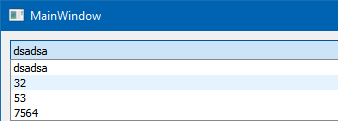
Oh that is not the blue selection, its a hover effect.
The delegate does remove blue selection with he paint() \o/ -
@mrjj Yes, I was talking and still talk about QComboBox.
I did test.
My results:

On the right I have QComboBox without delegate. And here we can see dots around item, and blue select rectangle.
On the left i have QComboBox with delegate but QStyledItemDelegate:
setItemDelegate(new QStyledItemDelegate());So I don't subclass QStyledItemDelegate, but use QT QStyledDelegate. Result? No dots, no select rectangle, only hover rectangle.
So I don't need any method like initStyleOption and paint to delete dots and select rectangle?
How Can I delete that hover rectangle?
-
@mrjj Yes, I was talking and still talk about QComboBox.
I did test.
My results:
On the right I have QComboBox without delegate. And here we can see dots around item, and blue select rectangle.
On the left i have QComboBox with delegate but QStyledItemDelegate:
setItemDelegate(new QStyledItemDelegate());So I don't subclass QStyledItemDelegate, but use QT QStyledDelegate. Result? No dots, no select rectangle, only hover rectangle.
So I don't need any method like initStyleOption and paint to delete dots and select rectangle?
How Can I delete that hover rectangle?
Hi
Hmm, you are right. simply giving it a plain QStyledItemDelegate
also removes both dots and selection colors.
That was pretty lucky :)I dont know. Using stylesheet has side effects and on Windows it ignores palette.
https://stackoverflow.com/questions/37765673/changing-hover-style-for-qcombobox -
@mrjj I thought about css. Do you know any delegate way?
Something like:
option->state = option->state & ~QStyle::State_HASHOVER;Big letters because this doesn't exists ;)
Hi
It seems thatvoid FocusControlDelegate::initStyleOption(QStyleOptionViewItem *option, const QModelIndex &index) const { option->state = option->state & ~QStyle::State_HasFocus; option->state &= ~QStyle::State_Selected; option->state &= ~QStyle::State_MouseOver; QStyledItemDelegate::initStyleOption(option, index); }does the trick.
-
@mrjj I have other question ( I ask to many questions to better understand delegate ). I would like to use that subclass of QStyledItemDelegate, but now I would like to see dots and selections ( QStyledItemDelegate removes dots and selection colors ). How? I check:
        std::cout<<index.row();
        if(option.state & QStyle::State_Selected)
            std::cout<<"selected";
        if(option.state & QStyle::State_HasFocus)
            std::cout<<"focus";
and I see that item, which I hover give me text "selected" and "focus".
So I would like to use subclass of QStyledItemDelegate and have dots and selections colors.
