
Skip to content
  • Categories
  • Recent
  • Tags
  • Popular
  • Users
  • Groups
  • Search
  • Get Qt Extensions
  • Unsolved
Collapse
Brand Logo
  1. Home
  2. Qt Development
  3. General and Desktop
  4. Debug. App Dir: how to correct work with files
Qt 6.11 is out! See what's new in the release blog

Debug. App Dir: how to correct work with files

Scheduled Pinned Locked Moved Solved General and Desktop
23 Posts 4 Posters 3.8k Views 1 Watching
  • Oldest to Newest
  • Newest to Oldest
  • Most Votes
Reply
  • Reply as topic
Log in to reply
This topic has been deleted. Only users with topic management privileges can see it.
  • sitesvS sitesv

    Hi!
    Trying to release a multilanguage app like this:
    link text

    But the next part of code is not working for me:

    m_langPath = QApplication::applicationDirPath();
    m_langPath.append("/languages");
    QDir dir(m_langPath);
    QStringList fileNames = dir.entryList(QStringList("TranslationExample_*.qm"));
    

    applicationDirPath returns: absolute_path_to_my_project/debug
    But folder language lays just in absolute_path_to_my_project folder.

    How to debug/release the app and write the universal code for working with the files?

    Thank you!

    J.HilkJ Offline
    J.HilkJ Offline
    J.Hilk
    Moderators
    wrote on last edited by J.Hilk
    #2

    @sitesv
    couple of options you have here.

    • Add your translation files to the QtRessource system, that way they will be part of the binary, but you're still able to normally access them / load them

    • Copy the files once to your build folder, as long as you do not delete the folder, those files will stay there

    • Or, write a post link macro that will copy the files for you (automatically)

    since this is something I do, here's example code:

    //*.pro file
    
    defineTest(copyToDestDir) {
        files = $$1
        dir = $$2
        # replace slashes in destination path for Windows
        win32:dir ~= s,/,\\,g
    
        for(file, files) {
            # replace slashes in source path for Windows
            win32:file ~= s,/,\\,g
    
            QMAKE_POST_LINK += $$QMAKE_COPY_DIR $$shell_quote($$file) $$shell_quote($$dir) $$escape_expand(\\n\\t)
        }
    
        export(QMAKE_POST_LINK)
    }
    
    copyToDestDir($$PWD/translations, $$DESTDIR/translations)
    

    Be aware of the Qt Code of Conduct, when posting : https://forum.qt.io/topic/113070/qt-code-of-conduct


    Q: What's that?
    A: It's blue light.
    Q: What does it do?
    A: It turns blue.

    sitesvS 1 Reply Last reply
    1
    • J.HilkJ J.Hilk

      @sitesv
      couple of options you have here.

      • Add your translation files to the QtRessource system, that way they will be part of the binary, but you're still able to normally access them / load them

      • Copy the files once to your build folder, as long as you do not delete the folder, those files will stay there

      • Or, write a post link macro that will copy the files for you (automatically)

      since this is something I do, here's example code:

      //*.pro file
      
      defineTest(copyToDestDir) {
          files = $$1
          dir = $$2
          # replace slashes in destination path for Windows
          win32:dir ~= s,/,\\,g
      
          for(file, files) {
              # replace slashes in source path for Windows
              win32:file ~= s,/,\\,g
      
              QMAKE_POST_LINK += $$QMAKE_COPY_DIR $$shell_quote($$file) $$shell_quote($$dir) $$escape_expand(\\n\\t)
          }
      
          export(QMAKE_POST_LINK)
      }
      
      copyToDestDir($$PWD/translations, $$DESTDIR/translations)
      
      sitesvS Offline
      sitesvS Offline
      sitesv
      wrote on last edited by sitesv
      #3

      @J-Hilk In fact new resource files may be added without rebuilding binary.
      In this case, I need to work without a qt resource system.
      Language files and doc's link - just an example of my problem.

      J.HilkJ 1 Reply Last reply
      0
      • sitesvS sitesv

        Hi!
        Trying to release a multilanguage app like this:
        link text

        But the next part of code is not working for me:

        m_langPath = QApplication::applicationDirPath();
        m_langPath.append("/languages");
        QDir dir(m_langPath);
        QStringList fileNames = dir.entryList(QStringList("TranslationExample_*.qm"));
        

        applicationDirPath returns: absolute_path_to_my_project/debug
        But folder language lays just in absolute_path_to_my_project folder.

        How to debug/release the app and write the universal code for working with the files?

        Thank you!

        Pablo J. RoginaP Offline
        Pablo J. RoginaP Offline
        Pablo J. Rogina
        wrote on last edited by
        #4

        @sitesv said in Debug. App Dir: how to correct work with files:

        applicationDirPath returns: absolute_path_to_my_project/debug

        If you're running your app from Qt Creator, check the settings for your debug session (under Project) so to set a specific working folder

        Upvote the answer(s) that helped you solve the issue
        Use "Topic Tools" button to mark your post as Solved
        Add screenshots via postimage.org
        Don't ask support requests via chat/PM. Please use the forum so others can benefit from the solution in the future

        sitesvS 1 Reply Last reply
        0
        • Pablo J. RoginaP Pablo J. Rogina

          @sitesv said in Debug. App Dir: how to correct work with files:

          applicationDirPath returns: absolute_path_to_my_project/debug

          If you're running your app from Qt Creator, check the settings for your debug session (under Project) so to set a specific working folder

          sitesvS Offline
          sitesvS Offline
          sitesv
          wrote on last edited by
          #5

          @Pablo-J-Rogina Do you mean a shadow build? Usually, I disable this mode.

          Pablo J. RoginaP 1 Reply Last reply
          0
          • sitesvS sitesv

            @Pablo-J-Rogina Do you mean a shadow build? Usually, I disable this mode.

            Pablo J. RoginaP Offline
            Pablo J. RoginaP Offline
            Pablo J. Rogina
            wrote on last edited by
            #6

            @sitesv I mean Working directory under Run Settings in Qt Creator (see screenshot there).

            Upvote the answer(s) that helped you solve the issue
            Use "Topic Tools" button to mark your post as Solved
            Add screenshots via postimage.org
            Don't ask support requests via chat/PM. Please use the forum so others can benefit from the solution in the future

            sitesvS 1 Reply Last reply
            0
            • Pablo J. RoginaP Pablo J. Rogina

              @sitesv I mean Working directory under Run Settings in Qt Creator (see screenshot there).

              sitesvS Offline
              sitesvS Offline
              sitesv
              wrote on last edited by
              #7

              @Pablo-J-Rogina Working directory is correct. But qt creates 'debug'/'release' folder and puts binary there. And when you start binary, applicationDirPath returns path to binary as-is: ...absoluth_path_to_project/debug/my_binary.exe.

              B 1 Reply Last reply
              0
              • sitesvS sitesv

                @J-Hilk In fact new resource files may be added without rebuilding binary.
                In this case, I need to work without a qt resource system.
                Language files and doc's link - just an example of my problem.

                J.HilkJ Offline
                J.HilkJ Offline
                J.Hilk
                Moderators
                wrote on last edited by
                #8

                @sitesv maybe you didn't read my post completely, as you apparently stoped after the first suggestion.

                • So I added bullet points

                Be aware of the Qt Code of Conduct, when posting : https://forum.qt.io/topic/113070/qt-code-of-conduct


                Q: What's that?
                A: It's blue light.
                Q: What does it do?
                A: It turns blue.

                sitesvS 1 Reply Last reply
                0
                • sitesvS sitesv

                  @Pablo-J-Rogina Working directory is correct. But qt creates 'debug'/'release' folder and puts binary there. And when you start binary, applicationDirPath returns path to binary as-is: ...absoluth_path_to_project/debug/my_binary.exe.

                  B Offline
                  B Offline
                  Bonnie
                  wrote on last edited by
                  #9

                  @sitesv
                  Do you mean you want my_binary.exe to be created without a debug folder?
                  set DESTDIR in your .pro, something like

                  DESTDIR = $$OUT_PWD
                  
                  1 Reply Last reply
                  1
                  • sitesvS Offline
                    sitesvS Offline
                    sitesv
                    wrote on last edited by
                    #10

                    I fould solution:

                    CONFIG -= debug_and_release
                    
                    J.HilkJ 1 Reply Last reply
                    0
                    • J.HilkJ J.Hilk

                      @sitesv maybe you didn't read my post completely, as you apparently stoped after the first suggestion.

                      • So I added bullet points
                      sitesvS Offline
                      sitesvS Offline
                      sitesv
                      wrote on last edited by
                      #11

                      @J-Hilk said in Debug. App Dir: how to correct work with files:

                      @sitesv maybe you didn't read my post completely, as you apparently stoped after the first suggestion.

                      No-no. I think you wrote not exactly what I need.

                      1 Reply Last reply
                      0
                      • sitesvS sitesv

                        I fould solution:

                        CONFIG -= debug_and_release
                        
                        J.HilkJ Offline
                        J.HilkJ Offline
                        J.Hilk
                        Moderators
                        wrote on last edited by J.Hilk
                        #12

                        @sitesv

                        A word of caution!
                        With no shadow build folder set, you're doing in source builds and are now you are mixing debug and release builds as well!

                        I would highly recommend to not do this, you'll (eventually) end up with apparently incomprehensible compile errors!


                        Be aware of the Qt Code of Conduct, when posting : https://forum.qt.io/topic/113070/qt-code-of-conduct


                        Q: What's that?
                        A: It's blue light.
                        Q: What does it do?
                        A: It turns blue.

                        sitesvS 1 Reply Last reply
                        1
                        • J.HilkJ J.Hilk

                          @sitesv

                          A word of caution!
                          With no shadow build folder set, you're doing in source builds and are now you are mixing debug and release builds as well!

                          I would highly recommend to not do this, you'll (eventually) end up with apparently incomprehensible compile errors!

                          sitesvS Offline
                          sitesvS Offline
                          sitesv
                          wrote on last edited by
                          #13

                          @J-Hilk said in Debug. App Dir: how to correct work with files:

                          A word of caution!
                          With no shadow build folder set, you're doing in source builds and are now you are mixing debug and release builds as well!

                          I thought that shadow build needs for building projects by various compiler types only. Could you please explain, what could be damaged without shadow build?

                          J.HilkJ 1 Reply Last reply
                          0
                          • sitesvS sitesv

                            @J-Hilk said in Debug. App Dir: how to correct work with files:

                            A word of caution!
                            With no shadow build folder set, you're doing in source builds and are now you are mixing debug and release builds as well!

                            I thought that shadow build needs for building projects by various compiler types only. Could you please explain, what could be damaged without shadow build?

                            J.HilkJ Offline
                            J.HilkJ Offline
                            J.Hilk
                            Moderators
                            wrote on last edited by
                            #14

                            @sitesv
                            first of, without a shadow build folder, the makefile, the .qmake.stash all compiler/qmake generated files (moc files, obj files, ui files, resource files etc.) will be in your source directory, and make it highly unreadable, auto generated source files should always be kept separately. If any thing ever fails (happens often enough) and the clean option of QtCreator does not clean everything needed you can simply delete the build folder and your done.

                            secondly, switching from debug to release can already cause problems, not just changing to a completely different compiler


                            Be aware of the Qt Code of Conduct, when posting : https://forum.qt.io/topic/113070/qt-code-of-conduct


                            Q: What's that?
                            A: It's blue light.
                            Q: What does it do?
                            A: It turns blue.

                            sitesvS 1 Reply Last reply
                            2
                            • J.HilkJ J.Hilk

                              @sitesv
                              first of, without a shadow build folder, the makefile, the .qmake.stash all compiler/qmake generated files (moc files, obj files, ui files, resource files etc.) will be in your source directory, and make it highly unreadable, auto generated source files should always be kept separately. If any thing ever fails (happens often enough) and the clean option of QtCreator does not clean everything needed you can simply delete the build folder and your done.

                              secondly, switching from debug to release can already cause problems, not just changing to a completely different compiler

                              sitesvS Offline
                              sitesvS Offline
                              sitesv
                              wrote on last edited by sitesv
                              #15

                              @J-Hilk Thank you!

                              J.HilkJ 1 Reply Last reply
                              0
                              • sitesvS sitesv

                                @J-Hilk Thank you!

                                J.HilkJ Offline
                                J.HilkJ Offline
                                J.Hilk
                                Moderators
                                wrote on last edited by
                                #16

                                @sitesv
                                I'm still not sure, what exactly is your case here, but if you only want to go up one folder and down into an other one you can do the following as well, without modifying the pro file:

                                /*
                                m_langPath = QApplication::applicationDirPath();
                                m_langPath.append("/languages");
                                QDir dir(m_langPath);
                                QStringList fileNames = dir.entryList(QStringList("TranslationExample_*.qm"));
                                */
                                
                                m_langPath = QApplication::applicationDirPath();
                                QDir dir(m_langPath);
                                dir.cdUp();
                                dir.cd("languages")
                                QStringList fileNames = dir.entryList(QStringList("TranslationExample_*.qm"));
                                

                                Be aware of the Qt Code of Conduct, when posting : https://forum.qt.io/topic/113070/qt-code-of-conduct


                                Q: What's that?
                                A: It's blue light.
                                Q: What does it do?
                                A: It turns blue.

                                sitesvS 1 Reply Last reply
                                0
                                • J.HilkJ J.Hilk

                                  @sitesv
                                  I'm still not sure, what exactly is your case here, but if you only want to go up one folder and down into an other one you can do the following as well, without modifying the pro file:

                                  /*
                                  m_langPath = QApplication::applicationDirPath();
                                  m_langPath.append("/languages");
                                  QDir dir(m_langPath);
                                  QStringList fileNames = dir.entryList(QStringList("TranslationExample_*.qm"));
                                  */
                                  
                                  m_langPath = QApplication::applicationDirPath();
                                  QDir dir(m_langPath);
                                  dir.cdUp();
                                  dir.cd("languages")
                                  QStringList fileNames = dir.entryList(QStringList("TranslationExample_*.qm"));
                                  
                                  sitesvS Offline
                                  sitesvS Offline
                                  sitesv
                                  wrote on last edited by sitesv
                                  #17

                                  @J-Hilk said in Debug. App Dir: how to correct work with files:

                                  //*.pro file

                                  defineTest(copyToDestDir) {
                                  files = $$1
                                  dir = $$2
                                  # replace slashes in destination path for Windows
                                  win32:dir ~= s,/,\,g

                                  for(file, files) {
                                      # replace slashes in source path for Windows
                                      win32:file ~= s,/,\\,g
                                  
                                      QMAKE_POST_LINK += $$QMAKE_COPY_DIR $$shell_quote($$file) $$shell_quote($$dir) $$escape_expand(\\n\\t)
                                  }
                                  
                                  export(QMAKE_POST_LINK)
                                  

                                  }

                                  copyToDestDir($$PWD/translations, $$DESTDIR/translations)

                                  This code is not working.

                                  sitesvS 1 Reply Last reply
                                  0
                                  • sitesvS sitesv

                                    @J-Hilk said in Debug. App Dir: how to correct work with files:

                                    //*.pro file

                                    defineTest(copyToDestDir) {
                                    files = $$1
                                    dir = $$2
                                    # replace slashes in destination path for Windows
                                    win32:dir ~= s,/,\,g

                                    for(file, files) {
                                        # replace slashes in source path for Windows
                                        win32:file ~= s,/,\\,g
                                    
                                        QMAKE_POST_LINK += $$QMAKE_COPY_DIR $$shell_quote($$file) $$shell_quote($$dir) $$escape_expand(\\n\\t)
                                    }
                                    
                                    export(QMAKE_POST_LINK)
                                    

                                    }

                                    copyToDestDir($$PWD/translations, $$DESTDIR/translations)

                                    This code is not working.

                                    sitesvS Offline
                                    sitesvS Offline
                                    sitesv
                                    wrote on last edited by
                                    #18

                                    @J-Hilk
                                    Just added couple of string:

                                    message($$files)
                                    message($$dir)
                                    

                                    There is the next output:

                                    Project MESSAGE: C:/Users/z/Documents/language/translations
                                    Project MESSAGE: \translations

                                    I think $$DESTDIR should be different.

                                    J.HilkJ 1 Reply Last reply
                                    0
                                    • sitesvS sitesv

                                      @J-Hilk
                                      Just added couple of string:

                                      message($$files)
                                      message($$dir)
                                      

                                      There is the next output:

                                      Project MESSAGE: C:/Users/z/Documents/language/translations
                                      Project MESSAGE: \translations

                                      I think $$DESTDIR should be different.

                                      J.HilkJ Offline
                                      J.HilkJ Offline
                                      J.Hilk
                                      Moderators
                                      wrote on last edited by
                                      #19

                                      @sitesv well, for once, you can tell DESTDIR what is shall be!

                                      For example, my DESTDIR looks like this:

                                      CONFIG(release, debug|release) {
                                          DESTDIR     = $$PWD/../Deployment/release
                                      }
                                      
                                      CONFIG(debug, debug|release) {
                                          DESTDIR     = $$PWD/../Deployment/debug
                                      }
                                      

                                      This results in a new folder outside my shadow build folder, that has the name Deployment. In that, there will be 2 additional folders, Release and Debug. In those, the compiled exe will be copied(and executed when started from QtCreator) and the previous function will copy my specified folders to there as well.

                                      In case of the translation files, (from the example line I posted) it would look like this for a release build:
                                      ..../Deployment/Release/translations


                                      Be aware of the Qt Code of Conduct, when posting : https://forum.qt.io/topic/113070/qt-code-of-conduct


                                      Q: What's that?
                                      A: It's blue light.
                                      Q: What does it do?
                                      A: It turns blue.

                                      sitesvS 1 Reply Last reply
                                      1
                                      • J.HilkJ J.Hilk

                                        @sitesv well, for once, you can tell DESTDIR what is shall be!

                                        For example, my DESTDIR looks like this:

                                        CONFIG(release, debug|release) {
                                            DESTDIR     = $$PWD/../Deployment/release
                                        }
                                        
                                        CONFIG(debug, debug|release) {
                                            DESTDIR     = $$PWD/../Deployment/debug
                                        }
                                        

                                        This results in a new folder outside my shadow build folder, that has the name Deployment. In that, there will be 2 additional folders, Release and Debug. In those, the compiled exe will be copied(and executed when started from QtCreator) and the previous function will copy my specified folders to there as well.

                                        In case of the translation files, (from the example line I posted) it would look like this for a release build:
                                        ..../Deployment/Release/translations

                                        sitesvS Offline
                                        sitesvS Offline
                                        sitesv
                                        wrote on last edited by
                                        #20

                                        @J-Hilk I'm done what you advise. But it is still not working... Files are not copied.
                                        Please, check a project in attach.
                                        link text

                                        J.HilkJ 1 Reply Last reply
                                        0
                                        • sitesvS sitesv

                                          @J-Hilk I'm done what you advise. But it is still not working... Files are not copied.
                                          Please, check a project in attach.
                                          link text

                                          J.HilkJ Offline
                                          J.HilkJ Offline
                                          J.Hilk
                                          Moderators
                                          wrote on last edited by
                                          #21

                                          @sitesv also a reason, why I advocate a shadow build folder! I was unable to open/build your project until I deleted all generated files :(

                                          Anyway, you actually get an error message about what fails:

                                          cp: ./translations and /Users/.../path/../translations are identical (not copied).

                                          Which is misleading at this point, because you actually forgot to add a comma between the the arguments.

                                          from
                                          copyToDestDir($$PWD/translations $$DESTDIR/translations)
                                          
                                          to
                                          copyToDestDir($$PWD/translations, $$DESTDIR/translations)
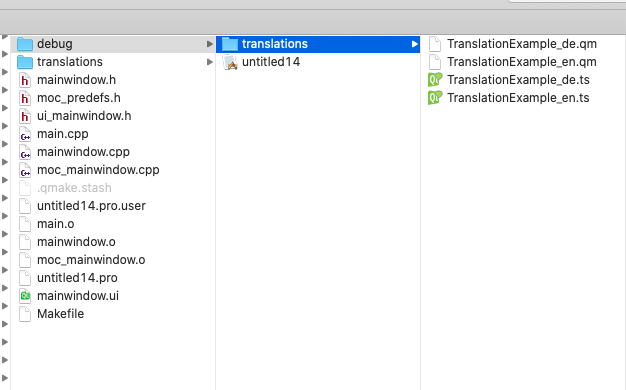
                                          

                                          b6da683d-6c4c-4a0b-8a84-07d125b018a4-image.png

                                          every time you now call rebuild (I think it has to be rebuild, not simply build) the copy operation should happen


                                          Be aware of the Qt Code of Conduct, when posting : https://forum.qt.io/topic/113070/qt-code-of-conduct


                                          Q: What's that?
                                          A: It's blue light.
                                          Q: What does it do?
                                          A: It turns blue.

                                          sitesvS 1 Reply Last reply
                                          1

                                          • Login

                                          • Login or register to search.
                                          • First post
                                            Last post
                                          0
                                          • Categories
                                          • Recent
                                          • Tags
                                          • Popular
                                          • Users
                                          • Groups
                                          • Search
                                          • Get Qt Extensions
                                          • Unsolved