
Debug. App Dir: how to correct work with files
-
A word of caution!
With no shadow build folder set, you're doing in source builds and are now you are mixing debug and release builds as well!I would highly recommend to not do this, you'll (eventually) end up with apparently incomprehensible compile errors!
Be aware of the Qt Code of Conduct, when posting : https://forum.qt.io/topic/113070/qt-code-of-conduct
Q: What's that?
A: It's blue light.
Q: What does it do?
A: It turns blue. -
A word of caution!
With no shadow build folder set, you're doing in source builds and are now you are mixing debug and release builds as well!I would highly recommend to not do this, you'll (eventually) end up with apparently incomprehensible compile errors!
@J-Hilk said in Debug. App Dir: how to correct work with files:
A word of caution!
With no shadow build folder set, you're doing in source builds and are now you are mixing debug and release builds as well!I thought that shadow build needs for building projects by various compiler types only. Could you please explain, what could be damaged without shadow build?
-
@J-Hilk said in Debug. App Dir: how to correct work with files:
A word of caution!
With no shadow build folder set, you're doing in source builds and are now you are mixing debug and release builds as well!I thought that shadow build needs for building projects by various compiler types only. Could you please explain, what could be damaged without shadow build?
@sitesv
first of, without a shadow build folder, the makefile, the .qmake.stash all compiler/qmake generated files (moc files, obj files, ui files, resource files etc.) will be in your source directory, and make it highly unreadable, auto generated source files should always be kept separately. If any thing ever fails (happens often enough) and the clean option of QtCreator does not clean everything needed you can simply delete the build folder and your done.secondly, switching from debug to release can already cause problems, not just changing to a completely different compiler
Be aware of the Qt Code of Conduct, when posting : https://forum.qt.io/topic/113070/qt-code-of-conduct
Q: What's that?
A: It's blue light.
Q: What does it do?
A: It turns blue. -
@sitesv
first of, without a shadow build folder, the makefile, the .qmake.stash all compiler/qmake generated files (moc files, obj files, ui files, resource files etc.) will be in your source directory, and make it highly unreadable, auto generated source files should always be kept separately. If any thing ever fails (happens often enough) and the clean option of QtCreator does not clean everything needed you can simply delete the build folder and your done.secondly, switching from debug to release can already cause problems, not just changing to a completely different compiler
-
@sitesv
I'm still not sure, what exactly is your case here, but if you only want to go up one folder and down into an other one you can do the following as well, without modifying the pro file:/* m_langPath = QApplication::applicationDirPath(); m_langPath.append("/languages"); QDir dir(m_langPath); QStringList fileNames = dir.entryList(QStringList("TranslationExample_*.qm")); */ m_langPath = QApplication::applicationDirPath(); QDir dir(m_langPath); dir.cdUp(); dir.cd("languages") QStringList fileNames = dir.entryList(QStringList("TranslationExample_*.qm"));
Be aware of the Qt Code of Conduct, when posting : https://forum.qt.io/topic/113070/qt-code-of-conduct
Q: What's that?
A: It's blue light.
Q: What does it do?
A: It turns blue. -
@sitesv
I'm still not sure, what exactly is your case here, but if you only want to go up one folder and down into an other one you can do the following as well, without modifying the pro file:/* m_langPath = QApplication::applicationDirPath(); m_langPath.append("/languages"); QDir dir(m_langPath); QStringList fileNames = dir.entryList(QStringList("TranslationExample_*.qm")); */ m_langPath = QApplication::applicationDirPath(); QDir dir(m_langPath); dir.cdUp(); dir.cd("languages") QStringList fileNames = dir.entryList(QStringList("TranslationExample_*.qm"));@J-Hilk said in Debug. App Dir: how to correct work with files:
//*.pro file
defineTest(copyToDestDir) {
files = $$1
dir = $$2
# replace slashes in destination path for Windows
win32:dir ~= s,/,\,gfor(file, files) { # replace slashes in source path for Windows win32:file ~= s,/,\\,g QMAKE_POST_LINK += $$QMAKE_COPY_DIR $$shell_quote($$file) $$shell_quote($$dir) $$escape_expand(\\n\\t) } export(QMAKE_POST_LINK)}
copyToDestDir($$PWD/translations, $$DESTDIR/translations)
This code is not working.
-
@J-Hilk said in Debug. App Dir: how to correct work with files:
//*.pro file
defineTest(copyToDestDir) {
files = $$1
dir = $$2
# replace slashes in destination path for Windows
win32:dir ~= s,/,\,gfor(file, files) { # replace slashes in source path for Windows win32:file ~= s,/,\\,g QMAKE_POST_LINK += $$QMAKE_COPY_DIR $$shell_quote($$file) $$shell_quote($$dir) $$escape_expand(\\n\\t) } export(QMAKE_POST_LINK)}
copyToDestDir($$PWD/translations, $$DESTDIR/translations)
This code is not working.
-
@J-Hilk
Just added couple of string:message($$files) message($$dir)There is the next output:
Project MESSAGE: C:/Users/z/Documents/language/translations
Project MESSAGE: \translationsI think $$DESTDIR should be different.
@sitesv well, for once, you can tell DESTDIR what is shall be!
For example, my DESTDIR looks like this:
CONFIG(release, debug|release) {
    DESTDIR     = $$PWD/../Deployment/release
}

CONFIG(debug, debug|release) {
    DESTDIR     = $$PWD/../Deployment/debug
}
This results in a new folder outside my shadow build folder, that has the name Deployment. In that, there will be 2 additional folders, Release and Debug. In those, the compiled exe will be copied(and executed when started from QtCreator) and the previous function will copy my specified folders to there as well.
In case of the translation files, (from the example line I posted) it would look like this for a release build:
..../Deployment/Release/translations
Be aware of the Qt Code of Conduct, when posting : https://forum.qt.io/topic/113070/qt-code-of-conduct
Q: What's that?
A: It's blue light.
Q: What does it do?
A: It turns blue. -
@sitesv well, for once, you can tell DESTDIR what is shall be!
For example, my DESTDIR looks like this:
CONFIG(release, debug|release) {
    DESTDIR     = $$PWD/../Deployment/release
}

CONFIG(debug, debug|release) {
    DESTDIR     = $$PWD/../Deployment/debug
}
This results in a new folder outside my shadow build folder, that has the name Deployment. In that, there will be 2 additional folders, Release and Debug. In those, the compiled exe will be copied(and executed when started from QtCreator) and the previous function will copy my specified folders to there as well.
In case of the translation files, (from the example line I posted) it would look like this for a release build:
..../Deployment/Release/translations -
@J-Hilk I'm done what you advise. But it is still not working... Files are not copied.
Please, check a project in attach.
link text@sitesv also a reason, why I advocate a shadow build folder! I was unable to open/build your project until I deleted all generated files :(
Anyway, you actually get an error message about what fails:
cp: ./translations and /Users/.../path/../translations are identical (not copied).
Which is misleading at this point, because you actually forgot to add a comma between the the arguments.
from
copyToDestDir($$PWD/translations $$DESTDIR/translations)

to
copyToDestDir($$PWD/translations, $$DESTDIR/translations)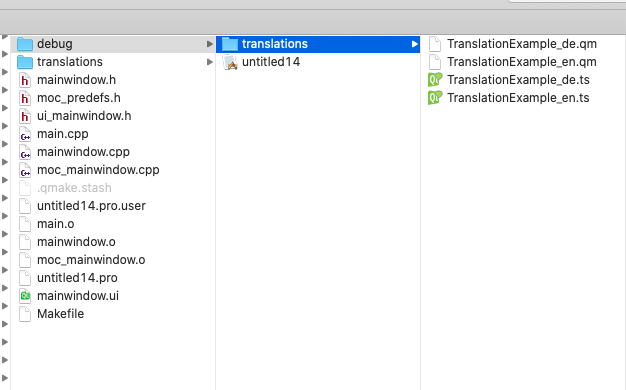
every time you now call rebuild (I think it has to be rebuild, not simply build) the copy operation should happen
Be aware of the Qt Code of Conduct, when posting : https://forum.qt.io/topic/113070/qt-code-of-conduct
Q: What's that?
A: It's blue light.
Q: What does it do?
A: It turns blue. -
@sitesv also a reason, why I advocate a shadow build folder! I was unable to open/build your project until I deleted all generated files :(
Anyway, you actually get an error message about what fails:
cp: ./translations and /Users/.../path/../translations are identical (not copied).
Which is misleading at this point, because you actually forgot to add a comma between the the arguments.
from
copyToDestDir($$PWD/translations $$DESTDIR/translations)

to
copyToDestDir($$PWD/translations, $$DESTDIR/translations)
every time you now call rebuild (I think it has to be rebuild, not simply build) the copy operation should happen
-
@J-Hilk It works! Thank you!
One more Q.
If the 'folder with files' has many files and in summary has a big volume (for example 200M), is it correct to every time copy it?

