Skip to content
  • Categories
  • Recent
  • Tags
  • Popular
  • Users
  • Groups
  • Search
  • Get Qt Extensions
  • Unsolved
Collapse
Brand Logo
  1. Home
  2. Qt Development
  3. Game Development
  4. how to move a draw (Qpainter) to Qlabel ?
Qt 6.11 is out! See what's new in the release blog

how to move a draw (Qpainter) to Qlabel ?

Scheduled Pinned Locked Moved Solved Game Development
15 Posts 2 Posters 4.8k Views 1 Watching
  • Oldest to Newest
  • Newest to Oldest
  • Most Votes
Reply
  • Reply as topic
Log in to reply
This topic has been deleted. Only users with topic management privileges can see it.
  • mrjjM Offline
    mrjjM Offline
    mrjj
    Lifetime Qt Champion
    wrote on last edited by mrjj
    #4

    Hi
    Why are you painting to a pixmap inside paintEvent ?
    You are allowed to that outside PaintEvent when to a pixmap.
    as the only time where you can use QPainter outside paintEvent.

    Also you dont seem to anything with the pixmap after ?
    like ui->somelabel->setPixmap(pix);

    Do you want what paintEvent draws in some other window or why do you want to paint
    to pixmap anyway ?
    (since you have paintEvent in thirdwindow already)

    1 Reply Last reply
    1
    • M Offline
      M Offline
      mayyy
      wrote on last edited by mayyy
      #5

      @mrjj i add this function outside the painEvent :
      void thirdwindow::drawlabel(){
      int h = ui->label_pic->height();
      int w = ui->label_pic->width();

         QPixmap pix(w, h); // give pixmap some size
         QPainter painter(&pix); // assign painter to it. note the &
         pix.fill( Qt::white );
      

      }

      ==> nothing has changed (I get the first board ) but when I add it to the constructor , I get totally the oposite of what I want :
      66606495-29d6-441e-a30c-dceff1b16b31-image.png

      ==> This is why I want to draw with pixmap (to use setPixmap after in a specific label)

      1 Reply Last reply
      0
      • mrjjM Offline
        mrjjM Offline
        mrjj
        Lifetime Qt Champion
        wrote on last edited by
        #6

        Hi
        Im not sure i know what you are trying.
        Are you showing all your code as
        drawlabel does nothing with the pixmap ??

        So what are you trying ?
        You have thirdwindow with paint event that draws the board.

        Then you have drawlabel that should to what ?

        1 Reply Last reply
        1
        • M Offline
          M Offline
          mayyy
          wrote on last edited by
          #7

          yes,actually the drawlabel did nothing to the code so i add the code to the constructor of this window but i get the oposite of what i want, here is the code:
          thirdwindow::thirdwindow(QWidget *parent) :
          QDialog(parent),
          ui(new Ui::thirdwindow)
          {
          ui->setupUi(this);
          int h = ui->label_pic->height();
          int w = ui->label_pic->width();

          QPixmap pix(w, h); // give pixmap some size
          QPainter painter(&pix); // assign painter to it. note the &
          pix.fill(Qt::white);
          ui->label_pic->setPixmap(pix);
          

          }

          mrjjM 1 Reply Last reply
          0
          • M mayyy

            yes,actually the drawlabel did nothing to the code so i add the code to the constructor of this window but i get the oposite of what i want, here is the code:
            thirdwindow::thirdwindow(QWidget *parent) :
            QDialog(parent),
            ui(new Ui::thirdwindow)
            {
            ui->setupUi(this);
            int h = ui->label_pic->height();
            int w = ui->label_pic->width();

            QPixmap pix(w, h); // give pixmap some size
            QPainter painter(&pix); // assign painter to it. note the &
            pix.fill(Qt::white);
            ui->label_pic->setPixmap(pix);
            

            }

            mrjjM Offline
            mrjjM Offline
            mrjj
            Lifetime Qt Champion
            wrote on last edited by
            #8

            @mayyy
            hi
            But that gives you exactly what picture shows.
            A big white rectangle the size of the label.

            What did you expect it to show ?

            1 Reply Last reply
            0
            • M Offline
              M Offline
              mayyy
              wrote on last edited by
              #9

              @mrjj instead of a white rectangle I want the chess board and the rest is empty (to add some extensions for the game )

              mrjjM 1 Reply Last reply
              0
              • M mayyy

                @mrjj instead of a white rectangle I want the chess board and the rest is empty (to add some extensions for the game )

                mrjjM Offline
                mrjjM Offline
                mrjj
                Lifetime Qt Champion
                wrote on last edited by
                #10

                @mayyy
                Ahh. well you can still do that but you need the code from paint Event in drawLabel
                then and remove code in paintevent so it dont draw in background.

                void thirdwindow::makeBoard()
                {
                // Initialization
                    int h = ui->label_pic->height();
                    int w = ui->label_pic->width();
                
                    QPixmap pix(w, h); // give pixmap some size
                    QPainter painter(&pix); // assign painter to it. note the &
                
                    unsigned int numCellX = 8, numCellY = 8;
                    QRect wRect = rect();
                    unsigned int cellSizeX = wRect.width() / numCellX;
                    unsigned int cellSizeY = wRect.height() / numCellY;
                    //QPainter painter(this);
                    painter.setRenderHint(QPainter::Antialiasing);
                
                    // Draw the background. The whole widget is drawed.
                    //painter.setBrush(QColor(0,0,0)); //black
                    pix.fill( Qt::black);
                
                    painter.drawRect(wRect);
                
                    // Draw the cells which are of the other color
                    // Note: the grid may not fit in the whole rect, because the size of the widget
                    // should be a multiple of the size of the cells. If not, a black line at the right
                    // and at the bottom may appear.
                    //painter.setBrush(QColor(255,255,255));
                    pix.fill( Qt::white );//white
                    for (unsigned int j = 0; j < numCellY; j++)
                        for (unsigned int i = j % 2; i < numCellX; i += 2)
                            painter.drawRect(i * cellSizeX, j * cellSizeY, cellSizeX, cellSizeY);
                    
                  ui->label_pic->setPixmap(pix);  // set to label
                }


                and in constructor just call
                makeBoard();

                1 Reply Last reply
                1
                • M Offline
                  M Offline
                  mayyy
                  wrote on last edited by
                  #11

                  @mrjj thank u but , this is what I get : the board is not drawn correctly
                  1fa2c14e-ea63-40b2-bcb8-b23025e2ab59-image.png

                  1 Reply Last reply
                  0
                  • mrjjM Offline
                    mrjjM Offline
                    mrjj
                    Lifetime Qt Champion
                    wrote on last edited by
                    #12

                    Hi
                    Just small bug
                    we say
                    QRect wRect = rect(); but that gives us rect of the window
                    so we need to say
                    QRect wRect = ui->label_pic-rect();

                    so we use the labels rect for calculations.

                    1 Reply Last reply
                    1
                    • M Offline
                      M Offline
                      mayyy
                      wrote on last edited by
                      #13

                      @mrjj This one is the closet to the goal ! ,but there is no black rect()
                      8600443b-1592-48ab-87a1-cdc14455e94b-image.png

                      mrjjM 1 Reply Last reply
                      0
                      • M mayyy

                        @mrjj This one is the closet to the goal ! ,but there is no black rect()
                        8600443b-1592-48ab-87a1-cdc14455e94b-image.png

                        mrjjM Offline
                        mrjjM Offline
                        mrjj
                        Lifetime Qt Champion
                        wrote on last edited by mrjj
                        #14

                        @mayyy
                        You call pix.fill and not
                        painter.setBrush

                        void MainWindow::makeBoard()
                        {
                        // Initialization
                            int h = ui->label_pic->height();
                            int w = ui->label_pic->width();
                        
                            QPixmap pix(w, h); // give pixmap some size
                            QPainter painter(&pix); // assign painter to it. note the &
                        
                            unsigned int numCellX = 8, numCellY = 8;
                            QRect wRect =  ui->label_pic->rect();
                            unsigned int cellSizeX = wRect.width() / numCellX;
                            unsigned int cellSizeY = wRect.height() / numCellY;
                            //QPainter painter(this);
                            painter.setRenderHint(QPainter::Antialiasing);
                        
                            // Draw the background. The whole widget is drawed.
                            //painter.setBrush(QColor(0,0,0)); //black
                            pix.fill( Qt::black);
                        
                            painter.drawRect(wRect);
                        
                            // Draw the cells which are of the other color
                            // Note: the grid may not fit in the whole rect, because the size of the widget
                            // should be a multiple of the size of the cells. If not, a black line at the right
                            // and at the bottom may appear.
                        
                            painter.setBrush(QColor(255,255,255)); // CHANGED
                          // pix.fill( Qt::white );//white  THIS IS WRONG 
                            for (unsigned int j = 0; j < numCellY; j++)
                                for (unsigned int i = j % 2; i < numCellX; i += 2)
                                    painter.drawRect(i * cellSizeX, j * cellSizeY, cellSizeX, cellSizeY);
                        
                            ui->label_pic->setPixmap(pix);
                        
                        }
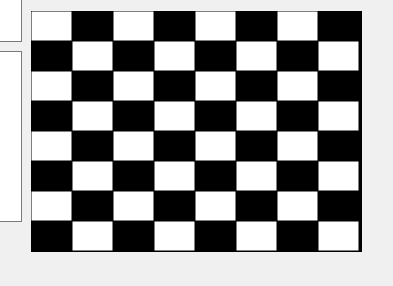
                        

                        alt text

                        1 Reply Last reply
                        3
                        • M Offline
                          M Offline
                          mayyy
                          wrote on last edited by
                          #15

                          @mrjj This is perfect ! thank u so much for ur help.

                          1 Reply Last reply
                          1

                          • Login

                          • Login or register to search.
                          • First post
                            Last post
                          0
                          • Categories
                          • Recent
                          • Tags
                          • Popular
                          • Users
                          • Groups
                          • Search
                          • Get Qt Extensions
                          • Unsolved