Skip to content
  • Categories
  • Recent
  • Tags
  • Popular
  • Users
  • Groups
  • Search
  • Get Qt Extensions
  • Unsolved
Collapse
Brand Logo
  1. Home
  2. Qt Development
  3. Game Development
  4. how to move a draw (Qpainter) to Qlabel ?
Qt 6.11 is out! See what's new in the release blog

how to move a draw (Qpainter) to Qlabel ?

Scheduled Pinned Locked Moved Solved Game Development
15 Posts 2 Posters 3.0k Views 1 Watching
  • Oldest to Newest
  • Newest to Oldest
  • Most Votes
Reply
  • Reply as topic
Log in to reply
This topic has been deleted. Only users with topic management privileges can see it.
  • M Offline
    M Offline
    mayyy
    wrote on last edited by mayyy
    #3

    @mrjj thank you for answering .
    here is the code:
    void thirdwindow::paintEvent(QPaintEvent*)
    {
    // Initialization
    int h = ui->label_pic->height();
    int w = ui->label_pic->width();

        QPixmap pix(w, h); // give pixmap some size
        QPainter painter(&pix); // assign painter to it. note the &
    
        unsigned int numCellX = 8, numCellY = 8;
        QRect wRect = rect();
        unsigned int cellSizeX = wRect.width() / numCellX;
        unsigned int cellSizeY = wRect.height() / numCellY;
        //QPainter painter(this);
        painter.setRenderHint(QPainter::Antialiasing);
    
        // Draw the background. The whole widget is drawed.
        //painter.setBrush(QColor(0,0,0)); //black
        pix.fill( Qt::black);
    
    
        painter.drawRect(wRect);
    
        // Draw the cells which are of the other color
        // Note: the grid may not fit in the whole rect, because the size of the widget
        // should be a multiple of the size of the cells. If not, a black line at the right
        // and at the bottom may appear.
        //painter.setBrush(QColor(255,255,255));
        pix.fill( Qt::white );//white
        for(unsigned int j = 0; j < numCellY; j++)
            for(unsigned int i = j % 2; i < numCellX; i+=2)
               painter.drawRect(i * cellSizeX, j * cellSizeY, cellSizeX, cellSizeY);
    

    }

    and the result :
    qt.gui.icc: fromIccProfile: failed minimal tag size sanity and an empty window , i think it misses a little detail coz the code compiles.
    ps: after two days i finally get it !

    1 Reply Last reply
    1
    • mrjjM Offline
      mrjjM Offline
      mrjj
      Lifetime Qt Champion
      wrote on last edited by mrjj
      #4

      Hi
      Why are you painting to a pixmap inside paintEvent ?
      You are allowed to that outside PaintEvent when to a pixmap.
      as the only time where you can use QPainter outside paintEvent.

      Also you dont seem to anything with the pixmap after ?
      like ui->somelabel->setPixmap(pix);

      Do you want what paintEvent draws in some other window or why do you want to paint
      to pixmap anyway ?
      (since you have paintEvent in thirdwindow already)

      1 Reply Last reply
      1
      • M Offline
        M Offline
        mayyy
        wrote on last edited by mayyy
        #5

        @mrjj i add this function outside the painEvent :
        void thirdwindow::drawlabel(){
        int h = ui->label_pic->height();
        int w = ui->label_pic->width();

           QPixmap pix(w, h); // give pixmap some size
           QPainter painter(&pix); // assign painter to it. note the &
           pix.fill( Qt::white );
        

        }

        ==> nothing has changed (I get the first board ) but when I add it to the constructor , I get totally the oposite of what I want :
        66606495-29d6-441e-a30c-dceff1b16b31-image.png

        ==> This is why I want to draw with pixmap (to use setPixmap after in a specific label)

        1 Reply Last reply
        0
        • mrjjM Offline
          mrjjM Offline
          mrjj
          Lifetime Qt Champion
          wrote on last edited by
          #6

          Hi
          Im not sure i know what you are trying.
          Are you showing all your code as
          drawlabel does nothing with the pixmap ??

          So what are you trying ?
          You have thirdwindow with paint event that draws the board.

          Then you have drawlabel that should to what ?

          1 Reply Last reply
          1
          • M Offline
            M Offline
            mayyy
            wrote on last edited by
            #7

            yes,actually the drawlabel did nothing to the code so i add the code to the constructor of this window but i get the oposite of what i want, here is the code:
            thirdwindow::thirdwindow(QWidget *parent) :
            QDialog(parent),
            ui(new Ui::thirdwindow)
            {
            ui->setupUi(this);
            int h = ui->label_pic->height();
            int w = ui->label_pic->width();

            QPixmap pix(w, h); // give pixmap some size
            QPainter painter(&pix); // assign painter to it. note the &
            pix.fill(Qt::white);
            ui->label_pic->setPixmap(pix);
            

            }

            mrjjM 1 Reply Last reply
            0
            • M mayyy

              yes,actually the drawlabel did nothing to the code so i add the code to the constructor of this window but i get the oposite of what i want, here is the code:
              thirdwindow::thirdwindow(QWidget *parent) :
              QDialog(parent),
              ui(new Ui::thirdwindow)
              {
              ui->setupUi(this);
              int h = ui->label_pic->height();
              int w = ui->label_pic->width();

              QPixmap pix(w, h); // give pixmap some size
              QPainter painter(&pix); // assign painter to it. note the &
              pix.fill(Qt::white);
              ui->label_pic->setPixmap(pix);
              

              }

              mrjjM Offline
              mrjjM Offline
              mrjj
              Lifetime Qt Champion
              wrote on last edited by
              #8

              @mayyy
              hi
              But that gives you exactly what picture shows.
              A big white rectangle the size of the label.

              What did you expect it to show ?

              1 Reply Last reply
              0
              • M Offline
                M Offline
                mayyy
                wrote on last edited by
                #9

                @mrjj instead of a white rectangle I want the chess board and the rest is empty (to add some extensions for the game )

                mrjjM 1 Reply Last reply
                0
                • M mayyy

                  @mrjj instead of a white rectangle I want the chess board and the rest is empty (to add some extensions for the game )

                  mrjjM Offline
                  mrjjM Offline
                  mrjj
                  Lifetime Qt Champion
                  wrote on last edited by
                  #10

                  @mayyy
                  Ahh. well you can still do that but you need the code from paint Event in drawLabel
                  then and remove code in paintevent so it dont draw in background.

                  void thirdwindow::makeBoard()
                  {
                  // Initialization
                      int h = ui->label_pic->height();
                      int w = ui->label_pic->width();
                  
                      QPixmap pix(w, h); // give pixmap some size
                      QPainter painter(&pix); // assign painter to it. note the &
                  
                      unsigned int numCellX = 8, numCellY = 8;
                      QRect wRect = rect();
                      unsigned int cellSizeX = wRect.width() / numCellX;
                      unsigned int cellSizeY = wRect.height() / numCellY;
                      //QPainter painter(this);
                      painter.setRenderHint(QPainter::Antialiasing);
                  
                      // Draw the background. The whole widget is drawed.
                      //painter.setBrush(QColor(0,0,0)); //black
                      pix.fill( Qt::black);
                  
                      painter.drawRect(wRect);
                  
                      // Draw the cells which are of the other color
                      // Note: the grid may not fit in the whole rect, because the size of the widget
                      // should be a multiple of the size of the cells. If not, a black line at the right
                      // and at the bottom may appear.
                      //painter.setBrush(QColor(255,255,255));
                      pix.fill( Qt::white );//white
                      for (unsigned int j = 0; j < numCellY; j++)
                          for (unsigned int i = j % 2; i < numCellX; i += 2)
                              painter.drawRect(i * cellSizeX, j * cellSizeY, cellSizeX, cellSizeY);
                      
                    ui->label_pic->setPixmap(pix);  // set to label
                  }


                  and in constructor just call
                  makeBoard();

                  1 Reply Last reply
                  1
                  • M Offline
                    M Offline
                    mayyy
                    wrote on last edited by
                    #11

                    @mrjj thank u but , this is what I get : the board is not drawn correctly
                    1fa2c14e-ea63-40b2-bcb8-b23025e2ab59-image.png

                    1 Reply Last reply
                    0
                    • mrjjM Offline
                      mrjjM Offline
                      mrjj
                      Lifetime Qt Champion
                      wrote on last edited by
                      #12

                      Hi
                      Just small bug
                      we say
                      QRect wRect = rect(); but that gives us rect of the window
                      so we need to say
                      QRect wRect = ui->label_pic-rect();

                      so we use the labels rect for calculations.

                      1 Reply Last reply
                      1
                      • M Offline
                        M Offline
                        mayyy
                        wrote on last edited by
                        #13

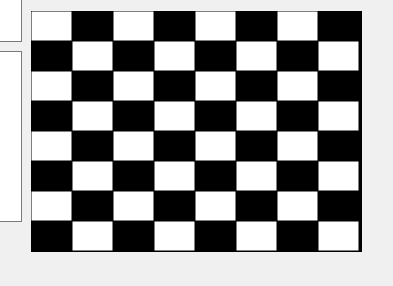
                        @mrjj This one is the closet to the goal ! ,but there is no black rect()
                        8600443b-1592-48ab-87a1-cdc14455e94b-image.png

                        mrjjM 1 Reply Last reply
                        0
                        • M mayyy

                          @mrjj This one is the closet to the goal ! ,but there is no black rect()
                          8600443b-1592-48ab-87a1-cdc14455e94b-image.png

                          mrjjM Offline
                          mrjjM Offline
                          mrjj
                          Lifetime Qt Champion
                          wrote on last edited by mrjj
                          #14

                          @mayyy
                          You call pix.fill and not
                          painter.setBrush

                          void MainWindow::makeBoard()
                          {
                          // Initialization
                              int h = ui->label_pic->height();
                              int w = ui->label_pic->width();
                          
                              QPixmap pix(w, h); // give pixmap some size
                              QPainter painter(&pix); // assign painter to it. note the &
                          
                              unsigned int numCellX = 8, numCellY = 8;
                              QRect wRect =  ui->label_pic->rect();
                              unsigned int cellSizeX = wRect.width() / numCellX;
                              unsigned int cellSizeY = wRect.height() / numCellY;
                              //QPainter painter(this);
                              painter.setRenderHint(QPainter::Antialiasing);
                          
                              // Draw the background. The whole widget is drawed.
                              //painter.setBrush(QColor(0,0,0)); //black
                              pix.fill( Qt::black);
                          
                              painter.drawRect(wRect);
                          
                              // Draw the cells which are of the other color
                              // Note: the grid may not fit in the whole rect, because the size of the widget
                              // should be a multiple of the size of the cells. If not, a black line at the right
                              // and at the bottom may appear.
                          
                              painter.setBrush(QColor(255,255,255)); // CHANGED
                            // pix.fill( Qt::white );//white  THIS IS WRONG 
                              for (unsigned int j = 0; j < numCellY; j++)
                                  for (unsigned int i = j % 2; i < numCellX; i += 2)
                                      painter.drawRect(i * cellSizeX, j * cellSizeY, cellSizeX, cellSizeY);
                          
                              ui->label_pic->setPixmap(pix);
                          
                          }
                          

                          alt text

                          1 Reply Last reply
                          3
                          • M Offline
                            M Offline
                            mayyy
                            wrote on last edited by
                            #15

                            @mrjj This is perfect ! thank u so much for ur help.

                            1 Reply Last reply
                            1

                            • Login

                            • Login or register to search.
                            • First post
                              Last post
                            0
                            • Categories
                            • Recent
                            • Tags
                            • Popular
                            • Users
                            • Groups
                            • Search
                            • Get Qt Extensions
                            • Unsolved