Skip to content
  • Categories
  • Recent
  • Tags
  • Popular
  • Users
  • Groups
  • Search
  • Get Qt Extensions
  • Unsolved
Collapse
Brand Logo
  1. Home
  2. Qt Development
  3. Installation and Deployment
  4. Qt silent installation on Linux server
Qt 6.11 is out! See what's new in the release blog

Qt silent installation on Linux server

Scheduled Pinned Locked Moved Solved Installation and Deployment
25 Posts 3 Posters 10.7k Views 1 Watching
  • Oldest to Newest
  • Newest to Oldest
  • Most Votes
Reply
  • Reply as topic
Log in to reply
This topic has been deleted. Only users with topic management privileges can see it.
  • K Kallappa

    @mrjj
    hi,
    I mean i need qt environement to build qt application on Linux server
    so i need qmake and make to compile qt source code.

    but i didn't found this on ~/Qt directory
    i have only below folders/files

    InstallationLog.txt  
    MaintenanceTool.dat 
     components.xml 
     installerResources
    Licenses             
    MaintenanceTool.ini  
    dist            
    network.xml
    MaintenanceTool      
    Tools              
    installer.dat
    
    mrjjM Offline
    mrjjM Offline
    mrjj
    Lifetime Qt Champion
    wrote on last edited by
    #12

    @Kallappa
    It seems that
    widget.selectComponent("qt.qt5.5130");
    widget.selectComponent("qt.qt5.5130.gcc_64");

    didnt really select anything?

    if you look at the link a user posted

    Controller.prototype.ComponentSelectionPageCallback = function() {
        var page = gui.pageWidgetByObjectName("ComponentSelectionPage");
    
        var archiveCheckBox = gui.findChild(page, "Archive");
        var latestCheckBox = gui.findChild(page, "Latest releases");
        var fetchButton = gui.findChild(page, "FetchCategoryButton");
    
        archiveCheckBox.click();
        latestCheckBox.click();
        fetchButton.click();
    
        // ...
    }
    

    Do you have that in script ?
    As now the versions are grouped so i think the script is not totally updated with the new installers.

    K 1 Reply Last reply
    0
    • mrjjM mrjj

      @Kallappa
      It seems that
      widget.selectComponent("qt.qt5.5130");
      widget.selectComponent("qt.qt5.5130.gcc_64");

      didnt really select anything?

      if you look at the link a user posted

      Controller.prototype.ComponentSelectionPageCallback = function() {
          var page = gui.pageWidgetByObjectName("ComponentSelectionPage");
      
          var archiveCheckBox = gui.findChild(page, "Archive");
          var latestCheckBox = gui.findChild(page, "Latest releases");
          var fetchButton = gui.findChild(page, "FetchCategoryButton");
      
          archiveCheckBox.click();
          latestCheckBox.click();
          fetchButton.click();
      
          // ...
      }
      

      Do you have that in script ?
      As now the versions are grouped so i think the script is not totally updated with the new installers.

      K Offline
      K Offline
      Kallappa
      wrote on last edited by
      #13

      @mrjj ,

      No the part above mentioned is not there in script for this it is as below

      Controller.prototype.ComponentSelectionPageCallback = function() {
          function list_packages() {
            var components = installer.components();
            console.log("Available components: " + components.length);
            var packages = ["Packages: "];
            for (var i = 0 ; i < components.length ;i++) {
                packages.push(components[i].name);
            }
            console.log(packages.join(" "));
          }
      
          list_packages();
      
          var widget = gui.currentPageWidget();
      
          console.log(widget);
      
          widget.deselectAll();
          widget.selectComponent("qt.qt5.5130");
          widget.selectComponent("qt.qt5.5130.gcc_64");
          // widget.deselectComponent("");
      
          gui.clickButton(buttons.NextButton);
      }
      
      K 1 Reply Last reply
      0
      • K Kallappa

        @mrjj ,

        No the part above mentioned is not there in script for this it is as below

        Controller.prototype.ComponentSelectionPageCallback = function() {
            function list_packages() {
              var components = installer.components();
              console.log("Available components: " + components.length);
              var packages = ["Packages: "];
              for (var i = 0 ; i < components.length ;i++) {
                  packages.push(components[i].name);
              }
              console.log(packages.join(" "));
            }
        
            list_packages();
        
            var widget = gui.currentPageWidget();
        
            console.log(widget);
        
            widget.deselectAll();
            widget.selectComponent("qt.qt5.5130");
            widget.selectComponent("qt.qt5.5130.gcc_64");
            // widget.deselectComponent("");
        
            gui.clickButton(buttons.NextButton);
        }
        
        K Offline
        K Offline
        Kallappa
        wrote on last edited by
        #14

        @mrjj,
        Hi,

        if i add the part

        var page = gui.pageWidgetByObjectName("ComponentSelectionPage");
        
            var archiveCheckBox = gui.findChild(page, "Archive");
            var latestCheckBox = gui.findChild(page, "Latest releases");
            var fetchButton = gui.findChild(page, "FetchCategoryButton");
        
            archiveCheckBox.click();
            latestCheckBox.click();
            fetchButton.click();
        
            // ...
        

        it give error for click() as function doesn't exist

        mrjjM 1 Reply Last reply
        0
        • K Kallappa

          @mrjj,
          Hi,

          if i add the part

          var page = gui.pageWidgetByObjectName("ComponentSelectionPage");
          
              var archiveCheckBox = gui.findChild(page, "Archive");
              var latestCheckBox = gui.findChild(page, "Latest releases");
              var fetchButton = gui.findChild(page, "FetchCategoryButton");
          
              archiveCheckBox.click();
              latestCheckBox.click();
              fetchButton.click();
          
              // ...
          

          it give error for click() as function doesn't exist

          mrjjM Offline
          mrjjM Offline
          mrjj
          Lifetime Qt Champion
          wrote on last edited by
          #15

          @Kallappa
          Hmm thats odd. it should work.

          Do you need a special Qt or jus the newest ?

          maybe you can just change the script to do that and ignore the Archive thing.

          K 1 Reply Last reply
          0
          • mrjjM mrjj

            @Kallappa
            Hmm thats odd. it should work.

            Do you need a special Qt or jus the newest ?

            maybe you can just change the script to do that and ignore the Archive thing.

            K Offline
            K Offline
            Kallappa
            wrote on last edited by
            #16

            @mrjj
            Hi,
            yes, i just need Qt5.14.0 or Qt5.14.2 installation on server,
            thats it.

            if any other ways kindly suggest here or the Qt's reference doc if any for command line installation in ubuntu

            mrjjM 1 Reply Last reply
            0
            • K Kallappa

              @mrjj
              Hi,
              yes, i just need Qt5.14.0 or Qt5.14.2 installation on server,
              thats it.

              if any other ways kindly suggest here or the Qt's reference doc if any for command line installation in ubuntu

              mrjjM Offline
              mrjjM Offline
              mrjj
              Lifetime Qt Champion
              wrote on last edited by mrjj
              #17

              @Kallappa
              sadly there is no commandline install version.

              We need to change these lines
              widget.selectComponent("qt.qt5.5130");
              widget.selectComponent("qt.qt5.5130.gcc_64");
              but I not sure what names should be for
              Qt5.14.0
              or if they will be in Archive.

              Do you use the newest online installer from Qt site ?

              It seems to have Qt5.14.0 in front
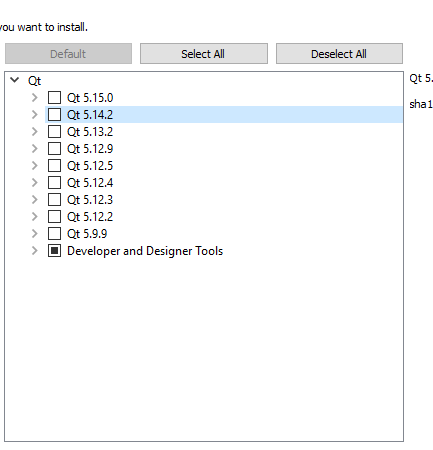
              alt text

              1 Reply Last reply
              0
              • mrjjM Offline
                mrjjM Offline
                mrjj
                Lifetime Qt Champion
                wrote on last edited by mrjj
                #18

                hi
                You can try
                widget.selectComponent("qt.qt5.14.2");
                widget.selectComponent("qt.qt5.14.2.gcc_64");
                and see if that works.

                I hope "Latest releases" is checked by default when running with this script else it wont work as nothing in list then.

                K 1 Reply Last reply
                1
                • mrjjM mrjj

                  hi
                  You can try
                  widget.selectComponent("qt.qt5.14.2");
                  widget.selectComponent("qt.qt5.14.2.gcc_64");
                  and see if that works.

                  I hope "Latest releases" is checked by default when running with this script else it wont work as nothing in list then.

                  K Offline
                  K Offline
                  Kallappa
                  wrote on last edited by
                  #19

                  @mrjj,

                  yes sure, Thanks, for your time
                  just now i tried with widget.selectAll(); instead of selecting each one
                  it works for me on Local system and now i will try on server.

                  thanks again

                  mrjjM 1 Reply Last reply
                  0
                  • K Kallappa

                    @mrjj,

                    yes sure, Thanks, for your time
                    just now i tried with widget.selectAll(); instead of selecting each one
                    it works for me on Local system and now i will try on server.

                    thanks again

                    mrjjM Offline
                    mrjjM Offline
                    mrjj
                    Lifetime Qt Champion
                    wrote on last edited by
                    #20

                    @Kallappa
                    Ok, i cross fingers.
                    You might get a shitload of other stuff but hopefully, that won't matter :)

                    K 1 Reply Last reply
                    0
                    • R Offline
                      R Offline
                      rtvisions
                      wrote on last edited by
                      #21

                      Do yourself a favor and DO NOT USE the offical Qt installers anymore. Use aqt install: https://github.com/miurahr/aqtinstall - Works perfectly on every platform.

                      1 Reply Last reply
                      2
                      • mrjjM mrjj

                        @Kallappa
                        Ok, i cross fingers.
                        You might get a shitload of other stuff but hopefully, that won't matter :)

                        K Offline
                        K Offline
                        Kallappa
                        wrote on last edited by
                        #22

                        Thanks @mrjj it worked for me on server also. :)

                        mrjjM 1 Reply Last reply
                        1
                        • K Kallappa

                          Thanks @mrjj it worked for me on server also. :)

                          mrjjM Offline
                          mrjjM Offline
                          mrjj
                          Lifetime Qt Champion
                          wrote on last edited by
                          #23

                          @Kallappa
                          Good to hear :)
                          So did it install tons of stuff or just a few ?
                          I wonder what one will get with selectAll :)

                          K 1 Reply Last reply
                          0
                          • mrjjM mrjj

                            @Kallappa
                            Good to hear :)
                            So did it install tons of stuff or just a few ?
                            I wonder what one will get with selectAll :)

                            K Offline
                            K Offline
                            Kallappa
                            wrote on last edited by
                            #24

                            @mrjj

                            hmm, Your right it is installed with all files related qt5.14.2

                            mrjjM 1 Reply Last reply
                            0
                            • K Kallappa

                              @mrjj

                              hmm, Your right it is installed with all files related qt5.14.2

                              mrjjM Offline
                              mrjjM Offline
                              mrjj
                              Lifetime Qt Champion
                              wrote on last edited by
                              #25

                              @Kallappa
                              Ok i kinda though it might. but was not sure.
                              Thank you for reporting back.

                              1 Reply Last reply
                              0

                              • Login

                              • Login or register to search.
                              • First post
                                Last post
                              0
                              • Categories
                              • Recent
                              • Tags
                              • Popular
                              • Users
                              • Groups
                              • Search
                              • Get Qt Extensions
                              • Unsolved