Skip to content
  • Categories
  • Recent
  • Tags
  • Popular
  • Users
  • Groups
  • Search
  • Get Qt
  • Unsolved
Collapse
Brand Logo
  1. Home
  2. Qt Development
  3. Installation and Deployment
  4. Qt silent installation on Linux server
Qt 6.11 is out! See what's new in the release blog

Qt silent installation on Linux server

Scheduled Pinned Locked Moved Solved Installation and Deployment
25 Posts 3 Posters 31.8k Views 1 Watching
  • Oldest to Newest
  • Newest to Oldest
  • Most Votes
Reply
  • Reply as topic
Log in to reply
This topic has been deleted. Only users with topic management privileges can see it.
  • mrjjM mrjj

    @Kallappa
    Yes, login is mandatory now. Even for open source.

    K Offline
    K Offline
    Kallappa
    wrote on last edited by
    #5

    @mrjj ,

    after adding this qtaccount.ini file ~/.local/share/Qt
    account login is done but may be problem with .qs script it stops after login

    [5] :/metadata/qt.qt5.5142.src
    [5] :/metadata/qt.qt5.5142.src/installscript.qs
    [5] :/metadata/qt.qt5.5142.qtnetworkauth.android
    [5] :/metadata/qt.qt5.5142.qtnetworkauth.android/installscript.qs
    [5] :/metadata/qt.qt5.5142.qtscript.android
    [5] :/metadata/qt.qt5.5142.qtscript.android/installscript.qs
    [5] :/metadata/qt.qt5.5142.qtlottie.gcc_64
    [5] :/metadata/qt.qt5.5142.qtlottie.gcc_64/installscript.qs
    [20] Loaded control script "qt-installer-noninteractive.qs"
    [20] Using control script: "qt-installer-noninteractive.qs"
    [3130] Login completed to Qt Account: "kallappa.bachagundi@verolt.com"
    [3130] Saving Qt Account settings to file: "/home/dev/.local/share/Qt/qtaccount.ini"
    [3210] "Installation preconditions ok, installation can proceed!" [ "success" ]
    [3218] Control script callback "ObligationsPageCallback" does not exist.

    mrjjM 1 Reply Last reply
    0
    • K Kallappa

      @mrjj ,

      after adding this qtaccount.ini file ~/.local/share/Qt
      account login is done but may be problem with .qs script it stops after login

      [5] :/metadata/qt.qt5.5142.src
      [5] :/metadata/qt.qt5.5142.src/installscript.qs
      [5] :/metadata/qt.qt5.5142.qtnetworkauth.android
      [5] :/metadata/qt.qt5.5142.qtnetworkauth.android/installscript.qs
      [5] :/metadata/qt.qt5.5142.qtscript.android
      [5] :/metadata/qt.qt5.5142.qtscript.android/installscript.qs
      [5] :/metadata/qt.qt5.5142.qtlottie.gcc_64
      [5] :/metadata/qt.qt5.5142.qtlottie.gcc_64/installscript.qs
      [20] Loaded control script "qt-installer-noninteractive.qs"
      [20] Using control script: "qt-installer-noninteractive.qs"
      [3130] Login completed to Qt Account: "kallappa.bachagundi@verolt.com"
      [3130] Saving Qt Account settings to file: "/home/dev/.local/share/Qt/qtaccount.ini"
      [3210] "Installation preconditions ok, installation can proceed!" [ "success" ]
      [3218] Control script callback "ObligationsPageCallback" does not exist.

      mrjjM Offline
      mrjjM Offline
      mrjj
      Lifetime Qt Champion
      wrote on last edited by
      #6

      Hi
      Not sure exactly what is wrong but it seems it tried to call
      ObligationsPageCallback
      and its not found so scripts exists.

      K 1 Reply Last reply
      0
      • mrjjM mrjj

        Hi
        Not sure exactly what is wrong but it seems it tried to call
        ObligationsPageCallback
        and its not found so scripts exists.

        K Offline
        K Offline
        Kallappa
        wrote on last edited by
        #7

        @mrjj , You can find the script here

        function Controller() {
            installer.autoRejectMessageBoxes();
            installer.setMessageBoxAutomaticAnswer("installationError", QMessageBox.Retry);
            installer.setMessageBoxAutomaticAnswer("installationErrorWithRetry", QMessageBox.Retry);
            installer.setMessageBoxAutomaticAnswer("DownloadError", QMessageBox.Retry);
            installer.setMessageBoxAutomaticAnswer("archiveDownloadError", QMessageBox.Retry);
            installer.installationFinished.connect(function() {
                gui.clickButton(buttons.NextButton);
            })
        }
        
        Controller.prototype.WelcomePageCallback = function() {
        //click delay here because the next button is initially disabled for ~1 second
            gui.clickButton(buttons.NextButton, 3000);
        }
        
        Controller.prototype.CredentialsPageCallback = function() {
            gui.clickButton(buttons.NextButton);
        }
        
        Controller.prototype.IntroductionPageCallback = function() {
            gui.clickButton(buttons.NextButton);
        }
        
        Controller.prototype.TargetDirectoryPageCallback = function()
        {
            //dev is the user in our docker image
            gui.currentPageWidget().TargetDirectoryLineEdit.setText(installer.value("HomeDir") + "/Qt");
            gui.clickButton(buttons.NextButton);
        }
        
        Controller.prototype.PerformInstallationPageCallback = function() {
            gui.clickButton(buttons.CommitButton);
        }
        
        Controller.prototype.ComponentSelectionPageCallback = function() {
            function list_packages() {
              var components = installer.components();
              console.log("Available components: " + components.length);
              var packages = ["Packages: "];
              for (var i = 0 ; i < components.length ;i++) {
                  packages.push(components[i].name);
              }
              console.log(packages.join(" "));
            }
        
            list_packages();
        
            var widget = gui.currentPageWidget();
        
            console.log(widget);
        
            widget.deselectAll();
            widget.selectComponent("qt.qt5.5130");
            widget.selectComponent("qt.qt5.5130.gcc_64");
            // widget.deselectComponent("");
        
            gui.clickButton(buttons.NextButton);
        }
        
        Controller.prototype.LicenseAgreementPageCallback = function() {
            gui.currentPageWidget().AcceptLicenseRadioButton.setChecked(true);
            gui.clickButton(buttons.NextButton);
        }
        
        Controller.prototype.StartMenuDirectoryPageCallback = function() {
            gui.clickButton(buttons.NextButton);
        }
        
        Controller.prototype.ReadyForInstallationPageCallback = function()
        {
            gui.clickButton(buttons.NextButton);
        }
        
        Controller.prototype.FinishedPageCallback = function() {
            var checkBoxForm = gui.currentPageWidget().LaunchQtCreatorCheckBoxForm;
            if (checkBoxForm && checkBoxForm.launchQtCreatorCheckBox) {
                checkBoxForm.launchQtCreatorCheckBox.checked = false;
            }
            gui.clickButton(buttons.FinishButton);
        }
                
        
        mrjjM K 2 Replies Last reply
        0
        • K Kallappa

          @mrjj , You can find the script here

          function Controller() {
              installer.autoRejectMessageBoxes();
              installer.setMessageBoxAutomaticAnswer("installationError", QMessageBox.Retry);
              installer.setMessageBoxAutomaticAnswer("installationErrorWithRetry", QMessageBox.Retry);
              installer.setMessageBoxAutomaticAnswer("DownloadError", QMessageBox.Retry);
              installer.setMessageBoxAutomaticAnswer("archiveDownloadError", QMessageBox.Retry);
              installer.installationFinished.connect(function() {
                  gui.clickButton(buttons.NextButton);
              })
          }
          
          Controller.prototype.WelcomePageCallback = function() {
          //click delay here because the next button is initially disabled for ~1 second
              gui.clickButton(buttons.NextButton, 3000);
          }
          
          Controller.prototype.CredentialsPageCallback = function() {
              gui.clickButton(buttons.NextButton);
          }
          
          Controller.prototype.IntroductionPageCallback = function() {
              gui.clickButton(buttons.NextButton);
          }
          
          Controller.prototype.TargetDirectoryPageCallback = function()
          {
              //dev is the user in our docker image
              gui.currentPageWidget().TargetDirectoryLineEdit.setText(installer.value("HomeDir") + "/Qt");
              gui.clickButton(buttons.NextButton);
          }
          
          Controller.prototype.PerformInstallationPageCallback = function() {
              gui.clickButton(buttons.CommitButton);
          }
          
          Controller.prototype.ComponentSelectionPageCallback = function() {
              function list_packages() {
                var components = installer.components();
                console.log("Available components: " + components.length);
                var packages = ["Packages: "];
                for (var i = 0 ; i < components.length ;i++) {
                    packages.push(components[i].name);
                }
                console.log(packages.join(" "));
              }
          
              list_packages();
          
              var widget = gui.currentPageWidget();
          
              console.log(widget);
          
              widget.deselectAll();
              widget.selectComponent("qt.qt5.5130");
              widget.selectComponent("qt.qt5.5130.gcc_64");
              // widget.deselectComponent("");
          
              gui.clickButton(buttons.NextButton);
          }
          
          Controller.prototype.LicenseAgreementPageCallback = function() {
              gui.currentPageWidget().AcceptLicenseRadioButton.setChecked(true);
              gui.clickButton(buttons.NextButton);
          }
          
          Controller.prototype.StartMenuDirectoryPageCallback = function() {
              gui.clickButton(buttons.NextButton);
          }
          
          Controller.prototype.ReadyForInstallationPageCallback = function()
          {
              gui.clickButton(buttons.NextButton);
          }
          
          Controller.prototype.FinishedPageCallback = function() {
              var checkBoxForm = gui.currentPageWidget().LaunchQtCreatorCheckBoxForm;
              if (checkBoxForm && checkBoxForm.launchQtCreatorCheckBox) {
                  checkBoxForm.launchQtCreatorCheckBox.checked = false;
              }
              gui.clickButton(buttons.FinishButton);
          }
                  
          
          mrjjM Offline
          mrjjM Offline
          mrjj
          Lifetime Qt Champion
          wrote on last edited by
          #8

          @Kallappa
          Hi
          It seems it's missing a section for the new screen with openSource info

          I can't recall if it has a next button or an ok button
          you could try to add

          Controller.prototype.ObligationsPageCallback= function()
          {
          gui.clickButton(buttons.NextButton);
          }

          and see.

          1 Reply Last reply
          1
          • K Kallappa

            @mrjj , You can find the script here

            function Controller() {
                installer.autoRejectMessageBoxes();
                installer.setMessageBoxAutomaticAnswer("installationError", QMessageBox.Retry);
                installer.setMessageBoxAutomaticAnswer("installationErrorWithRetry", QMessageBox.Retry);
                installer.setMessageBoxAutomaticAnswer("DownloadError", QMessageBox.Retry);
                installer.setMessageBoxAutomaticAnswer("archiveDownloadError", QMessageBox.Retry);
                installer.installationFinished.connect(function() {
                    gui.clickButton(buttons.NextButton);
                })
            }
            
            Controller.prototype.WelcomePageCallback = function() {
            //click delay here because the next button is initially disabled for ~1 second
                gui.clickButton(buttons.NextButton, 3000);
            }
            
            Controller.prototype.CredentialsPageCallback = function() {
                gui.clickButton(buttons.NextButton);
            }
            
            Controller.prototype.IntroductionPageCallback = function() {
                gui.clickButton(buttons.NextButton);
            }
            
            Controller.prototype.TargetDirectoryPageCallback = function()
            {
                //dev is the user in our docker image
                gui.currentPageWidget().TargetDirectoryLineEdit.setText(installer.value("HomeDir") + "/Qt");
                gui.clickButton(buttons.NextButton);
            }
            
            Controller.prototype.PerformInstallationPageCallback = function() {
                gui.clickButton(buttons.CommitButton);
            }
            
            Controller.prototype.ComponentSelectionPageCallback = function() {
                function list_packages() {
                  var components = installer.components();
                  console.log("Available components: " + components.length);
                  var packages = ["Packages: "];
                  for (var i = 0 ; i < components.length ;i++) {
                      packages.push(components[i].name);
                  }
                  console.log(packages.join(" "));
                }
            
                list_packages();
            
                var widget = gui.currentPageWidget();
            
                console.log(widget);
            
                widget.deselectAll();
                widget.selectComponent("qt.qt5.5130");
                widget.selectComponent("qt.qt5.5130.gcc_64");
                // widget.deselectComponent("");
            
                gui.clickButton(buttons.NextButton);
            }
            
            Controller.prototype.LicenseAgreementPageCallback = function() {
                gui.currentPageWidget().AcceptLicenseRadioButton.setChecked(true);
                gui.clickButton(buttons.NextButton);
            }
            
            Controller.prototype.StartMenuDirectoryPageCallback = function() {
                gui.clickButton(buttons.NextButton);
            }
            
            Controller.prototype.ReadyForInstallationPageCallback = function()
            {
                gui.clickButton(buttons.NextButton);
            }
            
            Controller.prototype.FinishedPageCallback = function() {
                var checkBoxForm = gui.currentPageWidget().LaunchQtCreatorCheckBoxForm;
                if (checkBoxForm && checkBoxForm.launchQtCreatorCheckBox) {
                    checkBoxForm.launchQtCreatorCheckBox.checked = false;
                }
                gui.clickButton(buttons.FinishButton);
            }
                    
            
            K Offline
            K Offline
            Kallappa
            wrote on last edited by
            #9

            @mrjj,

            i have added ObligationsPageCallback function as below

            Controller.prototype.ObligationsPageCallback = function() {
                var page = gui.pageWidgetByObjectName("ObligationsPage");
                page.obligationsAgreement.setChecked(true);
                page.completeChanged();
                gui.clickButton(buttons.NextButton);
            }
            

            and it completes the installation
            but but i don't have qmake to compile qt applications

            if am wrong sorry for above information, i am new to this

            mrjjM 1 Reply Last reply
            1
            • K Kallappa

              @mrjj,

              i have added ObligationsPageCallback function as below

              Controller.prototype.ObligationsPageCallback = function() {
                  var page = gui.pageWidgetByObjectName("ObligationsPage");
                  page.obligationsAgreement.setChecked(true);
                  page.completeChanged();
                  gui.clickButton(buttons.NextButton);
              }
              

              and it completes the installation
              but but i don't have qmake to compile qt applications

              if am wrong sorry for above information, i am new to this

              mrjjM Offline
              mrjjM Offline
              mrjj
              Lifetime Qt Champion
              wrote on last edited by
              #10

              @Kallappa
              Hi
              Well it worked so it seems fine. Good work.

              What you mean make is missing?
              But it did install a Qt version for you to use ?

              K 1 Reply Last reply
              0
              • mrjjM mrjj

                @Kallappa
                Hi
                Well it worked so it seems fine. Good work.

                What you mean make is missing?
                But it did install a Qt version for you to use ?

                K Offline
                K Offline
                Kallappa
                wrote on last edited by Kallappa
                #11

                @mrjj
                hi,
                I mean i need qt environement to build qt application on Linux server
                so i need qmake and make to compile qt source code.

                but i didn't found this on ~/Qt directory
                i have only below folders/files

                InstallationLog.txt  
                MaintenanceTool.dat 
                 components.xml 
                 installerResources
                Licenses             
                MaintenanceTool.ini  
                dist            
                network.xml
                MaintenanceTool      
                Tools              
                installer.dat
                
                mrjjM 1 Reply Last reply
                0
                • K Kallappa

                  @mrjj
                  hi,
                  I mean i need qt environement to build qt application on Linux server
                  so i need qmake and make to compile qt source code.

                  but i didn't found this on ~/Qt directory
                  i have only below folders/files

                  InstallationLog.txt  
                  MaintenanceTool.dat 
                   components.xml 
                   installerResources
                  Licenses             
                  MaintenanceTool.ini  
                  dist            
                  network.xml
                  MaintenanceTool      
                  Tools              
                  installer.dat
                  
                  mrjjM Offline
                  mrjjM Offline
                  mrjj
                  Lifetime Qt Champion
                  wrote on last edited by
                  #12

                  @Kallappa
                  It seems that
                  widget.selectComponent("qt.qt5.5130");
                  widget.selectComponent("qt.qt5.5130.gcc_64");

                  didnt really select anything?

                  if you look at the link a user posted

                  Controller.prototype.ComponentSelectionPageCallback = function() {
                      var page = gui.pageWidgetByObjectName("ComponentSelectionPage");
                  
                      var archiveCheckBox = gui.findChild(page, "Archive");
                      var latestCheckBox = gui.findChild(page, "Latest releases");
                      var fetchButton = gui.findChild(page, "FetchCategoryButton");
                  
                      archiveCheckBox.click();
                      latestCheckBox.click();
                      fetchButton.click();
                  
                      // ...
                  }
                  

                  Do you have that in script ?
                  As now the versions are grouped so i think the script is not totally updated with the new installers.

                  K 1 Reply Last reply
                  0
                  • mrjjM mrjj

                    @Kallappa
                    It seems that
                    widget.selectComponent("qt.qt5.5130");
                    widget.selectComponent("qt.qt5.5130.gcc_64");

                    didnt really select anything?

                    if you look at the link a user posted

                    Controller.prototype.ComponentSelectionPageCallback = function() {
                        var page = gui.pageWidgetByObjectName("ComponentSelectionPage");
                    
                        var archiveCheckBox = gui.findChild(page, "Archive");
                        var latestCheckBox = gui.findChild(page, "Latest releases");
                        var fetchButton = gui.findChild(page, "FetchCategoryButton");
                    
                        archiveCheckBox.click();
                        latestCheckBox.click();
                        fetchButton.click();
                    
                        // ...
                    }
                    

                    Do you have that in script ?
                    As now the versions are grouped so i think the script is not totally updated with the new installers.

                    K Offline
                    K Offline
                    Kallappa
                    wrote on last edited by
                    #13

                    @mrjj ,

                    No the part above mentioned is not there in script for this it is as below

                    Controller.prototype.ComponentSelectionPageCallback = function() {
                        function list_packages() {
                          var components = installer.components();
                          console.log("Available components: " + components.length);
                          var packages = ["Packages: "];
                          for (var i = 0 ; i < components.length ;i++) {
                              packages.push(components[i].name);
                          }
                          console.log(packages.join(" "));
                        }
                    
                        list_packages();
                    
                        var widget = gui.currentPageWidget();
                    
                        console.log(widget);
                    
                        widget.deselectAll();
                        widget.selectComponent("qt.qt5.5130");
                        widget.selectComponent("qt.qt5.5130.gcc_64");
                        // widget.deselectComponent("");
                    
                        gui.clickButton(buttons.NextButton);
                    }
                    
                    K 1 Reply Last reply
                    0
                    • K Kallappa

                      @mrjj ,

                      No the part above mentioned is not there in script for this it is as below

                      Controller.prototype.ComponentSelectionPageCallback = function() {
                          function list_packages() {
                            var components = installer.components();
                            console.log("Available components: " + components.length);
                            var packages = ["Packages: "];
                            for (var i = 0 ; i < components.length ;i++) {
                                packages.push(components[i].name);
                            }
                            console.log(packages.join(" "));
                          }
                      
                          list_packages();
                      
                          var widget = gui.currentPageWidget();
                      
                          console.log(widget);
                      
                          widget.deselectAll();
                          widget.selectComponent("qt.qt5.5130");
                          widget.selectComponent("qt.qt5.5130.gcc_64");
                          // widget.deselectComponent("");
                      
                          gui.clickButton(buttons.NextButton);
                      }
                      
                      K Offline
                      K Offline
                      Kallappa
                      wrote on last edited by
                      #14

                      @mrjj,
                      Hi,

                      if i add the part

                      var page = gui.pageWidgetByObjectName("ComponentSelectionPage");
                      
                          var archiveCheckBox = gui.findChild(page, "Archive");
                          var latestCheckBox = gui.findChild(page, "Latest releases");
                          var fetchButton = gui.findChild(page, "FetchCategoryButton");
                      
                          archiveCheckBox.click();
                          latestCheckBox.click();
                          fetchButton.click();
                      
                          // ...
                      

                      it give error for click() as function doesn't exist

                      mrjjM 1 Reply Last reply
                      0
                      • K Kallappa

                        @mrjj,
                        Hi,

                        if i add the part

                        var page = gui.pageWidgetByObjectName("ComponentSelectionPage");
                        
                            var archiveCheckBox = gui.findChild(page, "Archive");
                            var latestCheckBox = gui.findChild(page, "Latest releases");
                            var fetchButton = gui.findChild(page, "FetchCategoryButton");
                        
                            archiveCheckBox.click();
                            latestCheckBox.click();
                            fetchButton.click();
                        
                            // ...
                        

                        it give error for click() as function doesn't exist

                        mrjjM Offline
                        mrjjM Offline
                        mrjj
                        Lifetime Qt Champion
                        wrote on last edited by
                        #15

                        @Kallappa
                        Hmm thats odd. it should work.

                        Do you need a special Qt or jus the newest ?

                        maybe you can just change the script to do that and ignore the Archive thing.

                        K 1 Reply Last reply
                        0
                        • mrjjM mrjj

                          @Kallappa
                          Hmm thats odd. it should work.

                          Do you need a special Qt or jus the newest ?

                          maybe you can just change the script to do that and ignore the Archive thing.

                          K Offline
                          K Offline
                          Kallappa
                          wrote on last edited by
                          #16

                          @mrjj
                          Hi,
                          yes, i just need Qt5.14.0 or Qt5.14.2 installation on server,
                          thats it.

                          if any other ways kindly suggest here or the Qt's reference doc if any for command line installation in ubuntu

                          mrjjM 1 Reply Last reply
                          0
                          • K Kallappa

                            @mrjj
                            Hi,
                            yes, i just need Qt5.14.0 or Qt5.14.2 installation on server,
                            thats it.

                            if any other ways kindly suggest here or the Qt's reference doc if any for command line installation in ubuntu

                            mrjjM Offline
                            mrjjM Offline
                            mrjj
                            Lifetime Qt Champion
                            wrote on last edited by mrjj
                            #17

                            @Kallappa
                            sadly there is no commandline install version.

                            We need to change these lines
                            widget.selectComponent("qt.qt5.5130");
                            widget.selectComponent("qt.qt5.5130.gcc_64");
                            but I not sure what names should be for
                            Qt5.14.0
                            or if they will be in Archive.

                            Do you use the newest online installer from Qt site ?

                            It seems to have Qt5.14.0 in front
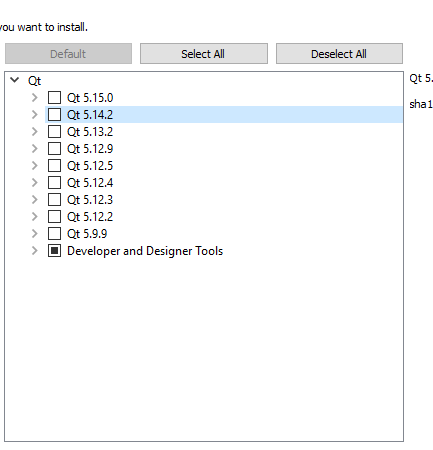
                            alt text

                            1 Reply Last reply
                            0
                            • mrjjM Offline
                              mrjjM Offline
                              mrjj
                              Lifetime Qt Champion
                              wrote on last edited by mrjj
                              #18

                              hi
                              You can try
                              widget.selectComponent("qt.qt5.14.2");
                              widget.selectComponent("qt.qt5.14.2.gcc_64");
                              and see if that works.

                              I hope "Latest releases" is checked by default when running with this script else it wont work as nothing in list then.

                              K 1 Reply Last reply
                              1
                              • mrjjM mrjj

                                hi
                                You can try
                                widget.selectComponent("qt.qt5.14.2");
                                widget.selectComponent("qt.qt5.14.2.gcc_64");
                                and see if that works.

                                I hope "Latest releases" is checked by default when running with this script else it wont work as nothing in list then.

                                K Offline
                                K Offline
                                Kallappa
                                wrote on last edited by
                                #19

                                @mrjj,

                                yes sure, Thanks, for your time
                                just now i tried with widget.selectAll(); instead of selecting each one
                                it works for me on Local system and now i will try on server.

                                thanks again

                                mrjjM 1 Reply Last reply
                                0
                                • K Kallappa

                                  @mrjj,

                                  yes sure, Thanks, for your time
                                  just now i tried with widget.selectAll(); instead of selecting each one
                                  it works for me on Local system and now i will try on server.

                                  thanks again

                                  mrjjM Offline
                                  mrjjM Offline
                                  mrjj
                                  Lifetime Qt Champion
                                  wrote on last edited by
                                  #20

                                  @Kallappa
                                  Ok, i cross fingers.
                                  You might get a shitload of other stuff but hopefully, that won't matter :)

                                  K 1 Reply Last reply
                                  0
                                  • R Offline
                                    R Offline
                                    rtvisions
                                    wrote on last edited by
                                    #21

                                    Do yourself a favor and DO NOT USE the offical Qt installers anymore. Use aqt install: https://github.com/miurahr/aqtinstall - Works perfectly on every platform.

                                    1 Reply Last reply
                                    2
                                    • mrjjM mrjj

                                      @Kallappa
                                      Ok, i cross fingers.
                                      You might get a shitload of other stuff but hopefully, that won't matter :)

                                      K Offline
                                      K Offline
                                      Kallappa
                                      wrote on last edited by
                                      #22

                                      Thanks @mrjj it worked for me on server also. :)

                                      mrjjM 1 Reply Last reply
                                      1
                                      • K Kallappa

                                        Thanks @mrjj it worked for me on server also. :)

                                        mrjjM Offline
                                        mrjjM Offline
                                        mrjj
                                        Lifetime Qt Champion
                                        wrote on last edited by
                                        #23

                                        @Kallappa
                                        Good to hear :)
                                        So did it install tons of stuff or just a few ?
                                        I wonder what one will get with selectAll :)

                                        K 1 Reply Last reply
                                        0
                                        • mrjjM mrjj

                                          @Kallappa
                                          Good to hear :)
                                          So did it install tons of stuff or just a few ?
                                          I wonder what one will get with selectAll :)

                                          K Offline
                                          K Offline
                                          Kallappa
                                          wrote on last edited by
                                          #24

                                          @mrjj

                                          hmm, Your right it is installed with all files related qt5.14.2

                                          mrjjM 1 Reply Last reply
                                          0

                                          • Login

                                          • Login or register to search.
                                          • First post
                                            Last post
                                          0
                                          • Categories
                                          • Recent
                                          • Tags
                                          • Popular
                                          • Users
                                          • Groups
                                          • Search
                                          • Get Qt
                                          • Unsolved