
ASCII number to Byte.
-
Hello, this is my first post on forum.
Here is what i have to do:
i have a QString. example: "EARTH"
the i need take every char, one by one, convert to ascii number, multiply the number by 2, convert back again to ascii, and build a byte array to send over tcpsocket.rules:
this bytearray is for a ax25 header, his lenght is always 6. if i receive some string smaller then 6, i have to fill the rest with "".my first try was:
build a byteArray_out filled with 0x40 (thats represents "" ).-
do a loop (at the satId.at.size() representing the "in" data) and take the chars from satId, and convert to ascii number, finally multiplying by 2 (ok).
int v = (satId.at(i).toLatin1())*2; -
build a bytearray from this number, take the first byte of this bytearray, and write in byteArray_out position at the loop (didnt work)
byteArray_out [i] = QByteArray::number(v, 16)[0];
I build a code taking another way (but i belive is not the better way){
int AX25Header::Initialize(QString satId, QString callsign) { if(satId.size() > 6 || callsign.size() > 6) return -1; //converting formula = string to ASCII decimal, decimal X2, new decimal to hex. //0x40 = "" QString satIdx2; for(int i=0; i < 6; i++){ if(i < satId.size()){ int v = satId.at(i).toLatin1(); v = v*2; QString hexadecimal; hexadecimal.setNum(v,16); satIdx2.append(hexadecimal); } else satIdx2.append("40"); } QByteArray satId_ba = QByteArray::fromHex(satIdx2.toUtf8()); if(satId_ba.size()!=6){ log("destination callsign size error"); return -1; } m_Instance.setDestinationCallSign(satId_ba); m_Instance.setDestinationSSID(0x00); QString satId_ba_str = satId_ba.toHex(); log("TC AX25 Destination Callsign = " + satId_ba_str); QString callsignx2; for(int i=0; i < 6; i++){ if(i < callsign.size()){ int v = callsign.at(i).toLatin1(); v = v*2; QString hexadecimal; hexadecimal.setNum(v,16); callsignx2.append(hexadecimal); } else callsignx2.append("40"); } QByteArray callsignx2_ba = QByteArray::fromHex(callsignx2.toUtf8()); if(callsignx2_ba.size()!=6){ log("source callsign size error"); return -1; } m_Instance.setSourceCallSign(callsignx2_ba); m_Instance.setSourceSSID(0x00); QString callsign_ba_str = callsignx2_ba.toHex(); log("TC AX25 Source Callsign = " + callsign_ba_str); // AX25 Control Fields m_Instance.setAX25ControlField(0x03); m_Instance.setAX25PIDField(0xF0); return 0; } -
-
Hi and welcome to devnet,
First thing to do: use only QByteArray. QString stores your string in UTF16 and you are doing useless back and forth transformation.
What do you mean by ASCII number ? Every char has a numerical representation so I am not sure what you want to achieve here.
-
Hi and welcome to devnet,
First thing to do: use only QByteArray. QString stores your string in UTF16 and you are doing useless back and forth transformation.
What do you mean by ASCII number ? Every char has a numerical representation so I am not sure what you want to achieve here.
@SGaist said in ASCII number to Byte.:
Every char has a numerical representation so I am not sure what you want to achieve here.
hi! thanks for reply!
ill give you a didatic example.i have this string:
N C B R 2i have to convert every char to a ascii number
N = 78
C = 76
B = 66
R = 82
2 = 50
"" = 32then i have to multiply the ascii numbers by 2:
78 -> 156
132 -> 134
66 -> 132
82 -> 50
50 -> 100
32 -> 64and finally convert the new numbers to hex:
156 -> 9c
132 -> 86
132 -> 84
164 -> a4
100 -> 64
64 -> 40so my final QByteArray is "9c-86-84-a4-64-40"
Look this table, the conversion is down to up.
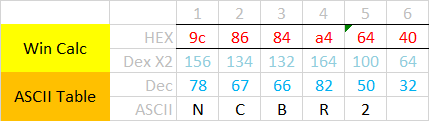
-
When you've only ascii characters in your string then convert your QString to a QByteArray and iterate over the single chars. Converting an integer back to a QString / QByteArray can be done with QString/QByteArray::number()

