Skip to content
  • Categories
  • Recent
  • Tags
  • Popular
  • Users
  • Groups
  • Search
  • Get Qt Extensions
  • Unsolved
Collapse
Brand Logo
  1. Home
  2. Qt Development
  3. Mobile and Embedded
  4. how to build and install qt5.12.5 plugin for raspbian-buster in raspberry 4?
Forum Updated to NodeBB v4.3 + New Features

how to build and install qt5.12.5 plugin for raspbian-buster in raspberry 4?

Scheduled Pinned Locked Moved Solved Mobile and Embedded
20 Posts 4 Posters 4.1k Views 1 Watching
  • Oldest to Newest
  • Newest to Oldest
  • Most Votes
Reply
  • Reply as topic
Log in to reply
This topic has been deleted. Only users with topic management privileges can see it.
  • S Offline
    S Offline
    stevewu
    wrote on last edited by
    #7

    where is the subdirectory?
    I check the path /usr/bin/qt5.12.5

    322dd011-210c-47c1-b92f-637b1cb2438e-图片.png

    and the build path,
    cb1a358f-ca32-4945-a020-9d900d7c2d1f-图片.png
    and the source path,
    e82b57b9-d240-46f1-bfa1-bdfd79c2684a-图片.png
    but can not find it,,,,

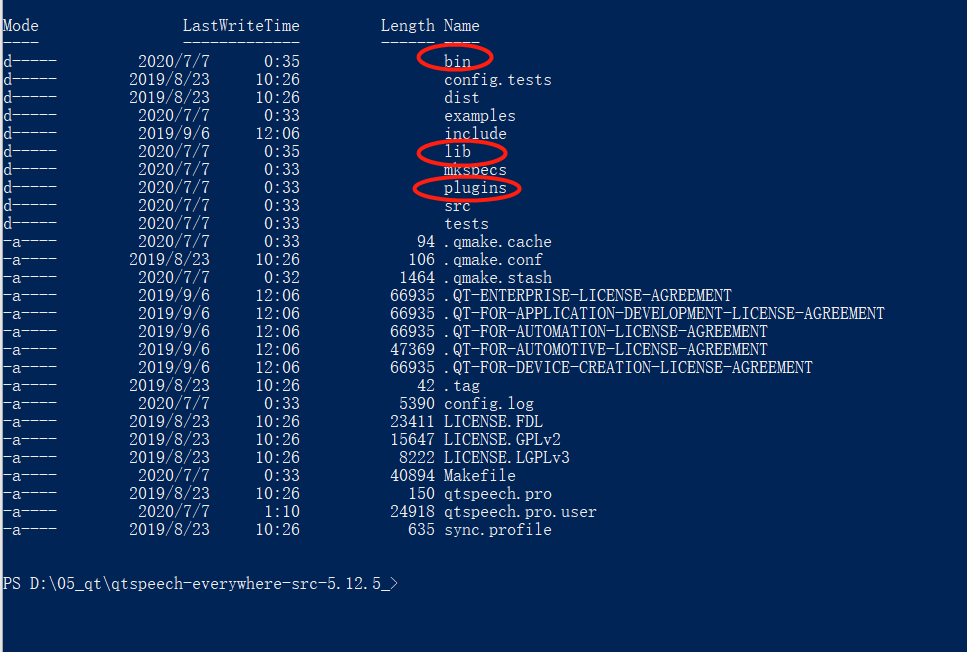
    the same code , I build in windows, it seems that everything is OK! I can get the /bin /lib and /plugins.... after build.
    bca09b10-8e81-4d0f-96b3-ce22e70bfc53-图片.png

    bb5640a0-f858-4d90-b01d-28cf2f7eaf28-图片.png
    c951baae-3d57-4b50-9c4b-5659d85abc59-图片.png

    jsulmJ 1 Reply Last reply
    0
    • S stevewu

      where is the subdirectory?
      I check the path /usr/bin/qt5.12.5
      322dd011-210c-47c1-b92f-637b1cb2438e-图片.png

      and the build path,
      cb1a358f-ca32-4945-a020-9d900d7c2d1f-图片.png
      and the source path,
      e82b57b9-d240-46f1-bfa1-bdfd79c2684a-图片.png
      but can not find it,,,,

      the same code , I build in windows, it seems that everything is OK! I can get the /bin /lib and /plugins.... after build.
      bca09b10-8e81-4d0f-96b3-ce22e70bfc53-图片.png

      bb5640a0-f858-4d90-b01d-28cf2f7eaf28-图片.png
      c951baae-3d57-4b50-9c4b-5659d85abc59-图片.png

      jsulmJ Offline
      jsulmJ Offline
      jsulm
      Lifetime Qt Champion
      wrote on last edited by jsulm
      #8

      @stevewu said in how to build and install qt5.12.5 plugin for raspbian-buster in raspberry 4?:

      where is the subdirectory?

      Did you check the output from "make install" you posted?
      It is right there: /usr/lib/qt5.12/lib...

      https://forum.qt.io/topic/113070/qt-code-of-conduct

      S 1 Reply Last reply
      0
      • jsulmJ jsulm

        @stevewu said in how to build and install qt5.12.5 plugin for raspbian-buster in raspberry 4?:

        where is the subdirectory?

        Did you check the output from "make install" you posted?
        It is right there: /usr/lib/qt5.12/lib...

        S Offline
        S Offline
        stevewu
        wrote on last edited by
        #9

        @jsulm thank you for reply, I check the /usr/lib/qt5.12/lib, find no subdirectory.
        after “make install” ,

        5fb38310-7ad2-4757-94f3-5ed3239fae02-图片.png

        I check the out put from “make ”, and find that ,
        it only build the code in path “/home/qt5_install/qtspeech_build/src/tts”,
        so i can get "libQt5TextToSpeech.so...etc" in the /lib, after "make" ,new add libs as below:

        41e57b5d-a860-4e45-866b-52621e60e8c5-图片.png
        but when it enters in “/home/qt5_install/qtspeech_build/src/plugins/tts”,
        put out information "nothing need to do for the first" and left, so the /plugin not be built.

        jsulmJ 1 Reply Last reply
        0
        • S stevewu

          @jsulm thank you for reply, I check the /usr/lib/qt5.12/lib, find no subdirectory.
          after “make install” ,
          5fb38310-7ad2-4757-94f3-5ed3239fae02-图片.png

          I check the out put from “make ”, and find that ,
          it only build the code in path “/home/qt5_install/qtspeech_build/src/tts”,
          so i can get "libQt5TextToSpeech.so...etc" in the /lib, after "make" ,new add libs as below:
          41e57b5d-a860-4e45-866b-52621e60e8c5-图片.png
          but when it enters in “/home/qt5_install/qtspeech_build/src/plugins/tts”,
          put out information "nothing need to do for the first" and left, so the /plugin not be built.

          jsulmJ Offline
          jsulmJ Offline
          jsulm
          Lifetime Qt Champion
          wrote on last edited by
          #10

          @stevewu said in how to build and install qt5.12.5 plugin for raspbian-buster in raspberry 4?:

          I check the /usr/lib/qt5.12/lib, find no subdirectory

          lib in/usr/lib/qt5.12/ IS the subdirectory I'm talking about.

          https://forum.qt.io/topic/113070/qt-code-of-conduct

          S 1 Reply Last reply
          0
          • jsulmJ jsulm

            @stevewu said in how to build and install qt5.12.5 plugin for raspbian-buster in raspberry 4?:

            I check the /usr/lib/qt5.12/lib, find no subdirectory

            lib in/usr/lib/qt5.12/ IS the subdirectory I'm talking about.

            S Offline
            S Offline
            stevewu
            wrote on last edited by
            #11

            @jsulm OK, thanks, I got it,,,
            but only "libQt5TextToSpeech.so..." in /usr/lib/qt5.12/lib, is OK for the plugin "text-to-speech"?
            "make" does not build the path “/home/qt5_install/qtspeech_build/src/plugins/tts”, it dose not matter?

            I run a test code(which can work in the win10) on the raspberry pi4, it can build success, but run error, put out "No text-to-speech plug-ins were found."

            jsulmJ 1 Reply Last reply
            0
            • S stevewu

              @jsulm OK, thanks, I got it,,,
              but only "libQt5TextToSpeech.so..." in /usr/lib/qt5.12/lib, is OK for the plugin "text-to-speech"?
              "make" does not build the path “/home/qt5_install/qtspeech_build/src/plugins/tts”, it dose not matter?

              I run a test code(which can work in the win10) on the raspberry pi4, it can build success, but run error, put out "No text-to-speech plug-ins were found."

              jsulmJ Offline
              jsulmJ Offline
              jsulm
              Lifetime Qt Champion
              wrote on last edited by
              #12

              @stevewu I guess you also need to build the tts plug-in from the plugins directory

              https://forum.qt.io/topic/113070/qt-code-of-conduct

              S P 3 Replies Last reply
              0
              • S Offline
                S Offline
                stevewu
                wrote on last edited by
                #13

                ok, tks, I will try it later.....

                1 Reply Last reply
                0
                • jsulmJ jsulm

                  @stevewu I guess you also need to build the tts plug-in from the plugins directory

                  S Offline
                  S Offline
                  stevewu
                  wrote on last edited by
                  #14

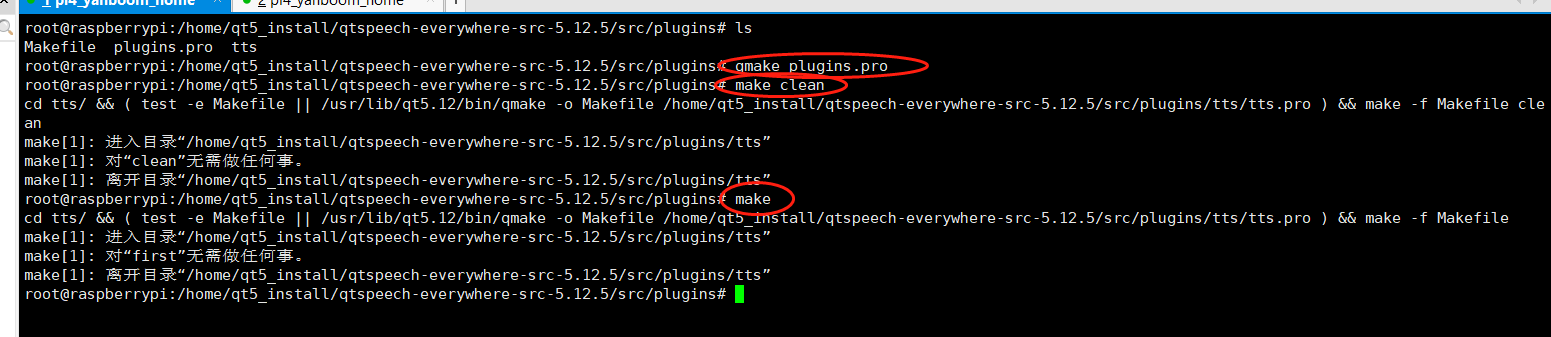
                  @jsulm hi, I enter the /src/plugins and make,, but it still does not work.

                  d377aa8b-2a86-4a77-ac25-0cfeae868b06-图片.png

                  could you please tell me how to fix it?

                  1 Reply Last reply
                  0
                  • jsulmJ jsulm

                    @stevewu I guess you also need to build the tts plug-in from the plugins directory

                    S Offline
                    S Offline
                    stevewu
                    wrote on last edited by
                    #15

                    @jsulm thank you very much , what you said is right...
                    I reinstall all the libs about libflite and libspeechd, and it works..

                    Pablo J. RoginaP P 2 Replies Last reply
                    0
                    • S stevewu

                      @jsulm thank you very much , what you said is right...
                      I reinstall all the libs about libflite and libspeechd, and it works..

                      Pablo J. RoginaP Offline
                      Pablo J. RoginaP Offline
                      Pablo J. Rogina
                      wrote on last edited by
                      #16

                      @stevewu said in how to build and install qt5.12.5 plugin for raspbian-buster in raspberry 4?:

                      and it works..

                      great, if your issue is solved please mark your post as such!

                      Upvote the answer(s) that helped you solve the issue
                      Use "Topic Tools" button to mark your post as Solved
                      Add screenshots via postimage.org
                      Don't ask support requests via chat/PM. Please use the forum so others can benefit from the solution in the future

                      S 1 Reply Last reply
                      0
                      • Pablo J. RoginaP Pablo J. Rogina

                        @stevewu said in how to build and install qt5.12.5 plugin for raspbian-buster in raspberry 4?:

                        and it works..

                        great, if your issue is solved please mark your post as such!

                        S Offline
                        S Offline
                        stevewu
                        wrote on last edited by
                        #17

                        @Pablo-J-Rogina OK.....

                        1 Reply Last reply
                        0
                        • S stevewu

                          @jsulm thank you very much , what you said is right...
                          I reinstall all the libs about libflite and libspeechd, and it works..

                          P Offline
                          P Offline
                          Peter_Gao
                          wrote on last edited by
                          #18

                          @stevewu Hi, I meet the same problem. Could you tell me how to fix it by reinstalling the libs about libflite and libspeechd? Looking forward to your reply, Thanks!

                          1 Reply Last reply
                          0
                          • jsulmJ jsulm

                            @stevewu I guess you also need to build the tts plug-in from the plugins directory

                            P Offline
                            P Offline
                            Peter_Gao
                            wrote on last edited by
                            #19

                            @jsulm I meet the same problem. I check the configuration of Qt TextToSpeech, and found all 'no'. Is this the problem that I don't make the right configuration? Please help me to make the right configuraiton. Thanks.
                            qt_speech.JPG

                            jsulmJ 1 Reply Last reply
                            0
                            • P Peter_Gao

                              @jsulm I meet the same problem. I check the configuration of Qt TextToSpeech, and found all 'no'. Is this the problem that I don't make the right configuration? Please help me to make the right configuraiton. Thanks.
                              qt_speech.JPG

                              jsulmJ Offline
                              jsulmJ Offline
                              jsulm
                              Lifetime Qt Champion
                              wrote on last edited by
                              #20

                              @Peter_Gao Did you install Flite, Speech Dispatcher and their dev packages?
                              You can always check config.log file to see what exactly is the problem.

                              https://forum.qt.io/topic/113070/qt-code-of-conduct

                              1 Reply Last reply
                              0

                              • Login

                              • Login or register to search.
                              • First post
                                Last post
                              0
                              • Categories
                              • Recent
                              • Tags
                              • Popular
                              • Users
                              • Groups
                              • Search
                              • Get Qt Extensions
                              • Unsolved