

QWidget::windowRole() use as storage for small textual data
-
hi
yes it should but we don't have to guess.
you can do
QWidget * fw = qApp->focusWidget();
and check out in the debugger (or qDebug its object name) to see what it is.It should be possible to get hold of the Dock again to get your data back.
@mrjj QWidget * fw and now widget is the same. See the picture please
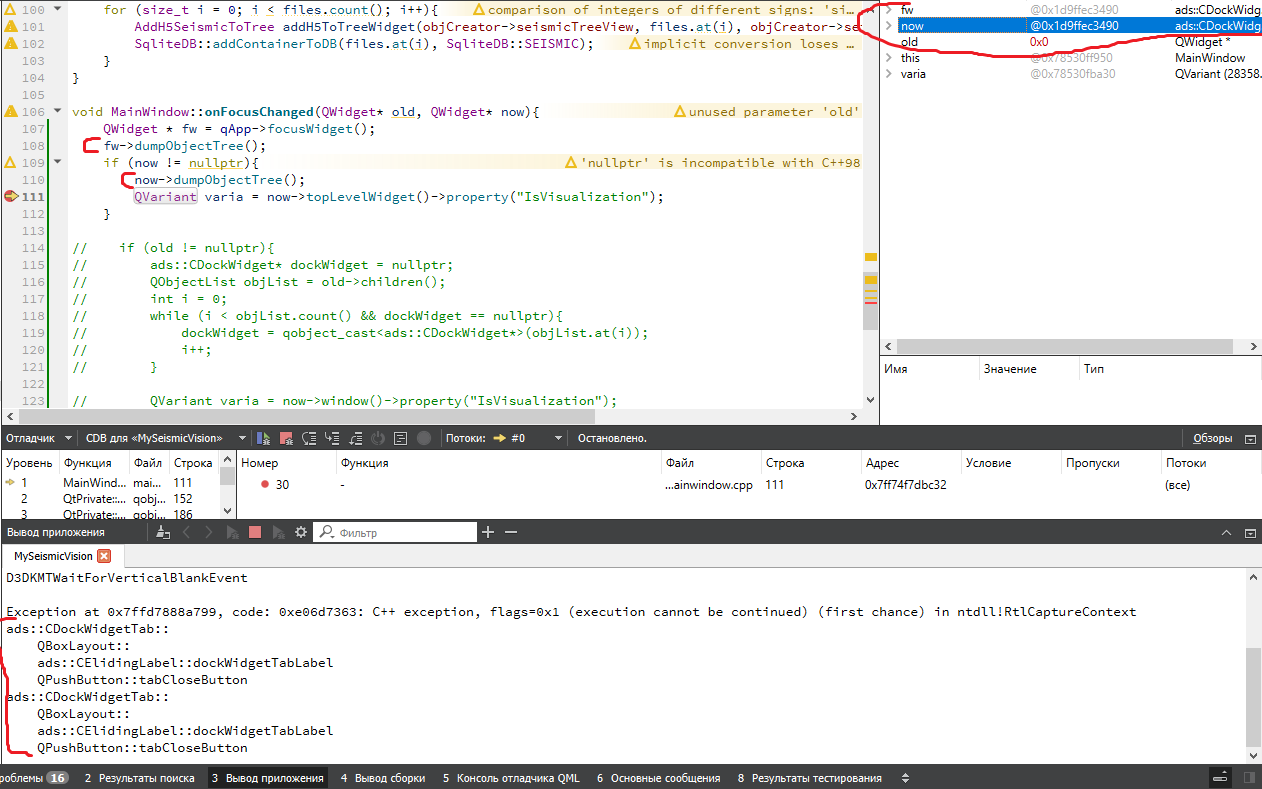
-
hi
yes it should but we don't have to guess.
you can do
QWidget * fw = qApp->focusWidget();
and check out in the debugger (or qDebug its object name) to see what it is.It should be possible to get hold of the Dock again to get your data back.
@mrjj now I'm trying to set property to the tabWidgets to wich CDockWidget belongs to:
QVTKOpenGLStereoWidget* MainWindowObjectCreator::createVTK2DWindow(){
    QVTKOpenGLStereoWidget* qvtkOpenGLStereoWidget = new QVTKOpenGLStereoWidget;
    ads::CDockWidget* dockWidget = new ads::CDockWidget("2D Window");
    dockWidget->setWidget(qvtkOpenGLStereoWidget);
    dockManager->addDockWidget(ads::RightDockWidgetArea, dockWidget);
    dockWidget->tabWidget()->setProperty("IsVisualization", 4443);
    //dockWidget->dumpObjectTree();
    return qvtkOpenGLStereoWidget;
}
but each time I manually change the focus the
MainWindow::onFocusChanged(QWidget* old, QWidget* now)works twice:
first time now is the old window
second time is the new window
and when the second time this method works then I get the correct value of property:void MainWindow::onFocusChanged(QWidget* old, QWidget* now){ QWidget * fw = qApp->focusWidget(); fw->dumpObjectTree(); if (now != nullptr){ now->dumpObjectTree(); QVariant varia = now->property("IsVisualization"); } }By the way this works only if the focused window is tabbed. Otherwise the focused widget is not a
tabWidget(). So idea to set property to thetabWidget()doesn't seem to work -
@mrjj now I'm trying to set property to the tabWidgets to wich CDockWidget belongs to:
QVTKOpenGLStereoWidget* MainWindowObjectCreator::createVTK2DWindow(){
    QVTKOpenGLStereoWidget* qvtkOpenGLStereoWidget = new QVTKOpenGLStereoWidget;
    ads::CDockWidget* dockWidget = new ads::CDockWidget("2D Window");
    dockWidget->setWidget(qvtkOpenGLStereoWidget);
    dockManager->addDockWidget(ads::RightDockWidgetArea, dockWidget);
    dockWidget->tabWidget()->setProperty("IsVisualization", 4443);
    //dockWidget->dumpObjectTree();
    return qvtkOpenGLStereoWidget;
}
but each time I manually change the focus the
MainWindow::onFocusChanged(QWidget* old, QWidget* now)works twice:
first time now is the old window
second time is the new window
and when the second time this method works then I get the correct value of property:void MainWindow::onFocusChanged(QWidget* old, QWidget* now){ QWidget * fw = qApp->focusWidget(); fw->dumpObjectTree(); if (now != nullptr){ now->dumpObjectTree(); QVariant varia = now->property("IsVisualization"); } }By the way this works only if the focused window is tabbed. Otherwise the focused widget is not a
tabWidget(). So idea to set property to thetabWidget()doesn't seem to workAh silly me. of cause now will be the same as qApp->focusWidget(); :)
and it does seem to be the actual DockWidget ! which i didn't expect.Is it possible you have 2 connects to the onFocusChanged signal ?
Not really sure why it should run twice. I don't recall it normally does that.Its normally not an issue to loop up the chain to find the top parent.
So not sure why it dont seem to work for you here. -
Ah silly me. of cause now will be the same as qApp->focusWidget(); :)
and it does seem to be the actual DockWidget ! which i didn't expect.Is it possible you have 2 connects to the onFocusChanged signal ?
Not really sure why it should run twice. I don't recall it normally does that.Its normally not an issue to loop up the chain to find the top parent.
So not sure why it dont seem to work for you here. -
@mrjj yes, now I also find this looking for parent not working for me strange :)
Just a moment I guess that I'm missing something important...@Please_Help_me_D
Yeah as the dumptree clearly shows its the top as we expect
ads::CDockWidget::2D Window
QBoxLayout::
QAction::
QScrollArea::dockWidgetScrollArea
QWidget::qt_scrollarea_viewport
QVTKOpenGLStereoWidget::
QVBoxLayout::
....But the test with qApp->focusWidget(); showd now is the Dock so
looking at this code.f (now != nullptr){
ads::CDockWidget* dockWidget = nullptr;
QObjectList objList = now->children();Do you only check its children ?
and in that case, the line
dockWidget = qobject_castads::CDockWidget*(objList.at(i));will always return null as you skip the now ? and only cast children ?
-
@Please_Help_me_D
Yeah as the dumptree clearly shows its the top as we expect
ads::CDockWidget::2D Window
QBoxLayout::
QAction::
QScrollArea::dockWidgetScrollArea
QWidget::qt_scrollarea_viewport
QVTKOpenGLStereoWidget::
QVBoxLayout::
....But the test with qApp->focusWidget(); showd now is the Dock so
looking at this code.f (now != nullptr){
ads::CDockWidget* dockWidget = nullptr;
QObjectList objList = now->children();Do you only check its children ?
and in that case, the line
dockWidget = qobject_castads::CDockWidget*(objList.at(i));will always return null as you skip the now ? and only cast children ?
@mrjj let me clarify one moment.
Earlier wrote an unclear post about what widget which dumptree has.
Also there are two possible ways howads::CDockWidgetis attached to the application:- CDockWidget is tabbed
- CDockWidget is float (we can pick and drag it as it is like a new window)
So we have different dumptrees for
QWidget* nowobject ononFocusChanged(QWidget* old, QWidget* now)Here is dumptree for tabbed CDOckWidget:
ads::CDockWidgetTab::
    QBoxLayout::
    ads::CElidingLabel::dockWidgetTabLabel
    QPushButton::tabCloseButton
And here is for float CDockWidget:
QScrollArea::dockWidgetScrollArea
    QWidget::qt_scrollarea_viewport
        QVTKOpenGLStereoWidget::
            QVBoxLayout::
            QWindowContainer::
    QWidget::qt_scrollarea_hcontainer
        QScrollBar::
        QBoxLayout::
    QWidget::qt_scrollarea_vcontainer
        QScrollBar::
        QBoxLayout::
So we have a deal with two types of top level widgets :)
But I would like to set the property only to a single type widget and ifonFocusChanged()look for that object innowwidget -
@mrjj let me clarify one moment.
Earlier wrote an unclear post about what widget which dumptree has.
Also there are two possible ways howads::CDockWidgetis attached to the application:- CDockWidget is tabbed
- CDockWidget is float (we can pick and drag it as it is like a new window)
So we have different dumptrees for
QWidget* nowobject ononFocusChanged(QWidget* old, QWidget* now)Here is dumptree for tabbed CDOckWidget:
ads::CDockWidgetTab::
    QBoxLayout::
    ads::CElidingLabel::dockWidgetTabLabel
    QPushButton::tabCloseButton
And here is for float CDockWidget:
QScrollArea::dockWidgetScrollArea
    QWidget::qt_scrollarea_viewport
        QVTKOpenGLStereoWidget::
            QVBoxLayout::
            QWindowContainer::
    QWidget::qt_scrollarea_hcontainer
        QScrollBar::
        QBoxLayout::
    QWidget::qt_scrollarea_vcontainer
        QScrollBar::
        QBoxLayout::
So we have a deal with two types of top level widgets :)
But I would like to set the property only to a single type widget and ifonFocusChanged()look for that object innowwidget@Please_Help_me_D
aha. I missed the being tabbed part.
So when tabbed, the Dock becomes a CDockWidgetTab and the Dock is not around any more? -
@Please_Help_me_D
aha. I missed the being tabbed part.
So when tabbed, the Dock becomes a CDockWidgetTab and the Dock is not around any more? -
@mrjj when tabbed the focused widget is
CDockWidgetTab(because I do this dumptree on thenowwidget when certain widget is focused). And I don't know exactly whereCDockWidgetdisappears :)@Please_Help_me_D
Is CDockWidget just a normal QDockWidget ?
-
@Please_Help_me_D
Is CDockWidget just a normal QDockWidget ?@mrjj here it is
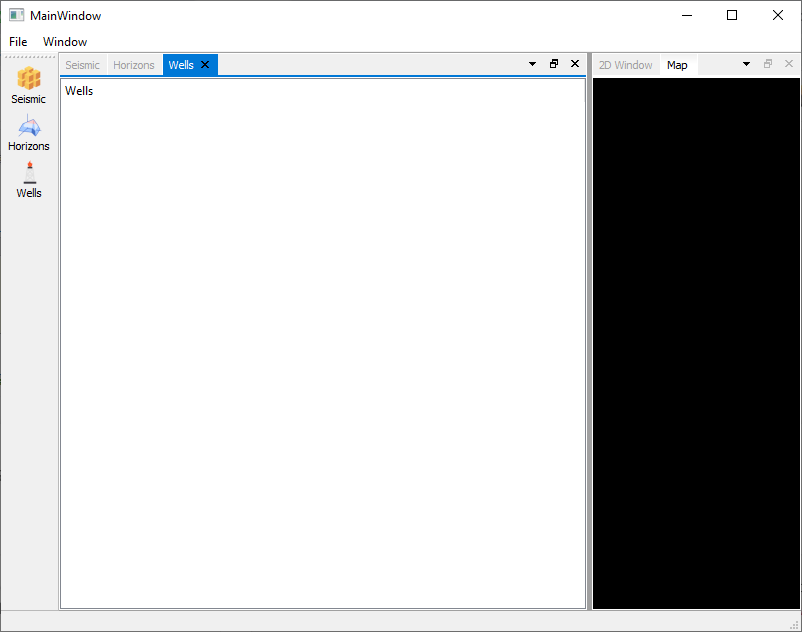
with the code:
void MainWindow::onFocusChanged(QWidget* old, QWidget* now){
    if (now != nullptr){
        now->dumpObjectTree();
    }
}
I started interactively change focused window and the qDebug output shows me that the toplevel widget of dumpObjectTree depends upon where I click: if I click on the
QTreeWidgetthe this widget is on the rop, if on the label thenCDockWidgetTabis on the top... -
@mrjj here it is
with the code:
void MainWindow::onFocusChanged(QWidget* old, QWidget* now){
    if (now != nullptr){
        now->dumpObjectTree();
    }
}
I started interactively change focused window and the qDebug output shows me that the toplevel widget of dumpObjectTree depends upon where I click: if I click on the
QTreeWidgetthe this widget is on the rop, if on the label thenCDockWidgetTabis on the top...@Please_Help_me_D
Hi
I think its a custom setup as it dont look the same for Qt exmaples
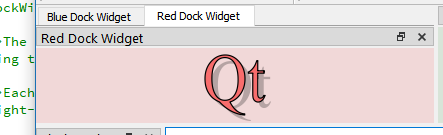
Is CDockWidget your own class ?
-
@Please_Help_me_D
Hi
I think its a custom setup as it dont look the same for Qt exmaples
Is CDockWidget your own class ?
-
@Please_Help_me_D
ah. its looks awesome.
Ok so that makes sense. So it will actually hide the dock and the tab
is the parent.
That means setting your value on teh Dock will not work as it not there when tabbed.You could instead add a plain QWidget + layout + qvtkOpenGLStereoWidget/ what you normal put in the dock
so that we always have this QWidget as top and you can add the dynamic property there.
This ofcause adds extra widget to all docks so if you have huge tons of them, it might be wasteful. -
@Please_Help_me_D
ah. its looks awesome.
Ok so that makes sense. So it will actually hide the dock and the tab
is the parent.
That means setting your value on teh Dock will not work as it not there when tabbed.You could instead add a plain QWidget + layout + qvtkOpenGLStereoWidget/ what you normal put in the dock
so that we always have this QWidget as top and you can add the dynamic property there.
This ofcause adds extra widget to all docks so if you have huge tons of them, it might be wasteful.@mrjj said in QWidget::windowRole() use as storage for small textual data:
You could instead add a plain QWidget + layout + qvtkOpenGLStereoWidget/ what you normal put in the dock
so that we always have this QWidget as top and you can add the dynamic property there.
This ofcause adds extra widget to all docks so if you have huge tons of them, it might be wasteful.Could you please explain this a little bit more? Can't understand the idea.
Or we could postpone it till tomorrow it is late night :) -
@mrjj said in QWidget::windowRole() use as storage for small textual data:
You could instead add a plain QWidget + layout + qvtkOpenGLStereoWidget/ what you normal put in the dock
so that we always have this QWidget as top and you can add the dynamic property there.
This ofcause adds extra widget to all docks so if you have huge tons of them, it might be wasteful.Could you please explain this a little bit more? Can't understand the idea.
Or we could postpone it till tomorrow it is late night :)@Please_Help_me_D
Yes let do it tomorrow as im also tired :)
Its nothing complicated just extra widget with a layout that holds your normal content.
Im assuminng that even CDock will go away, your actual content still exists so if we add a new QWidget that
is always included we could add the property there.

