
Icons from Resources not showing up in QPushButton or QToolButton
-
The porting guide tutorial chapter 3 talks about rcc. Note that the name of the tool is pyside2-rcc for PySide2.
@SGaist Oh, I see the trick. Good to know. I think there's also another similar way - to set a "step" in the project settings in the execution of the program and define the comand there (so that it is executed before the python code itself).
I converted the icons.qrc file using pyside2-rcc and it went all right, with no messages, producing icons.py, which sits in the root of the project now. It's content looks jason-like (probably should).
I then imported the file in my header:
import iconsHowever, there's no change, I get no icons.
I deleted the both the icons.py and icons.qrc and created a new resource file iconsres.qrc with all the icons from scratch (using QtCrator GUI), this time in the root (not in the Resource folder). It should have no effect, because the icons.py was in the root anyway. I converted it to iconsres.py and changed the import line to
import iconsresThe icons are left like:
        self.MainToolBar.addWidget(QPushButton(QIcon(':/icons/AddRecord.png'),'NNN'))
        self.MainToolBar.addWidget(QPushButton(QIcon(':/icons/gear.png'),'OOO'))
        self.MainToolBar.addWidget(QPushButton(QIcon(':/person.png'),'PPP'))
        self.MainToolBar.addWidget(QPushButton(QIcon(':/tools.png'),'RRR'))

        mbtnTestQ = QPushButton()
        mbtnTestQ.setText("Qqqqq")
        mbtnTestQ.setIconSize(QSize(24,24))
        mbtnTestQ.setIcon(QIcon(QPixmap(":/icons/co.png")))
        self.MainToolBar.addWidget(mbtnTestQ)
No change whatsoever :-(.
-
did you name your resource like this?:
<qresource prefix="icons">
<file alias="AddRecord">icons/AddRecord.png</file>
</qresource>
maybe get rid of the .png extention
QtGui.QPixmap(':/icons/AddRecord')@alom Thank you for you suggestion. I tried omitting extension, it didn't work.
My resource file looks exactly like that, except that prefix is starting with a slash and whole content is enclosed in <RCC> tag. I tried to recreate the resource from scratch and omit the slash in prefix, which I left there the first time, but it has no effect - the slash is added automatically.
<RCC>
    <qresource prefix="/icons">
        <file>Resources/AddRecord.png</file>
        <file>Resources/admin.png</file>
        <file>Resources/envelope.png</file>
        <file>Resources/gear.png</file>
        <file>Resources/helpLarge.png</file>
        <file>Resources/itemRev.png</file>
        <file>Resources/person.png</file>
        <file>Resources/plan.png</file>
        <file>Resources/Table_gray.png</file>
        <file>Resources/Table_green.png</file>
        <file>Resources/Table.png</file>
        <file>Resources/TableEdit.png</file>
        <file>Resources/TableEditCancel.png</file>
        <file>Resources/tagBlue.png</file>
        <file>Resources/tagGreen.png</file>
        <file>Resources/tagRed.png</file>
        <file>Resources/tools.png</file>
    </qresource>
</RCC>
The converted file (iconsres.py) starts like this:
from PySide2 import QtCore

qt_resource_data = b"\
\x00\x00\x01\x8f\
\x89\
PNG\x0d\x0a\x1a\x0a\x00\x00\x00\x0dIHDR\x00\....................."
...
...
...
def qInitResources():
    QtCore.qRegisterResourceData(0x03, qt_resource_struct, qt_resource_name, qt_resource_data)

def qCleanupResources():
    QtCore.qUnregisterResourceData(0x03, qt_resource_struct, qt_resource_name, qt_resource_data)

qInitResources()
I even tried to add an extra new toolbar elsewhere, but id didn't help:
        # Create pyqt toolbar
        toolBar2 = QToolBar()
        self.Lout = self.window.findChild(QLayout, 'HomeLayout')
        self.Lout.addWidget(toolBar2)

        # Add buttons to toolbar
        toolButton1 = QToolButton()
        toolButton1.setText("Apple")
        toolButton1.setIcon(QIcon(QPixmap(":/icons/plan.png")))
        toolButton1.setCheckable(True)
        toolButton1.setAutoExclusive(True)
        toolBar2.addWidget(toolButton1)
        toolButton2 = QToolButton()
        toolButton2.setText("Orange")
        toolButton2.setIcon(QIcon(QPixmap(":/icons/tools.png")))
        toolButton2.setCheckable(True)
        toolButton2.setAutoExclusive(True)
        toolBar2.addWidget(toolButton2)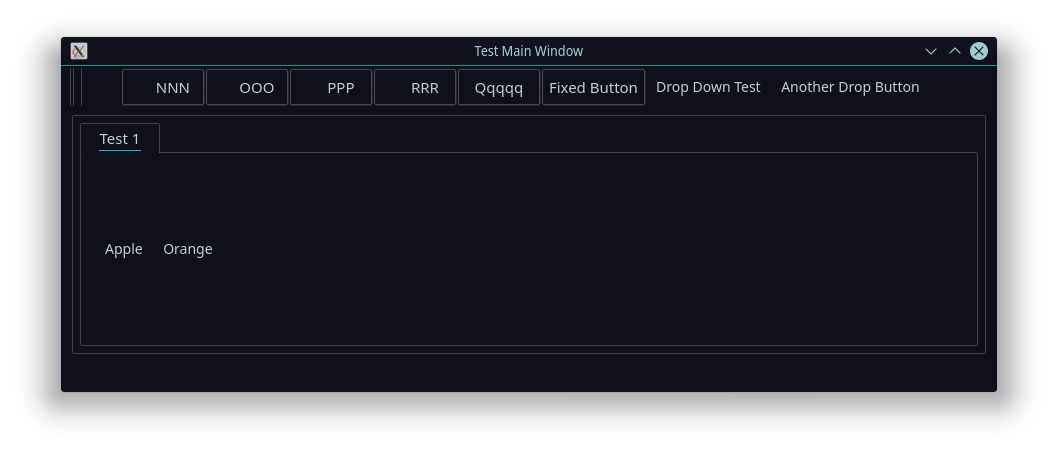
The "Apple" and "Orange" are the new buttons of a new toolBar2. Can it be something with the size of the buttons? Setting icon size explicitly doesn't help:
toolBar2.iconSize = QSize(24, 24)Setting toolbar height doesn't seem to have visual effect:
toolBar2.height = 60Just to be sure, I'll create a new project and set everything from scratch, but if anyone has any ideas, I'd appreciate them.
-
@alom Thank you for you suggestion. I tried omitting extension, it didn't work.
My resource file looks exactly like that, except that prefix is starting with a slash and whole content is enclosed in <RCC> tag. I tried to recreate the resource from scratch and omit the slash in prefix, which I left there the first time, but it has no effect - the slash is added automatically.
<RCC>
    <qresource prefix="/icons">
        <file>Resources/AddRecord.png</file>
        <file>Resources/admin.png</file>
        <file>Resources/envelope.png</file>
        <file>Resources/gear.png</file>
        <file>Resources/helpLarge.png</file>
        <file>Resources/itemRev.png</file>
        <file>Resources/person.png</file>
        <file>Resources/plan.png</file>
        <file>Resources/Table_gray.png</file>
        <file>Resources/Table_green.png</file>
        <file>Resources/Table.png</file>
        <file>Resources/TableEdit.png</file>
        <file>Resources/TableEditCancel.png</file>
        <file>Resources/tagBlue.png</file>
        <file>Resources/tagGreen.png</file>
        <file>Resources/tagRed.png</file>
        <file>Resources/tools.png</file>
    </qresource>
</RCC>
The converted file (iconsres.py) starts like this:
from PySide2 import QtCore

qt_resource_data = b"\
\x00\x00\x01\x8f\
\x89\
PNG\x0d\x0a\x1a\x0a\x00\x00\x00\x0dIHDR\x00\....................."
...
...
...
def qInitResources():
    QtCore.qRegisterResourceData(0x03, qt_resource_struct, qt_resource_name, qt_resource_data)

def qCleanupResources():
    QtCore.qUnregisterResourceData(0x03, qt_resource_struct, qt_resource_name, qt_resource_data)

qInitResources()
I even tried to add an extra new toolbar elsewhere, but id didn't help:
        # Create pyqt toolbar
        toolBar2 = QToolBar()
        self.Lout = self.window.findChild(QLayout, 'HomeLayout')
        self.Lout.addWidget(toolBar2)

        # Add buttons to toolbar
        toolButton1 = QToolButton()
        toolButton1.setText("Apple")
        toolButton1.setIcon(QIcon(QPixmap(":/icons/plan.png")))
        toolButton1.setCheckable(True)
        toolButton1.setAutoExclusive(True)
        toolBar2.addWidget(toolButton1)
        toolButton2 = QToolButton()
        toolButton2.setText("Orange")
        toolButton2.setIcon(QIcon(QPixmap(":/icons/tools.png")))
        toolButton2.setCheckable(True)
        toolButton2.setAutoExclusive(True)
        toolBar2.addWidget(toolButton2)
The "Apple" and "Orange" are the new buttons of a new toolBar2. Can it be something with the size of the buttons? Setting icon size explicitly doesn't help:
toolBar2.iconSize = QSize(24, 24)Setting toolbar height doesn't seem to have visual effect:
toolBar2.height = 60Just to be sure, I'll create a new project and set everything from scratch, but if anyone has any ideas, I'd appreciate them.
-
Heya,
Hmmm... strange, i'm not sure where the issues is. If you not using an alias and only prefix, I would have though the file path should be:":/icons/Resources/TableEdit.png"Thats why I use prefix and alias in my qrc file, so my path is always:
":/prefix/alias"and if you just explicitly set the image path for a test, your the image is defiantly working fine?
toolButton1.setIcon(QIcon(QPixmap("your/local/network/path/plan.png"))) -
Heya,
Hmmm... strange, i'm not sure where the issues is. If you not using an alias and only prefix, I would have though the file path should be:":/icons/Resources/TableEdit.png"Thats why I use prefix and alias in my qrc file, so my path is always:
":/prefix/alias"and if you just explicitly set the image path for a test, your the image is defiantly working fine?
toolButton1.setIcon(QIcon(QPixmap("your/local/network/path/plan.png")))@alom Well, I would distinguish the file path in the XML file and resource reference in the code. When the inconsres.qrc is compiled into iconsres.py, it doesn't matter what paths are in the inconsres.qrc, as long as the iconsres.py contains the converted binary data (which in my case it appears it does, it looks similar to images when encoded to jason).
So then it's important that the reference from the code is correct to the encoded images. Something might be broken within the encoded iconsres.py file, the reference in QPixMap might be incorrect or something in the GUI object might be set wrong.Is my line of thinking correct?
Also, do I understand it right, that there are no tools to track variables and objects through execution? I mean something functionally similar i.e. to VS, like mouse hovering over included iconsres.py to see, that it contains objects like "icons/person.png", etc.
-
To be honest i'm not sure, but trying to recreate your example above in a test file at home, where I did not not use an aslias, I had to use
":/icons/Resources/TableEdit.png"to get the image to show. Not including 'Resources" in the path failed to load it.
Unfortunately this is the extent of my knowledge with resource files
-
To be honest i'm not sure, but trying to recreate your example above in a test file at home, where I did not not use an aslias, I had to use
":/icons/Resources/TableEdit.png"to get the image to show. Not including 'Resources" in the path failed to load it.
Unfortunately this is the extent of my knowledge with resource files
-
Heya,
Hmmm... strange, i'm not sure where the issues is. If you not using an alias and only prefix, I would have though the file path should be:":/icons/Resources/TableEdit.png"Thats why I use prefix and alias in my qrc file, so my path is always:
":/prefix/alias"and if you just explicitly set the image path for a test, your the image is defiantly working fine?
toolButton1.setIcon(QIcon(QPixmap("your/local/network/path/plan.png"))) -
@alom Oh, that is interesting and very helpful, thank you! It doesn't work for me, though. Could you tell me please, did you do the conversion using:
pyside2-rcc iconsres.qrc -o iconsres.py?
Heya,
yes I used the snippet I posted in my above post. I save this as a separate .py file where i keep my resources and run this to generate my files. You need to make sure your system path env has acess to pyside2-rcc, else you need to modify the code to point to the pyside2-rcc on your network.import subprocess from pathlib import Path file_path = Path(__file__) output_file = file_path.parent.parent / Path('guiResources.py') resource_file = file_path.parent / Path('resources.qrc') # cmd and sub process to generated new font resource file cmd = f'pyside2-rcc {resource_file} -o {output_file}' subprocess.call(cmd, shell=True) -
Heya,
yes I used the snippet I posted in my above post. I save this as a separate .py file where i keep my resources and run this to generate my files. You need to make sure your system path env has acess to pyside2-rcc, else you need to modify the code to point to the pyside2-rcc on your network.import subprocess from pathlib import Path file_path = Path(__file__) output_file = file_path.parent.parent / Path('guiResources.py') resource_file = file_path.parent / Path('resources.qrc') # cmd and sub process to generated new font resource file cmd = f'pyside2-rcc {resource_file} -o {output_file}' subprocess.call(cmd, shell=True)@alom I still can't make it work. Your way is exactly how I do it, but for the moment I run the command directly as noted above.
I did another test with QLabel:
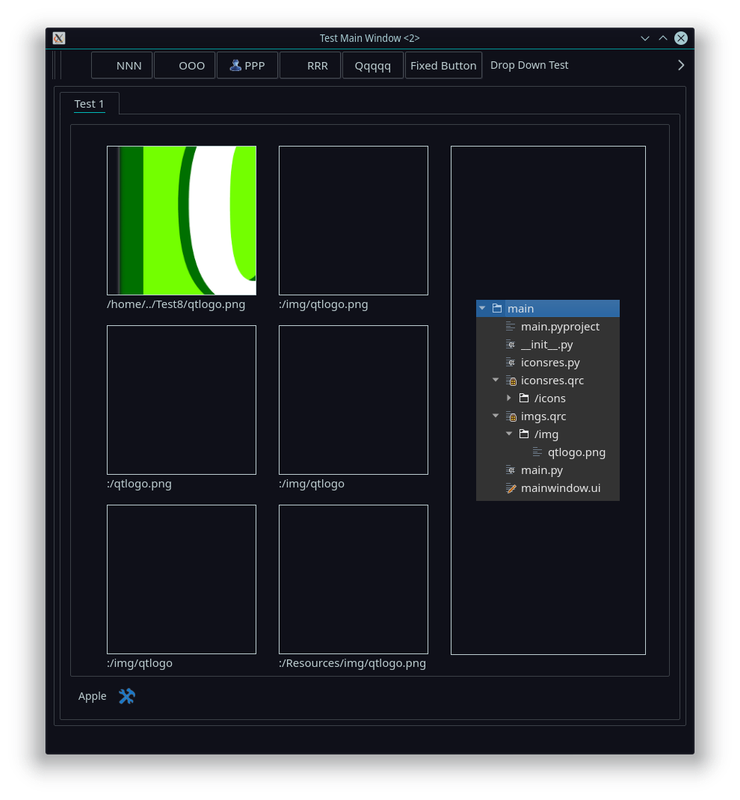
The imgs.qrc is shown in the screenshot including it's content, one picture (qtlogo.png). Converted this way:
pyside2-rcc imgs.qrc -o imgs.pyCode fractions:
from PySide2.QtWidgets import ..., QToolButton, ..., QLabel
from PySide2.QtGui import QIcon, QPixmap
import imgs
...
        self.pic1box = self.window.findChild(QLabel, "Pic1")
        self.pic1box.setText = "/home/../Test8/qtlogo.png"
        self.pic1box.setPixmap(QPixmap("/home/libor/Coding/Projects/Test8/qtlogo.png"))

        self.pic2box = self.window.findChild(QLabel, "Pic2")
        self.pic2box.setText = ":/img/qtlogo.png"
        self.pic2box.setPixmap(QPixmap(":/img/qtlogo.png"))

        self.pic3box = self.window.findChild(QLabel, "Pic3")
        self.pic3box.setText = ":/qtlogo.png"
        self.pic3box.setPixmap(QPixmap(":/qtlogo.png"))

        self.pic4box = self.window.findChild(QLabel, "Pic4")
        self.pic4box.setText = ":/img/qtlogo"
        self.pic4box.setPixmap(QPixmap(":/img/qtlogo"))

        self.pic5box = self.window.findChild(QLabel, "Pic5")
        self.pic5box.setText = ":/qtlogo"
        self.pic5box.setPixmap(QPixmap(":/qtlogo"))

        self.pic6box = self.window.findChild(QLabel, "Pic6")
        self.pic6box.setText = ":/Resources/img/qtlogo.png"
        self.pic6box.setPixmap(QPixmap(":/qtlogo.png"))
All icons and images shown have the path set directly, not via resource file.
-
What version of PySide2 are you using ?
Interested in AI ? www.idiap.ch
Please read the Qt Code of Conduct - https://forum.qt.io/topic/113070/qt-code-of-conduct -
@SGaist I don't know if this is a proper way to find out, but versions are listed:
> pip install --upgrade PySide2 Defaulting to user installation because normal site-packages is not writeable Requirement already up-to-date: PySide2 in /usr/lib64/python3.6/site-packages (5.15.0a1.dev1584103015) Requirement already satisfied, skipping upgrade: shiboken2==5.15.0a1.dev1584103015 in /usr/lib64/python3.6/site-packages (from PySide2) (5.15.0a1.dev1584103015) -
@SGaist I don't know if this is a proper way to find out, but versions are listed:
> pip install --upgrade PySide2 Defaulting to user installation because normal site-packages is not writeable Requirement already up-to-date: PySide2 in /usr/lib64/python3.6/site-packages (5.15.0a1.dev1584103015) Requirement already satisfied, skipping upgrade: shiboken2==5.15.0a1.dev1584103015 in /usr/lib64/python3.6/site-packages (from PySide2) (5.15.0a1.dev1584103015)OK, there are example apps that come with PySide2. Now I went into this one, which is using resource file:
/usr/lib64/python3.6/site-packages/PySide2/examples/widgets/animation/appchooser/...and run it:
> python3 ./appchooser.py
QPixmap::scaled: Pixmap is a null pixmap
QPixmap::scaled: Pixmap is a null pixmap
QPixmap::scaled: Pixmap is a null pixmap
QPixmap::scaled: Pixmap is a null pixmap
QPixmap::scaled: Pixmap is a null pixmap
QPixmap::scaled: Pixmap is a null pixmap
QPixmap::scaled: Pixmap is a null pixmap
QPixmap::scaled: Pixmap is a null pixmap
and I see only white blank window. Could someone try to run this example app and let me know it it is working? I wonder, if it's connected to this issue I'm experiencing with resource files.
-
OK, there are example apps that come with PySide2. Now I went into this one, which is using resource file:
/usr/lib64/python3.6/site-packages/PySide2/examples/widgets/animation/appchooser/...and run it:
> python3 ./appchooser.py
QPixmap::scaled: Pixmap is a null pixmap
QPixmap::scaled: Pixmap is a null pixmap
QPixmap::scaled: Pixmap is a null pixmap
QPixmap::scaled: Pixmap is a null pixmap
QPixmap::scaled: Pixmap is a null pixmap
QPixmap::scaled: Pixmap is a null pixmap
QPixmap::scaled: Pixmap is a null pixmap
QPixmap::scaled: Pixmap is a null pixmap
and I see only white blank window. Could someone try to run this example app and let me know it it is working? I wonder, if it's connected to this issue I'm experiencing with resource files.
I somehow progressed a bit with the issue. I tried another Python, the virtual environment that I set during some of tutorials. I installed a PySide2 into that venv and when running my test application in that environment, I can see 2 more pictures in QLabels (actualy those which should work).

But what is interesting nad unfortunate, the icons on the QPushButtons still don't work (the 2 that are shown are assigned via direct link, not a resource file). Icons are in different resource file (iconsres.qrc/icons) from the images (imgs.qrc/img), as is visible in the tree depicted in the screenshot.
Also, when I ran the AppChooser example from PySide2 example set, it was working with the venv.
So I did "pip uninstall pyside2" and "pip uninstall shoboken2" and then "pip install shoboken2" and "pip install pyside2", but it didn't help.
I have two conclusions:
- Something is broken in my system Python. I have no idea how to fix it.
- There's something wrong with the iconsres.qrc and also with new testres.qrc, third resource I tried to create in the test project. The 2nd resource file imgs.qrc is valid. But I don't know what went wrong, what's the difference between them.
Any advices for further steps appreciated.
-
Can you provide a minimal example with all files that allows to reproduce your issue ?
Interested in AI ? www.idiap.ch
Please read the Qt Code of Conduct - https://forum.qt.io/topic/113070/qt-code-of-conduct -
@Denni-0 Yep, the thing is, that your modified PyQt5 code works on my system Python, but does not work on the virtual environment Python! So the exact oposite of the case of PySide2 version... It gets even more confusing. Obviously on both is installed the same PyQt5 and PySide2 package.
-
Since you gave an alias to each entry of the qrc file, use that allias to access the images.
For example:
self.pic1box.setPixmap(QPixmap(":/icons/qtlogo"))Interested in AI ? www.idiap.ch
Please read the Qt Code of Conduct - https://forum.qt.io/topic/113070/qt-code-of-conduct -
Since you gave an alias to each entry of the qrc file, use that allias to access the images.
For example:
self.pic1box.setPixmap(QPixmap(":/icons/qtlogo"))@SGaist Tested, wierd results gets wierder. There should be no difference between usage of alias and file name. But guess what - it still doesn't work in my system environment Python, but in the virtual environment Python, it works with aliases, but doesn't with file names!
Just look at the last screenshot (some 5 posts above), where it works both with the alias and the file name, as it should (it's two unscaled QtLogo images on the right).Now it looks like this: On the left is app run in system environment or in venv using file names and on the right using virtual Python environment with aliases:
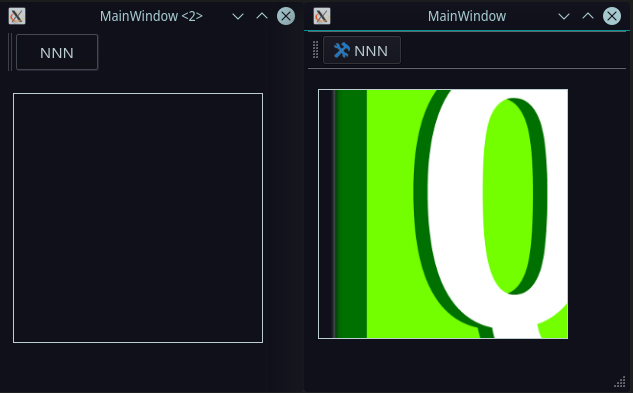
By now I know it's not really the code, but this uncertainty and instability is not a hair smaller concern anyway. One cannot deliver reliable app, not knowing what's happening.
I believe it has to be in the Python itself. There must be some difference between the package distributed in OpenSUSE:
> python3 --version
Python 3.6.10
> pip show PySide2
Name: PySide2
Version: 5.14.1
Summary: Python bindings for the Qt cross-platform application and UI framework
Home-page: https://www.pyside.org
Author: Qt for Python Team
Author-email: pyside@qt-project.org
License: LGPL
Location: /usr/lib64/python3.6/site-packages
Requires: shiboken2
...and the virtual environment:
> ~/Coding/Projects/venv/bin/python3 --version
Python 3.6.10
> ~/Coding/Projects/venv/bin/pip3 show PySide2
Name: PySide2
Version: 5.14.1
Summary: Python bindings for the Qt cross-platform application and UI framework
Home-page: https://www.pyside.org
Author: Qt for Python Team
Author-email: pyside@qt-project.org
License: LGPL
Location: ~/Coding/Projects/venv/lib/python3.6/site-packages
Requires: shiboken2
They look same, but there must be a glitch somewhere.


