Skip to content
  • Categories
  • Recent
  • Tags
  • Popular
  • Users
  • Groups
  • Search
  • Get Qt
  • Unsolved
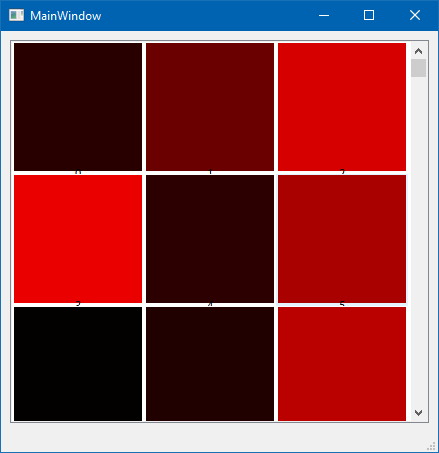
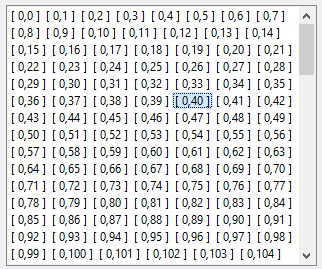
Collapse
Brand Logo
  1. Home
  2. Qt Development
  3. General and Desktop
  4. Select multiple widget in layout
Qt 6.11 is out! See what's new in the release blog

Select multiple widget in layout

Scheduled Pinned Locked Moved Solved General and Desktop
13 Posts 4 Posters 2.7k Views 3 Watching
  • Oldest to Newest
  • Newest to Oldest
  • Most Votes
Reply
  • Reply as topic
Log in to reply
This topic has been deleted. Only users with topic management privileges can see it.
  • SGaistS Offline
    SGaistS Offline
    SGaist
    Lifetime Qt Champion
    wrote on last edited by
    #4

    Then it would make more sense to use a QListView with possibly a QFileSystemModel for listing the images.

    Interested in AI ? www.idiap.ch
    Please read the Qt Code of Conduct - https://forum.qt.io/topic/113070/qt-code-of-conduct

    1 Reply Last reply
    2
    • mrjjM Offline
      mrjjM Offline
      mrjj
      Lifetime Qt Champion
      wrote on last edited by
      #5

      QListView

      and maybe set it in icon mode
      https://doc.qt.io/qt-5/qlistview.html#ViewMode-enum
      as it then would be a grid of selectable items.

      1 Reply Last reply
      2
      • H Offline
        H Offline
        Howard
        wrote on last edited by
        #6

        Will QListView support a 2D grid of icons?

        mrjjM 1 Reply Last reply
        0
        • H Howard

          Will QListView support a 2D grid of icons?

          mrjjM Offline
          mrjjM Offline
          mrjj
          Lifetime Qt Champion
          wrote on last edited by
          #7

          @Howard

          Hi
          yes when viewmode is set to icon mode, its like
          a 2d grid.

          H 1 Reply Last reply
          1
          • mrjjM mrjj

            @Howard

            Hi
            yes when viewmode is set to icon mode, its like
            a 2d grid.

            H Offline
            H Offline
            Howard
            wrote on last edited by
            #8

            I said "Will QListView support a 2D grid of icons?"

            @mrjj said "yes when viewmode is set to icon mode, its like
            a 2d grid"

            I haven't been able to make that happen. I can make the QListView show only one row at a time. What am I missing?

            ac0acd61-fc45-48fb-9a70-f45f1e3562b5-image.png

            // listview.cpp
            #include "listview.h"
            #include <QListView>
            #include <QStandardItemModel>
            #include <QApplication>
            
            widget::widget(QWidget *parent) : QWidget( parent ) {
              setFixedSize(300,200);
              int nrow = 4,
                  ncol = 3;
            
              QStandardItemModel *model = new QStandardItemModel(nrow, ncol, this);
              for (int c=0; c<ncol; ++c) { // fill model value
                for(int r=0; r<nrow; r++) {
                  QString sstr = "[ " + QString::number(c) + "," + QString::number(r) + " ]";
                  QStandardItem* item = new QStandardItem(sstr);
                  model->setItem(r, c, item);
                }
              }
            
              QListView* listView = new QListView(this);
              listView->setViewMode(QListView::IconMode);
              listView->setSelectionMode(QAbstractItemView::ExtendedSelection);
              listView->setModel(model);
              //listView->setModelColumn(ncol-1);
            }
            
            int main(int argc, char *argv[]) {
              QApplication a(argc, argv);
            
              widget lve;
              lve.show();
            
              return a.exec();
            }
            
            #pragma once
            // listview.h
            #include <QWidget>
            
            class widget : public QWidget {
              Q_OBJECT
             
             public:
              widget(QWidget* parent=nullptr);
            };
            
            1 Reply Last reply
            0
            • CKurduC Offline
              CKurduC Offline
              CKurdu
              wrote on last edited by
              #9

              @Howard said in Select multiple widget in layout:

              I haven't been able to make that happen. I can make the QListView show only one row at a time. What am I missing?

              If you add more content it is automatically adding new rows if this is your really need.

              You reap what you sow it

              1 Reply Last reply
              2
              • mrjjM Offline
                mrjjM Offline
                mrjj
                Lifetime Qt Champion
                wrote on last edited by mrjj
                #10

                Hi

                As @CKurdu says, keep on adding then its more clear :=)
                alt text

                as 128x128 with icons

                alt text

                Also, you must likely want the resizeMode to be Adjust so it will use all space available.
                and also tweak
                listView->setGridSize(QSize(132, 132));
                listView->setIconSize(QSize(128, 128));
                to make it look like you want. (icons fills all space)

                1 Reply Last reply
                1
                • H Offline
                  H Offline
                  Howard
                  wrote on last edited by
                  #11

                  This seems to work for a proof of concept. Before I go too much further, is this right? I'll add calls to setGridSize and setIconSize later...

                  // listview.cpp
                  #include "listview.h"
                  #include <QListView>
                  #include <QStandardItemModel>
                  #include <QApplication>
                  #include <QMdiArea>
                  #include <QMdiSubWindow>
                  
                  MainWindow::MainWindow() : QMainWindow() {
                    QMdiArea* mdiArea = new QMdiArea;
                    setCentralWidget(mdiArea);
                  
                    int nrow = 4000,
                        ncol = 1;
                  
                    QStandardItemModel *model = new QStandardItemModel(nrow, ncol, this);
                    QSize itemsize(60,30);
                    for(int r=0; r<nrow; r++) {
                      QString sstr = "[ " + QString::number(r) + " ]";
                      QStandardItem* item = new QStandardItem(sstr);
                      item->setSizeHint(itemsize);
                      model->setItem(r, 0, item);
                    }
                  
                    QListView* listview = new QListView;
                    listview->setViewMode(QListView::IconMode);
                    listview->setSelectionMode(QAbstractItemView::ExtendedSelection);
                    listview->setModel(model);
                    listview->setResizeMode(QListView::Adjust);
                  
                    QMdiSubWindow* subWindow = mdiArea->addSubWindow(listview);
                    subWindow->showMaximized();
                  }
                  
                  int main(int argc, char *argv[]) {
                    QApplication app(argc, argv);
                  
                    MainWindow mainWin;
                    mainWin.show();
                  
                    return app.exec();
                  }
                  
                  #pragma once
                  // listview.h
                  #include <QMainWindow>
                  
                  class MainWindow : public QMainWindow {
                    Q_OBJECT
                   
                   public:
                    MainWindow();
                  };
                  
                  1 Reply Last reply
                  0
                  • mrjjM Offline
                    mrjjM Offline
                    mrjj
                    Lifetime Qt Champion
                    wrote on last edited by
                    #12

                    Hi
                    It does look fine.
                    I think you can set GridSize at any point but i didnt test it.

                    1 Reply Last reply
                    1
                    • H Offline
                      H Offline
                      Howard
                      wrote on last edited by
                      #13

                      In case it might help to see my Linux image viewer, you can get its source code here:

                      https://github.com/HowardRubin-dev/Thumbnal-Image-Viewer

                      1 Reply Last reply
                      1

                      • Login

                      • Login or register to search.
                      • First post
                        Last post
                      0
                      • Categories
                      • Recent
                      • Tags
                      • Popular
                      • Users
                      • Groups
                      • Search
                      • Get Qt
                      • Unsolved