
how to automatically update GUI status
-
@J-Hilk
This program correctly on Desktop. When I try to deply to my SDR Board then following error occures:
1).
/usr/local/Qt-4.8.7-arm/include/QtGui/qlineedit.h:196: error: ‘void QLineEdit::textEdited(const QString&)’ is protected
void textEdited(const QString &);
^2).
/home/ijaz/Qt_applications/update_automatically/mainwindow.cpp:11: error: within this context
connect(ui->lineEdit, &QLineEdit::textEdited, this, =->void
^3).
/home/ijaz/Qt_applications/update_automatically/mainwindow.cpp:23: warning: lambda expressions only available with -std=c++11 or -std=gnu++11 [enabled by default]
});
^
4).
/home/ijaz/Qt_applications/update_automatically/mainwindow.cpp:23: error: no matching function for call to ‘MainWindow::connect(QLineEdit*&, void (QLineEdit::)(const QString&), MainWindow const, MainWindow::MainWindow(QWidget*)::__lambda0)’
});
^@Mijaz said in how to automatically update GUI status:
Qt-4.8.7-arm
Is there a reason why you use Qt4?
Also your compiler for the device does not support C++11. -
@J-Hilk
This program correctly on Desktop. When I try to deply to my SDR Board then following error occures:
1).
/usr/local/Qt-4.8.7-arm/include/QtGui/qlineedit.h:196: error: ‘void QLineEdit::textEdited(const QString&)’ is protected
void textEdited(const QString &);
^2).
/home/ijaz/Qt_applications/update_automatically/mainwindow.cpp:11: error: within this context
connect(ui->lineEdit, &QLineEdit::textEdited, this, =->void
^3).
/home/ijaz/Qt_applications/update_automatically/mainwindow.cpp:23: warning: lambda expressions only available with -std=c++11 or -std=gnu++11 [enabled by default]
});
^
4).
/home/ijaz/Qt_applications/update_automatically/mainwindow.cpp:23: error: no matching function for call to ‘MainWindow::connect(QLineEdit*&, void (QLineEdit::)(const QString&), MainWindow const, MainWindow::MainWindow(QWidget*)::__lambda0)’
});
^@Mijaz
my example uses a lambda in the connect, that is only possible in Qt5 and newer. Not in QT 4But you should be able to move it in its own class function and connect it the old fashioned way
Be aware of the Qt Code of Conduct, when posting : https://forum.qt.io/topic/113070/qt-code-of-conduct
Q: What's that?
A: It's blue light.
Q: What does it do?
A: It turns blue. -
@Mijaz
my example uses a lambda in the connect, that is only possible in Qt5 and newer. Not in QT 4But you should be able to move it in its own class function and connect it the old fashioned way
@J-Hilk
I have changed this code to the old version and it works fine. There are two cases I want to execute, cases are follows.case 1: Working correctly.
MainWindow::MainWindow(QWidget *parent) :
QMainWindow(parent),
ui(new Ui::MainWindow)
{
ui->setupUi(this);
connect(ui->lineEdit_input, SIGNAL(textEdited(QString)), this, SLOT(myFunction()));}
void MainWindow::myFunction()
{
QString str = ui->lineEdit_input->text();
qDebug()<<"Input (HEX) = " << str;
ui->lineEdit_1->setText(str);
bool ok1;
qint64 iVal = str.toLongLong(&ok1,16);
ui->lineEdit_2->setText(QString::number(iVal));
QString binnumber = str.setNum(iVal, 2);
ui->lineEdit_3->setText(binnumber);
qDebug()<<"Convert to Int = " << QString::number(iVal);
qDebug()<<"Convert to Binary = " << binnumber;
qDebug()<<"size of string binnumber = " << binnumber.size();
}

case 2: Not working correctly,
MainWindow::MainWindow(QWidget *parent) :
QMainWindow(parent),
ui(new Ui::MainWindow)
{
ui->setupUi(this);
connect(ui->lineEdit_input, SIGNAL(textEdited(QString)), this, SLOT(myFunction()));
QProcess process;
process.start("sudo devmem2 0x41210000");
process.waitForFinished(-1); // will wait forever until finished
QString stdout = process.readAllStandardOutput();
qDebug()<<"Input (HEX) = " << stdout;
QChar data[8] = { stdout[98], stdout[99], stdout[100], stdout[101], stdout[102], stdout[103], stdout[104],stdout[105]};
QString str1(data, 8);
qDebug()<<"Input (HEX) = " << str1;}
void MainWindow::myFunction()
{
QString str = ui->lineEdit_input->setText(str1);
qDebug()<<"Input (HEX) = " << str;
ui->lineEdit_1->setText(str);
bool ok1;
qint64 iVal = str.toLongLong(&ok1,16);
ui->lineEdit_2->setText(QString::number(iVal));
QString binnumber = str.setNum(iVal, 2);
ui->lineEdit_3->setText(binnumber);
qDebug()<<"Convert to Int = " << QString::number(iVal);
qDebug()<<"Convert to Binary = " << binnumber;
qDebug()<<"size of string binnumber = " << binnumber.size();
}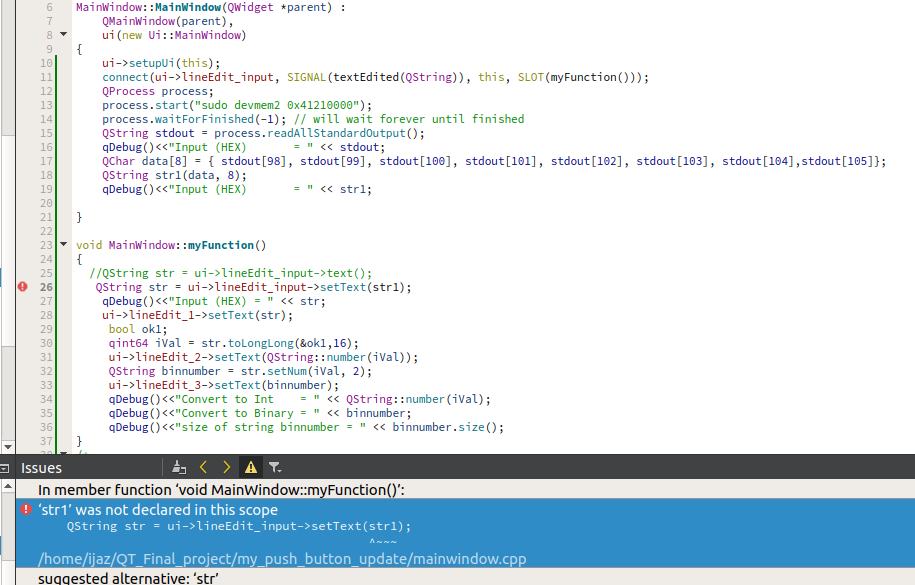
"QString str1" is unkown "void MainWindow::myFunction()"
-
@J-Hilk
I have changed this code to the old version and it works fine. There are two cases I want to execute, cases are follows.case 1: Working correctly.
MainWindow::MainWindow(QWidget *parent) :
QMainWindow(parent),
ui(new Ui::MainWindow)
{
ui->setupUi(this);
connect(ui->lineEdit_input, SIGNAL(textEdited(QString)), this, SLOT(myFunction()));}
void MainWindow::myFunction()
{
QString str = ui->lineEdit_input->text();
qDebug()<<"Input (HEX) = " << str;
ui->lineEdit_1->setText(str);
bool ok1;
qint64 iVal = str.toLongLong(&ok1,16);
ui->lineEdit_2->setText(QString::number(iVal));
QString binnumber = str.setNum(iVal, 2);
ui->lineEdit_3->setText(binnumber);
qDebug()<<"Convert to Int = " << QString::number(iVal);
qDebug()<<"Convert to Binary = " << binnumber;
qDebug()<<"size of string binnumber = " << binnumber.size();
}
case 2: Not working correctly,
MainWindow::MainWindow(QWidget *parent) :
QMainWindow(parent),
ui(new Ui::MainWindow)
{
ui->setupUi(this);
connect(ui->lineEdit_input, SIGNAL(textEdited(QString)), this, SLOT(myFunction()));
QProcess process;
process.start("sudo devmem2 0x41210000");
process.waitForFinished(-1); // will wait forever until finished
QString stdout = process.readAllStandardOutput();
qDebug()<<"Input (HEX) = " << stdout;
QChar data[8] = { stdout[98], stdout[99], stdout[100], stdout[101], stdout[102], stdout[103], stdout[104],stdout[105]};
QString str1(data, 8);
qDebug()<<"Input (HEX) = " << str1;}
void MainWindow::myFunction()
{
QString str = ui->lineEdit_input->setText(str1);
qDebug()<<"Input (HEX) = " << str;
ui->lineEdit_1->setText(str);
bool ok1;
qint64 iVal = str.toLongLong(&ok1,16);
ui->lineEdit_2->setText(QString::number(iVal));
QString binnumber = str.setNum(iVal, 2);
ui->lineEdit_3->setText(binnumber);
qDebug()<<"Convert to Int = " << QString::number(iVal);
qDebug()<<"Convert to Binary = " << binnumber;
qDebug()<<"size of string binnumber = " << binnumber.size();
}"QString str1" is unkown "void MainWindow::myFunction()"
@Mijaz said in how to automatically update GUI status:
str1
Where is it defined?
The compiler actually tells you that it does not exist at that location... -
@Mijaz said in how to automatically update GUI status:
Qt-4.8.7-arm
Is there a reason why you use Qt4?
Also your compiler for the device does not support C++11. -
@J-Hilk
I have changed this code to the old version and it works fine. There are two cases I want to execute, cases are follows.case 1: Working correctly.
MainWindow::MainWindow(QWidget *parent) :
QMainWindow(parent),
ui(new Ui::MainWindow)
{
ui->setupUi(this);
connect(ui->lineEdit_input, SIGNAL(textEdited(QString)), this, SLOT(myFunction()));}
void MainWindow::myFunction()
{
QString str = ui->lineEdit_input->text();
qDebug()<<"Input (HEX) = " << str;
ui->lineEdit_1->setText(str);
bool ok1;
qint64 iVal = str.toLongLong(&ok1,16);
ui->lineEdit_2->setText(QString::number(iVal));
QString binnumber = str.setNum(iVal, 2);
ui->lineEdit_3->setText(binnumber);
qDebug()<<"Convert to Int = " << QString::number(iVal);
qDebug()<<"Convert to Binary = " << binnumber;
qDebug()<<"size of string binnumber = " << binnumber.size();
}
case 2: Not working correctly,
MainWindow::MainWindow(QWidget *parent) :
QMainWindow(parent),
ui(new Ui::MainWindow)
{
ui->setupUi(this);
connect(ui->lineEdit_input, SIGNAL(textEdited(QString)), this, SLOT(myFunction()));
QProcess process;
process.start("sudo devmem2 0x41210000");
process.waitForFinished(-1); // will wait forever until finished
QString stdout = process.readAllStandardOutput();
qDebug()<<"Input (HEX) = " << stdout;
QChar data[8] = { stdout[98], stdout[99], stdout[100], stdout[101], stdout[102], stdout[103], stdout[104],stdout[105]};
QString str1(data, 8);
qDebug()<<"Input (HEX) = " << str1;}
void MainWindow::myFunction()
{
QString str = ui->lineEdit_input->setText(str1);
qDebug()<<"Input (HEX) = " << str;
ui->lineEdit_1->setText(str);
bool ok1;
qint64 iVal = str.toLongLong(&ok1,16);
ui->lineEdit_2->setText(QString::number(iVal));
QString binnumber = str.setNum(iVal, 2);
ui->lineEdit_3->setText(binnumber);
qDebug()<<"Convert to Int = " << QString::number(iVal);
qDebug()<<"Convert to Binary = " << binnumber;
qDebug()<<"size of string binnumber = " << binnumber.size();
}"QString str1" is unkown "void MainWindow::myFunction()"
-
I am using Qt4 because the errors occurred while cross-compilation of Qt5 to my Board.
@Mijaz Keep in mind that Qt4 is reached its end of life already and is not supported anymore.
-
@Mijaz said in how to automatically update GUI status:
str1
Where is it defined?
The compiler actually tells you that it does not exist at that location... -
@Mijaz said in how to automatically update GUI status:
QString str1 is defined in MainWindow::MainWindow(QWidget *parent) :
as local variable which only exists inside MainWindow::MainWindow(QWidget *parent)...
-
@Mijaz
now I have defined str1 in mainwindow.h
/////////////
public:
explicit MainWindow(QWidget *parent = 0);
~MainWindow();
QString str1;///////////////////////
MainWindow::MainWindow(QWidget *parent) :
QMainWindow(parent),
ui(new Ui::MainWindow)
{
ui->setupUi(this);
connect(ui->lineEdit_input, SIGNAL(textEdited(QString)), this, SLOT(myFunction()));
QProcess process;
process.start("sudo devmem2 0x41210000");
process.waitForFinished(-1); // will wait forever until finished
QString stdout = process.readAllStandardOutput();
qDebug()<<"Input (HEX) = " << stdout;
QChar data[8] = { stdout[98], stdout[99], stdout[100], stdout[101], stdout[102], stdout[103], stdout[104],stdout[105]};
QString str11(data, 8);
qDebug()<<"local string = " << str11;
bool ok1;
str1= str11.toInt(&ok1,16);
qDebug()<<"Globle string = " << QString::number(str1);}
void MainWindow::myFunction()
{
//QString str = ui->lineEdit_input->text();
QString str = str1;
qDebug()<<"Input (HEX) = " << str;
ui->lineEdit_1->setText(str);
bool ok1;
qint64 iVal = str.toLongLong(&ok1,16);
ui->lineEdit_2->setText(QString::number(iVal));
QString binnumber = str.setNum(iVal, 2);
ui->lineEdit_3->setText(binnumber);
qDebug()<<"Convert to Int = " << QString::number(iVal);
qDebug()<<"Convert to Binary = " << binnumber;
qDebug()<<"size of string binnumber = " << binnumber.size();
}
//////////////
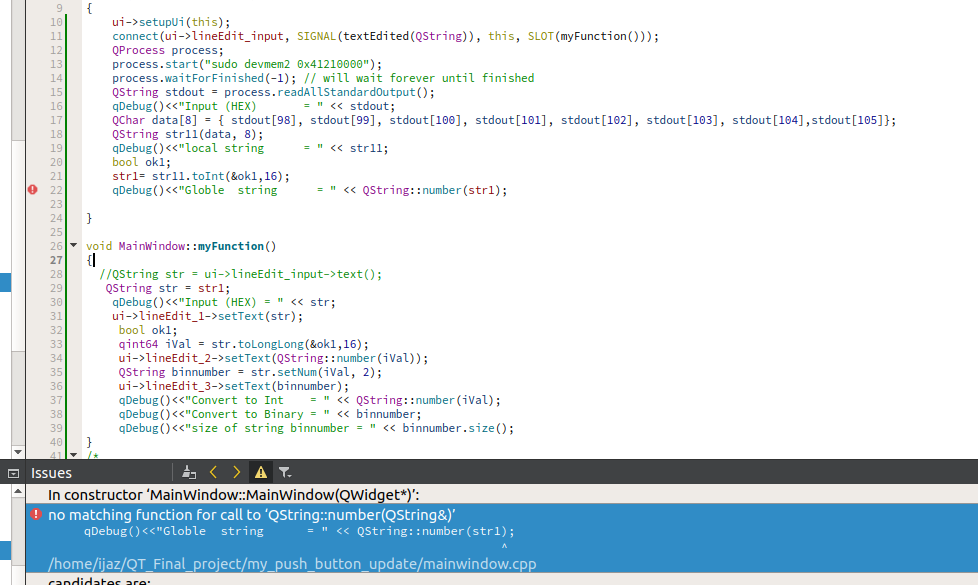
error now:/home/ijaz/QT_Final_project/my_push_button_update/mainwindow.cpp:22: error: no matching function for call to ‘QString::number(QString&)’
qDebug()<<"Globle string = " << QString::number(str1);
^
-
@Mijaz
now I have defined str1 in mainwindow.h
/////////////
public:
explicit MainWindow(QWidget *parent = 0);
~MainWindow();
QString str1;///////////////////////
MainWindow::MainWindow(QWidget *parent) :
QMainWindow(parent),
ui(new Ui::MainWindow)
{
ui->setupUi(this);
connect(ui->lineEdit_input, SIGNAL(textEdited(QString)), this, SLOT(myFunction()));
QProcess process;
process.start("sudo devmem2 0x41210000");
process.waitForFinished(-1); // will wait forever until finished
QString stdout = process.readAllStandardOutput();
qDebug()<<"Input (HEX) = " << stdout;
QChar data[8] = { stdout[98], stdout[99], stdout[100], stdout[101], stdout[102], stdout[103], stdout[104],stdout[105]};
QString str11(data, 8);
qDebug()<<"local string = " << str11;
bool ok1;
str1= str11.toInt(&ok1,16);
qDebug()<<"Globle string = " << QString::number(str1);}
void MainWindow::myFunction()
{
//QString str = ui->lineEdit_input->text();
QString str = str1;
qDebug()<<"Input (HEX) = " << str;
ui->lineEdit_1->setText(str);
bool ok1;
qint64 iVal = str.toLongLong(&ok1,16);
ui->lineEdit_2->setText(QString::number(iVal));
QString binnumber = str.setNum(iVal, 2);
ui->lineEdit_3->setText(binnumber);
qDebug()<<"Convert to Int = " << QString::number(iVal);
qDebug()<<"Convert to Binary = " << binnumber;
qDebug()<<"size of string binnumber = " << binnumber.size();
}
//////////////
error now:/home/ijaz/QT_Final_project/my_push_button_update/mainwindow.cpp:22: error: no matching function for call to ‘QString::number(QString&)’
qDebug()<<"Globle string = " << QString::number(str1);
^
-
@Mijaz
So look at the error message. It tells you precisely what is wrong, you don't need to ask.str1is of typeQString, andQString::number()takes a number and converts it to a string. Which you don't have or want....@J-Hilk @JonB @jsulm
There are basically two different cases:
Case-1:
The user will give input in lineEdit_input and other things should update sharply according to the input. This case Working fine, I have attached code for this case.Case-2:
In this case-2 user will not enter value but the value will come from QProcess function. If I will Execute this code without any loop it works fine but if QProcess output got changed then other things did not update according to QProcess.
Therefore I used a While loop to continually check the QProcess and update the required things. But, when I deploy this to the board and run the application it goes hang. The code for this case is also given.Case-1
#include <QString>
#include <QProcess>
MainWindow::MainWindow(QWidget *parent) :
QMainWindow(parent),
ui(new Ui::MainWindow)
{
ui->setupUi(this);
connect(ui->lineEdit_input, SIGNAL(textEdited(QString)), this, SLOT(myFunction()));
}
void MainWindow::myFunction()
{
QString str1 = ui->lineEdit_input->text();
qDebug()<<"Input (HEX) = " << str1;
ui->lineEdit_1->setText(str1);
bool ok1;
qint64 iVal = str1.toLongLong(&ok1,16);
qDebug()<<"Convert to Int = " << QString::number(iVal);
ui->lineEdit_2->setText(QString::number(iVal));
QString binnumber = str1.setNum(iVal, 2);
ui->lineEdit_3->setText(binnumber);
qDebug()<<"Convert to Binary = " << binnumber;
qDebug()<<"size of string binnumber = " << binnumber.size();
}
Case-2
#include <QString>
#include <QProcess>
QString str1;
MainWindow::MainWindow(QWidget *parent) :
QMainWindow(parent),
ui(new Ui::MainWindow)
{
ui->setupUi(this);
while (1) {
QProcess process;
process.start("sudo devmem2 0x41210000");
process.waitForFinished(-1); // will wait forever until finished
QString stdout = process.readAllStandardOutput();
qDebug()<<"Input (HEX) = " << stdout;
QChar data[8] = { stdout[98], stdout[99], stdout[100], stdout[101], stdout[102], stdout[103], stdout[104],stdout[105]};
QString str11(data, 8);
qDebug()<<"Input (HEX) = " << str11;
str1= str11;
qDebug()<<"Globle = " << str1;
myFunction();
// for produce delay
for(int i=0;i<1000000;++i)
{
qDebug() << "Print i value" <<i;
}
}
}
void MainWindow::myFunction()
{
ui->lineEdit_input->setText(str1);
qDebug()<<"Input (HEX) = " << str1;
ui->lineEdit_1->setText(str1);
bool ok1;
qint64 iVal = str1.toLongLong(&ok1,16);
qDebug()<<"Convert to Int = " << QString::number(iVal);
ui->lineEdit_2->setText(QString::number(iVal));
QString binnumber = str1.setNum(iVal, 2);
ui->lineEdit_3->setText(binnumber);
qDebug()<<"Convert to Binary = " << binnumber;
qDebug()<<"size of string binnumber = " << binnumber.size();
} -
@Mijaz Keep in mind that Qt4 is reached its end of life already and is not supported anymore.
@jsulm
I have the Qt-5.9.5 version on my Desktop. I have tried to cross-compile this version at my board. I am facing an error at the ./configuration stage. Do you have any helpful resources for cross-compile?I have followed the following websites. I have SDR ADRV9361 board instead of Raspberry.
https://wiki.qt.io/RaspberryPi2EGLFS
https://mechatronicsblog.com/cross-compile-and-deploy-qt-5-12-for-raspberry-pi/
https://forum.qt.io/topic/52546/tuto-build-qt-to-cross-compile-for-arm/2the os-version of the board :
analog@analog:~$ cat /etc/os-release
NAME="Linaro"
VERSION="14.04"
ID=Linarothe os-version of the Desktop
cat /etc/os-release
NAME="Ubuntu"
VERSION="18.04.2 LTS (Bionic Beaver)"
ID=ubuntu
ID_LIKE=debian
PRETTY_NAME="Ubuntu 18.04.2 LTS"
VERSION_ID="18.04" -
@J-Hilk @JonB @jsulm
There are basically two different cases:
Case-1:
The user will give input in lineEdit_input and other things should update sharply according to the input. This case Working fine, I have attached code for this case.Case-2:
In this case-2 user will not enter value but the value will come from QProcess function. If I will Execute this code without any loop it works fine but if QProcess output got changed then other things did not update according to QProcess.
Therefore I used a While loop to continually check the QProcess and update the required things. But, when I deploy this to the board and run the application it goes hang. The code for this case is also given.Case-1
#include <QString>
#include <QProcess>
MainWindow::MainWindow(QWidget *parent) :
QMainWindow(parent),
ui(new Ui::MainWindow)
{
ui->setupUi(this);
connect(ui->lineEdit_input, SIGNAL(textEdited(QString)), this, SLOT(myFunction()));
}
void MainWindow::myFunction()
{
QString str1 = ui->lineEdit_input->text();
qDebug()<<"Input (HEX) = " << str1;
ui->lineEdit_1->setText(str1);
bool ok1;
qint64 iVal = str1.toLongLong(&ok1,16);
qDebug()<<"Convert to Int = " << QString::number(iVal);
ui->lineEdit_2->setText(QString::number(iVal));
QString binnumber = str1.setNum(iVal, 2);
ui->lineEdit_3->setText(binnumber);
qDebug()<<"Convert to Binary = " << binnumber;
qDebug()<<"size of string binnumber = " << binnumber.size();
}
Case-2
#include <QString>
#include <QProcess>
QString str1;
MainWindow::MainWindow(QWidget *parent) :
QMainWindow(parent),
ui(new Ui::MainWindow)
{
ui->setupUi(this);
while (1) {
QProcess process;
process.start("sudo devmem2 0x41210000");
process.waitForFinished(-1); // will wait forever until finished
QString stdout = process.readAllStandardOutput();
qDebug()<<"Input (HEX) = " << stdout;
QChar data[8] = { stdout[98], stdout[99], stdout[100], stdout[101], stdout[102], stdout[103], stdout[104],stdout[105]};
QString str11(data, 8);
qDebug()<<"Input (HEX) = " << str11;
str1= str11;
qDebug()<<"Globle = " << str1;
myFunction();
// for produce delay
for(int i=0;i<1000000;++i)
{
qDebug() << "Print i value" <<i;
}
}
}
void MainWindow::myFunction()
{
ui->lineEdit_input->setText(str1);
qDebug()<<"Input (HEX) = " << str1;
ui->lineEdit_1->setText(str1);
bool ok1;
qint64 iVal = str1.toLongLong(&ok1,16);
qDebug()<<"Convert to Int = " << QString::number(iVal);
ui->lineEdit_2->setText(QString::number(iVal));
QString binnumber = str1.setNum(iVal, 2);
ui->lineEdit_3->setText(binnumber);
qDebug()<<"Convert to Binary = " << binnumber;
qDebug()<<"size of string binnumber = " << binnumber.size();
}@Mijaz
But the post you made was to show a compilation error, and I pointed out what the message was and how it related to your code. What you have written since does not acknowledge that and has nothing to do with it. You seem to jump from one question to another without any explanation. -
@J-Hilk @JonB @jsulm
There are basically two different cases:
Case-1:
The user will give input in lineEdit_input and other things should update sharply according to the input. This case Working fine, I have attached code for this case.Case-2:
In this case-2 user will not enter value but the value will come from QProcess function. If I will Execute this code without any loop it works fine but if QProcess output got changed then other things did not update according to QProcess.
Therefore I used a While loop to continually check the QProcess and update the required things. But, when I deploy this to the board and run the application it goes hang. The code for this case is also given.Case-1
#include <QString>
#include <QProcess>
MainWindow::MainWindow(QWidget *parent) :
QMainWindow(parent),
ui(new Ui::MainWindow)
{
ui->setupUi(this);
connect(ui->lineEdit_input, SIGNAL(textEdited(QString)), this, SLOT(myFunction()));
}
void MainWindow::myFunction()
{
QString str1 = ui->lineEdit_input->text();
qDebug()<<"Input (HEX) = " << str1;
ui->lineEdit_1->setText(str1);
bool ok1;
qint64 iVal = str1.toLongLong(&ok1,16);
qDebug()<<"Convert to Int = " << QString::number(iVal);
ui->lineEdit_2->setText(QString::number(iVal));
QString binnumber = str1.setNum(iVal, 2);
ui->lineEdit_3->setText(binnumber);
qDebug()<<"Convert to Binary = " << binnumber;
qDebug()<<"size of string binnumber = " << binnumber.size();
}
Case-2
#include <QString>
#include <QProcess>
QString str1;
MainWindow::MainWindow(QWidget *parent) :
QMainWindow(parent),
ui(new Ui::MainWindow)
{
ui->setupUi(this);
while (1) {
QProcess process;
process.start("sudo devmem2 0x41210000");
process.waitForFinished(-1); // will wait forever until finished
QString stdout = process.readAllStandardOutput();
qDebug()<<"Input (HEX) = " << stdout;
QChar data[8] = { stdout[98], stdout[99], stdout[100], stdout[101], stdout[102], stdout[103], stdout[104],stdout[105]};
QString str11(data, 8);
qDebug()<<"Input (HEX) = " << str11;
str1= str11;
qDebug()<<"Globle = " << str1;
myFunction();
// for produce delay
for(int i=0;i<1000000;++i)
{
qDebug() << "Print i value" <<i;
}
}
}
void MainWindow::myFunction()
{
ui->lineEdit_input->setText(str1);
qDebug()<<"Input (HEX) = " << str1;
ui->lineEdit_1->setText(str1);
bool ok1;
qint64 iVal = str1.toLongLong(&ok1,16);
qDebug()<<"Convert to Int = " << QString::number(iVal);
ui->lineEdit_2->setText(QString::number(iVal));
QString binnumber = str1.setNum(iVal, 2);
ui->lineEdit_3->setText(binnumber);
qDebug()<<"Convert to Binary = " << binnumber;
qDebug()<<"size of string binnumber = " << binnumber.size();
}@Mijaz
The code is hard to read because it's not indented and you do not use the forum post tools to display it is code. Please if you paste code at least use the</>icon button in the post's toolbar to mark as code, placing it inside 3 backtick markers.I do not claim to understand what you are saying Case-2 is trying to accomplish. But any code you use which has
while (1)inMainWindow::MainWindow()is not going to be right. It will block, not allow the main Qt event loop to run, and "hang" the application as you say.You really need to move over to signals & slots, that's what is required in Qt program to avoid "hanging". Get rid of your
forloop "to produce delay", it's quite the wrong way to do it (use aQTimerif you need a delay). -
@jsulm
I have the Qt-5.9.5 version on my Desktop. I have tried to cross-compile this version at my board. I am facing an error at the ./configuration stage. Do you have any helpful resources for cross-compile?I have followed the following websites. I have SDR ADRV9361 board instead of Raspberry.
https://wiki.qt.io/RaspberryPi2EGLFS
https://mechatronicsblog.com/cross-compile-and-deploy-qt-5-12-for-raspberry-pi/
https://forum.qt.io/topic/52546/tuto-build-qt-to-cross-compile-for-arm/2the os-version of the board :
analog@analog:~$ cat /etc/os-release
NAME="Linaro"
VERSION="14.04"
ID=Linarothe os-version of the Desktop
cat /etc/os-release
NAME="Ubuntu"
VERSION="18.04.2 LTS (Bionic Beaver)"
ID=ubuntu
ID_LIKE=debian
PRETTY_NAME="Ubuntu 18.04.2 LTS"
VERSION_ID="18.04"@Mijaz said in how to automatically update GUI status:
I have the Qt-5.9.5 version on my Desktop. I have tried to cross-compile this version at my board. I am facing an error at the ./configuration stage. Do you have any helpful resources for cross-compile?
I have followed the following websites. I have SDR ADRV9361 board instead of Raspberry.Please do some favors to the community:
- Stop posting to a topic already marked as solved!
- Stop posting to a topic already marked as solved, with an issue completely unrelated to the original topic
Working this way is only in your benefit, I'd rather say kinda selfish if you want, since I doubt somebody looking for help regarding cross-compilation will look at a topic titled "how to automatically update GUI status", right?
Upvote the answer(s) that helped you solve the issue
Use "Topic Tools" button to mark your post as Solved
Add screenshots via postimage.org
Don't ask support requests via chat/PM. Please use the forum so others can benefit from the solution in the future -
@Mijaz said in how to automatically update GUI status:
I have the Qt-5.9.5 version on my Desktop. I have tried to cross-compile this version at my board. I am facing an error at the ./configuration stage. Do you have any helpful resources for cross-compile?
I have followed the following websites. I have SDR ADRV9361 board instead of Raspberry.Please do some favors to the community:
- Stop posting to a topic already marked as solved!
- Stop posting to a topic already marked as solved, with an issue completely unrelated to the original topic
Working this way is only in your benefit, I'd rather say kinda selfish if you want, since I doubt somebody looking for help regarding cross-compilation will look at a topic titled "how to automatically update GUI status", right?


