

Qt creator no console output for Android
-
Did you try use qDebug() for C++ or console.log() for QML?
I am developing Android application on Qt 5.13.0 too, and they work fine with me.@quang-phu Hi, thanks for answer.
Yes, it all works for desktop and ios. It worked for android as well, but not anymore. The console is completilly empty, not only missing user output -
@Bremenpl
Without console log, can your app run correctly? If can I think you should put a screen shot about your project setting.
This is my .pro file content and my setting, you can refer them.QT += quick CONFIG += c++11 android { QMAKE_LFLAGS += -nostdlib++ } # The following define makes your compiler emit warnings if you use # any feature of Qt which as been marked deprecated (the exact warnings # depend on your compiler). Please consult the documentation of the # deprecated API in order to know how to port your code away from it. DEFINES += QT_DEPRECATED_WARNINGS # You can also make your code fail to compile if you use deprecated APIs. # In order to do so, uncomment the following line. # You can also select to disable deprecated APIs only up to a certain version of Qt. #DEFINES += QT_DISABLE_DEPRECATED_BEFORE=0x060000 # disables all the APIs deprecated before Qt 6.0.0 SOURCES += \ controllers/GrammarController.cpp \ controllers/ModuleController.cpp \ controllers/NavigationController.cpp \ controllers/QuestionController.cpp \ controllers/VocabularyController.cpp \ datamodel/GrammarModel.cpp \ datamodel/QuestionModel.cpp \ datamodel/VocabularyModel.cpp \ main.cpp RESOURCES += views.qrc \ assets.qrc \ components.qrc \ database.qrc \ images.qrc \ pages.qrc \ vocabulary.qrc # Additional import path used to resolve QML modules in Qt Creator's code model QML_IMPORT_PATH = # Additional import path used to resolve QML modules just for Qt Quick Designer QML_DESIGNER_IMPORT_PATH = # Default rules for deployment. qnx: target.path = /tmp/$${TARGET}/bin else: unix:!android: target.path = /opt/$${TARGET}/bin !isEmpty(target.path): INSTALLS += target HEADERS += \ controllers/GrammarController.h \ controllers/ModuleController.h \ controllers/NavigationController.h \ controllers/QuestionController.h \ controllers/VocabularyController.h \ datamodel/GrammarModel.h \ datamodel/QuestionModel.h \ datamodel/VocabularyModel.h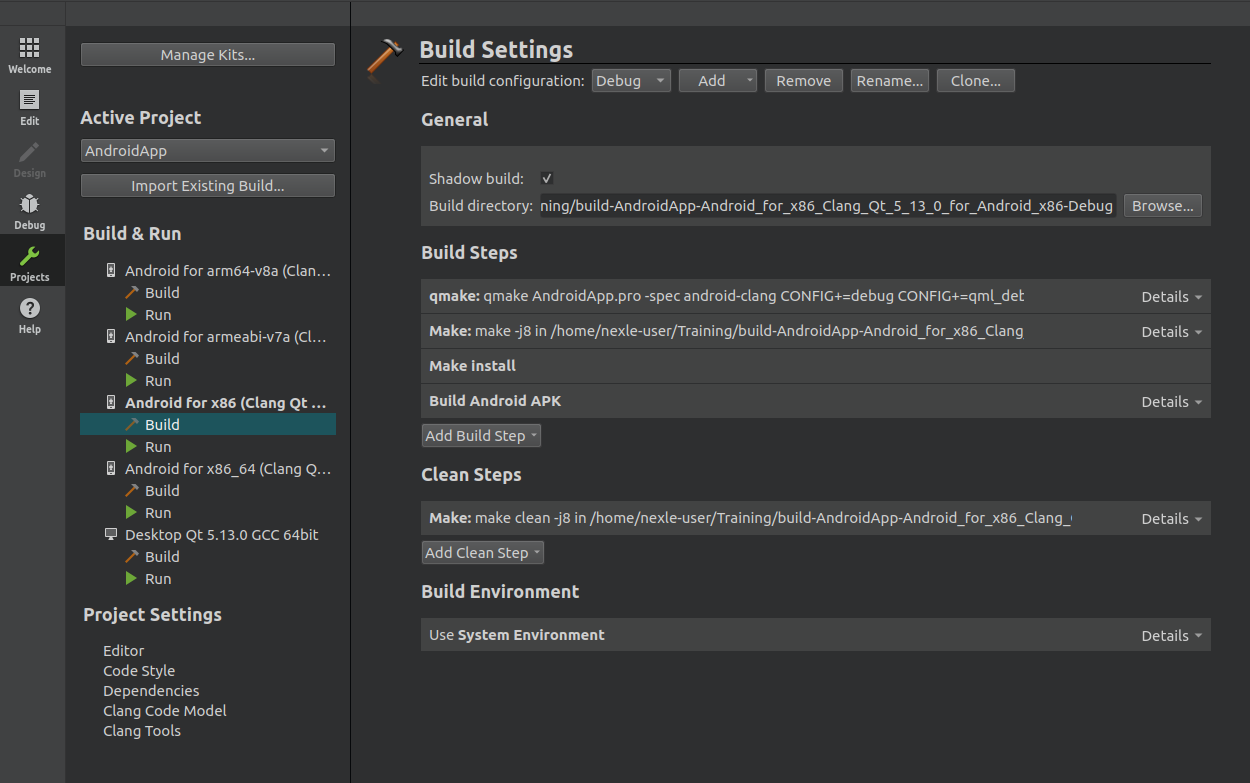
Thanks!
-
@Bremenpl
Without console log, can your app run correctly? If can I think you should put a screen shot about your project setting.
This is my .pro file content and my setting, you can refer them.QT += quick CONFIG += c++11 android { QMAKE_LFLAGS += -nostdlib++ } # The following define makes your compiler emit warnings if you use # any feature of Qt which as been marked deprecated (the exact warnings # depend on your compiler). Please consult the documentation of the # deprecated API in order to know how to port your code away from it. DEFINES += QT_DEPRECATED_WARNINGS # You can also make your code fail to compile if you use deprecated APIs. # In order to do so, uncomment the following line. # You can also select to disable deprecated APIs only up to a certain version of Qt. #DEFINES += QT_DISABLE_DEPRECATED_BEFORE=0x060000 # disables all the APIs deprecated before Qt 6.0.0 SOURCES += \ controllers/GrammarController.cpp \ controllers/ModuleController.cpp \ controllers/NavigationController.cpp \ controllers/QuestionController.cpp \ controllers/VocabularyController.cpp \ datamodel/GrammarModel.cpp \ datamodel/QuestionModel.cpp \ datamodel/VocabularyModel.cpp \ main.cpp RESOURCES += views.qrc \ assets.qrc \ components.qrc \ database.qrc \ images.qrc \ pages.qrc \ vocabulary.qrc # Additional import path used to resolve QML modules in Qt Creator's code model QML_IMPORT_PATH = # Additional import path used to resolve QML modules just for Qt Quick Designer QML_DESIGNER_IMPORT_PATH = # Default rules for deployment. qnx: target.path = /tmp/$${TARGET}/bin else: unix:!android: target.path = /opt/$${TARGET}/bin !isEmpty(target.path): INSTALLS += target HEADERS += \ controllers/GrammarController.h \ controllers/ModuleController.h \ controllers/NavigationController.h \ controllers/QuestionController.h \ controllers/VocabularyController.h \ datamodel/GrammarModel.h \ datamodel/QuestionModel.h \ datamodel/VocabularyModel.hThanks!
@quang-phu Hi, thanks for answer. Here are my settings:
# The application version
VERSION = 1.0

OTHER_FILES += app.rc
RC_FILE = app.rc

QT += quick widgets core xml multimedia opcua
CONFIG += c++11

# The following define makes your compiler emit warnings if you use
# any feature of Qt which as been marked deprecated (the exact warnings
# depend on your compiler). Please consult the documentation of the
# deprecated API in order to know how to port your code away from it.
DEFINES += QT_DEPRECATED_WARNINGS APP_VERSION=\\\"$$VERSION\\\"

# You can also make your code fail to compile if you use deprecated APIs.
# In order to do so, uncomment the following line.
# You can also select to disable deprecated APIs only up to a certain version of Qt.

# disables all the APIs deprecated before Qt 6.0.0
#DEFINES += QT_DISABLE_DEPRECATED_BEFORE=0x060000

HEADERS += \
    ccolumns.h \
    cconfigcolumns.h \
    cconfigtablemodel.h \
    cdataentry.h \
    cdatastatus.h \
    cdimmode.h \
    cdisconnector.h \
    cexecutable.h \
    cfleetmanager.h \
    cinputtablemodel.h \
    cintegrator.h \
    cnodeextractor.h \
    cnodetype.h \
    criskdata.h \
    crisklevel.h \
    criskname.h \
    criskstate.h \
    cscreenview.h \
    csettings.h \
    ctablerow.h \
    cthreadmover.h \
    cuaproxy.h \
    copcuahelper.h \
    cvartablemodel.h \
    cvessel.h \
    domitem.h \
    dommodel.h

SOURCES += \
    cconfigtablemodel.cpp \
    cdataentry.cpp \
    cdisconnector.cpp \
    cexecutable.cpp \
    cfleetmanager.cpp \
    cinputtablemodel.cpp \
    cintegrator.cpp \
    cnodeextractor.cpp \
    csettings.cpp \
    ctablerow.cpp \
    cthreadmover.cpp \
    cvartablemodel.cpp \
    cvessel.cpp \
    domitem.cpp \
    dommodel.cpp \
    main.cpp \
    criskdata.cpp \
    cuaproxy.cpp \
    copcuahelper.cpp

RESOURCES += qml.qrc

# Default rules for deployment.
qnx: target.path = /tmp/$${TARGET}/bin
else: unix:!android: target.path = /opt/$${TARGET}/bin
!isEmpty(target.path): INSTALLS += target


DISTFILES += \
    android/AndroidManifest.xml \
    android/build.gradle \
    android/gradle/wrapper/gradle-wrapper.jar \
    android/gradle/wrapper/gradle-wrapper.properties \
    android/gradlew \
    android/gradlew.bat \
    android/res/values/libs.xml

contains(ANDROID_TARGET_ARCH,arm64-v8a) {
    ANDROID_PACKAGE_SOURCE_DIR = \
        $$PWD/android
}
-
@Bremenpl
Hmm, there is no special, I haven't met this issue before. In this case I think you should try to find out root cause first, by some ways:- Run you app on desktop environment with this qt
- Make new project and run, if issue still exists, the qt has something wrong.
- Uninstall qt and reinstall again, may this can help, try to install all components if can.
Thanks!
-
@Bremenpl
Hmm, there is no special, I haven't met this issue before. In this case I think you should try to find out root cause first, by some ways:- Run you app on desktop environment with this qt
- Make new project and run, if issue still exists, the qt has something wrong.
- Uninstall qt and reinstall again, may this can help, try to install all components if can.
Thanks!
@quang-phu Hi,
I have just installed the same environment on a linux based virtual machine- No output there as well... -
@Bremenpl
Hmm, there is no special, I haven't met this issue before. In this case I think you should try to find out root cause first, by some ways:- Run you app on desktop environment with this qt
- Make new project and run, if issue still exists, the qt has something wrong.
- Uninstall qt and reinstall again, may this can help, try to install all components if can.
Thanks!
@quang-phu I have tested the windows setup with a different phone (Samsung S10 E) and the output is there. For LG G6 and Nokia 6 there is no output. We have compared the programmer's settings and they are the same...
-
Did the same android version of devices (Samsung S10E vs LG G6, Nokia 6)?
For this case, I think you should test output for default device that Android Studio provide. Then you can build an app file and run on other devices.@quang-phu Samsung and Nokia runs the same android version.
-
@quang-phu Samsung and Nokia runs the same android version.
Hallo @bremenpl,
Few solutions below.
-
Can you once check if the debuggable is set to true in the AndroidManifest.xml file under application .
<application android:debuggable="true"> and disable this for removing logs. -
Use qInstallMessageHandler and generate the log file in mobile storage.
           #if defined(Q_OS_ANDROID)
               qInstallMessageHandler(messageOutputRedirect);
           #endif
All the best.
-
-
I also have the same issue. I am using qt version 5.14.1. my ndk version is 21.3.6528147 and sdk version is 26.1.1. I tried all the solutions given above but didn't get logs. is there any other ways to get these logs.
-
I have the same issue with Qt 5.15.2, NDK 21.3.6528147, SDK 29 and 30. The error occurs since I switched to this NDK version, r20b worked for me.
If I want to see the output, then I have to open Android Studio, because there in Logcat it appears (just search for the Appname)UPDATE:
I was able to solve the problem by completely uninstalling Qt, Qt Creator and Android Studio. I also deleted associated folders in AppData and then reinstalled Qt and Qt Creator. I downloaded Java, Android SDK, Ndk and OpenSSL via the Qt Creator. After that I can use NDK 21.3.6528147 too

