Led Like buttons/Widgets
-
@BlackDogWhite
Surely
Here is similar sample
https://www.dropbox.com/sh/mnaipp7apodqp0d/AABkpILwRICtBxd-5lK0CcUSa?dl=0Make sure to open UseTheLeds.pro
in the UseTheLeds subfolder.
It show a led using .pri inclusion. That is it compiles the leds into the project.There is also qledplugin.pro that compiles it as a plugin.
Note that to use it as a plugin, you need the visual studio compiler to make it loadable by
Creator. (mingw wont work)Using .pri inclusion, you dont have a plugin, but can use promotion. ( as UseTheLeds.pro shows)
While a plugin, offers design time settings of properties, you can access the promoted led in code
using ui->ledname and hence get almost the same.Let me know if you want to create a plugin. I didnt test if that part just works
but UseTheLeds surely runs on 5.10@mrjj Thank you for sharing those files. I was able to open the UseTheLeds project, run it, modify it and all was cool.
But then I tried to add another instance of the qLed, both by promotion (drag a Containers->Widget onto the form; rtClk->Promote ) and by coping the already working qLed object. Neither of these worked. Adding to the MainWindow constructor
ui->qLed_2->setShape(QLed::Circle);  // the "copied" version of qLed
ui->MyQled->setShape(QLed::Circle); // the promoted container widget
would cause the compile to fail because neither qLed_2 nor MyQled were members of Ui::MainWindow.
Obviously I've skipped an important step. Probably something to do with ui_mainwindow.h. Am I supposed to edit that manually (I don't think so, but it's not getting updated automatically)?
Hints??
-
@mrjj Thank you for sharing those files. I was able to open the UseTheLeds project, run it, modify it and all was cool.
But then I tried to add another instance of the qLed, both by promotion (drag a Containers->Widget onto the form; rtClk->Promote ) and by coping the already working qLed object. Neither of these worked. Adding to the MainWindow constructor
ui->qLed_2->setShape(QLed::Circle);  // the "copied" version of qLed
ui->MyQled->setShape(QLed::Circle); // the promoted container widget
would cause the compile to fail because neither qLed_2 nor MyQled were members of Ui::MainWindow.
Obviously I've skipped an important step. Probably something to do with ui_mainwindow.h. Am I supposed to edit that manually (I don't think so, but it's not getting updated automatically)?
Hints??
@mrjj
ohhhh, I must not have something set up properly, maybe because this was just a demo. But when I add stuff to the ui, the ui_mainwindow.h file is created up and over in a build-UseTheLeds-Desktop_blah_blah-Debug directory. So that .h file has references to MyQled and qLed_2.Must be something screwed up in my environment.
-
@mrjj
ohhhh, I must not have something set up properly, maybe because this was just a demo. But when I add stuff to the ui, the ui_mainwindow.h file is created up and over in a build-UseTheLeds-Desktop_blah_blah-Debug directory. So that .h file has references to MyQled and qLed_2.Must be something screwed up in my environment.
@BlackDogWhite
hi, nope something up with usetheleds demo as copying
the promoted several time didnt show many lights.
Ill will report back when i have a look at it :) -
@BlackDogWhite
hi, nope something up with usetheleds demo as copying
the promoted several time didnt show many lights.
Ill will report back when i have a look at it :)@mrjj well, it may also be my environment, sadly. I'm trying to figure out Qt, both on the PC and on a Raspberry Pi 3, using MS Visual Studio (which I'm pretty familiar with), along with QT VS Tools and VisualGDB.
-
I can get your demo (UseTheLeds) working under Qt Creator (except for the above referenced problem) and displaying on the PC
-
I also have a working GUI program developed on the PC (with VS, Qt VS Tools, and VisualGDB) that runs both on the PC and squirts down to the Pi.
-
But trying to add the Qled code to the working GUI program breaks everything, possibly in part because the cross compiler chain (c:\sysgcc\raspberry...) cannot find QtSvg includes. When I search for QtSvg, I find it but only in a qt4 dir chain (SysGCC\raspberry\arm-linux-gnueabihf\sysroot\usr\include\qt4...)
Ouch, I'm getting a headache!
-
-
@mrjj well, it may also be my environment, sadly. I'm trying to figure out Qt, both on the PC and on a Raspberry Pi 3, using MS Visual Studio (which I'm pretty familiar with), along with QT VS Tools and VisualGDB.
-
I can get your demo (UseTheLeds) working under Qt Creator (except for the above referenced problem) and displaying on the PC
-
I also have a working GUI program developed on the PC (with VS, Qt VS Tools, and VisualGDB) that runs both on the PC and squirts down to the Pi.
-
But trying to add the Qled code to the working GUI program breaks everything, possibly in part because the cross compiler chain (c:\sysgcc\raspberry...) cannot find QtSvg includes. When I search for QtSvg, I find it but only in a qt4 dir chain (SysGCC\raspberry\arm-linux-gnueabihf\sysroot\usr\include\qt4...)
Ouch, I'm getting a headache!
@BlackDogWhite
Hi
Do you need it to be very scale able ?
Else we could use png for the leds if getting the SVG module to the Pi is
difficult.However, there was something odd wiht the sample. i will link a new one here as soon as its weekend :)
-
-
@BlackDogWhite
Hi
Do you need it to be very scale able ?
Else we could use png for the leds if getting the SVG module to the Pi is
difficult.However, there was something odd wiht the sample. i will link a new one here as soon as its weekend :)
@mrjj First off, I'm up for any help someone is willing to offer. A revised version would be very useful, if only to study the differences and learn something else about how all this works.
I'm going to look, hopefully this afternoon, where my cross compiler install went wrong. Maybe I can get that upgraded to Qt5 so the SVG stuff works. But I certainly wouldn't mind seeing how it would work with PNG's!
-
@mrjj First off, I'm up for any help someone is willing to offer. A revised version would be very useful, if only to study the differences and learn something else about how all this works.
I'm going to look, hopefully this afternoon, where my cross compiler install went wrong. Maybe I can get that upgraded to Qt5 so the SVG stuff works. But I certainly wouldn't mind seeing how it would work with PNG's!
Hi
Here is other sample that allows copy paste of promoted widget.
Im not sure what was up with the other. the ui file seemed stale.Anyway, this works. the go button show random shape and color.
I have included only bare minimum of qled files to work.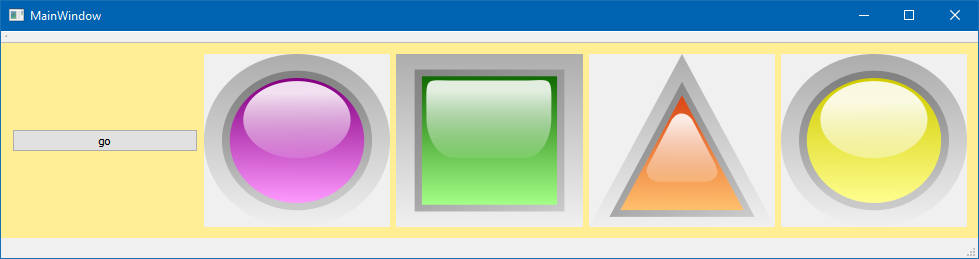
-
Hi
Here is other sample that allows copy paste of promoted widget.
Im not sure what was up with the other. the ui file seemed stale.Anyway, this works. the go button show random shape and color.
I have included only bare minimum of qled files to work.@mrjj Thanks MrJJ. I was able to copy your code and create a project from scratch using the QLed class to render a button. On the UI I drag in a Widget object and promote it to QLed. It shows up just fine. This is all in Qt Creator 4.5.1, Qt 5.10.1 and Visual Studio 2013 for the compiler.
I was also able to get it to work on the Raspberry Pi using VS 2013 along with Qt VS Tools and VisualGDB added in.
Still have quite a bit to learn, never having done Qt or Pi before. But with your help I've made good progress. Maybe I'll get bold and actually try to get the plugin to work as well, but that's pretty low priority.
Thank you for all your help. You da man!
Ron -
@mrjj Thanks MrJJ. I was able to copy your code and create a project from scratch using the QLed class to render a button. On the UI I drag in a Widget object and promote it to QLed. It shows up just fine. This is all in Qt Creator 4.5.1, Qt 5.10.1 and Visual Studio 2013 for the compiler.
I was also able to get it to work on the Raspberry Pi using VS 2013 along with Qt VS Tools and VisualGDB added in.
Still have quite a bit to learn, never having done Qt or Pi before. But with your help I've made good progress. Maybe I'll get bold and actually try to get the plugin to work as well, but that's pretty low priority.
Thank you for all your help. You da man!
Ron@BlackDogWhite
Super :)
well crosscompiling is not easy. So good work.
Since you already have visual studio, it might not be huge work to get the plugin running
but in this case it offer not so much besides seeing the leds in designer and setting type and
color directly in Designer. ( you could also do that with dynamic properties as they are
added to the actual widget type also when using promotion) -
Hi
Here is other sample that allows copy paste of promoted widget.
Im not sure what was up with the other. the ui file seemed stale.Anyway, this works. the go button show random shape and color.
I have included only bare minimum of qled files to work. -
@viniltc
Hi
Link is still ok
https://www.dropbox.com/s/kfti0otv9ez9u28/Myleds.zip?dl=0
just tested -
@viniltc
Hi
Link is still ok
https://www.dropbox.com/s/kfti0otv9ez9u28/Myleds.zip?dl=0
just tested -
Hi
You can right-click it and apply a layout.
Its not disabled. it shows no layout is assigned.
However,why do you want to have layout in it ?
It would be more normal to put the led and the other widget in a separate layout. -
Hi
You can right-click it and apply a layout.
Its not disabled. it shows no layout is assigned.
However,why do you want to have layout in it ?
It would be more normal to put the led and the other widget in a separate layout.@mrjj
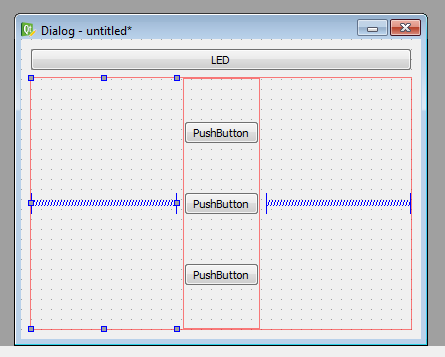
Thanks a lot for the clarification. I'm aiming for a fully resizable GUI, that's why I need a layout. Like for example:
 (the moment it's without a layout)
But when I apply a grid layout to the GUI, I'm kind of struggling to get its widgets (especially LED) at its place! -
Hi
Well you add a layout to the parent. (the window)
and then insert the Led and buttons into that layout.
so if you resize the window, they will all follow.update
Ahh first saw now, you did use a grid layout, so it was about the position.
Luckily @Pl45m4 to the rescue :) -
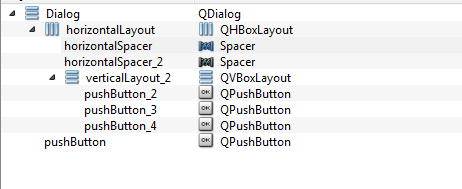
To realize the layout, like it is shown in your image, you dont need a GridLayout. Two VerticalLayouts paired with one HorizontalLayout should work.