Skip to content
  • Categories
  • Recent
  • Tags
  • Popular
  • Users
  • Groups
  • Search
  • Get Qt Extensions
  • Unsolved
Collapse
Brand Logo
  1. Home
  2. Qt Development
  3. General and Desktop
  4. Add QFTP module in qt5

Add QFTP module in qt5

Scheduled Pinned Locked Moved Unsolved General and Desktop
16 Posts 5 Posters 3.7k Views 2 Watching
  • Oldest to Newest
  • Newest to Oldest
  • Most Votes
Reply
  • Reply as topic
Log in to reply
This topic has been deleted. Only users with topic management privileges can see it.
  • Z Offline
    Z Offline
    Zunneh
    wrote on last edited by
    #1

    Hello guys, i want to add QFTP module to qt5, after download the source file from github, what is the next steps ?

    0_1562236616517_Qtmou.png

    please try to be the most explicit step by step, 4 days past and i m blocked to add this module , thanks

    note : don't tell me there is QNetworkAcessManager because i need the QFtp for list() method

    JonBJ 1 Reply Last reply
    0
    • Christian EhrlicherC Online
      Christian EhrlicherC Online
      Christian Ehrlicher
      Lifetime Qt Champion
      wrote on last edited by
      #2

      What did you try exactly? What did not work?
      I would simply trying to run qmake inside the source dir and/or create a separate build dir and call qmake from there with the path to the qtftp.pro file

      Qt Online Installer direct download: https://download.qt.io/official_releases/online_installers/
      Visit the Qt Academy at https://academy.qt.io/catalog

      Z 1 Reply Last reply
      0
      • Z Zunneh

        Hello guys, i want to add QFTP module to qt5, after download the source file from github, what is the next steps ?

        0_1562236616517_Qtmou.png

        please try to be the most explicit step by step, 4 days past and i m blocked to add this module , thanks

        note : don't tell me there is QNetworkAcessManager because i need the QFtp for list() method

        JonBJ Online
        JonBJ Online
        JonB
        wrote on last edited by
        #3

        @Zunneh
        I cannot help you with how to get QFtp working, but....

        I know your question here comes as a result of your https://forum.qt.io/topic/104526/download-a-folder-with-qnetworkaccessmanager-instead-of-file. Before you have to commit to getting QFtp to work, I did ask you there:

        That means you won't be able to get a list of folder contents from server so that you can then ask it to download each one. (Unless your attempt to get() the folder URL returned anything like a list of files?)

        Did you check what your attempt to get() the folder URL actually returns? You said "it diidn't work (to do the download)", but does it return anything?

        Z 1 Reply Last reply
        0
        • JonBJ JonB

          @Zunneh
          I cannot help you with how to get QFtp working, but....

          I know your question here comes as a result of your https://forum.qt.io/topic/104526/download-a-folder-with-qnetworkaccessmanager-instead-of-file. Before you have to commit to getting QFtp to work, I did ask you there:

          That means you won't be able to get a list of folder contents from server so that you can then ask it to download each one. (Unless your attempt to get() the folder URL returned anything like a list of files?)

          Did you check what your attempt to get() the folder URL actually returns? You said "it diidn't work (to do the download)", but does it return anything?

          Z Offline
          Z Offline
          Zunneh
          wrote on last edited by
          #4

          @JonB said in Add QFTP module in qt5:

          That means you won't be able to get a list of folder contents from server so that you can then ask it to download each one. (Unless your attempt to get() the folder URL returned anything like a list of files?)

          get() didn't return anything, i saw in other post that the only solution for my problem is to install QFTP

          1 Reply Last reply
          1
          • Christian EhrlicherC Christian Ehrlicher

            What did you try exactly? What did not work?
            I would simply trying to run qmake inside the source dir and/or create a separate build dir and call qmake from there with the path to the qtftp.pro file

            Z Offline
            Z Offline
            Zunneh
            wrote on last edited by
            #5

            @Christian-Ehrlicher i dowloaded this file, i put the directory in my desktop and i open the qtftp.pro ,then i tried Qmake no error , but when i try to build it says error 0_1562237829063_qtmarche.png

            JonBJ 1 Reply Last reply
            0
            • Z Zunneh

              @Christian-Ehrlicher i dowloaded this file, i put the directory in my desktop and i open the qtftp.pro ,then i tried Qmake no error , but when i try to build it says error 0_1562237829063_qtmarche.png

              JonBJ Online
              JonBJ Online
              JonB
              wrote on last edited by
              #6

              @Zunneh
              Just to let you know: once someone has helped you to get this compiled, for sample code which will copy a directory recursively via QFtp see http://www.informit.com/articles/article.aspx?p=1405552 (search for recursively; code is old but principle is correct, hopefully it still works). Listing is also covered in https://stackoverflow.com/questions/23067695/qt-4-7-how-to-iterate-through-files-in-an-ftp-directory.

              Z 1 Reply Last reply
              3
              • JonBJ JonB

                @Zunneh
                Just to let you know: once someone has helped you to get this compiled, for sample code which will copy a directory recursively via QFtp see http://www.informit.com/articles/article.aspx?p=1405552 (search for recursively; code is old but principle is correct, hopefully it still works). Listing is also covered in https://stackoverflow.com/questions/23067695/qt-4-7-how-to-iterate-through-files-in-an-ftp-directory.

                Z Offline
                Z Offline
                Zunneh
                wrote on last edited by
                #7

                @JonB Thank you , hope now someone help me to install the QFtp module

                1 Reply Last reply
                0
                • Christian EhrlicherC Online
                  Christian EhrlicherC Online
                  Christian Ehrlicher
                  Lifetime Qt Champion
                  wrote on last edited by
                  #8

                  The readme states:

                  "Note: If you downloaded the source package from a hosting service
                  such as Gitorious, the package does not contain the generated headers
                  under the ./include directory. Before building, you'll need to generate
                  them manually by running the syncqt Perl script. For example:

                  cd qtftp
                  <QTDIR>/bin/syncqt.pl -version 5.x.y"

                  Qt Online Installer direct download: https://download.qt.io/official_releases/online_installers/
                  Visit the Qt Academy at https://academy.qt.io/catalog

                  JonBJ 1 Reply Last reply
                  2
                  • Christian EhrlicherC Christian Ehrlicher

                    The readme states:

                    "Note: If you downloaded the source package from a hosting service
                    such as Gitorious, the package does not contain the generated headers
                    under the ./include directory. Before building, you'll need to generate
                    them manually by running the syncqt Perl script. For example:

                    cd qtftp
                    <QTDIR>/bin/syncqt.pl -version 5.x.y"

                    JonBJ Online
                    JonBJ Online
                    JonB
                    wrote on last edited by
                    #9

                    @Christian-Ehrlicher
                    I wonder how many Windows users will have Perl installed?! :)

                    J.HilkJ 1 Reply Last reply
                    0
                    • Christian EhrlicherC Online
                      Christian EhrlicherC Online
                      Christian Ehrlicher
                      Lifetime Qt Champion
                      wrote on last edited by
                      #10

                      @JonB : if you want to compile Qt then you have to. And since QtFtp was a part of Qt and is now deprecated it's buildsystem was never ported away from this.

                      Qt Online Installer direct download: https://download.qt.io/official_releases/online_installers/
                      Visit the Qt Academy at https://academy.qt.io/catalog

                      JonBJ 1 Reply Last reply
                      2
                      • Christian EhrlicherC Christian Ehrlicher

                        @JonB : if you want to compile Qt then you have to. And since QtFtp was a part of Qt and is now deprecated it's buildsystem was never ported away from this.

                        JonBJ Online
                        JonBJ Online
                        JonB
                        wrote on last edited by
                        #11

                        @Christian-Ehrlicher
                        OIC, I have never compiled Qt, I did wonder whether that process might require Perl.
                        I remember when Perl was first invented, I had to compile it then :)

                        1 Reply Last reply
                        0
                        • JonBJ JonB

                          @Christian-Ehrlicher
                          I wonder how many Windows users will have Perl installed?! :)

                          J.HilkJ Offline
                          J.HilkJ Offline
                          J.Hilk
                          Moderators
                          wrote on last edited by
                          #12

                          @JonB I installed perl, and python. Even switched my old laptop completely over to linux.
                          The things Qt made me do over the years. Stuff I swore I wouldn't ever touch again, yet here I am ...
                          -_-


                          Be aware of the Qt Code of Conduct, when posting : https://forum.qt.io/topic/113070/qt-code-of-conduct


                          Q: What's that?
                          A: It's blue light.
                          Q: What does it do?
                          A: It turns blue.

                          Z 1 Reply Last reply
                          2
                          • J.HilkJ J.Hilk

                            @JonB I installed perl, and python. Even switched my old laptop completely over to linux.
                            The things Qt made me do over the years. Stuff I swore I wouldn't ever touch again, yet here I am ...
                            -_-

                            Z Offline
                            Z Offline
                            Zunneh
                            wrote on last edited by
                            #13

                            @J.Hilk i need to install perl to execute that script ? thanks

                            mrjjM 1 Reply Last reply
                            0
                            • Z Zunneh

                              @J.Hilk i need to install perl to execute that script ? thanks

                              mrjjM Offline
                              mrjjM Offline
                              mrjj
                              Lifetime Qt Champion
                              wrote on last edited by
                              #14

                              @Zunneh
                              Hi
                              yes it seems so to generate some important headers.
                              You can get it from here
                              http://downloads.activestate.com/ActivePerl/releases/5.14.2.1402/

                              Z 1 Reply Last reply
                              3
                              • mrjjM Offline
                                mrjjM Offline
                                mrjj
                                Lifetime Qt Champion
                                wrote on last edited by
                                #15

                                Hi
                                Had to try it.
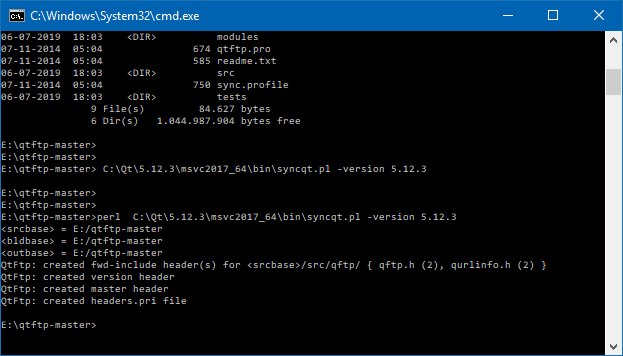
                                You can call it like

                                E:\qtftp-master>perl C:\Qt\5.12.3\msvc2017_64\bin\syncqt.pl -version 5.12.3

                                make sure to change the path to right one and also the Qt version

                                alt text
                                and it did create the include folder.

                                1 Reply Last reply
                                4
                                • mrjjM mrjj

                                  @Zunneh
                                  Hi
                                  yes it seems so to generate some important headers.
                                  You can get it from here
                                  http://downloads.activestate.com/ActivePerl/releases/5.14.2.1402/

                                  Z Offline
                                  Z Offline
                                  Zunneh
                                  wrote on last edited by Zunneh
                                  #16
                                  This post is deleted!
                                  1 Reply Last reply
                                  0

                                  • Login

                                  • Login or register to search.
                                  • First post
                                    Last post
                                  0
                                  • Categories
                                  • Recent
                                  • Tags
                                  • Popular
                                  • Users
                                  • Groups
                                  • Search
                                  • Get Qt Extensions
                                  • Unsolved