Skip to content
  • Categories
  • Recent
  • Tags
  • Popular
  • Users
  • Groups
  • Search
  • Get Qt Extensions
  • Unsolved
Collapse
Brand Logo
  1. Home
  2. Qt Development
  3. General and Desktop
  4. How to make a SVG at tab Widget ?
Forum Updated to NodeBB v4.3 + New Features

How to make a SVG at tab Widget ?

Scheduled Pinned Locked Moved Solved General and Desktop
55 Posts 6 Posters 11.6k Views 2 Watching
  • Oldest to Newest
  • Newest to Oldest
  • Most Votes
Reply
  • Reply as topic
Log in to reply
This topic has been deleted. Only users with topic management privileges can see it.
  • jsulmJ jsulm

    @RiceBall said in How to make a SVG at tab Widget ?:

    where can I code it ?mainwindow.h or mainwindow.cpp

    in customwidget.h + customwidget.cpp...

    R Offline
    R Offline
    RiceBall
    wrote on last edited by RiceBall
    #35

    @jsulm said in How to make a SVG at tab Widget ?:

    @RiceBall said in How to make a SVG at tab Widget ?:

    where can I code it ?mainwindow.h or mainwindow.cpp

    in customwidget.h + customwidget.cpp...

    So I create new customwidget.h & customwidget.cpp
    And coding like below.
    Is it right ??
    Because at mainwindow.cpp it show "use of undeclared identifier 'scene'".

    customwidget.h

    #ifndef CUSTOMWIDGET_H
    #define CUSTOMWIDGET_H
    #include <QWidget>
    
    class customwidget : public QWidget
    {
        Q_OBJECT
    public:
        explicit customwidget(QWidget *parent = nullptr);
    signals:
    public slots:
    };
    
    #endif // CUSTOMWIDGET_H


    customwidget.cpp

    #include "customwidget.h"
    #include <QGridLayout>
    #include <QSvgWidget>
    
    
    customwidget::customwidget(QWidget *parent) : QWidget(parent)
    {
        QGridLayout *glyt = new QGridLayout;
        
           QSvgWidget *svgWid1 = new QSvgWidget("../iHMI_2/splash1.svg");
           QSvgWidget *svgWid2 = new QSvgWidget("../iHMI_2/splash2.svg");
           QSvgWidget *svgWid3 = new QSvgWidget("../iHMI_2/splash3.svg");
           QSvgWidget *svgWid4 = new QSvgWidget("../iHMI_2/splash4.svg");
        
           glyt->addWidget(svgWid1);
           glyt->addWidget(svgWid2);
           glyt->addWidget(svgWid3);
           glyt->addWidget(svgWid4);
        
           this->setLayout(glyt);
    }
    

    mainwindow.cpp

    #include "mainwindow.h"
    #include "ui_mainwindow.h"
    #include <QLabel>
    #include "customwidget.h"
    
    
    //#include <QGraphicsScene>
    //#include <QGraphicsView>
    //#include <QtSvg/QSvgWidget>
    //#include <QMovie>
    //#include <QPixmap>
    
    
    MainWindow::MainWindow(QWidget *parent) :
        QMainWindow(parent),
        ui(new Ui::MainWindow)
    {
        ui->setupUi(this);
        CustomWidget *csw = new CustomWidget;
        scene->addWidget(csw);
    
    
    R jsulmJ 2 Replies Last reply
    0
    • R RiceBall

      @jsulm said in How to make a SVG at tab Widget ?:

      @RiceBall said in How to make a SVG at tab Widget ?:

      where can I code it ?mainwindow.h or mainwindow.cpp

      in customwidget.h + customwidget.cpp...

      So I create new customwidget.h & customwidget.cpp
      And coding like below.
      Is it right ??
      Because at mainwindow.cpp it show "use of undeclared identifier 'scene'".

      customwidget.h

      #ifndef CUSTOMWIDGET_H
      #define CUSTOMWIDGET_H
      #include <QWidget>
      
      class customwidget : public QWidget
      {
          Q_OBJECT
      public:
          explicit customwidget(QWidget *parent = nullptr);
      signals:
      public slots:
      };
      
      #endif // CUSTOMWIDGET_H


      customwidget.cpp

      #include "customwidget.h"
      #include <QGridLayout>
      #include <QSvgWidget>
      
      
      customwidget::customwidget(QWidget *parent) : QWidget(parent)
      {
          QGridLayout *glyt = new QGridLayout;
          
             QSvgWidget *svgWid1 = new QSvgWidget("../iHMI_2/splash1.svg");
             QSvgWidget *svgWid2 = new QSvgWidget("../iHMI_2/splash2.svg");
             QSvgWidget *svgWid3 = new QSvgWidget("../iHMI_2/splash3.svg");
             QSvgWidget *svgWid4 = new QSvgWidget("../iHMI_2/splash4.svg");
          
             glyt->addWidget(svgWid1);
             glyt->addWidget(svgWid2);
             glyt->addWidget(svgWid3);
             glyt->addWidget(svgWid4);
          
             this->setLayout(glyt);
      }
      

      mainwindow.cpp

      #include "mainwindow.h"
      #include "ui_mainwindow.h"
      #include <QLabel>
      #include "customwidget.h"
      
      
      //#include <QGraphicsScene>
      //#include <QGraphicsView>
      //#include <QtSvg/QSvgWidget>
      //#include <QMovie>
      //#include <QPixmap>
      
      
      MainWindow::MainWindow(QWidget *parent) :
          QMainWindow(parent),
          ui(new Ui::MainWindow)
      {
          ui->setupUi(this);
          CustomWidget *csw = new CustomWidget;
          scene->addWidget(csw);
      
      
      R Offline
      R Offline
      RiceBall
      wrote on last edited by
      #36

      @Pradeep-P-N
      Is this your meaning like above reply?

      mrjjM Pradeep P NP 2 Replies Last reply
      0
      • R RiceBall

        @Pradeep-P-N
        Is this your meaning like above reply?

        mrjjM Offline
        mrjjM Offline
        mrjj
        Lifetime Qt Champion
        wrote on last edited by mrjj
        #37

        @RiceBall
        Hi
        Yes, he meant to make such a custom class.

        However, in MainWindow, you just use a scene which is undefined. (or did u add it as member ?)
        You should at least do
        QGraphicsScene *scene = new QGraphicsScene;
        first.

        1 Reply Last reply
        1
        • R RiceBall

          @Pradeep-P-N
          Is this your meaning like above reply?

          Pradeep P NP Offline
          Pradeep P NP Offline
          Pradeep P N
          wrote on last edited by Pradeep P N
          #38

          Hi @RiceBall
          Sorry was bit busy, Yes follow below instructions.

          • Create a Class inheriting from QWidget (Example as above code class CustomWidget : public QWidget)
          • Use the QLayout Class options available (Use whichever suitable to your UI Arrangement)
          • Once you have the CustomeWidget ready you can use this Class as the widget for Graphics Scene
          QGraphicsScene *scene = new QGraphicsScene
          CustomWidget *csw = new CustomWidget;
          scene->addWidget(csw);
          
          • Optimize your code and you can achieve the result you are looking for.

          All the best.

          Pradeep Nimbalkar.
          Upvote the answer(s) that helped you to solve the issue...
          Keep code clean.

          R 1 Reply Last reply
          4
          • Pradeep P NP Pradeep P N

            Hi @RiceBall
            Sorry was bit busy, Yes follow below instructions.

            • Create a Class inheriting from QWidget (Example as above code class CustomWidget : public QWidget)
            • Use the QLayout Class options available (Use whichever suitable to your UI Arrangement)
            • Once you have the CustomeWidget ready you can use this Class as the widget for Graphics Scene
            QGraphicsScene *scene = new QGraphicsScene
            CustomWidget *csw = new CustomWidget;
            scene->addWidget(csw);
            
            • Optimize your code and you can achieve the result you are looking for.

            All the best.

            R Offline
            R Offline
            RiceBall
            wrote on last edited by
            #39

            @mrjj
            @Pradeep-P-N said in How to make a SVG at tab Widget ?:

            QGraphicsScene *scene = new QGraphicsScene

            I try to fix code and test it.
            But I can see it loading something but is white.

                ui->setupUi(this);
                CustomWidget *csw = new CustomWidget;
                QGraphicsScene *scene = new QGraphicsScene;
                scene->addWidget(csw);
                ui->graphicsView->setScene(scene);


            0_1560181567099_73e060c5-017f-4def-b7fa-e60b4fcfe5b0-image.png

            0_1560181613760_02ca1518-6496-4026-a90a-3bd98d93974a-image.png

            1 Reply Last reply
            0
            • R RiceBall

              @jsulm said in How to make a SVG at tab Widget ?:

              @RiceBall said in How to make a SVG at tab Widget ?:

              where can I code it ?mainwindow.h or mainwindow.cpp

              in customwidget.h + customwidget.cpp...

              So I create new customwidget.h & customwidget.cpp
              And coding like below.
              Is it right ??
              Because at mainwindow.cpp it show "use of undeclared identifier 'scene'".

              customwidget.h

              #ifndef CUSTOMWIDGET_H
              #define CUSTOMWIDGET_H
              #include <QWidget>
              
              class customwidget : public QWidget
              {
                  Q_OBJECT
              public:
                  explicit customwidget(QWidget *parent = nullptr);
              signals:
              public slots:
              };
              
              #endif // CUSTOMWIDGET_H


              customwidget.cpp

              #include "customwidget.h"
              #include <QGridLayout>
              #include <QSvgWidget>
              
              
              customwidget::customwidget(QWidget *parent) : QWidget(parent)
              {
                  QGridLayout *glyt = new QGridLayout;
                  
                     QSvgWidget *svgWid1 = new QSvgWidget("../iHMI_2/splash1.svg");
                     QSvgWidget *svgWid2 = new QSvgWidget("../iHMI_2/splash2.svg");
                     QSvgWidget *svgWid3 = new QSvgWidget("../iHMI_2/splash3.svg");
                     QSvgWidget *svgWid4 = new QSvgWidget("../iHMI_2/splash4.svg");
                  
                     glyt->addWidget(svgWid1);
                     glyt->addWidget(svgWid2);
                     glyt->addWidget(svgWid3);
                     glyt->addWidget(svgWid4);
                  
                     this->setLayout(glyt);
              }
              

              mainwindow.cpp

              #include "mainwindow.h"
              #include "ui_mainwindow.h"
              #include <QLabel>
              #include "customwidget.h"
              
              
              //#include <QGraphicsScene>
              //#include <QGraphicsView>
              //#include <QtSvg/QSvgWidget>
              //#include <QMovie>
              //#include <QPixmap>
              
              
              MainWindow::MainWindow(QWidget *parent) :
                  QMainWindow(parent),
                  ui(new Ui::MainWindow)
              {
                  ui->setupUi(this);
                  CustomWidget *csw = new CustomWidget;
                  scene->addWidget(csw);
              
              
              jsulmJ Offline
              jsulmJ Offline
              jsulm
              Lifetime Qt Champion
              wrote on last edited by
              #40

              @RiceBall said in How to make a SVG at tab Widget ?:

              QSvgWidget *svgWid1 = new QSvgWidget("../iHMI_2/splash1.svg");
              QSvgWidget *svgWid2 = new QSvgWidget("../iHMI_2/splash2.svg");
              QSvgWidget *svgWid3 = new QSvgWidget("../iHMI_2/splash3.svg");
              QSvgWidget *svgWid4 = new QSvgWidget("../iHMI_2/splash4.svg");

              You're using relative paths: did you make sure the files are actually found at runtime?

              https://forum.qt.io/topic/113070/qt-code-of-conduct

              R 1 Reply Last reply
              2
              • jsulmJ jsulm

                @RiceBall said in How to make a SVG at tab Widget ?:

                QSvgWidget *svgWid1 = new QSvgWidget("../iHMI_2/splash1.svg");
                QSvgWidget *svgWid2 = new QSvgWidget("../iHMI_2/splash2.svg");
                QSvgWidget *svgWid3 = new QSvgWidget("../iHMI_2/splash3.svg");
                QSvgWidget *svgWid4 = new QSvgWidget("../iHMI_2/splash4.svg");

                You're using relative paths: did you make sure the files are actually found at runtime?

                R Offline
                R Offline
                RiceBall
                wrote on last edited by
                #41

                @jsulm said in How to make a SVG at tab Widget ?:

                @RiceBall said in How to make a SVG at tab Widget ?:

                QSvgWidget *svgWid1 = new QSvgWidget("../iHMI_2/splash1.svg");
                QSvgWidget *svgWid2 = new QSvgWidget("../iHMI_2/splash2.svg");
                QSvgWidget *svgWid3 = new QSvgWidget("../iHMI_2/splash3.svg");
                QSvgWidget *svgWid4 = new QSvgWidget("../iHMI_2/splash4.svg");

                You're using relative paths: did you make sure the files are actually found at runtime?

                I changed to the absolute path.
                The problem is the same.
                Does it have any possible I coding wrong ??

                0_1560302175659_10b76459-1af8-4343-987b-48bda39c8a98-image.png

                0_1560302272379_4276155c-ef46-495f-b3b5-0072c3ef9c1b-image.png

                jsulmJ 1 Reply Last reply
                0
                • R RiceBall

                  @jsulm said in How to make a SVG at tab Widget ?:

                  @RiceBall said in How to make a SVG at tab Widget ?:

                  QSvgWidget *svgWid1 = new QSvgWidget("../iHMI_2/splash1.svg");
                  QSvgWidget *svgWid2 = new QSvgWidget("../iHMI_2/splash2.svg");
                  QSvgWidget *svgWid3 = new QSvgWidget("../iHMI_2/splash3.svg");
                  QSvgWidget *svgWid4 = new QSvgWidget("../iHMI_2/splash4.svg");

                  You're using relative paths: did you make sure the files are actually found at runtime?

                  I changed to the absolute path.
                  The problem is the same.
                  Does it have any possible I coding wrong ??

                  0_1560302175659_10b76459-1af8-4343-987b-48bda39c8a98-image.png

                  0_1560302272379_4276155c-ef46-495f-b3b5-0072c3ef9c1b-image.png

                  jsulmJ Offline
                  jsulmJ Offline
                  jsulm
                  Lifetime Qt Champion
                  wrote on last edited by
                  #42

                  @RiceBall You can also check this:

                  • Get the renderer from the SVG widget using https://doc.qt.io/qt-5/qsvgwidget.html#renderer
                  • Check what https://doc.qt.io/qt-5/qsvgrenderer.html#isValid returns

                  And also call show() on each SVG widget you're creating.

                  https://forum.qt.io/topic/113070/qt-code-of-conduct

                  R 1 Reply Last reply
                  0
                  • jsulmJ jsulm

                    @RiceBall You can also check this:

                    • Get the renderer from the SVG widget using https://doc.qt.io/qt-5/qsvgwidget.html#renderer
                    • Check what https://doc.qt.io/qt-5/qsvgrenderer.html#isValid returns

                    And also call show() on each SVG widget you're creating.

                    R Offline
                    R Offline
                    RiceBall
                    wrote on last edited by
                    #43

                    @jsulm said in How to make a SVG at tab Widget ?:

                    @RiceBall You can also check this:

                    • Get the renderer from the SVG widget using https://doc.qt.io/qt-5/qsvgwidget.html#renderer
                    • Check what https://doc.qt.io/qt-5/qsvgrenderer.html#isValid returns

                    And also call show() on each SVG widget you're creating.

                    How could I use it ??
                    Can you make a sample for me ??
                    Thank you.

                    jsulmJ 1 Reply Last reply
                    0
                    • R RiceBall

                      @jsulm said in How to make a SVG at tab Widget ?:

                      @RiceBall You can also check this:

                      • Get the renderer from the SVG widget using https://doc.qt.io/qt-5/qsvgwidget.html#renderer
                      • Check what https://doc.qt.io/qt-5/qsvgrenderer.html#isValid returns

                      And also call show() on each SVG widget you're creating.

                      How could I use it ??
                      Can you make a sample for me ??
                      Thank you.

                      jsulmJ Offline
                      jsulmJ Offline
                      jsulm
                      Lifetime Qt Champion
                      wrote on last edited by
                      #44

                      @RiceBall said in How to make a SVG at tab Widget ?:

                      How could I use it ??

                      Come on, what's difficult about it?!

                      svgWid1->show();
                      ...
                      qDebug() << svgWid1->renderer()->isValid();
                      

                      https://forum.qt.io/topic/113070/qt-code-of-conduct

                      R 1 Reply Last reply
                      0
                      • jsulmJ jsulm

                        @RiceBall said in How to make a SVG at tab Widget ?:

                        How could I use it ??

                        Come on, what's difficult about it?!

                        svgWid1->show();
                        ...
                        qDebug() << svgWid1->renderer()->isValid();
                        
                        R Offline
                        R Offline
                        RiceBall
                        wrote on last edited by
                        #45

                        @jsulm said in How to make a SVG at tab Widget ?:

                        @RiceBall said in How to make a SVG at tab Widget ?:

                        How could I use it ??

                        Come on, what's difficult about it?!

                        svgWid1->show();
                        ...
                        qDebug() << svgWid1->renderer()->isValid();
                        

                        Sorry to ask too much easily question.
                        Because I just started learning QT and C++.
                        So some documents are difficult for me.

                        I try to add code like you writing at customwidget.cpp
                        But I can't see any different.

                        jsulmJ 1 Reply Last reply
                        0
                        • R RiceBall

                          @jsulm said in How to make a SVG at tab Widget ?:

                          @RiceBall said in How to make a SVG at tab Widget ?:

                          How could I use it ??

                          Come on, what's difficult about it?!

                          svgWid1->show();
                          ...
                          qDebug() << svgWid1->renderer()->isValid();
                          

                          Sorry to ask too much easily question.
                          Because I just started learning QT and C++.
                          So some documents are difficult for me.

                          I try to add code like you writing at customwidget.cpp
                          But I can't see any different.

                          jsulmJ Offline
                          jsulmJ Offline
                          jsulm
                          Lifetime Qt Champion
                          wrote on last edited by
                          #46

                          @RiceBall OK, no problem.
                          The second line should print something to the console - what do you see there ("Application Output" tab in QtCreator)?

                          https://forum.qt.io/topic/113070/qt-code-of-conduct

                          R 1 Reply Last reply
                          0
                          • jsulmJ jsulm

                            @RiceBall OK, no problem.
                            The second line should print something to the console - what do you see there ("Application Output" tab in QtCreator)?

                            R Offline
                            R Offline
                            RiceBall
                            wrote on last edited by
                            #47

                            @jsulm said in How to make a SVG at tab Widget ?:

                            @RiceBall OK, no problem.
                            The second line should print something to the console - what do you see there ("Application Output" tab in QtCreator)?

                            Do I add code at customwidget.cpp is right ??
                            I can't see any QDebug message.

                            0_1560510789930_f2b4c22c-dc55-4b26-9c9b-5e85b1f1b2d9-image.png

                            jsulmJ 1 Reply Last reply
                            0
                            • R RiceBall

                              @jsulm said in How to make a SVG at tab Widget ?:

                              @RiceBall OK, no problem.
                              The second line should print something to the console - what do you see there ("Application Output" tab in QtCreator)?

                              Do I add code at customwidget.cpp is right ??
                              I can't see any QDebug message.

                              0_1560510789930_f2b4c22c-dc55-4b26-9c9b-5e85b1f1b2d9-image.png

                              jsulmJ Offline
                              jsulmJ Offline
                              jsulm
                              Lifetime Qt Champion
                              wrote on last edited by
                              #48

                              @RiceBall Are you sure you create an instance of customwidget? Because I don't see the output of qDebug().

                              https://forum.qt.io/topic/113070/qt-code-of-conduct

                              R 1 Reply Last reply
                              0
                              • jsulmJ jsulm

                                @RiceBall Are you sure you create an instance of customwidget? Because I don't see the output of qDebug().

                                R Offline
                                R Offline
                                RiceBall
                                wrote on last edited by
                                #49

                                @jsulm said in How to make a SVG at tab Widget ?:

                                @RiceBall Are you sure you create an instance of customwidget? Because I don't see the output of qDebug().

                                I have made it as you see picture.
                                But I think it maybe somewhere is mistake.
                                below is my file.
                                If you have time,could you help me to check it ??
                                link text

                                1 Reply Last reply
                                0
                                • mrjjM Offline
                                  mrjjM Offline
                                  mrjj
                                  Lifetime Qt Champion
                                  wrote on last edited by mrjj
                                  #50

                                  Hi
                                  I had a quick look.
                                  several things:
                                  1:
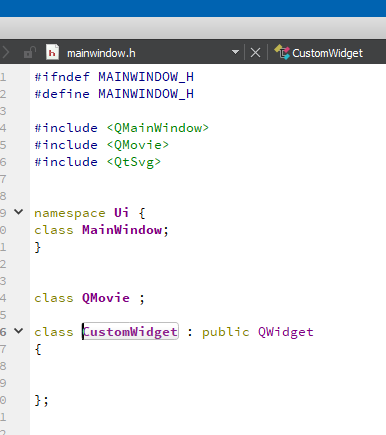
                                  alt text
                                  you have another CustomWidget that you use. its not the one with the svg files. its pretty empty.
                                  delete it.

                                  2:
                                  Use your actual widget. Notice the class name is with all small letters and you used one with mixed. the empty class.

                                  alt text
                                  This has to be

                                  customwidget *csw = new customwidget; <<<<< notice small letters.
                                  

                                  3:
                                  Your paths are wrong, or you are not using the resources.
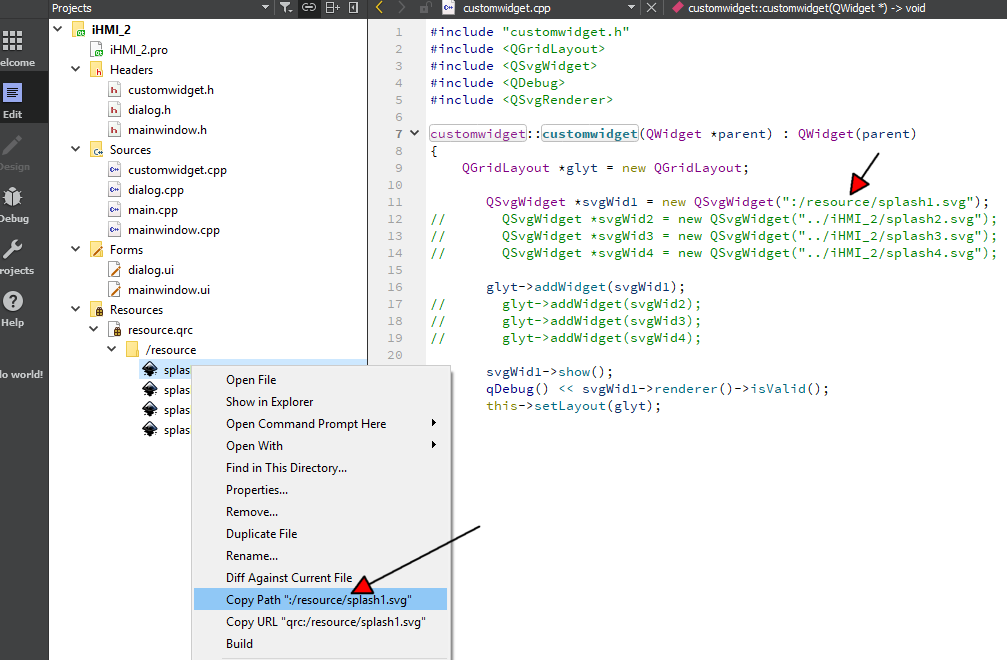
                                  alt text

                                  Right click the files in the left side project view and use the get path function there. then its always correct.
                                  4:
                                  Then it will show. (profit)
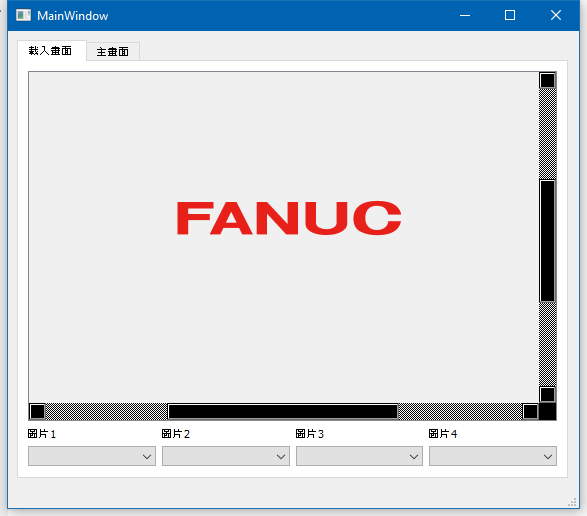
                                  alt text

                                  https://www.dropbox.com/s/nq3o3nd0qha79h2/iHMI_2B.zip?dl=0

                                  R 1 Reply Last reply
                                  1
                                  • mrjjM mrjj

                                    Hi
                                    I had a quick look.
                                    several things:
                                    1:
                                    alt text
                                    you have another CustomWidget that you use. its not the one with the svg files. its pretty empty.
                                    delete it.

                                    2:
                                    Use your actual widget. Notice the class name is with all small letters and you used one with mixed. the empty class.
                                    alt text
                                    This has to be

                                    customwidget *csw = new customwidget; <<<<< notice small letters.
                                    

                                    3:
                                    Your paths are wrong, or you are not using the resources.
                                    alt text

                                    Right click the files in the left side project view and use the get path function there. then its always correct.
                                    4:
                                    Then it will show. (profit)
                                    alt text

                                    https://www.dropbox.com/s/nq3o3nd0qha79h2/iHMI_2B.zip?dl=0

                                    R Offline
                                    R Offline
                                    RiceBall
                                    wrote on last edited by
                                    #51

                                    @mrjj said in How to make a SVG at tab Widget ?:

                                    Hi
                                    I had a quick look.
                                    several things:
                                    1:
                                    alt text
                                    you have another CustomWidget that you use. its not the one with the svg files. its pretty empty.
                                    delete it.

                                    2:
                                    Use your actual widget. Notice the class name is with all small letters and you used one with mixed. the empty class.
                                    alt text
                                    This has to be

                                    customwidget *csw = new customwidget; <<<<< notice small letters.
                                    

                                    3:
                                    Your paths are wrong, or you are not using the resources.
                                    alt text

                                    Right click the files in the left side project view and use the get path function there. then its always correct.
                                    4:
                                    Then it will show. (profit)
                                    alt text

                                    https://www.dropbox.com/s/nq3o3nd0qha79h2/iHMI_2B.zip?dl=0

                                    Thank you for @jsulm help.
                                    It looks like not very easy for me to debug it.
                                    I need to learning more and more.

                                    final problem.
                                    My loading picture want to overlap together.(Now is not)
                                    How to coding it ??

                                    0_1560588535028_f29273d7-2969-4a79-a94d-e836acffd5c6-image.png

                                    1 Reply Last reply
                                    0
                                    • mrjjM Offline
                                      mrjjM Offline
                                      mrjj
                                      Lifetime Qt Champion
                                      wrote on last edited by mrjj
                                      #52

                                      Hi
                                      well learning to use the debugger is a must do as that find such error.
                                      I saw the empty class by stepping into the code with f10.
                                      So with debugger, it was not hard to find.

                                      Anyway,
                                      They are not on top of each other
                                      as you put them in layout.

                                      So you can drop the layout

                                      customwidget::customwidget(QWidget *parent) : QWidget(parent)
                                      {
                                          //QGridLayout *glyt = new QGridLayout;
                                      
                                          QSvgWidget *svgWid1 = new QSvgWidget(":/resource/splash1.svg", this);
                                          QSvgWidget *svgWid2 = new QSvgWidget(":/resource/splash2.svg", this);
                                          //       QSvgWidget *svgWid3 = new QSvgWidget("../iHMI_2/splash3.svg");
                                          //       QSvgWidget *svgWid4 = new QSvgWidget("../iHMI_2/splash4.svg");
                                      
                                          //glyt->addWidget(svgWid1);
                                          //glyt->addWidget(svgWid2);
                                          //glyt->addWidget(svgWid2);
                                          //glyt->addWidget(svgWid3);
                                          //glyt->addWidget(svgWid4);
                                      
                                          svgWid1->show();
                                      
                                          qDebug() << svgWid1->renderer()->isValid();
                                      
                                          //this->setLayout(glyt);
                                      
                                      }



                                      alt text

                                      However, im not 100% sure on what the goal is with the 3 SVG and the "Loading" one so
                                      it might not be what you really want.

                                      R 1 Reply Last reply
                                      1
                                      • mrjjM mrjj

                                        Hi
                                        well learning to use the debugger is a must do as that find such error.
                                        I saw the empty class by stepping into the code with f10.
                                        So with debugger, it was not hard to find.

                                        Anyway,
                                        They are not on top of each other
                                        as you put them in layout.

                                        So you can drop the layout

                                        customwidget::customwidget(QWidget *parent) : QWidget(parent)
                                        {
                                            //QGridLayout *glyt = new QGridLayout;
                                        
                                            QSvgWidget *svgWid1 = new QSvgWidget(":/resource/splash1.svg", this);
                                            QSvgWidget *svgWid2 = new QSvgWidget(":/resource/splash2.svg", this);
                                            //       QSvgWidget *svgWid3 = new QSvgWidget("../iHMI_2/splash3.svg");
                                            //       QSvgWidget *svgWid4 = new QSvgWidget("../iHMI_2/splash4.svg");
                                        
                                            //glyt->addWidget(svgWid1);
                                            //glyt->addWidget(svgWid2);
                                            //glyt->addWidget(svgWid2);
                                            //glyt->addWidget(svgWid3);
                                            //glyt->addWidget(svgWid4);
                                        
                                            svgWid1->show();
                                        
                                            qDebug() << svgWid1->renderer()->isValid();
                                        
                                            //this->setLayout(glyt);
                                        
                                        }


                                        alt text

                                        However, im not 100% sure on what the goal is with the 3 SVG and the "Loading" one so
                                        it might not be what you really want.

                                        R Offline
                                        R Offline
                                        RiceBall
                                        wrote on last edited by
                                        #53

                                        @mrjj
                                        Finally, I did it.
                                        Thank you for your patient answer.

                                        The last question , my background is set to black color.
                                        And My SVG file is transparent.
                                        How could I set scene background to black ?
                                        I have set "scene->setBackgroundBrush(Qt::black);"

                                        0_1560617208827_5df93602-7c23-4d2e-856e-b618e2422525-image.png

                                        1 Reply Last reply
                                        0
                                        • mrjjM Offline
                                          mrjjM Offline
                                          mrjj
                                          Lifetime Qt Champion
                                          wrote on last edited by mrjj
                                          #54

                                          Hi
                                          \0/
                                          You can ask widget to be transparent. You are seeing the customwidget.
                                          ( in mainwin)
                                          customwidget *csw = new customwidget;
                                          csw->setAttribute(Qt::WA_NoSystemBackground, true); // add this
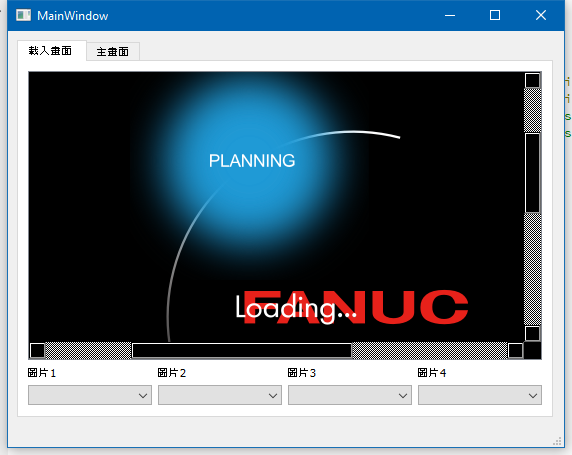
                                          alt text

                                          R 1 Reply Last reply
                                          2

                                          • Login

                                          • Login or register to search.
                                          • First post
                                            Last post
                                          0
                                          • Categories
                                          • Recent
                                          • Tags
                                          • Popular
                                          • Users
                                          • Groups
                                          • Search
                                          • Get Qt Extensions
                                          • Unsolved