
Skip to content
  • Categories
  • Recent
  • Tags
  • Popular
  • Users
  • Groups
  • Search
  • Get Qt Extensions
  • Unsolved
Collapse
Brand Logo
  1. Home
  2. Qt Development
  3. General and Desktop
  4. How can I consistently create QOpenGLWidget applications to show up?
Qt 6.11 is out! See what's new in the release blog

How can I consistently create QOpenGLWidget applications to show up?

Scheduled Pinned Locked Moved Unsolved General and Desktop
30 Posts 3 Posters 7.0k Views 2 Watching
  • Oldest to Newest
  • Newest to Oldest
  • Most Votes
Reply
  • Reply as topic
Log in to reply
This topic has been deleted. Only users with topic management privileges can see it.
  • S Offline
    S Offline
    Sailanarmo
    wrote on last edited by
    #18

    @SGaist

    I will uninstall my graphics driver and reinstall them. I will let you know what happens.

    1 Reply Last reply
    0
    • S Offline
      S Offline
      Sailanarmo
      wrote on last edited by
      #19

      @SGaist

      I've uninstalled the graphics drivers and I attempted to launch the same application without the drivers. The same behavior happened. I then reinstalled the graphics drivers and launched the program, and the same behavior happened.

      I could try downgrading my driver version. But I do not know where to go to find a lesser version of my drivers. I also don't know, why Qt chooses to launch one application, and not the other just fine. It's all very confusing.

      1 Reply Last reply
      0
      • S Offline
        S Offline
        Sailanarmo
        wrote on last edited by
        #20

        @SGaist

        I just launched the program from my home. It launches just fine. Only difference is that I am running a GTX 1080ti instead of an RTX 2080. I know I am repeating the same thing, but I do not understand why the linux machine with the same physical graphics card runs the program fine. But when I switch to the windows partition, it craps out.

        I'm kind of at a loss here. Maybe it is a hardware issue within windows itself. Or maybe it's a one time fluke and it is only affecting me.

        1 Reply Last reply
        0
        • SGaistS Offline
          SGaistS Offline
          SGaist
          Lifetime Qt Champion
          wrote on last edited by
          #21

          As I already said, it's likely a driver issue. While sharing the same version number, the architecture is different between these two OSes.

          Interested in AI ? www.idiap.ch
          Please read the Qt Code of Conduct - https://forum.qt.io/topic/113070/qt-code-of-conduct

          1 Reply Last reply
          0
          • S Offline
            S Offline
            Sailanarmo
            wrote on last edited by Sailanarmo
            #22

            @SGaist

            I rolled back the drivers to when I first built this computer. I am running 419.17 now instead of 419.67 which is the current version. This is the driver I was using when my first application started. The same issue is happening.

            I really do not think it is a driver issue if I am going to be completely honest. You do know more than I do, so maybe you are correct, however I feel if it were a driver issue I wouldn't get inconsistencies with different programs using OpenGL (meaning some programs that I created using Qt and OpenGL work and others do not). The other thing that suggests to me that it isn't my driver, is the fact that I can create a separate OpenGL application without Qt just fine. But it does me no good if I cannot use Qt to work on my projects.

            Another more drastic measure that I have given thought, was wiping the OS entirely and starting from scratch. However this is the last thing that I want to do because this takes a lot of time and causes big headaches.

            Thank you again for all of your help.

            EDIT it appears I haven't rolled them back

            EDIT 2 I am running 411.70, I'm assuming this is the earliest driver that NVIDIA Automatically provides with the graphics card. And it is the same behavior. Again, I do not think it is the drivers. But it seems we have beat this to the ground as far as we can go.

            1 Reply Last reply
            0
            • S Offline
              S Offline
              Sailanarmo
              wrote on last edited by
              #23

              @SGaist

              I put a break point in main and ran it with a debugger, I pressed paused when nothing happened and this is what came up. It doesn't mean anything to me, but maybe it means something to you.
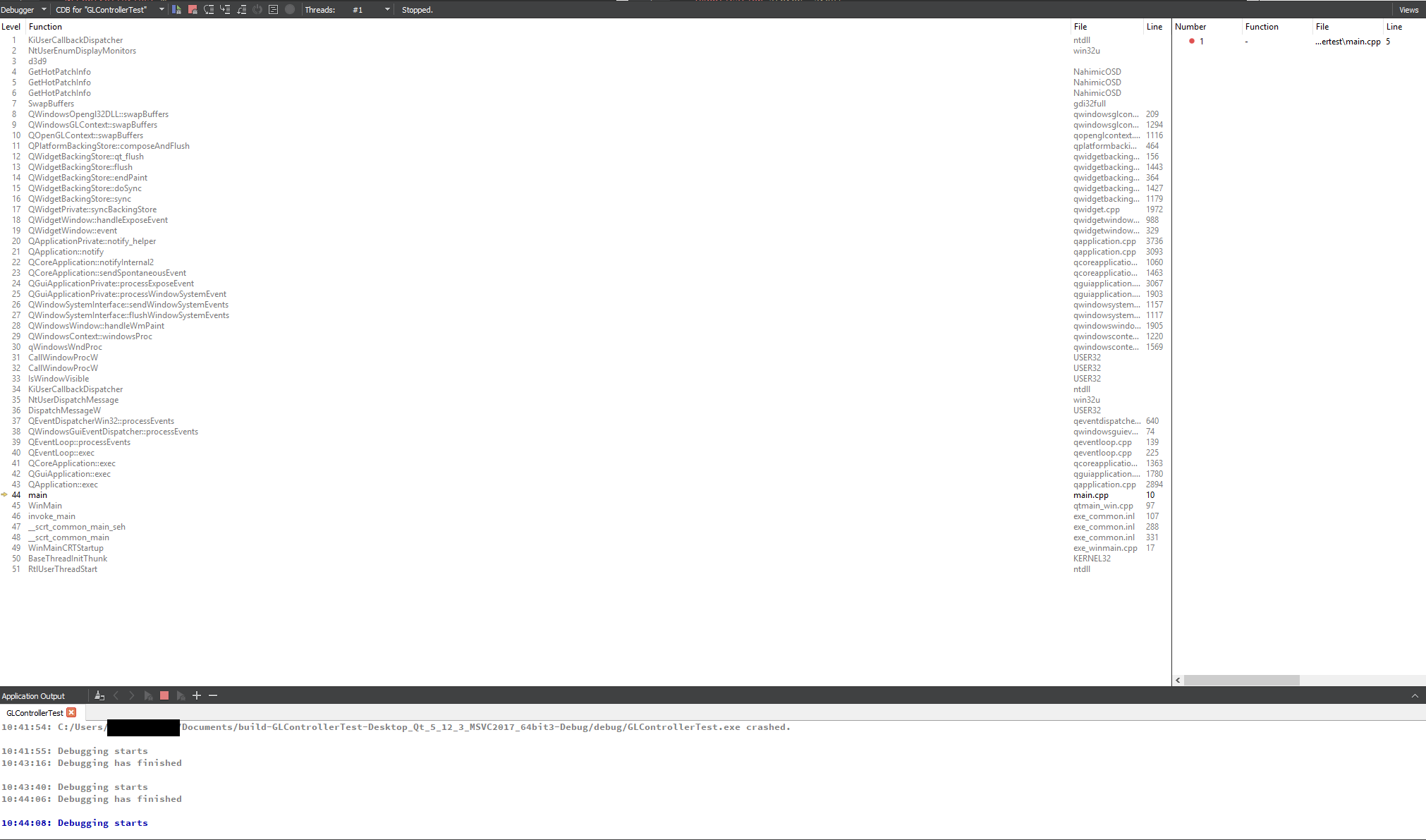
              0_1557766222311_backtrace.png

              1 Reply Last reply
              0
              • S Offline
                S Offline
                Sailanarmo
                wrote on last edited by
                #24

                UPDATE A REALLY Weird one, once I discover the solution I will mark this as solved.

                @SGaist as I suspected, it was not the drivers, the drivers are just fine. However, it could be the configuration of my setup that is causing it to crash.

                Essentially I am running two monitors, both using display port, and both are connected to my graphics card. When I try to launch the program on my left monitor (meaning the secondary monitor) the program halts and crashes. However, if I launch the program on my right monitor (the primary monitor) the program launches just fine. And this is with all openGL applications. So I will try and figure out the root of this cause and I will mark the post as solved once I figure out how to launch it on both monitors.

                1 Reply Last reply
                0
                • SGaistS Offline
                  SGaistS Offline
                  SGaist
                  Lifetime Qt Champion
                  wrote on last edited by
                  #25

                  Thanks for the feedback !

                  Same monitors ? What resolution are they ?

                  Interested in AI ? www.idiap.ch
                  Please read the Qt Code of Conduct - https://forum.qt.io/topic/113070/qt-code-of-conduct

                  S 1 Reply Last reply
                  0
                  • SGaistS SGaist

                    Thanks for the feedback !

                    Same monitors ? What resolution are they ?

                    S Offline
                    S Offline
                    Sailanarmo
                    wrote on last edited by
                    #26

                    @SGaist

                    They are the same monitors. They are Dell U2717D 27" 2560x1440 60 hz Monitors.

                    Link: https://pcpartpicker.com/product/QpH48d/dell-monitor-u2717d

                    Both are plugged into the graphics card using Display Port.

                    1 Reply Last reply
                    0
                    • SGaistS Offline
                      SGaistS Offline
                      SGaist
                      Lifetime Qt Champion
                      wrote on last edited by
                      #27

                      Might be a silly test but does it still happen if you change the output used to connect your screen ?

                      Interested in AI ? www.idiap.ch
                      Please read the Qt Code of Conduct - https://forum.qt.io/topic/113070/qt-code-of-conduct

                      S 1 Reply Last reply
                      0
                      • SGaistS SGaist

                        Might be a silly test but does it still happen if you change the output used to connect your screen ?

                        S Offline
                        S Offline
                        Sailanarmo
                        wrote on last edited by
                        #28

                        @SGaist

                        as in change the cable? or change the primary monitor?

                        1 Reply Last reply
                        0
                        • SGaistS Offline
                          SGaistS Offline
                          SGaist
                          Lifetime Qt Champion
                          wrote on last edited by
                          #29

                          As in plug the cable in a different output. IIRC the RTX2080 has four of them.

                          Interested in AI ? www.idiap.ch
                          Please read the Qt Code of Conduct - https://forum.qt.io/topic/113070/qt-code-of-conduct

                          S 1 Reply Last reply
                          0
                          • SGaistS SGaist

                            As in plug the cable in a different output. IIRC the RTX2080 has four of them.

                            S Offline
                            S Offline
                            Sailanarmo
                            wrote on last edited by
                            #30

                            @SGaist

                            yes, I just changed the output and it still has the same effect on the secondary monitor.

                            1 Reply Last reply
                            0

                            • Login

                            • Login or register to search.
                            • First post
                              Last post
                            0
                            • Categories
                            • Recent
                            • Tags
                            • Popular
                            • Users
                            • Groups
                            • Search
                            • Get Qt Extensions
                            • Unsolved