
Skip to content
  • Categories
  • Recent
  • Tags
  • Popular
  • Users
  • Groups
  • Search
  • Get Qt Extensions
  • Unsolved
Collapse
Brand Logo
  1. Home
  2. Qt Development
  3. General and Desktop
  4. How can I consistently create QOpenGLWidget applications to show up?

How can I consistently create QOpenGLWidget applications to show up?

Scheduled Pinned Locked Moved Unsolved General and Desktop
30 Posts 3 Posters 4.7k Views 2 Watching
  • Oldest to Newest
  • Newest to Oldest
  • Most Votes
Reply
  • Reply as topic
Log in to reply
This topic has been deleted. Only users with topic management privileges can see it.
  • SGaistS SGaist

    You can start by updating your Qt version to the latest version of the 5.12 series. If it still crashes, you can also try the 5.13 beta.

    S Offline
    S Offline
    Sailanarmo
    wrote on last edited by
    #10

    @SGaist

    I did an update of QT and the same behavior has produced itself. I did not try the beta. That is something I can try here in an hour or two.

    1 Reply Last reply
    0
    • fcarneyF Offline
      fcarneyF Offline
      fcarney
      wrote on last edited by
      #11

      Is it practical to ever use a QOpenGLWidget without subclassing it anyway? Or promoting it? I thought using that widget would require a fair amount of opengl code to go with it.

      C++ is a perfectly valid school of magic.

      S 1 Reply Last reply
      0
      • fcarneyF fcarney

        Is it practical to ever use a QOpenGLWidget without subclassing it anyway? Or promoting it? I thought using that widget would require a fair amount of opengl code to go with it.

        S Offline
        S Offline
        Sailanarmo
        wrote on last edited by
        #12

        @fcarney That is what I am doing. I create a class, and then with the widget I promote it to that class. At least this is what I am attempting to do with my current program in Windows. However, like I said, it just hangs there for no reason. It doesn't crash, just hangs, no errors.

        So to recreate it, I just created a new project from scratch and then threw the widget on there and hit run. Again, same behavior. But, when I go to Ubuntu 17.04, there is no issue, the program runs just fine. Which tells me there is something wrong with the windows side of things.

        I was able to finish my project within Linux, however, getting it to run in Window's will now be the trick because it doesn't want to run in Windows. It just hangs there.

        1 Reply Last reply
        0
        • S Offline
          S Offline
          Sailanarmo
          wrote on last edited by
          #13

          @SGaist

          Went to 5.12.3 and I have the same results on Windows. I've tried with 5.12.1, 5.12.2, and now 5.12.3 and all have the same exact behavior.
          which is odd, because the one application in which my opengl program works was ran with 5.12.1. So I don't really know why it would start acting this way now.

          1 Reply Last reply
          0
          • S Offline
            S Offline
            Sailanarmo
            wrote on last edited by
            #14

            Update 3

            I uninstalled and reinstalled QT. And that did not work either, I really do not understand why this is happening as I don't think I have done anything different from the past. I am not sure if this is a bug, since I seem to be the only one suffering from this problem. I have attached images of one of my programs running, another image of the program I am working on hanging, and a final image showing how simple the ui looks compared to the one that is working.

            So I do not know what to do from here. Again, I am not sure if this is something I am doing wrong, if it is a bug, or maybe it is just my computer. I have tried this program in both Linux and MacOSX and it runs just fine. However, when I try this in Windows. It doesn't work at all. So I am at a complete loss of what to try. I have also linked the code that I am working on if anyone would like to clone it down and try running it. You must have C++17 in order for this program to run however.

            Image 1: 0_1557514009366_workingProgram.png

            Image 2:0_1557514023567_nonWorkingProgram.png

            Image 3: 0_1557514053611_theui.png

            Github link: https://github.com/Sailanarmo/ControllerTest

            @SGaist @fcarney or anyone who would like to help out. This is as far as I can get. Where do I go from here?

            1 Reply Last reply
            0
            • SGaistS Offline
              SGaistS Offline
              SGaist
              Lifetime Qt Champion
              wrote on last edited by
              #15

              It might be a graphics card driver issue. Can you test your application on a Windows machine with a different card ? Or update/downgrade your Nvidia drivers.

              Interested in AI ? www.idiap.ch
              Please read the Qt Code of Conduct - https://forum.qt.io/topic/113070/qt-code-of-conduct

              1 Reply Last reply
              0
              • S Offline
                S Offline
                Sailanarmo
                wrote on last edited by
                #16

                @SGaist

                I will go ahead and try that next. That is the only thing I haven't done. I have updated my Nvidia drivers to their latest versions. It's just odd to me since my linux partition is using the same graphics card as my Windows machine. When I get home I will test it on my Windows Machine there.

                Thank you for working with me.

                1 Reply Last reply
                0
                • SGaistS Offline
                  SGaistS Offline
                  SGaist
                  Lifetime Qt Champion
                  wrote on last edited by
                  #17

                  Then we can rule out a hardware related issue. So it's very likely the driver. Even if the same version, these are still two radically different platforms.

                  Interested in AI ? www.idiap.ch
                  Please read the Qt Code of Conduct - https://forum.qt.io/topic/113070/qt-code-of-conduct

                  1 Reply Last reply
                  0
                  • S Offline
                    S Offline
                    Sailanarmo
                    wrote on last edited by
                    #18

                    @SGaist

                    I will uninstall my graphics driver and reinstall them. I will let you know what happens.

                    1 Reply Last reply
                    0
                    • S Offline
                      S Offline
                      Sailanarmo
                      wrote on last edited by
                      #19

                      @SGaist

                      I've uninstalled the graphics drivers and I attempted to launch the same application without the drivers. The same behavior happened. I then reinstalled the graphics drivers and launched the program, and the same behavior happened.

                      I could try downgrading my driver version. But I do not know where to go to find a lesser version of my drivers. I also don't know, why Qt chooses to launch one application, and not the other just fine. It's all very confusing.

                      1 Reply Last reply
                      0
                      • S Offline
                        S Offline
                        Sailanarmo
                        wrote on last edited by
                        #20

                        @SGaist

                        I just launched the program from my home. It launches just fine. Only difference is that I am running a GTX 1080ti instead of an RTX 2080. I know I am repeating the same thing, but I do not understand why the linux machine with the same physical graphics card runs the program fine. But when I switch to the windows partition, it craps out.

                        I'm kind of at a loss here. Maybe it is a hardware issue within windows itself. Or maybe it's a one time fluke and it is only affecting me.

                        1 Reply Last reply
                        0
                        • SGaistS Offline
                          SGaistS Offline
                          SGaist
                          Lifetime Qt Champion
                          wrote on last edited by
                          #21

                          As I already said, it's likely a driver issue. While sharing the same version number, the architecture is different between these two OSes.

                          Interested in AI ? www.idiap.ch
                          Please read the Qt Code of Conduct - https://forum.qt.io/topic/113070/qt-code-of-conduct

                          1 Reply Last reply
                          0
                          • S Offline
                            S Offline
                            Sailanarmo
                            wrote on last edited by Sailanarmo
                            #22

                            @SGaist

                            I rolled back the drivers to when I first built this computer. I am running 419.17 now instead of 419.67 which is the current version. This is the driver I was using when my first application started. The same issue is happening.

                            I really do not think it is a driver issue if I am going to be completely honest. You do know more than I do, so maybe you are correct, however I feel if it were a driver issue I wouldn't get inconsistencies with different programs using OpenGL (meaning some programs that I created using Qt and OpenGL work and others do not). The other thing that suggests to me that it isn't my driver, is the fact that I can create a separate OpenGL application without Qt just fine. But it does me no good if I cannot use Qt to work on my projects.

                            Another more drastic measure that I have given thought, was wiping the OS entirely and starting from scratch. However this is the last thing that I want to do because this takes a lot of time and causes big headaches.

                            Thank you again for all of your help.

                            EDIT it appears I haven't rolled them back

                            EDIT 2 I am running 411.70, I'm assuming this is the earliest driver that NVIDIA Automatically provides with the graphics card. And it is the same behavior. Again, I do not think it is the drivers. But it seems we have beat this to the ground as far as we can go.

                            1 Reply Last reply
                            0
                            • S Offline
                              S Offline
                              Sailanarmo
                              wrote on last edited by
                              #23

                              @SGaist

                              I put a break point in main and ran it with a debugger, I pressed paused when nothing happened and this is what came up. It doesn't mean anything to me, but maybe it means something to you.
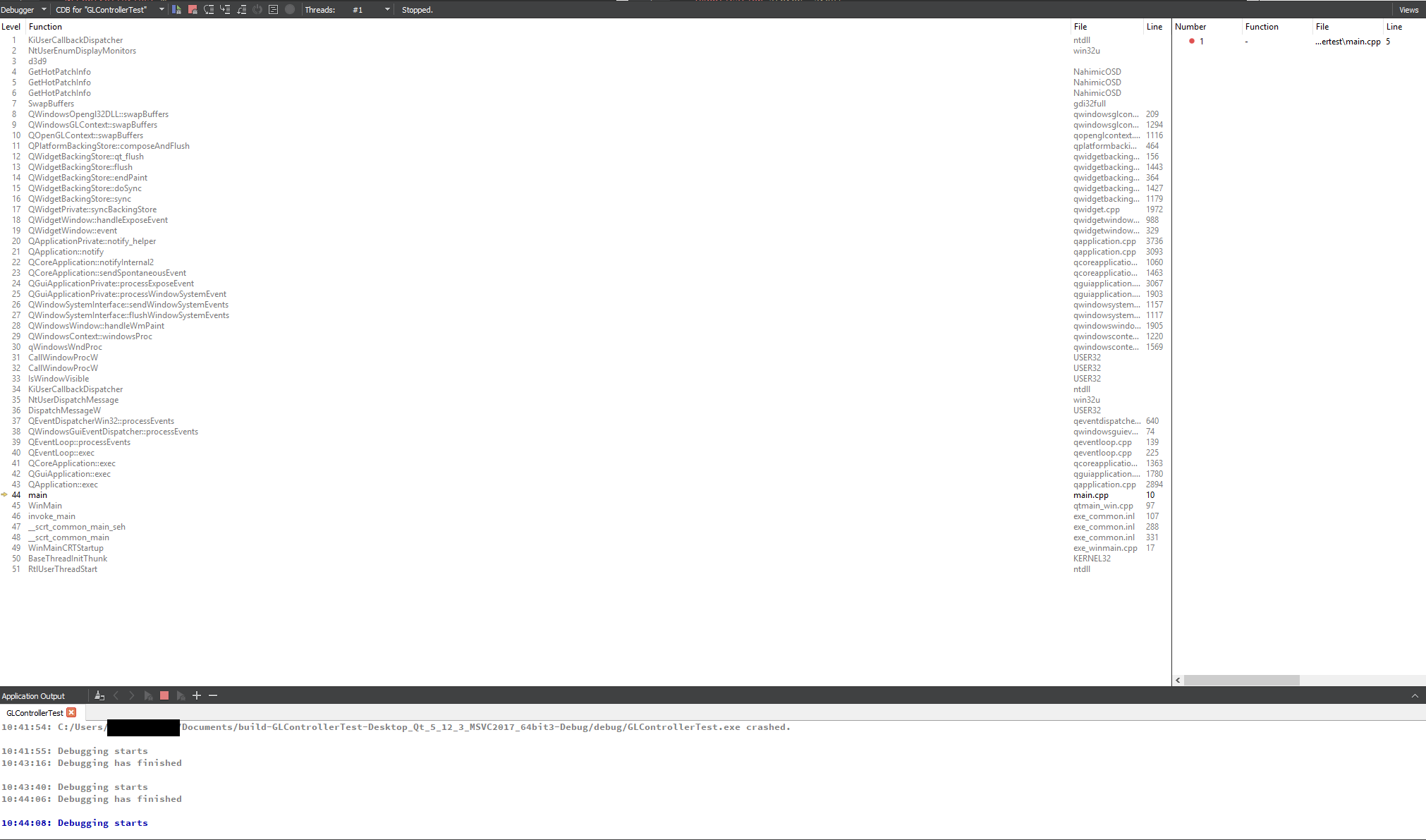
                              0_1557766222311_backtrace.png

                              1 Reply Last reply
                              0
                              • S Offline
                                S Offline
                                Sailanarmo
                                wrote on last edited by
                                #24

                                UPDATE A REALLY Weird one, once I discover the solution I will mark this as solved.

                                @SGaist as I suspected, it was not the drivers, the drivers are just fine. However, it could be the configuration of my setup that is causing it to crash.

                                Essentially I am running two monitors, both using display port, and both are connected to my graphics card. When I try to launch the program on my left monitor (meaning the secondary monitor) the program halts and crashes. However, if I launch the program on my right monitor (the primary monitor) the program launches just fine. And this is with all openGL applications. So I will try and figure out the root of this cause and I will mark the post as solved once I figure out how to launch it on both monitors.

                                1 Reply Last reply
                                0
                                • SGaistS Offline
                                  SGaistS Offline
                                  SGaist
                                  Lifetime Qt Champion
                                  wrote on last edited by
                                  #25

                                  Thanks for the feedback !

                                  Same monitors ? What resolution are they ?

                                  Interested in AI ? www.idiap.ch
                                  Please read the Qt Code of Conduct - https://forum.qt.io/topic/113070/qt-code-of-conduct

                                  S 1 Reply Last reply
                                  0
                                  • SGaistS SGaist

                                    Thanks for the feedback !

                                    Same monitors ? What resolution are they ?

                                    S Offline
                                    S Offline
                                    Sailanarmo
                                    wrote on last edited by
                                    #26

                                    @SGaist

                                    They are the same monitors. They are Dell U2717D 27" 2560x1440 60 hz Monitors.

                                    Link: https://pcpartpicker.com/product/QpH48d/dell-monitor-u2717d

                                    Both are plugged into the graphics card using Display Port.

                                    1 Reply Last reply
                                    0
                                    • SGaistS Offline
                                      SGaistS Offline
                                      SGaist
                                      Lifetime Qt Champion
                                      wrote on last edited by
                                      #27

                                      Might be a silly test but does it still happen if you change the output used to connect your screen ?

                                      Interested in AI ? www.idiap.ch
                                      Please read the Qt Code of Conduct - https://forum.qt.io/topic/113070/qt-code-of-conduct

                                      S 1 Reply Last reply
                                      0
                                      • SGaistS SGaist

                                        Might be a silly test but does it still happen if you change the output used to connect your screen ?

                                        S Offline
                                        S Offline
                                        Sailanarmo
                                        wrote on last edited by
                                        #28

                                        @SGaist

                                        as in change the cable? or change the primary monitor?

                                        1 Reply Last reply
                                        0
                                        • SGaistS Offline
                                          SGaistS Offline
                                          SGaist
                                          Lifetime Qt Champion
                                          wrote on last edited by
                                          #29

                                          As in plug the cable in a different output. IIRC the RTX2080 has four of them.

                                          Interested in AI ? www.idiap.ch
                                          Please read the Qt Code of Conduct - https://forum.qt.io/topic/113070/qt-code-of-conduct

                                          S 1 Reply Last reply
                                          0

                                          • Login

                                          • Login or register to search.
                                          • First post
                                            Last post
                                          0
                                          • Categories
                                          • Recent
                                          • Tags
                                          • Popular
                                          • Users
                                          • Groups
                                          • Search
                                          • Get Qt Extensions
                                          • Unsolved