Skip to content
  • Categories
  • Recent
  • Tags
  • Popular
  • Users
  • Groups
  • Search
  • Get Qt Extensions
  • Unsolved
Collapse
Brand Logo
  1. Home
  2. Qt Development
  3. Mobile and Embedded
  4. Advice about the application I will be making? (I'm a beginner)
Forum Updated to NodeBB v4.3 + New Features

Advice about the application I will be making? (I'm a beginner)

Scheduled Pinned Locked Moved Unsolved Mobile and Embedded
77 Posts 6 Posters 27.7k Views 2 Watching
  • Oldest to Newest
  • Newest to Oldest
  • Most Votes
Reply
  • Reply as topic
Log in to reply
This topic has been deleted. Only users with topic management privileges can see it.
  • JonBJ JonB

    @KillerSmath
    Then the question is: can you specify something at open() time to override that behaviour, without changing the driver? Or, can you temporarily change that driver flag from code before opening? Then the OP would have found out/use it in future.

    Meanwhile, the OP needs to understand that the two paths (one with space, one with backslash) refer to quite different files!

    D Offline
    D Offline
    dvlpr.bernard
    wrote on last edited by dvlpr.bernard
    #67

    I see so that's the reason why there is a newly created database in my folder. Also backslash "\" specifies the parent folder. I have encountered that on web dev. Thank you!

    1 Reply Last reply
    0
    • JonBJ JonB

      @KillerSmath
      Then the question is: can you specify something at open() time to override that behaviour, without changing the driver? Or, can you temporarily change that driver flag from code before opening? Then the OP would have found out/use it in future.

      Meanwhile, the OP needs to understand that the two paths (one with space, one with backslash) refer to quite different files!

      KillerSmathK Offline
      KillerSmathK Offline
      KillerSmath
      wrote on last edited by
      #68

      @JonB
      Your answer is on sqlite source code.

      Unhapply, that behaviour is only avoided if you are using SQLITE_OPEN_READONLY flag

      @Computer Science Student - Brazil
      Web Developer and Researcher
      “Sometimes it’s the people no one imagines anything of who do the things that no one can imagine.” - Alan Turing

      JonBJ 1 Reply Last reply
      3
      • KillerSmathK KillerSmath

        @JonB
        Your answer is on sqlite source code.

        Unhapply, that behaviour is only avoided if you are using SQLITE_OPEN_READONLY flag

        JonBJ Offline
        JonBJ Offline
        JonB
        wrote on last edited by JonB
        #69

        @KillerSmath
        Then @dvlpr-bernard might want to do a QFile::exists() check on the filepath prior to the open() if he wants to ensure he is opening a correctly-spelled existing database rather than accidentally creating a blank new one....

        1 Reply Last reply
        3
        • D Offline
          D Offline
          dvlpr.bernard
          wrote on last edited by
          #70

          I tried different code but it didn't work. What should I do to replace query variable value with my variable in qt.
          "select Answer from mydatabase where QQuantity = 5 and Topic = 'FOR' and Difficulty_Level = 'ADVANCED'"

          0_1556809488139_40bef343-e9e0-41ad-bb2e-070a5789455e-image.png

          KroMignonK 1 Reply Last reply
          0
          • D dvlpr.bernard

            I tried different code but it didn't work. What should I do to replace query variable value with my variable in qt.
            "select Answer from mydatabase where QQuantity = 5 and Topic = 'FOR' and Difficulty_Level = 'ADVANCED'"
            0_1556809488139_40bef343-e9e0-41ad-bb2e-070a5789455e-image.png

            KroMignonK Offline
            KroMignonK Offline
            KroMignon
            wrote on last edited by KroMignon
            #71

            @dvlpr.bernard This should work:

            query.prepare("select answer from mydatabase where QQuantitiy=:qquantity AND Topic =:topic and Difficulty_Level =:difficulty_level")
            query.bindValue(":qquantity", current_num);
            query.bindValue(":topic", ch_topic);
            query.bindValue(":difficulty_level", ch_div_lvl);
            

            binValue will add necessary escape sequencies for string values.
            you only have to ensure placeholder in prepare string is the same as which given to bindValue().

            Read QSqlQuery Class for more details.

            It is an old maxim of mine that when you have excluded the impossible, whatever remains, however improbable, must be the truth. (Sherlock Holmes)

            D 1 Reply Last reply
            4
            • KroMignonK KroMignon

              @dvlpr.bernard This should work:

              query.prepare("select answer from mydatabase where QQuantitiy=:qquantity AND Topic =:topic and Difficulty_Level =:difficulty_level")
              query.bindValue(":qquantity", current_num);
              query.bindValue(":topic", ch_topic);
              query.bindValue(":difficulty_level", ch_div_lvl);
              

              binValue will add necessary escape sequencies for string values.
              you only have to ensure placeholder in prepare string is the same as which given to bindValue().

              Read QSqlQuery Class for more details.

              D Offline
              D Offline
              dvlpr.bernard
              wrote on last edited by dvlpr.bernard
              #72

              @KroMignon
              It is working now there is just a misspelled word QQuantitiy to QQuantity. Thank you sir :)

              1 Reply Last reply
              0
              • D Offline
                D Offline
                dvlpr.bernard
                wrote on last edited by
                #73

                Good day!

                I got strange spacing whenever I get a question from my database.
                Before I paste to the database:
                0_1556893610379_c08bd5fe-6b99-41af-86c7-7baba4f004f8-image.png

                After I executed the query
                0_1556893684717_cfe98f8b-b909-4343-b680-0b3131f0226a-image.png

                Sir @mrjj you mentioned earlier that I can make it look more like a code in a text editor. Like so
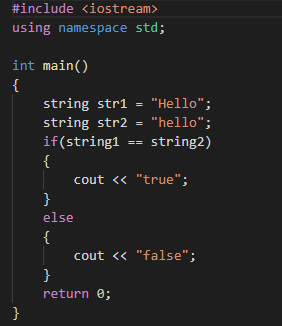
                0_1556894107853_0cffa870-6b69-4959-9ffe-7b936a3595ab-image.png
                How is that?

                KillerSmathK 1 Reply Last reply
                0
                • D dvlpr.bernard

                  Good day!

                  I got strange spacing whenever I get a question from my database.
                  Before I paste to the database:
                  0_1556893610379_c08bd5fe-6b99-41af-86c7-7baba4f004f8-image.png

                  After I executed the query
                  0_1556893684717_cfe98f8b-b909-4343-b680-0b3131f0226a-image.png

                  Sir @mrjj you mentioned earlier that I can make it look more like a code in a text editor. Like so
                  0_1556894107853_0cffa870-6b69-4959-9ffe-7b936a3595ab-image.png
                  How is that?

                  KillerSmathK Offline
                  KillerSmathK Offline
                  KillerSmath
                  wrote on last edited by
                  #74

                  @dvlpr.bernard

                  I got strange spacing whenever I get a question from my database.
                  Before I paste to the database:
                  0_1556893610379_c08bd5fe-6b99-41af-86c7-7baba4f004f8-image.png

                  After I executed the query
                  0_1556893684717_cfe98f8b-b909-4343-b680-0b3131f0226a-image.png

                  Are you using "raw" or tabulation spaces to indent your example codes ?

                  @mrjj has mentioned the QSyntaxHighlighter

                  @Computer Science Student - Brazil
                  Web Developer and Researcher
                  “Sometimes it’s the people no one imagines anything of who do the things that no one can imagine.” - Alan Turing

                  D 1 Reply Last reply
                  1
                  • KillerSmathK KillerSmath

                    @dvlpr.bernard

                    I got strange spacing whenever I get a question from my database.
                    Before I paste to the database:
                    0_1556893610379_c08bd5fe-6b99-41af-86c7-7baba4f004f8-image.png

                    After I executed the query
                    0_1556893684717_cfe98f8b-b909-4343-b680-0b3131f0226a-image.png

                    Are you using "raw" or tabulation spaces to indent your example codes ?

                    @mrjj has mentioned the QSyntaxHighlighter

                    D Offline
                    D Offline
                    dvlpr.bernard
                    wrote on last edited by
                    #75

                    @KillerSmath
                    I was using the tabulation spaces to indent. I thought that was the problem so I tried the raw tabulation or using the spacebar but I still got the same result.

                    KillerSmathK 1 Reply Last reply
                    0
                    • D dvlpr.bernard

                      @KillerSmath
                      I was using the tabulation spaces to indent. I thought that was the problem so I tried the raw tabulation or using the spacebar but I still got the same result.

                      KillerSmathK Offline
                      KillerSmathK Offline
                      KillerSmath
                      wrote on last edited by KillerSmath
                      #76

                      @dvlpr.bernard
                      I am not sure if you can directly change the tab stop size in QLabel.
                      A possible way, since you are using tab spaces to indent your code, would be replace all tabs by raw spaces.

                      QString string = "#include <iostream>\n#include <stdlib>\n\nint main(){\n\tbool x;\n}";
                      string.replace('\t', QLatin1String("    ")); // 4 raw spaces
                      label->setText(string);
                      

                      However, QTextEdit has the feature to change the TabSize and it is the default widget used by QSyntaxHighlighter.

                      @Computer Science Student - Brazil
                      Web Developer and Researcher
                      “Sometimes it’s the people no one imagines anything of who do the things that no one can imagine.” - Alan Turing

                      1 Reply Last reply
                      1
                      • mrjjM Offline
                        mrjjM Offline
                        mrjj
                        Lifetime Qt Champion
                        wrote on last edited by
                        #77

                        Hi
                        You can take the highlighter from here
                        https://doc.qt.io/qt-5/qtwidgets-richtext-syntaxhighlighter-example.html
                        (the sample is in creator already )
                        and instead of having the question code in a QLabel, use TextEdit as @KillerSmath says.

                        1 Reply Last reply
                        0

                        • Login

                        • Login or register to search.
                        • First post
                          Last post
                        0
                        • Categories
                        • Recent
                        • Tags
                        • Popular
                        • Users
                        • Groups
                        • Search
                        • Get Qt Extensions
                        • Unsolved