Skip to content
  • Categories
  • Recent
  • Tags
  • Popular
  • Users
  • Groups
  • Search
  • Get Qt
  • Unsolved
Collapse
Brand Logo
  1. Home
  2. Qt Development
  3. QML and Qt Quick
  4. My first QML app's problem on macOS High Sierra
Qt 6.12 LTS is out! See what's new in the release blog

My first QML app's problem on macOS High Sierra

Scheduled Pinned Locked Moved Solved QML and Qt Quick
36 Posts 4 Posters 14.9k Views 3 Watching
  • Oldest to Newest
  • Newest to Oldest
  • Most Votes
Reply
  • Reply as topic
Log in to reply
This topic has been deleted. Only users with topic management privileges can see it.
  • J.HilkJ J.Hilk

    @tomy usually that happens automatically,
    you connect your iPhone,
    the phone asks to you trust this Mac(if it's first time connected)
    you tell the phone that you trust it
    -> You have than access to it

    Maybe it's not properly propercated through the VM ? Do you see the iPhone in iTunes ?

    tomyT Offline
    tomyT Offline
    tomy
    wrote on last edited by
    #13

    @J.Hilk s

    Do you see the iPhone in iTunes ?

    I don't see it. It's charging through mac but probably not connected to it properly. It's the first time I use mac and may have made a mistake when the message has come up for the first connect.

    1 Reply Last reply
    0
    • Shrinidhi UpadhyayaS Shrinidhi Upadhyaya

      Hi @tomy , have you configured development team in Xcode? can you show me the build settings for your Qt5.12.1 ios kit?

      tomyT Offline
      tomyT Offline
      tomy
      wrote on last edited by tomy
      #14

      @Shrinidhi-Upadhyaya

      have you configured development team in Xcode?

      No.

      can you show me the build settings for your Qt5.12.1 ios kit?

      Here it is:

      0_1552472227651_Screen Shot 2019-03-13 at 3.14.41 AM.png

      1 Reply Last reply
      0
      • Shrinidhi UpadhyayaS Offline
        Shrinidhi UpadhyayaS Offline
        Shrinidhi Upadhyaya
        wrote on last edited by
        #15

        Hi @tomy , okay then you need to configure your xcode with your apple developer account and once you do that you will get an option to select the Development team(that will be your mail-id),now you can see its default(Under IOS Settings).

        Have a look in the IOS settings, there is warning there at the last, its telling the same thing.

        Once you do this, i guess it will build,i guess @J-Hilk has already helped you to configure the Device using Xcode.

        Shrinidhi Upadhyaya.
        Upvote the answer(s) that helped you to solve the issue.

        tomyT 1 Reply Last reply
        0
        • Shrinidhi UpadhyayaS Shrinidhi Upadhyaya

          Hi @tomy , okay then you need to configure your xcode with your apple developer account and once you do that you will get an option to select the Development team(that will be your mail-id),now you can see its default(Under IOS Settings).

          Have a look in the IOS settings, there is warning there at the last, its telling the same thing.

          Once you do this, i guess it will build,i guess @J-Hilk has already helped you to configure the Device using Xcode.

          tomyT Offline
          tomyT Offline
          tomy
          wrote on last edited by
          #16

          @Shrinidhi-Upadhyaya Hi,

          If configuring Xcode is what which has to be done through double clicking on the .xcodeproj in the project's folder and choosing the connected iPhone by the "iPhoneXR" button and following the wizard's steps, I can't do that now because my iPhone is not shown there.
          I think I firstly must solve this problem. Probably I mistakenly have tapped on intrust instead of trust and now I need to retrieve it.
          When it's solved I go for the above steps to configure Xcode.

          1 Reply Last reply
          0
          • Shrinidhi UpadhyayaS Offline
            Shrinidhi UpadhyayaS Offline
            Shrinidhi Upadhyaya
            wrote on last edited by
            #17

            Hi @tomy , okay do one thing connect your phone, you will see your device name on the list where now you are getting "No Device" and if your device is untrusted it will be something like For example:-
            Tom's Iphone(Untrusted) and if it comes like this you need to reset the settings.

            If you want to reset your settings then in your Iphone:- Settings->General->Reset->Reset Location & Privacy, do this.
            NOTE:- Just check once whether its the right method to reset to be on safe side.

            Shrinidhi Upadhyaya.
            Upvote the answer(s) that helped you to solve the issue.

            tomyT 1 Reply Last reply
            2
            • Shrinidhi UpadhyayaS Shrinidhi Upadhyaya

              Hi @tomy , okay do one thing connect your phone, you will see your device name on the list where now you are getting "No Device" and if your device is untrusted it will be something like For example:-
              Tom's Iphone(Untrusted) and if it comes like this you need to reset the settings.

              If you want to reset your settings then in your Iphone:- Settings->General->Reset->Reset Location & Privacy, do this.
              NOTE:- Just check once whether its the right method to reset to be on safe side.

              tomyT Offline
              tomyT Offline
              tomy
              wrote on last edited by
              #18

              @Shrinidhi-Upadhyaya Hi,

              I only says: No device is connected.

              I think my phone is not connected to the macOS X. It's still being charged through the connected cable maybe to the host machine (Windows) not macOS.

              I suppose I need to find a way to connect my iPhone to the macOS virtual machine which is on VMware workstation player.

              1 Reply Last reply
              0
              • tomyT Offline
                tomyT Offline
                tomy
                wrote on last edited by tomy
                #19

                What I did are these:

                1- Enrolled my Apple ID in the developer.apple.com. I needed to set the two factor authentication. My hell country Iran, (managed by the US/UK) is banned so I called one of my relatives' number in Europe. Then it was done.

                2- Using Xcode -> Preferences -> Accounts I signed my account. Used a "Personal Team"

                3- The phone is also connected to iTunes and Xcode also now recognizes it.

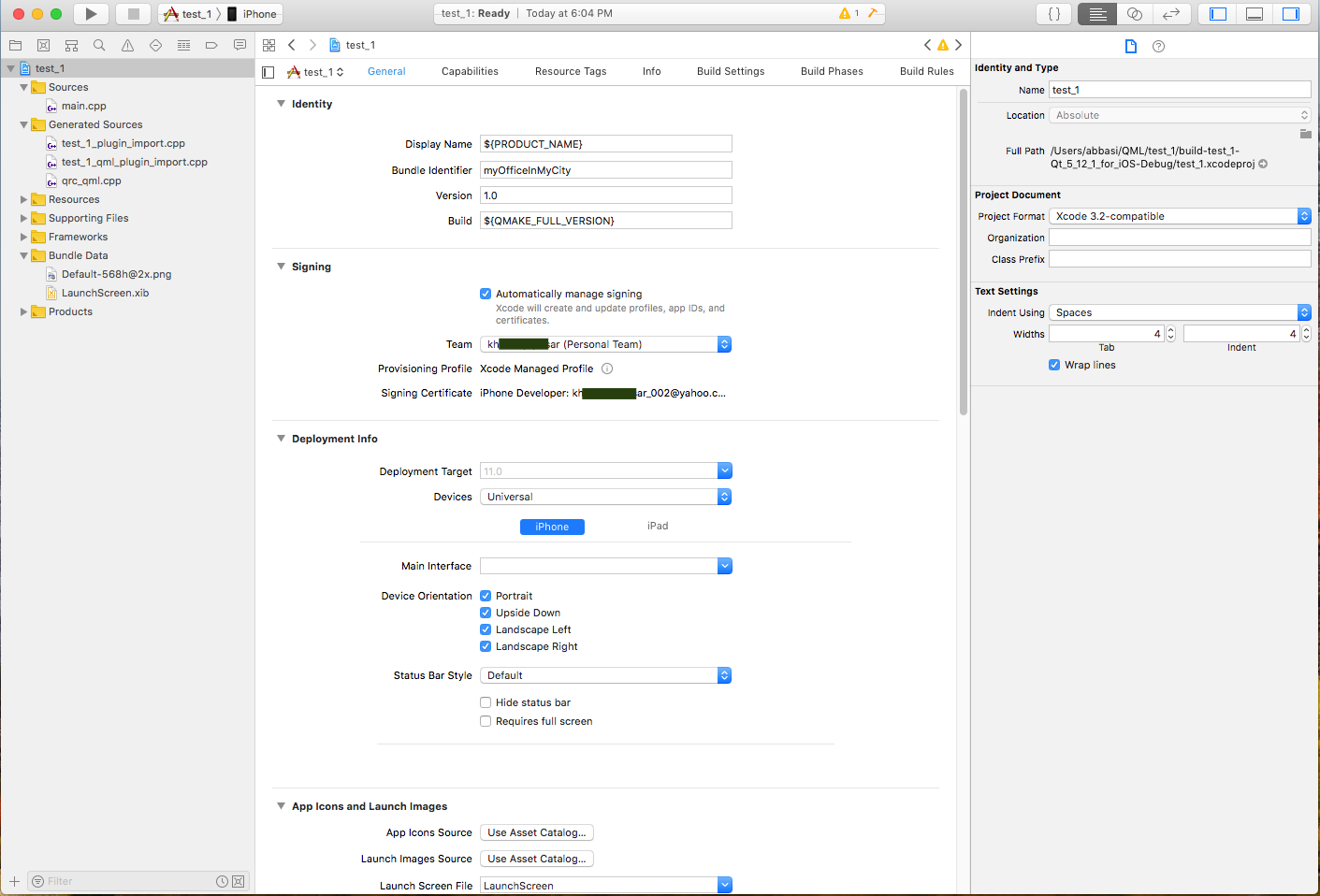
                Now there's one error:

                0_1552486762219_Screen Shot 2019-03-13 at 5.48.24 PM.png

                In the Projects also:

                0_1552498556239_Screen Shot 2019-03-13 at 8.55.59 PM.png

                I think if we solve that no provisioning profile found for the selected team, the job is done and I can build the app by the iOS kit.

                Any idea on how to solve that last problem please?

                1 Reply Last reply
                0
                • tomyT Offline
                  tomyT Offline
                  tomy
                  wrote on last edited by tomy
                  #20

                  Apparently there's not a solution to solve this problem and most probably the reason is that the developer Apple account is free. (If it's a paid one, there will be no issue I suppose)

                  Now isn't there any other way to build my QML projects using the iOS kit on macOS X and without Xcode?
                  I mean, is Xcode mandatory?

                  1 Reply Last reply
                  0
                  • SGaistS Offline
                    SGaistS Offline
                    SGaist
                    Lifetime Qt Champion
                    wrote on last edited by
                    #21

                    Hi,

                    Yes, Xcode is mandatory. You have to set it up once to get your iOS development going.

                    As for the signing stuff see QTBUG-38782

                    Interested in AI ? www.idiap.ch
                    Please read the Qt Code of Conduct - https://forum.qt.io/topic/113070/qt-code-of-conduct

                    tomyT 1 Reply Last reply
                    1
                    • SGaistS SGaist

                      Hi,

                      Yes, Xcode is mandatory. You have to set it up once to get your iOS development going.

                      As for the signing stuff see QTBUG-38782

                      tomyT Offline
                      tomyT Offline
                      tomy
                      wrote on last edited by
                      #22

                      @SGaist

                      As for the signing stuff see QTBUG-38782

                      Do you mean that it's possible that we now using QMAKE_DEVELOPMENT_TEAM and QMAKE_PROVISIONING_PROFILE on macOS X Terminal solve the issue with the development team and provisioning profile? I'm not sure.

                      1 Reply Last reply
                      0
                      • tomyT Offline
                        tomyT Offline
                        tomy
                        wrote on last edited by
                        #23

                        The signing errors are vanished now:

                        0_1552574520311_1.png

                        I also built the following easiest project and it was run successfully without any errors unlike the prior times:

                        0_1552574584350_2.png

                        My first question is, where in the project's directory is the test_1.ipa file for which this QML project has been built by the iOS kit, please?

                        The second question, why can't I still run the project using the iOS kit:
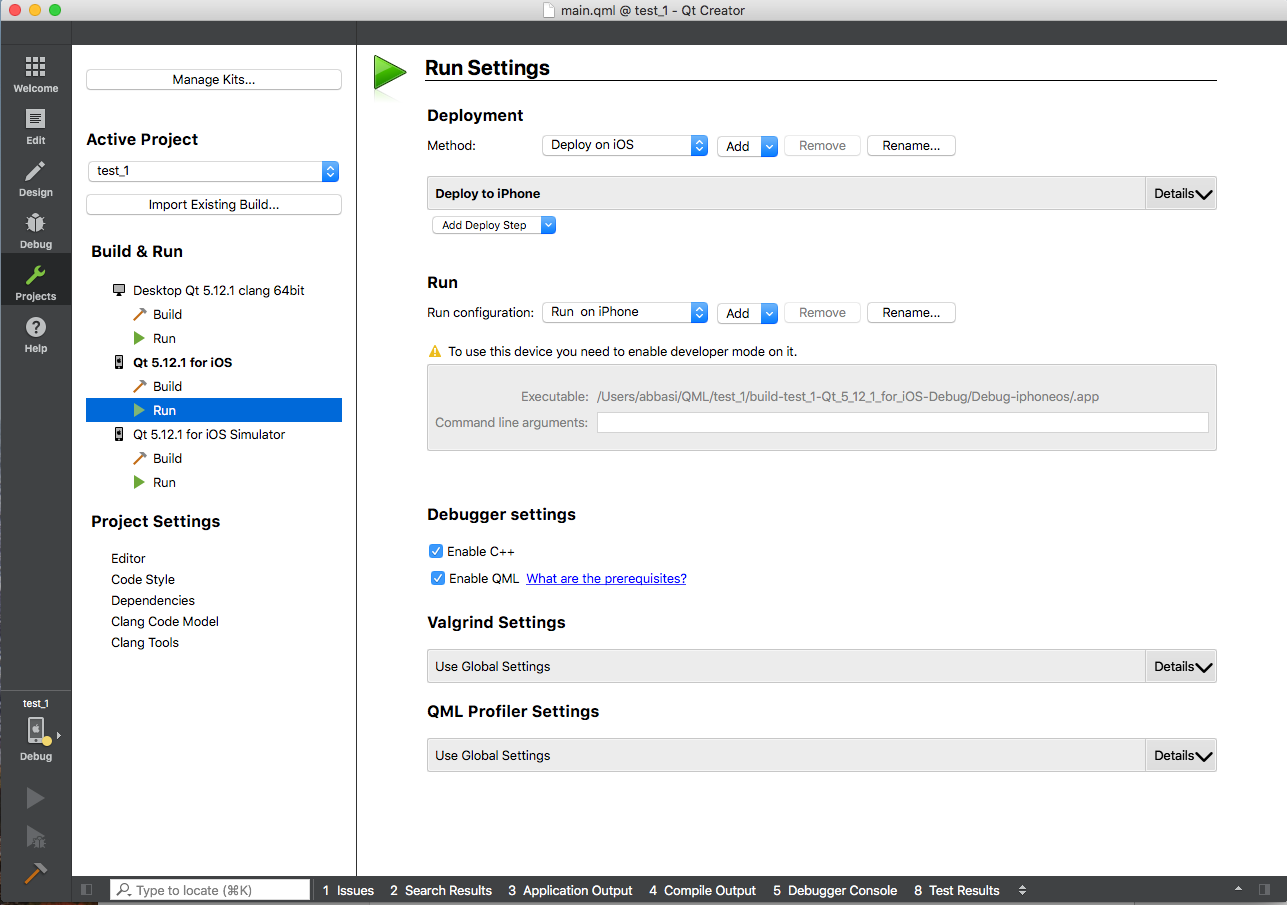
                        0_1552574805753_3.png

                        In the developer menu of my iPhone, I don't see any on/off, but I think it's enabled.

                        1 Reply Last reply
                        0
                        • SGaistS Offline
                          SGaistS Offline
                          SGaist
                          Lifetime Qt Champion
                          wrote on last edited by
                          #24

                          Did you check with Xcode ?

                          See this thread.

                          Interested in AI ? www.idiap.ch
                          Please read the Qt Code of Conduct - https://forum.qt.io/topic/113070/qt-code-of-conduct

                          tomyT 1 Reply Last reply
                          2
                          • SGaistS SGaist

                            Did you check with Xcode ?

                            See this thread.

                            tomyT Offline
                            tomyT Offline
                            tomy
                            wrote on last edited by tomy
                            #25

                            @SGaist
                            Thank you really very much. You solved my issue and I finally could install that simple project on my iPhone.

                            After that I tested one of my recent complete projects. So I transferred it onto macOS and opened it by Qt Creator. And while my iPhone was connected to macOS, ran the project, then I got the error: xcodebuid failed.

                            Then I opened the projects .xcodeproj file. Firstly it was this way, with signing errors once again:
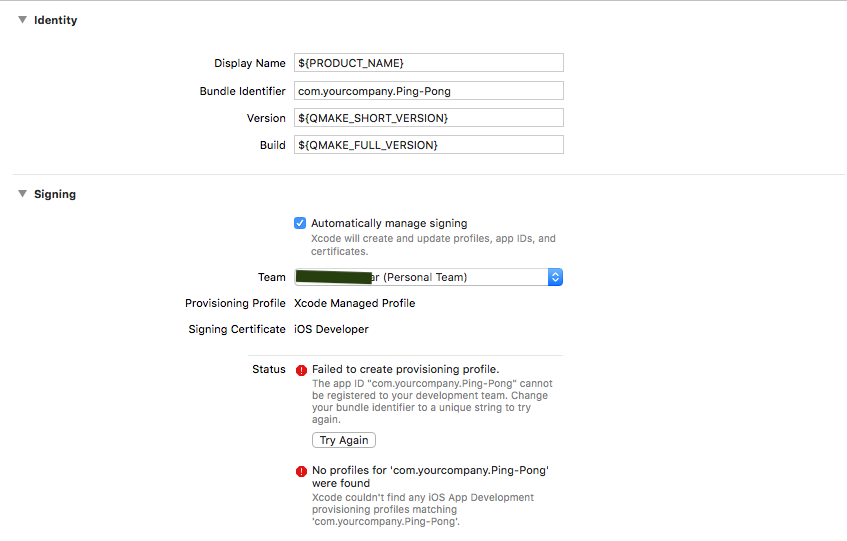
                            0_1552609562283_1.png

                            Then I changed the string of "Bundle Identifier" by adding a word as shown below, and the signing errors were vanished afterwards:
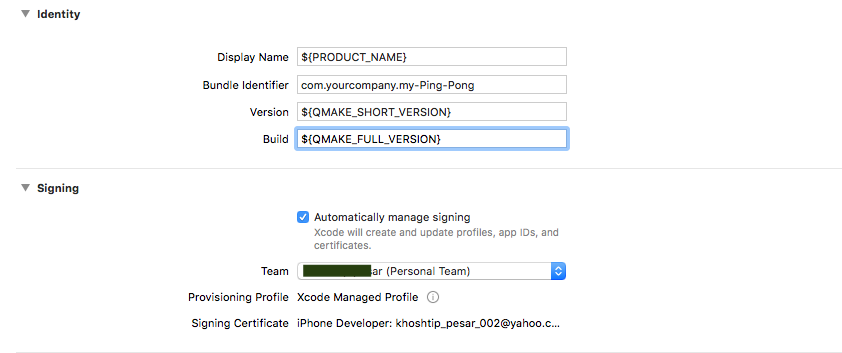
                            0_1552609633990_2.png

                            Then closed that menu and went back to Xcode -> Devices -> Setup device complete.

                            Then ran the project once again:
                            Still get this error: xcodebuid failed.

                            So I got back to the .xcodeproj file and saw astonishingly the previous settings, shown in the first screenshot above, has returned!

                            Should I have saved that change in the Bundle Identifier before closing it? If so, what is the appropriate way of this, please?

                            Apparently the problem is much more vast that affected Apple, Facebook and many more companies! [And me too, just right this time when I went for iOS developing for the first time! :( ]

                            J.HilkJ 1 Reply Last reply
                            0
                            • tomyT tomy

                              @SGaist
                              Thank you really very much. You solved my issue and I finally could install that simple project on my iPhone.

                              After that I tested one of my recent complete projects. So I transferred it onto macOS and opened it by Qt Creator. And while my iPhone was connected to macOS, ran the project, then I got the error: xcodebuid failed.

                              Then I opened the projects .xcodeproj file. Firstly it was this way, with signing errors once again:

                              0_1552609562283_1.png

                              Then I changed the string of "Bundle Identifier" by adding a word as shown below, and the signing errors were vanished afterwards:

                              0_1552609633990_2.png

                              Then closed that menu and went back to Xcode -> Devices -> Setup device complete.

                              Then ran the project once again:
                              Still get this error: xcodebuid failed.

                              So I got back to the .xcodeproj file and saw astonishingly the previous settings, shown in the first screenshot above, has returned!

                              Should I have saved that change in the Bundle Identifier before closing it? If so, what is the appropriate way of this, please?

                              Apparently the problem is much more vast that affected Apple, Facebook and many more companies! [And me too, just right this time when I went for iOS developing for the first time! :( ]

                              J.HilkJ Offline
                              J.HilkJ Offline
                              J.Hilk
                              Moderators
                              wrote on last edited by
                              #26

                              @tomy that is not unexpected, the Xcode project file is generated on each compile.

                              But to battle your issues.
                              Make the changes you want in Xcode (it has the better editor for this)
                              go to your build folder and find the Info.plist file.
                              Copy and paste that file to your source files
                              inside your pro file add the following:

                              ios{
                                  QMAKE_INFO_PLIST =Info.plist // if it's inside a folder specify that too e.g. myFolder/Info.plist
                              }
                              

                              now, your settings are not generated each compile time, but are taken from the info.plist file


                              Be aware of the Qt Code of Conduct, when posting : https://forum.qt.io/topic/113070/qt-code-of-conduct


                              Q: What's that?
                              A: It's blue light.
                              Q: What does it do?
                              A: It turns blue.

                              tomyT 1 Reply Last reply
                              1
                              • J.HilkJ J.Hilk

                                @tomy that is not unexpected, the Xcode project file is generated on each compile.

                                But to battle your issues.
                                Make the changes you want in Xcode (it has the better editor for this)
                                go to your build folder and find the Info.plist file.
                                Copy and paste that file to your source files
                                inside your pro file add the following:

                                ios{
                                    QMAKE_INFO_PLIST =Info.plist // if it's inside a folder specify that too e.g. myFolder/Info.plist
                                }
                                

                                now, your settings are not generated each compile time, but are taken from the info.plist file

                                tomyT Offline
                                tomyT Offline
                                tomy
                                wrote on last edited by
                                #27

                                @J.Hilk

                                Copy and paste that file to your source files

                                Do you mean the project's original directory, where the .pro file exists, by "source files", please?

                                J.HilkJ 1 Reply Last reply
                                0
                                • tomyT tomy

                                  @J.Hilk

                                  Copy and paste that file to your source files

                                  Do you mean the project's original directory, where the .pro file exists, by "source files", please?

                                  J.HilkJ Offline
                                  J.HilkJ Offline
                                  J.Hilk
                                  Moderators
                                  wrote on last edited by
                                  #28

                                  @tomy It doesn't really matter where exactly you paste the file. But if you place it besides the pro file (same folder) you can simply write QMAKE_INFO_PLIST =Info.plist without specifying an absolute or relative path on your own.


                                  Be aware of the Qt Code of Conduct, when posting : https://forum.qt.io/topic/113070/qt-code-of-conduct


                                  Q: What's that?
                                  A: It's blue light.
                                  Q: What does it do?
                                  A: It turns blue.

                                  tomyT 1 Reply Last reply
                                  1
                                  • J.HilkJ J.Hilk

                                    @tomy It doesn't really matter where exactly you paste the file. But if you place it besides the pro file (same folder) you can simply write QMAKE_INFO_PLIST =Info.plist without specifying an absolute or relative path on your own.

                                    tomyT Offline
                                    tomyT Offline
                                    tomy
                                    wrote on last edited by
                                    #29

                                    @J.Hilk said in

                                    After these, I used the "build and then run the current scheme" button on Xcode to install the app on my iPhone. Xcode firstly responded by a message to me that I need to trust the developer (myself) on the iPhone => I did this and re-ran that button (on Xcode). This time it says:
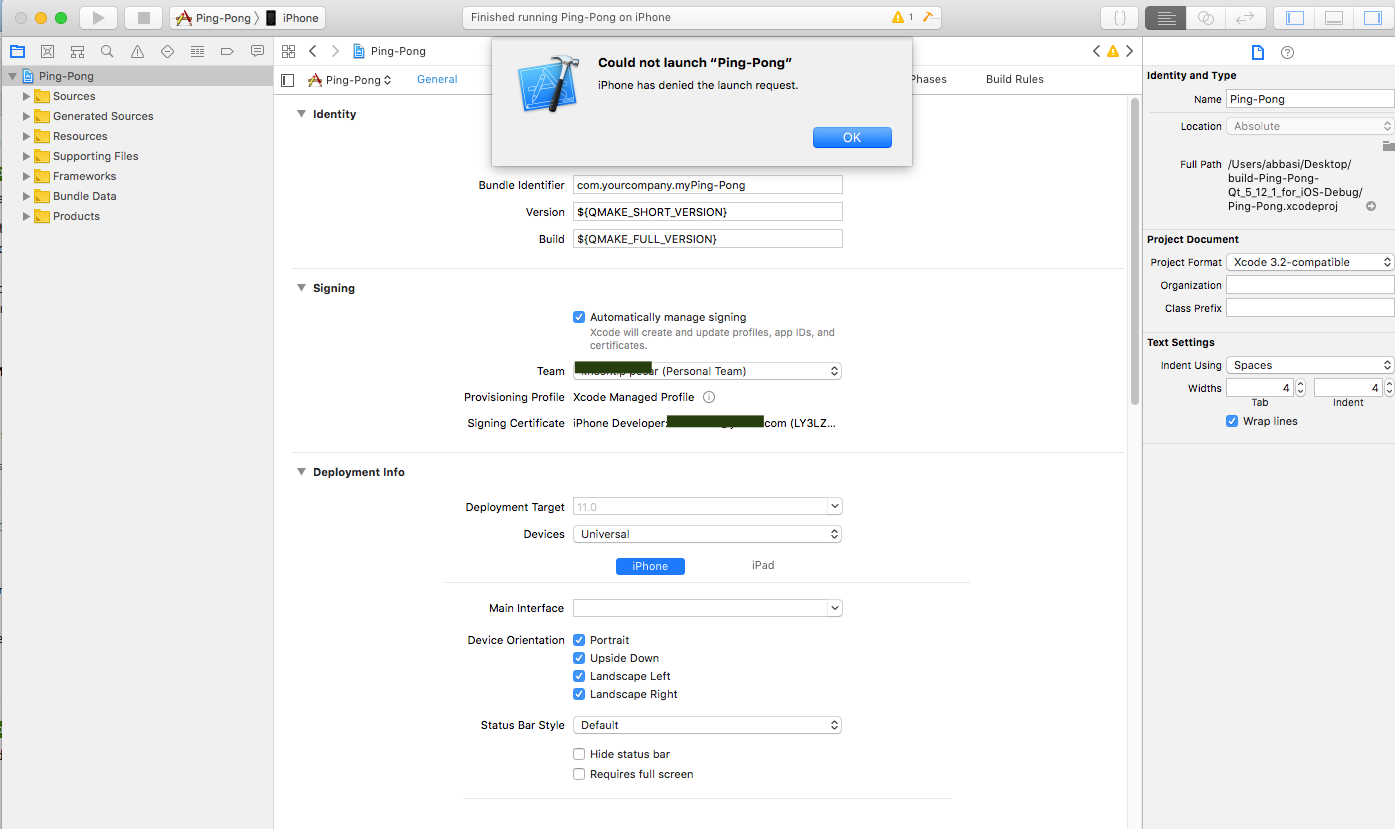
                                    0_1552635822931_Screen Shot 2019-03-15 at 11.10.01 AM.png

                                    J.HilkJ 1 Reply Last reply
                                    0
                                    • tomyT tomy

                                      @J.Hilk said in

                                      After these, I used the "build and then run the current scheme" button on Xcode to install the app on my iPhone. Xcode firstly responded by a message to me that I need to trust the developer (myself) on the iPhone => I did this and re-ran that button (on Xcode). This time it says:

                                      0_1552635822931_Screen Shot 2019-03-15 at 11.10.01 AM.png

                                      J.HilkJ Offline
                                      J.HilkJ Offline
                                      J.Hilk
                                      Moderators
                                      wrote on last edited by
                                      #30

                                      @tomy never had this one oO

                                      but check this thread
                                      https://stackoverflow.com/questions/45421179/xcode-9-error-iphone-has-denied-the-launch-request

                                      has a couple of different solutions offered


                                      Be aware of the Qt Code of Conduct, when posting : https://forum.qt.io/topic/113070/qt-code-of-conduct


                                      Q: What's that?
                                      A: It's blue light.
                                      Q: What does it do?
                                      A: It turns blue.

                                      tomyT 1 Reply Last reply
                                      1
                                      • J.HilkJ J.Hilk

                                        @tomy never had this one oO

                                        but check this thread
                                        https://stackoverflow.com/questions/45421179/xcode-9-error-iphone-has-denied-the-launch-request

                                        has a couple of different solutions offered

                                        tomyT Offline
                                        tomyT Offline
                                        tomy
                                        wrote on last edited by tomy
                                        #31

                                        @J.Hilk said in

                                        I unchecked "product->scheme->edit scheme->info->debug executable" checkbox and Xcode installed the app on the iPhone.

                                        Is it a correct choice, according to your experience, please?

                                        One other problem is, when installing this app on Android its icon is shown on the device, but on my iPhone the icon is not shown:

                                        0_1552640217420_1.jpg

                                        J.HilkJ 1 Reply Last reply
                                        0
                                        • tomyT tomy

                                          @J.Hilk said in

                                          I unchecked "product->scheme->edit scheme->info->debug executable" checkbox and Xcode installed the app on the iPhone.

                                          Is it a correct choice, according to your experience, please?

                                          One other problem is, when installing this app on Android its icon is shown on the device, but on my iPhone the icon is not shown:

                                          0_1552640217420_1.jpg

                                          J.HilkJ Offline
                                          J.HilkJ Offline
                                          J.Hilk
                                          Moderators
                                          wrote on last edited by
                                          #32

                                          @tomy that is because for android, you define the icon inside the AndroidManifest.xml in iOS you define the icon via th info.plist

                                          for example:

                                          <key>CFBundleIcons</key>
                                          	<dict>
                                          		<key>CFBundlePrimaryIcon</key>
                                          		<dict>
                                          			<key>CFBundleIconFiles</key>
                                          			<array>
                                          				<string>AppIcon20x20</string>
                                          				<string>AppIcon29x29</string>
                                          				<string>AppIcon40x40</string>
                                          				<string>AppIcon60x60</string>
                                          			</array>
                                          			<key>CFBundleIconName</key>
                                          			<string>AppIcon</string>
                                          		</dict>
                                          	</dict>
                                          

                                          how ever Xcode has a nice drag and drop handling for the icons,

                                          0_1552643248228_0ce44279-b69a-4b48-8c82-f8aa7ba524b1-image.png


                                          Be aware of the Qt Code of Conduct, when posting : https://forum.qt.io/topic/113070/qt-code-of-conduct


                                          Q: What's that?
                                          A: It's blue light.
                                          Q: What does it do?
                                          A: It turns blue.

                                          tomyT 1 Reply Last reply
                                          1

                                          • Login

                                          • Login or register to search.
                                          • First post
                                            Last post
                                          0
                                          • Categories
                                          • Recent
                                          • Tags
                                          • Popular
                                          • Users
                                          • Groups
                                          • Search
                                          • Get Qt
                                          • Unsolved