Skip to content
  • Categories
  • Recent
  • Tags
  • Popular
  • Users
  • Groups
  • Search
  • Get Qt Extensions
  • Unsolved
Collapse
Brand Logo
  1. Home
  2. Qt Development
  3. General and Desktop
  4. QPainter drawtext Bold
Forum Updated to NodeBB v4.3 + New Features

QPainter drawtext Bold

Scheduled Pinned Locked Moved Solved General and Desktop
37 Posts 4 Posters 12.2k Views 1 Watching
  • Oldest to Newest
  • Newest to Oldest
  • Most Votes
Reply
  • Reply as topic
Log in to reply
This topic has been deleted. Only users with topic management privileges can see it.
  • mrjjM mrjj

    @TheCipo76
    When you find it, please tell here.
    Its always good for me to know what i missed.

    TheCipo76T Offline
    TheCipo76T Offline
    TheCipo76
    wrote on last edited by
    #19

    @mrjj Sorry .. my bad..
    when you asked to try app i was working on windows..
    on mac don't works in image and neither pdf

    mrjjM 1 Reply Last reply
    0
    • TheCipo76T TheCipo76

      @mrjj Sorry .. my bad..
      when you asked to try app i was working on windows..
      on mac don't works in image and neither pdf

      mrjjM Offline
      mrjjM Offline
      mrjj
      Lifetime Qt Champion
      wrote on last edited by
      #20

      @TheCipo76
      Aha, and did you try the
      http://doc.qt.io/qt-5/qtwidgets-richtext-textedit-example.html
      example on mac too ?
      We have other poster that has Bold issue on macOs.
      https://forum.qt.io/topic/98726/qtextedit-make-text-bold

      so its kinda important to know if RichText sample do not go bold for you either as it then
      smells like a Qt thing /Xcode / macOS version thing.

      TheCipo76T 1 Reply Last reply
      0
      • mrjjM mrjj

        @TheCipo76
        Aha, and did you try the
        http://doc.qt.io/qt-5/qtwidgets-richtext-textedit-example.html
        example on mac too ?
        We have other poster that has Bold issue on macOs.
        https://forum.qt.io/topic/98726/qtextedit-make-text-bold

        so its kinda important to know if RichText sample do not go bold for you either as it then
        smells like a Qt thing /Xcode / macOS version thing.

        TheCipo76T Offline
        TheCipo76T Offline
        TheCipo76
        wrote on last edited by TheCipo76
        #21

        @mrjj Yes, i've already tried on mac and it works
        1_1548529787056_Schermata 2019-01-26 alle 20.07.52.png

        0_1548529787056_Schermata 2019-01-26 alle 20.08.01.png

        1 Reply Last reply
        1
        • TheCipo76T TheCipo76

          @mrjj Yes, i've tried using Verdana and works correctly

          I've modified my code like this:

          QFont bold("Verdana", 20);
          bold.setBold(true);
          painter.setFont(bold);
          painter.drawText(2000, 50, "BOLD TEXT");
          

          but no bold text..

          TheCipo76T Offline
          TheCipo76T Offline
          TheCipo76
          wrote on last edited by
          #22
          This post is deleted!
          1 Reply Last reply
          0
          • mrjjM Offline
            mrjjM Offline
            mrjj
            Lifetime Qt Champion
            wrote on last edited by
            #23

            Hi
            (only talking macOs)
            So Rich Text can do bold but your code does not ?
            So unlike other poster - its sort of mixed.
            Very odd.
            Also if not even my sample with image give Bold text then
            something is not workings it should.
            I wonder if the font itself could be the issue.
            did you try with other fonts in the code ?

            TheCipo76T 1 Reply Last reply
            0
            • mrjjM mrjj

              Hi
              (only talking macOs)
              So Rich Text can do bold but your code does not ?
              So unlike other poster - its sort of mixed.
              Very odd.
              Also if not even my sample with image give Bold text then
              something is not workings it should.
              I wonder if the font itself could be the issue.
              did you try with other fonts in the code ?

              TheCipo76T Offline
              TheCipo76T Offline
              TheCipo76
              wrote on last edited by
              #24

              @mrjj i've tried with "Times" with the same result
              no bold text

              mrjjM 1 Reply Last reply
              0
              • TheCipo76T TheCipo76

                @mrjj i've tried with "Times" with the same result
                no bold text

                mrjjM Offline
                mrjjM Offline
                mrjj
                Lifetime Qt Champion
                wrote on last edited by
                #25

                @TheCipo76
                Ok so seems the same as other poster.
                Do you also have message in Creator ?
                like
                Project WARNING: Qt has only been tested with version 10.13 of the platform SDK, you're using 10.14.

                TheCipo76T 1 Reply Last reply
                0
                • mrjjM mrjj

                  @TheCipo76
                  Ok so seems the same as other poster.
                  Do you also have message in Creator ?
                  like
                  Project WARNING: Qt has only been tested with version 10.13 of the platform SDK, you're using 10.14.

                  TheCipo76T Offline
                  TheCipo76T Offline
                  TheCipo76
                  wrote on last edited by TheCipo76
                  #26

                  @mrjj Yes, but i've silenced it with:

                  CONFIG += sdk_no_version_check

                  this is the message:

                  Project WARNING: Qt has only been tested with version 10.13 of the platform SDK, you're using 10.14.
                  Project WARNING: This is an unsupported configuration. You may experience build issues, and by using
                  Project WARNING: the 10.14 SDK you are opting in to new features that Qt has not been prepared for.
                  Project WARNING: E.g., 10.14 enables dark mode and layer-backed views, which Qt 5.11 does not support.
                  Project WARNING: Please downgrade the SDK you use to build your app to version 10.13, or configure
                  Project WARNING: with CONFIG+=sdk_no_version_check when running qmake to silence this warning.

                  mrjjM 1 Reply Last reply
                  0
                  • TheCipo76T TheCipo76

                    @mrjj Yes, but i've silenced it with:

                    CONFIG += sdk_no_version_check

                    this is the message:

                    Project WARNING: Qt has only been tested with version 10.13 of the platform SDK, you're using 10.14.
                    Project WARNING: This is an unsupported configuration. You may experience build issues, and by using
                    Project WARNING: the 10.14 SDK you are opting in to new features that Qt has not been prepared for.
                    Project WARNING: E.g., 10.14 enables dark mode and layer-backed views, which Qt 5.11 does not support.
                    Project WARNING: Please downgrade the SDK you use to build your app to version 10.13, or configure
                    Project WARNING: with CONFIG+=sdk_no_version_check when running qmake to silence this warning.

                    mrjjM Offline
                    mrjjM Offline
                    mrjj
                    Lifetime Qt Champion
                    wrote on last edited by
                    #27

                    @TheCipo76
                    Ok super , so i think its related.
                    and what Qt are you using ?
                    The other poster is using Qt 5.12.0

                    TheCipo76T 1 Reply Last reply
                    0
                    • mrjjM mrjj

                      @TheCipo76
                      Ok super , so i think its related.
                      and what Qt are you using ?
                      The other poster is using Qt 5.12.0

                      TheCipo76T Offline
                      TheCipo76T Offline
                      TheCipo76
                      wrote on last edited by TheCipo76
                      #28

                      @mrjj Qt 5.12.0

                      so we are Qt mac os x tester?? lol

                      1 Reply Last reply
                      0
                      • mrjjM Offline
                        mrjjM Offline
                        mrjj
                        Lifetime Qt Champion
                        wrote on last edited by
                        #29

                        Ok
                        I think that version might have some kind of issue with Mojave
                        Tried to scan the bug site but didn't see anything.

                        TheCipo76T 1 Reply Last reply
                        0
                        • mrjjM mrjj

                          Ok
                          I think that version might have some kind of issue with Mojave
                          Tried to scan the bug site but didn't see anything.

                          TheCipo76T Offline
                          TheCipo76T Offline
                          TheCipo76
                          wrote on last edited by TheCipo76
                          #30

                          @mrjj i've founded this:

                          https://bugreports.qt.io/browse/QTBUG-69955

                          but is not properly the same thing

                          mrjjM 1 Reply Last reply
                          0
                          • TheCipo76T TheCipo76

                            @mrjj i've founded this:

                            https://bugreports.qt.io/browse/QTBUG-69955

                            but is not properly the same thing

                            mrjjM Offline
                            mrjjM Offline
                            mrjj
                            Lifetime Qt Champion
                            wrote on last edited by
                            #31

                            @TheCipo76
                            Oh nice found.
                            I think that is very related.
                            weights is other term for bold.
                            So should be fixed in
                            5.12.0 Beta 1
                            but i dont know if that is the same version that is available as
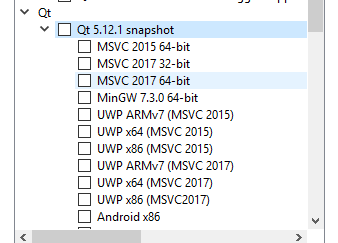
                            alt text

                            Would it be an option to try it out ?

                            aha_1980A 1 Reply Last reply
                            3
                            • mrjjM mrjj

                              @TheCipo76
                              Oh nice found.
                              I think that is very related.
                              weights is other term for bold.
                              So should be fixed in
                              5.12.0 Beta 1
                              but i dont know if that is the same version that is available as
                              alt text

                              Would it be an option to try it out ?

                              aha_1980A Offline
                              aha_1980A Offline
                              aha_1980
                              Lifetime Qt Champion
                              wrote on last edited by
                              #32

                              @mrjj It should already be fixed in 5.12.0, but of course also in the 5.12.1 snapshot and final release.

                              Qt has to stay free or it will die.

                              mrjjM 1 Reply Last reply
                              3
                              • aha_1980A aha_1980

                                @mrjj It should already be fixed in 5.12.0, but of course also in the 5.12.1 snapshot and final release.

                                mrjjM Offline
                                mrjjM Offline
                                mrjj
                                Lifetime Qt Champion
                                wrote on last edited by
                                #33

                                @aha_1980
                                Ah yes, of cause. i read it as 5.12.1 Beta 1
                                but the released 5.12.0 sure includes the beta code: )

                                Hmm that is actually bad news as its either not included
                                or did not fix Bold/weight issues in all cases.
                                Or was fixed for platform SDK 10.13 , but not for 10.14.

                                So what is the right approach here ?
                                With only 2 posters having Bold issue, im not sure it warrants a new bug report yet ?

                                aha_1980A 1 Reply Last reply
                                0
                                • mrjjM mrjj

                                  @aha_1980
                                  Ah yes, of cause. i read it as 5.12.1 Beta 1
                                  but the released 5.12.0 sure includes the beta code: )

                                  Hmm that is actually bad news as its either not included
                                  or did not fix Bold/weight issues in all cases.
                                  Or was fixed for platform SDK 10.13 , but not for 10.14.

                                  So what is the right approach here ?
                                  With only 2 posters having Bold issue, im not sure it warrants a new bug report yet ?

                                  aha_1980A Offline
                                  aha_1980A Offline
                                  aha_1980
                                  Lifetime Qt Champion
                                  wrote on last edited by
                                  #34

                                  @mrjj If they use Qt 5.12.0 and have the issue, they should at least comment at the linked report. Maybe it's an easy fix?

                                  Qt has to stay free or it will die.

                                  TheCipo76T 1 Reply Last reply
                                  2
                                  • aha_1980A aha_1980

                                    @mrjj If they use Qt 5.12.0 and have the issue, they should at least comment at the linked report. Maybe it's an easy fix?

                                    TheCipo76T Offline
                                    TheCipo76T Offline
                                    TheCipo76
                                    wrote on last edited by
                                    #35

                                    @aha_1980 @mrjj I've updated to ultimate version and works correctly

                                    Thank you for help!

                                    mrjjM 1 Reply Last reply
                                    2
                                    • TheCipo76T TheCipo76

                                      @aha_1980 @mrjj I've updated to ultimate version and works correctly

                                      Thank you for help!

                                      mrjjM Offline
                                      mrjjM Offline
                                      mrjj
                                      Lifetime Qt Champion
                                      wrote on last edited by
                                      #36

                                      @TheCipo76
                                      hi
                                      That is super good to hear. \o/
                                      Just to be clear.
                                      The ultimate version is the
                                      5.12.1 snapshot ?
                                      Or what version did you install ?
                                      (not sure what ultimate version refers too :) )

                                      TheCipo76T 1 Reply Last reply
                                      1
                                      • mrjjM mrjj

                                        @TheCipo76
                                        hi
                                        That is super good to hear. \o/
                                        Just to be clear.
                                        The ultimate version is the
                                        5.12.1 snapshot ?
                                        Or what version did you install ?
                                        (not sure what ultimate version refers too :) )

                                        TheCipo76T Offline
                                        TheCipo76T Offline
                                        TheCipo76
                                        wrote on last edited by
                                        #37

                                        @mrjj Yes 5.12.1 snapshot

                                        1 Reply Last reply
                                        2

                                        • Login

                                        • Login or register to search.
                                        • First post
                                          Last post
                                        0
                                        • Categories
                                        • Recent
                                        • Tags
                                        • Popular
                                        • Users
                                        • Groups
                                        • Search
                                        • Get Qt Extensions
                                        • Unsolved