Skip to content
  • Categories
  • Recent
  • Tags
  • Popular
  • Users
  • Groups
  • Search
  • Get Qt Extensions
  • Unsolved
Collapse
Brand Logo
  1. Home
  2. Qt Development
  3. General and Desktop
  4. QPainter drawtext Bold
Qt 6.11 is out! See what's new in the release blog

QPainter drawtext Bold

Scheduled Pinned Locked Moved Solved General and Desktop
37 Posts 4 Posters 20.2k Views 1 Watching
  • Oldest to Newest
  • Newest to Oldest
  • Most Votes
Reply
  • Reply as topic
Log in to reply
This topic has been deleted. Only users with topic management privileges can see it.
  • TheCipo76T TheCipo76

    @mrjj Yes, i've tried it and works great both pdf than image!

    mrjjM Offline
    mrjjM Offline
    mrjj
    Lifetime Qt Champion
    wrote on last edited by
    #12

    @TheCipo76
    Oh so PDF also worked with this sample ?

    TheCipo76T 1 Reply Last reply
    0
    • mrjjM mrjj

      @TheCipo76
      Oh so PDF also worked with this sample ?

      TheCipo76T Offline
      TheCipo76T Offline
      TheCipo76
      wrote on last edited by TheCipo76
      #13

      @mrjj Yes..
      i don't know why (it was my code... or not??)

      mrjjM 1 Reply Last reply
      0
      • TheCipo76T TheCipo76

        @mrjj Yes..
        i don't know why (it was my code... or not??)

        mrjjM Offline
        mrjjM Offline
        mrjj
        Lifetime Qt Champion
        wrote on last edited by mrjj
        #14

        @TheCipo76
        Sample is like 98% your code. just removed the Date stuff.
        Even to Image is your code, just to a pixmap.
        Rest of it, is the same. So something must have went wrong
        altering the code, or maybe it didnt use new code or something.

        TheCipo76T 1 Reply Last reply
        0
        • mrjjM mrjj

          @TheCipo76
          Sample is like 98% your code. just removed the Date stuff.
          Even to Image is your code, just to a pixmap.
          Rest of it, is the same. So something must have went wrong
          altering the code, or maybe it didnt use new code or something.

          TheCipo76T Offline
          TheCipo76T Offline
          TheCipo76
          wrote on last edited by
          #15

          @mrjj ok, now i will search where is the problem..

          mrjjM 1 Reply Last reply
          0
          • TheCipo76T TheCipo76

            @mrjj ok, now i will search where is the problem..

            mrjjM Offline
            mrjjM Offline
            mrjj
            Lifetime Qt Champion
            wrote on last edited by mrjj
            #16

            @TheCipo76
            Good hunting. Now we know it will work so
            its just to compare sample to actual code and see what could be difference.

            TheCipo76T 1 Reply Last reply
            0
            • mrjjM mrjj

              @TheCipo76
              Good hunting. Now we know it will work so
              its just to compare sample to actual code and see what could be difference.

              TheCipo76T Offline
              TheCipo76T Offline
              TheCipo76
              wrote on last edited by
              #17

              @mrjj Thank you.. it's what i will do ;)

              mrjjM 1 Reply Last reply
              0
              • TheCipo76T TheCipo76

                @mrjj Thank you.. it's what i will do ;)

                mrjjM Offline
                mrjjM Offline
                mrjj
                Lifetime Qt Champion
                wrote on last edited by
                #18

                @TheCipo76
                When you find it, please tell here.
                Its always good for me to know what i missed.

                TheCipo76T 1 Reply Last reply
                0
                • mrjjM mrjj

                  @TheCipo76
                  When you find it, please tell here.
                  Its always good for me to know what i missed.

                  TheCipo76T Offline
                  TheCipo76T Offline
                  TheCipo76
                  wrote on last edited by
                  #19

                  @mrjj Sorry .. my bad..
                  when you asked to try app i was working on windows..
                  on mac don't works in image and neither pdf

                  mrjjM 1 Reply Last reply
                  0
                  • TheCipo76T TheCipo76

                    @mrjj Sorry .. my bad..
                    when you asked to try app i was working on windows..
                    on mac don't works in image and neither pdf

                    mrjjM Offline
                    mrjjM Offline
                    mrjj
                    Lifetime Qt Champion
                    wrote on last edited by
                    #20

                    @TheCipo76
                    Aha, and did you try the
                    http://doc.qt.io/qt-5/qtwidgets-richtext-textedit-example.html
                    example on mac too ?
                    We have other poster that has Bold issue on macOs.
                    https://forum.qt.io/topic/98726/qtextedit-make-text-bold

                    so its kinda important to know if RichText sample do not go bold for you either as it then
                    smells like a Qt thing /Xcode / macOS version thing.

                    TheCipo76T 1 Reply Last reply
                    0
                    • mrjjM mrjj

                      @TheCipo76
                      Aha, and did you try the
                      http://doc.qt.io/qt-5/qtwidgets-richtext-textedit-example.html
                      example on mac too ?
                      We have other poster that has Bold issue on macOs.
                      https://forum.qt.io/topic/98726/qtextedit-make-text-bold

                      so its kinda important to know if RichText sample do not go bold for you either as it then
                      smells like a Qt thing /Xcode / macOS version thing.

                      TheCipo76T Offline
                      TheCipo76T Offline
                      TheCipo76
                      wrote on last edited by TheCipo76
                      #21

                      @mrjj Yes, i've already tried on mac and it works
                      1_1548529787056_Schermata 2019-01-26 alle 20.07.52.png

                      0_1548529787056_Schermata 2019-01-26 alle 20.08.01.png

                      1 Reply Last reply
                      1
                      • TheCipo76T TheCipo76

                        @mrjj Yes, i've tried using Verdana and works correctly

                        I've modified my code like this:

                        QFont bold("Verdana", 20);
                        bold.setBold(true);
                        painter.setFont(bold);
                        painter.drawText(2000, 50, "BOLD TEXT");
                        

                        but no bold text..

                        TheCipo76T Offline
                        TheCipo76T Offline
                        TheCipo76
                        wrote on last edited by
                        #22
                        This post is deleted!
                        1 Reply Last reply
                        0
                        • mrjjM Offline
                          mrjjM Offline
                          mrjj
                          Lifetime Qt Champion
                          wrote on last edited by
                          #23

                          Hi
                          (only talking macOs)
                          So Rich Text can do bold but your code does not ?
                          So unlike other poster - its sort of mixed.
                          Very odd.
                          Also if not even my sample with image give Bold text then
                          something is not workings it should.
                          I wonder if the font itself could be the issue.
                          did you try with other fonts in the code ?

                          TheCipo76T 1 Reply Last reply
                          0
                          • mrjjM mrjj

                            Hi
                            (only talking macOs)
                            So Rich Text can do bold but your code does not ?
                            So unlike other poster - its sort of mixed.
                            Very odd.
                            Also if not even my sample with image give Bold text then
                            something is not workings it should.
                            I wonder if the font itself could be the issue.
                            did you try with other fonts in the code ?

                            TheCipo76T Offline
                            TheCipo76T Offline
                            TheCipo76
                            wrote on last edited by
                            #24

                            @mrjj i've tried with "Times" with the same result
                            no bold text

                            mrjjM 1 Reply Last reply
                            0
                            • TheCipo76T TheCipo76

                              @mrjj i've tried with "Times" with the same result
                              no bold text

                              mrjjM Offline
                              mrjjM Offline
                              mrjj
                              Lifetime Qt Champion
                              wrote on last edited by
                              #25

                              @TheCipo76
                              Ok so seems the same as other poster.
                              Do you also have message in Creator ?
                              like
                              Project WARNING: Qt has only been tested with version 10.13 of the platform SDK, you're using 10.14.

                              TheCipo76T 1 Reply Last reply
                              0
                              • mrjjM mrjj

                                @TheCipo76
                                Ok so seems the same as other poster.
                                Do you also have message in Creator ?
                                like
                                Project WARNING: Qt has only been tested with version 10.13 of the platform SDK, you're using 10.14.

                                TheCipo76T Offline
                                TheCipo76T Offline
                                TheCipo76
                                wrote on last edited by TheCipo76
                                #26

                                @mrjj Yes, but i've silenced it with:

                                CONFIG += sdk_no_version_check

                                this is the message:

                                Project WARNING: Qt has only been tested with version 10.13 of the platform SDK, you're using 10.14.
                                Project WARNING: This is an unsupported configuration. You may experience build issues, and by using
                                Project WARNING: the 10.14 SDK you are opting in to new features that Qt has not been prepared for.
                                Project WARNING: E.g., 10.14 enables dark mode and layer-backed views, which Qt 5.11 does not support.
                                Project WARNING: Please downgrade the SDK you use to build your app to version 10.13, or configure
                                Project WARNING: with CONFIG+=sdk_no_version_check when running qmake to silence this warning.

                                mrjjM 1 Reply Last reply
                                0
                                • TheCipo76T TheCipo76

                                  @mrjj Yes, but i've silenced it with:

                                  CONFIG += sdk_no_version_check

                                  this is the message:

                                  Project WARNING: Qt has only been tested with version 10.13 of the platform SDK, you're using 10.14.
                                  Project WARNING: This is an unsupported configuration. You may experience build issues, and by using
                                  Project WARNING: the 10.14 SDK you are opting in to new features that Qt has not been prepared for.
                                  Project WARNING: E.g., 10.14 enables dark mode and layer-backed views, which Qt 5.11 does not support.
                                  Project WARNING: Please downgrade the SDK you use to build your app to version 10.13, or configure
                                  Project WARNING: with CONFIG+=sdk_no_version_check when running qmake to silence this warning.

                                  mrjjM Offline
                                  mrjjM Offline
                                  mrjj
                                  Lifetime Qt Champion
                                  wrote on last edited by
                                  #27

                                  @TheCipo76
                                  Ok super , so i think its related.
                                  and what Qt are you using ?
                                  The other poster is using Qt 5.12.0

                                  TheCipo76T 1 Reply Last reply
                                  0
                                  • mrjjM mrjj

                                    @TheCipo76
                                    Ok super , so i think its related.
                                    and what Qt are you using ?
                                    The other poster is using Qt 5.12.0

                                    TheCipo76T Offline
                                    TheCipo76T Offline
                                    TheCipo76
                                    wrote on last edited by TheCipo76
                                    #28

                                    @mrjj Qt 5.12.0

                                    so we are Qt mac os x tester?? lol

                                    1 Reply Last reply
                                    0
                                    • mrjjM Offline
                                      mrjjM Offline
                                      mrjj
                                      Lifetime Qt Champion
                                      wrote on last edited by
                                      #29

                                      Ok
                                      I think that version might have some kind of issue with Mojave
                                      Tried to scan the bug site but didn't see anything.

                                      TheCipo76T 1 Reply Last reply
                                      0
                                      • mrjjM mrjj

                                        Ok
                                        I think that version might have some kind of issue with Mojave
                                        Tried to scan the bug site but didn't see anything.

                                        TheCipo76T Offline
                                        TheCipo76T Offline
                                        TheCipo76
                                        wrote on last edited by TheCipo76
                                        #30

                                        @mrjj i've founded this:

                                        https://bugreports.qt.io/browse/QTBUG-69955

                                        but is not properly the same thing

                                        mrjjM 1 Reply Last reply
                                        0
                                        • TheCipo76T TheCipo76

                                          @mrjj i've founded this:

                                          https://bugreports.qt.io/browse/QTBUG-69955

                                          but is not properly the same thing

                                          mrjjM Offline
                                          mrjjM Offline
                                          mrjj
                                          Lifetime Qt Champion
                                          wrote on last edited by
                                          #31

                                          @TheCipo76
                                          Oh nice found.
                                          I think that is very related.
                                          weights is other term for bold.
                                          So should be fixed in
                                          5.12.0 Beta 1
                                          but i dont know if that is the same version that is available as
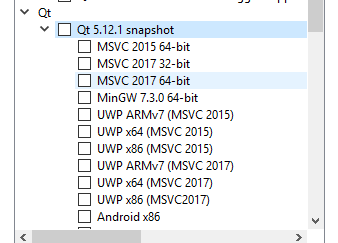
                                          alt text

                                          Would it be an option to try it out ?

                                          aha_1980A 1 Reply Last reply
                                          3

                                          • Login

                                          • Login or register to search.
                                          • First post
                                            Last post
                                          0
                                          • Categories
                                          • Recent
                                          • Tags
                                          • Popular
                                          • Users
                                          • Groups
                                          • Search
                                          • Get Qt Extensions
                                          • Unsolved