
pass variable from tab to dialog
-
Just to be sure, do you have several different widgets that you built with designer and that you are putting together in that dialog ?
Interested in AI ? www.idiap.ch
Please read the Qt Code of Conduct - https://forum.qt.io/topic/113070/qt-code-of-conduct -
Just to be sure, do you have several different widgets that you built with designer and that you are putting together in that dialog ?
@SGaist i've two different forms (but similar 90%)
n.1 tabcomplessivo
some tabcomponente
all in the mainwindowi've created with designer and added to tablewidget with code (first post) and populated dinamically with different table (from database) with different query
i have always only one tabcomplessivo and some (depends by item in database)
tabcomponentecomplessivo = componente + componente +... + componente
i hope that's clear (my english is not very good..)i have to describe all operations on every componente to build one complessivo
-
Then you should implement proper APIs for these different forms to pass values around so each will be an independent entity.
You might have to rethink a bit what element of your UI is responsible of what. For example, does it really make sens that
Aggiornais part of the left widget ? Shouldn't it be outside so that the slot connected to it can grab the data generated and then put them in the QTableWidget. -
Really there's no way to read data from Tabs??
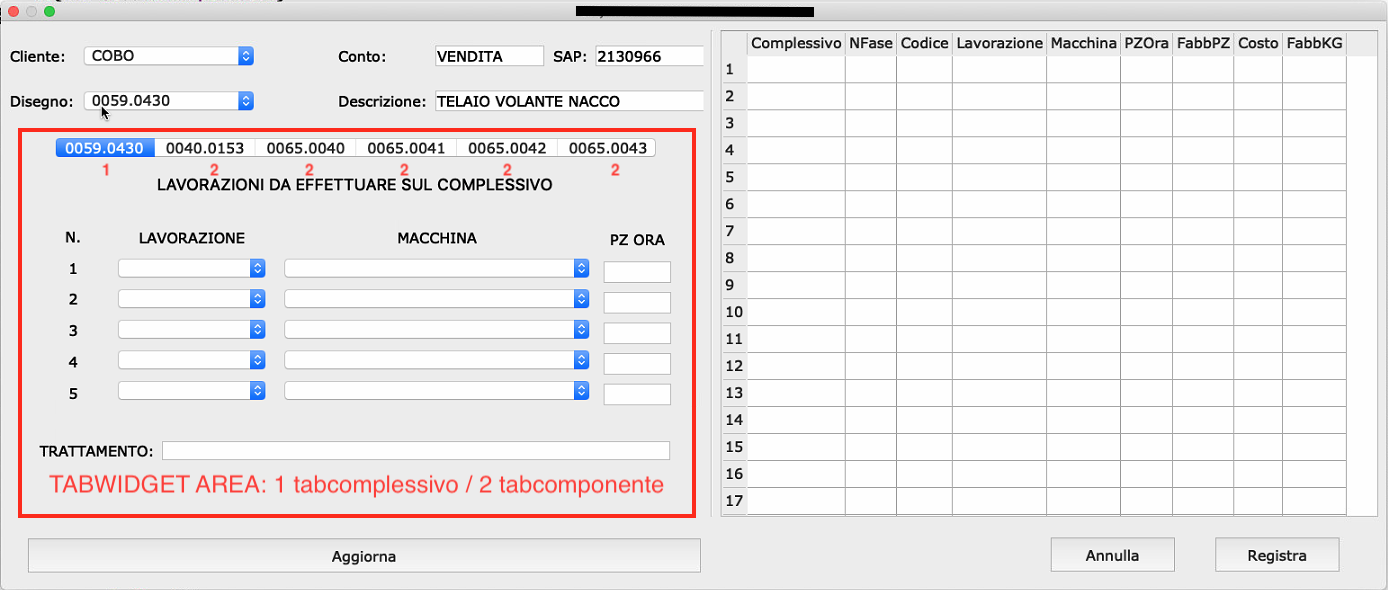
TabWidget (and then all the Tabs) were inside the dialog as you see in the picture..
"Aggiorna" is already in the Dialog (not in TabWidget).
Including tabcomplessivo (form) and tabcomponente (form) in the TabWidget do not have any sense if i can't access to it's data from the Dialog.
Create a single Connect/signal from each comboBox/LineEdit do not allow to insert complete row of Model (TableView).
My idea was:
- firts select/insert in Tabs
- in any moments i can view the actual input with Aggiorna click() that put all selections/input data in the Model (TableView).
I've already implemented QSqlTableModel (TableView) and Aggiorna void to get data from Dialog and insert to Model (Codice, Complessivo..) the only missing part is get data from Tabs (with 2 loop as i've already wrote).
I have to delete all and do with another method??
-
Really there's no way to read data from Tabs??
TabWidget (and then all the Tabs) were inside the dialog as you see in the picture..
"Aggiorna" is already in the Dialog (not in TabWidget).
Including tabcomplessivo (form) and tabcomponente (form) in the TabWidget do not have any sense if i can't access to it's data from the Dialog.
Create a single Connect/signal from each comboBox/LineEdit do not allow to insert complete row of Model (TableView).
My idea was:
- firts select/insert in Tabs
- in any moments i can view the actual input with Aggiorna click() that put all selections/input data in the Model (TableView).
I've already implemented QSqlTableModel (TableView) and Aggiorna void to get data from Dialog and insert to Model (Codice, Complessivo..) the only missing part is get data from Tabs (with 2 loop as i've already wrote).
I have to delete all and do with another method??
@TheCipo76
Hi
The reason I are confused is that is not clear if you simply added
the tabs in Designer. ( with combo boxes and all)
In that case the combobox are directly readable to the dialog via UIOR
You made a new form ui object with the both .h and .cpp
and you make a new instance of your form and use
as Tab widget.
In that case UI is private and you need an access method to get data and the pointer of
the widget as you create it to be used as TabWidget. -
@TheCipo76
Hi
The reason I are confused is that is not clear if you simply added
the tabs in Designer. ( with combo boxes and all)
In that case the combobox are directly readable to the dialog via UIOR
You made a new form ui object with the both .h and .cpp
and you make a new instance of your form and use
as Tab widget.
In that case UI is private and you need an access method to get data and the pointer of
the widget as you create it to be used as TabWidget.@mrjj it's the second case..
now i've two possibility
delete forms (tabcomplessivo and tabcomponente) and insert directly ComboBoxes and LineEdits data in the Tabs (Simplest way)
or
implement a method to get data from froms
The second way is my favourite but i don't know to do it
my initial question is precisely what
how to get data from Tabs (forms uses as TabWidget)Probably i've explain not very well.. Sorry
-
@mrjj it's the second case..
now i've two possibility
delete forms (tabcomplessivo and tabcomponente) and insert directly ComboBoxes and LineEdits data in the Tabs (Simplest way)
or
implement a method to get data from froms
The second way is my favourite but i don't know to do it
my initial question is precisely what
how to get data from Tabs (forms uses as TabWidget)Probably i've explain not very well.. Sorry
@TheCipo76
Hi
Well you just keep the pointer around from
when you new the Form class and insert as tabwidget.And then in Form class , you add access method that will return
the data from the combo boxes since UI is private. -
@TheCipo76
Hi
Well you just keep the pointer around from
when you new the Form class and insert as tabwidget.And then in Form class , you add access method that will return
the data from the combo boxes since UI is private.@mrjj this is tabcomponente .h
#ifndef TABCOMPONENTE_H
#define TABCOMPONENTE_H

#include <QWidget>
#include <QComboBox>
#include <QSqlDatabase>

namespace Ui {
class tabcomponente;
}

class tabcomponente : public QWidget
{
    Q_OBJECT

public slots:

    void MACCHINE();

public:
    explicit tabcomponente(QWidget *parent = nullptr, QString nome = "");
    ~tabcomponente();

private:
    Ui::tabcomponente *ui;

    QSqlDatabase aDatabase;

    //Array Lavorazioni
    QComboBox *array_Lavorazione[5];
    QComboBox *array_Macchine[5];
    QLineEdit *array_PZOra[5];

};

#endif // TABCOMPONENTE_H
and this is how i've added to TabWidget
ui->tabWidget->addTab(new tabcomponente(this, comp.value(0).toString()), comp.value(0).toString());comp.value(0) get name of Tab from Database
where the pointer will be added??
-
Hi
I mean keep the pointer around. like
tabcomp = new tabcomponente(this, comp.value(0).toString());
ui->tabWidget->addTab(tabcomp);in .h you have
tabcomponente *tabcomp=0;so later u can use tabcomp to get access .
Right now, you are not keeping the returned pointer from new.
Alternatively, you can get it from tabwidget.
via the http://doc.qt.io/qt-5/qtabwidget.html#widget
You have to use qobject_cast to cast to the right type as it returns the widget
as base class, not your type.tabcomponente* thetab = qobject_cast<tabcomponente*>( ui->tabWidname->widget( INDEX ) ); if( thetab ) { // MUST perform check. it can fail if not that type. thetab->xxxx } -
Hi
I mean keep the pointer around. like
tabcomp = new tabcomponente(this, comp.value(0).toString());
ui->tabWidget->addTab(tabcomp);in .h you have
tabcomponente *tabcomp=0;so later u can use tabcomp to get access .
Right now, you are not keeping the returned pointer from new.
Alternatively, you can get it from tabwidget.
via the http://doc.qt.io/qt-5/qtabwidget.html#widget
You have to use qobject_cast to cast to the right type as it returns the widget
as base class, not your type.tabcomponente* thetab = qobject_cast<tabcomponente*>( ui->tabWidname->widget( INDEX ) ); if( thetab ) { // MUST perform check. it can fail if not that type. thetab->xxxx }


