Skip to content
  • Categories
  • Recent
  • Tags
  • Popular
  • Users
  • Groups
  • Search
  • Get Qt
  • Unsolved
Collapse
Brand Logo
  1. Home
  2. Qt Development
  3. General and Desktop
  4. pass variable from tab to dialog
Qt 6.12 LTS is out! See what's new in the release blog

pass variable from tab to dialog

Scheduled Pinned Locked Moved Solved General and Desktop
29 Posts 3 Posters 7.1k Views 2 Watching
  • Oldest to Newest
  • Newest to Oldest
  • Most Votes
Reply
  • Reply as topic
Log in to reply
This topic has been deleted. Only users with topic management privileges can see it.
  • SGaistS SGaist

    Are you only preparing the data to be stored in the database or will you also be showing entries from the database in that table view ?

    TheCipo76T Offline
    TheCipo76T Offline
    TheCipo76
    wrote on last edited by TheCipo76
    #17

    @SGaist only prepare a preview
    then (on "Registra" click) it will be stored in db

    otherwise the tableview need filter in order to don't show (and modify) other data (item) in the table

    both case is good however

    1 Reply Last reply
    0
    • SGaistS Offline
      SGaistS Offline
      SGaist
      Lifetime Qt Champion
      wrote on last edited by
      #18

      In that case, wouldn't it be easier to use a QTableWidget to setup the rows and then QSqlQuery to update your database when you click on Registra

      Interested in AI ? www.idiap.ch
      Please read the Qt Code of Conduct - https://forum.qt.io/topic/113070/qt-code-of-conduct

      TheCipo76T 1 Reply Last reply
      0
      • SGaistS SGaist

        In that case, wouldn't it be easier to use a QTableWidget to setup the rows and then QSqlQuery to update your database when you click on Registra

        TheCipo76T Offline
        TheCipo76T Offline
        TheCipo76
        wrote on last edited by TheCipo76
        #19

        @SGaist yes but i can't access to data in tabcomplessivo and tabcomponente
        as i've already wrote up they were in the mainwindow and declared pulic

        1 Reply Last reply
        0
        • SGaistS Offline
          SGaistS Offline
          SGaist
          Lifetime Qt Champion
          wrote on last edited by
          #20

          Just to be sure, do you have several different widgets that you built with designer and that you are putting together in that dialog ?

          Interested in AI ? www.idiap.ch
          Please read the Qt Code of Conduct - https://forum.qt.io/topic/113070/qt-code-of-conduct

          TheCipo76T 1 Reply Last reply
          1
          • SGaistS SGaist

            Just to be sure, do you have several different widgets that you built with designer and that you are putting together in that dialog ?

            TheCipo76T Offline
            TheCipo76T Offline
            TheCipo76
            wrote on last edited by TheCipo76
            #21

            @SGaist i've two different forms (but similar 90%)
            n.1 tabcomplessivo
            some tabcomponente
            all in the mainwindow

            i've created with designer and added to tablewidget with code (first post) and populated dinamically with different table (from database) with different query

            i have always only one tabcomplessivo and some (depends by item in database)
            tabcomponente

            complessivo = componente + componente +... + componente
            i hope that's clear (my english is not very good..)

            i have to describe all operations on every componente to build one complessivo

            1 Reply Last reply
            0
            • SGaistS Offline
              SGaistS Offline
              SGaist
              Lifetime Qt Champion
              wrote on last edited by
              #22

              Then you should implement proper APIs for these different forms to pass values around so each will be an independent entity.

              You might have to rethink a bit what element of your UI is responsible of what. For example, does it really make sens that Aggiorna is part of the left widget ? Shouldn't it be outside so that the slot connected to it can grab the data generated and then put them in the QTableWidget.

              Interested in AI ? www.idiap.ch
              Please read the Qt Code of Conduct - https://forum.qt.io/topic/113070/qt-code-of-conduct

              1 Reply Last reply
              0
              • TheCipo76T Offline
                TheCipo76T Offline
                TheCipo76
                wrote on last edited by TheCipo76
                #23

                Really there's no way to read data from Tabs??
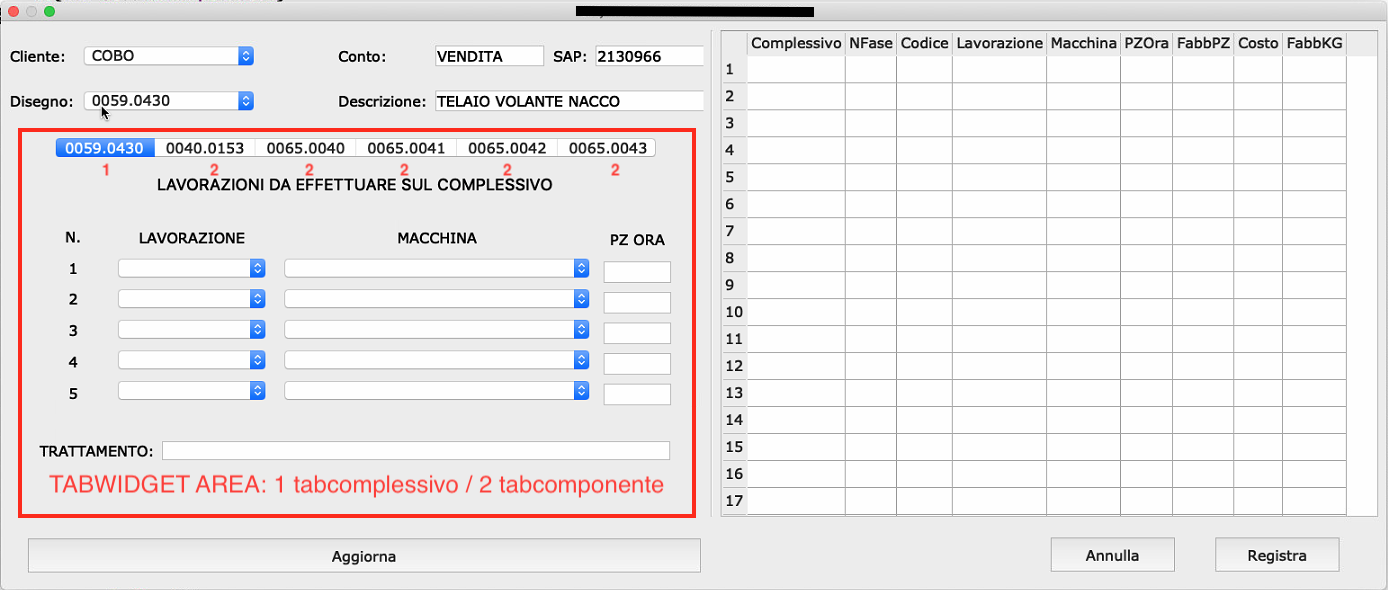
                0_1541323958859_d78b15a7-c904-418c-9885-b9cd369a29cd.png

                TabWidget (and then all the Tabs) were inside the dialog as you see in the picture..

                "Aggiorna" is already in the Dialog (not in TabWidget).

                Including tabcomplessivo (form) and tabcomponente (form) in the TabWidget do not have any sense if i can't access to it's data from the Dialog.

                Create a single Connect/signal from each comboBox/LineEdit do not allow to insert complete row of Model (TableView).

                My idea was:

                • firts select/insert in Tabs
                • in any moments i can view the actual input with Aggiorna click() that put all selections/input data in the Model (TableView).

                I've already implemented QSqlTableModel (TableView) and Aggiorna void to get data from Dialog and insert to Model (Codice, Complessivo..) the only missing part is get data from Tabs (with 2 loop as i've already wrote).

                I have to delete all and do with another method??

                mrjjM 1 Reply Last reply
                0
                • TheCipo76T TheCipo76

                  Really there's no way to read data from Tabs??

                  0_1541323958859_d78b15a7-c904-418c-9885-b9cd369a29cd.png

                  TabWidget (and then all the Tabs) were inside the dialog as you see in the picture..

                  "Aggiorna" is already in the Dialog (not in TabWidget).

                  Including tabcomplessivo (form) and tabcomponente (form) in the TabWidget do not have any sense if i can't access to it's data from the Dialog.

                  Create a single Connect/signal from each comboBox/LineEdit do not allow to insert complete row of Model (TableView).

                  My idea was:

                  • firts select/insert in Tabs
                  • in any moments i can view the actual input with Aggiorna click() that put all selections/input data in the Model (TableView).

                  I've already implemented QSqlTableModel (TableView) and Aggiorna void to get data from Dialog and insert to Model (Codice, Complessivo..) the only missing part is get data from Tabs (with 2 loop as i've already wrote).

                  I have to delete all and do with another method??

                  mrjjM Offline
                  mrjjM Offline
                  mrjj
                  Lifetime Qt Champion
                  wrote on last edited by mrjj
                  #24

                  @TheCipo76
                  Hi
                  The reason I are confused is that is not clear if you simply added
                  the tabs in Designer. ( with combo boxes and all)
                  In that case the combobox are directly readable to the dialog via UI

                  OR

                  You made a new form ui object with the both .h and .cpp
                  and you make a new instance of your form and use
                  as Tab widget.
                  In that case UI is private and you need an access method to get data and the pointer of
                  the widget as you create it to be used as TabWidget.

                  TheCipo76T 1 Reply Last reply
                  0
                  • mrjjM mrjj

                    @TheCipo76
                    Hi
                    The reason I are confused is that is not clear if you simply added
                    the tabs in Designer. ( with combo boxes and all)
                    In that case the combobox are directly readable to the dialog via UI

                    OR

                    You made a new form ui object with the both .h and .cpp
                    and you make a new instance of your form and use
                    as Tab widget.
                    In that case UI is private and you need an access method to get data and the pointer of
                    the widget as you create it to be used as TabWidget.

                    TheCipo76T Offline
                    TheCipo76T Offline
                    TheCipo76
                    wrote on last edited by TheCipo76
                    #25

                    @mrjj it's the second case..

                    now i've two possibility

                    delete forms (tabcomplessivo and tabcomponente) and insert directly ComboBoxes and LineEdits data in the Tabs (Simplest way)

                    or

                    implement a method to get data from froms

                    The second way is my favourite but i don't know to do it

                    my initial question is precisely what
                    how to get data from Tabs (forms uses as TabWidget)

                    Probably i've explain not very well.. Sorry

                    mrjjM 1 Reply Last reply
                    0
                    • TheCipo76T TheCipo76

                      @mrjj it's the second case..

                      now i've two possibility

                      delete forms (tabcomplessivo and tabcomponente) and insert directly ComboBoxes and LineEdits data in the Tabs (Simplest way)

                      or

                      implement a method to get data from froms

                      The second way is my favourite but i don't know to do it

                      my initial question is precisely what
                      how to get data from Tabs (forms uses as TabWidget)

                      Probably i've explain not very well.. Sorry

                      mrjjM Offline
                      mrjjM Offline
                      mrjj
                      Lifetime Qt Champion
                      wrote on last edited by
                      #26

                      @TheCipo76
                      Hi
                      Well you just keep the pointer around from
                      when you new the Form class and insert as tabwidget.

                      And then in Form class , you add access method that will return
                      the data from the combo boxes since UI is private.

                      TheCipo76T 1 Reply Last reply
                      0
                      • mrjjM mrjj

                        @TheCipo76
                        Hi
                        Well you just keep the pointer around from
                        when you new the Form class and insert as tabwidget.

                        And then in Form class , you add access method that will return
                        the data from the combo boxes since UI is private.

                        TheCipo76T Offline
                        TheCipo76T Offline
                        TheCipo76
                        wrote on last edited by TheCipo76
                        #27

                        @mrjj this is tabcomponente .h

                        #ifndef TABCOMPONENTE_H
                        #define TABCOMPONENTE_H
                        
                        #include <QWidget>
                        #include <QComboBox>
                        #include <QSqlDatabase>
                        
                        namespace Ui {
                        class tabcomponente;
                        }
                        
                        class tabcomponente : public QWidget
                        {
                            Q_OBJECT
                        
                        public slots:
                        
                            void MACCHINE();
                        
                        public:
                            explicit tabcomponente(QWidget *parent = nullptr, QString nome = "");
                            ~tabcomponente();
                        
                        private:
                            Ui::tabcomponente *ui;
                        
                            QSqlDatabase aDatabase;
                        
                            //Array Lavorazioni
                            QComboBox *array_Lavorazione[5];
                            QComboBox *array_Macchine[5];
                            QLineEdit *array_PZOra[5];
                        
                        };
                        
                        #endif // TABCOMPONENTE_H


                        and this is how i've added to TabWidget

                        ui->tabWidget->addTab(new tabcomponente(this, comp.value(0).toString()), comp.value(0).toString());
                        

                        comp.value(0) get name of Tab from Database

                        where the pointer will be added??

                        1 Reply Last reply
                        0
                        • mrjjM Offline
                          mrjjM Offline
                          mrjj
                          Lifetime Qt Champion
                          wrote on last edited by mrjj
                          #28

                          Hi
                          I mean keep the pointer around. like
                          tabcomp = new tabcomponente(this, comp.value(0).toString());
                          ui->tabWidget->addTab(tabcomp);

                          in .h you have
                          tabcomponente *tabcomp=0;

                          so later u can use tabcomp to get access .

                          Right now, you are not keeping the returned pointer from new.

                          Alternatively, you can get it from tabwidget.
                          via the http://doc.qt.io/qt-5/qtabwidget.html#widget
                          You have to use qobject_cast to cast to the right type as it returns the widget
                          as base class, not your type.

                          tabcomponente* thetab = qobject_cast<tabcomponente*>(  ui->tabWidname->widget( INDEX )  );
                            if( thetab ) { // MUST perform check. it can fail if not that type.
                              thetab->xxxx
                            }
                          
                          TheCipo76T 1 Reply Last reply
                          1
                          • mrjjM mrjj

                            Hi
                            I mean keep the pointer around. like
                            tabcomp = new tabcomponente(this, comp.value(0).toString());
                            ui->tabWidget->addTab(tabcomp);

                            in .h you have
                            tabcomponente *tabcomp=0;

                            so later u can use tabcomp to get access .

                            Right now, you are not keeping the returned pointer from new.

                            Alternatively, you can get it from tabwidget.
                            via the http://doc.qt.io/qt-5/qtabwidget.html#widget
                            You have to use qobject_cast to cast to the right type as it returns the widget
                            as base class, not your type.

                            tabcomponente* thetab = qobject_cast<tabcomponente*>(  ui->tabWidname->widget( INDEX )  );
                              if( thetab ) { // MUST perform check. it can fail if not that type.
                                thetab->xxxx
                              }
                            
                            TheCipo76T Offline
                            TheCipo76T Offline
                            TheCipo76
                            wrote on last edited by TheCipo76
                            #29

                            @mrjj now the code works without errors.. Great!!!

                            Thank you very much!!!

                            1 Reply Last reply
                            1

                            • Login

                            • Login or register to search.
                            • First post
                              Last post
                            0
                            • Categories
                            • Recent
                            • Tags
                            • Popular
                            • Users
                            • Groups
                            • Search
                            • Get Qt
                            • Unsolved