Skip to content
  • Categories
  • Recent
  • Tags
  • Popular
  • Users
  • Groups
  • Search
  • Get Qt Extensions
  • Unsolved
Collapse
Brand Logo
  1. Home
  2. Qt Development
  3. General and Desktop
  4. Deployment
Forum Updated to NodeBB v4.3 + New Features

Deployment

Scheduled Pinned Locked Moved Solved General and Desktop
16 Posts 7 Posters 2.1k Views 2 Watching
  • Oldest to Newest
  • Newest to Oldest
  • Most Votes
Reply
  • Reply as topic
Log in to reply
This topic has been deleted. Only users with topic management privileges can see it.
  • J Offline
    J Offline
    jrod2much
    wrote on last edited by
    #7

    @J-Hilk No QML in my project

    1 Reply Last reply
    0
    • J Offline
      J Offline
      jrod2much
      wrote on last edited by
      #8

      @Pablo-J-Rogina
      0_1540815103939_fb1242dc-baee-42f5-b0fb-91ca2b569195-image.png

      1 Reply Last reply
      0
      • J Offline
        J Offline
        jrod2much
        wrote on last edited by
        #9

        it is very weird because the .exe file created using windeployqt works perfectly fine on my computer but if I transfer the entire folder to another computer, the .exe is unresponsive.

        1 Reply Last reply
        0
        • J Offline
          J Offline
          jrod2much
          wrote on last edited by
          #10

          @J-Hilk @Pablo-J-Rogina now I am getting this error
          0_1540825086410_21f8225c-9cc1-46d4-a3c6-f2da740afa35-image.png

          J.HilkJ 1 Reply Last reply
          0
          • mrjjM Offline
            mrjjM Offline
            mrjj
            Lifetime Qt Champion
            wrote on last edited by
            #11

            Hi
            And you did make/have a deployment folder with the right sub folders for it ?
            it should look like ( as minimum. it can have mroe subfolders)
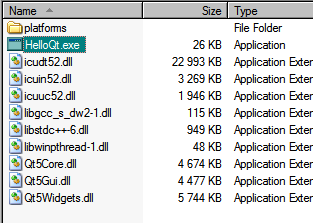
            alt text
            All credits to
            http://www.tripleboot.org/?p=138

            1 Reply Last reply
            3
            • R Offline
              R Offline
              Rondog
              wrote on last edited by Rondog
              #12

              One suggestion would be to compile Qt from source with the option '-no-icu'. If you look at the above file list the three ICU files are over 28 mb in size where everything else combined is around 18 mb (including the platform DLL's). I think you only need the ICU files for webkit (?).

              jsulmJ 1 Reply Last reply
              1
              • hskoglundH Offline
                hskoglundH Offline
                hskoglund
                wrote on last edited by
                #13

                Hi, even though you have copied all files/folders correctly to the other PC, it could be another installation of Qt on it that disturbs your Pixymon.exe from loading its plugins.
                You could try tracing the loading of plugins:
                first download DebugView and start it to see the output,
                then launch a CMD window and type:

                SET QT_DEBUG_PLUGINS=1
                

                then start Pixymon.exe from that CMD window and look at the messages appearing in DebugView, should be something like: “QFactoryLoader::QFactoryLoader() checking..."

                1 Reply Last reply
                1
                • R Rondog

                  One suggestion would be to compile Qt from source with the option '-no-icu'. If you look at the above file list the three ICU files are over 28 mb in size where everything else combined is around 18 mb (including the platform DLL's). I think you only need the ICU files for webkit (?).

                  jsulmJ Offline
                  jsulmJ Offline
                  jsulm
                  Lifetime Qt Champion
                  wrote on last edited by
                  #14

                  @Rondog I'm not sure compiling Qt is the right suggestion for somebody having problems deploying a Qt app just to save some space...

                  https://forum.qt.io/topic/113070/qt-code-of-conduct

                  1 Reply Last reply
                  1
                  • J jrod2much

                    @J-Hilk @Pablo-J-Rogina now I am getting this error
                    0_1540825086410_21f8225c-9cc1-46d4-a3c6-f2da740afa35-image.png

                    J.HilkJ Offline
                    J.HilkJ Offline
                    J.Hilk
                    Moderators
                    wrote on last edited by
                    #15

                    @jrod2much
                    did you by chance use the wrong deployment tool ? each precompiled version of qt that you install comes with it's own tool. ANd if you compile your project with mingw and use the msvc windeploytool. The needed files are copied, but they are technically from the wrong Qt-Folder.


                    Be aware of the Qt Code of Conduct, when posting : https://forum.qt.io/topic/113070/qt-code-of-conduct


                    Q: What's that?
                    A: It's blue light.
                    Q: What does it do?
                    A: It turns blue.

                    1 Reply Last reply
                    1
                    • J Offline
                      J Offline
                      jrod2much
                      wrote on last edited by jrod2much
                      #16

                      so as usual, i just kept trying things and it finally worked haha, Thank you guys. I don't think it was a Qt problem but more of an individual program problem having to do with missing files.

                      1 Reply Last reply
                      0

                      • Login

                      • Login or register to search.
                      • First post
                        Last post
                      0
                      • Categories
                      • Recent
                      • Tags
                      • Popular
                      • Users
                      • Groups
                      • Search
                      • Get Qt Extensions
                      • Unsolved