
Skip to content
  • Categories
  • Recent
  • Tags
  • Popular
  • Users
  • Groups
  • Search
  • Get Qt
  • Unsolved
Collapse
qtws26_logo

The Qt Event of the Year: Qt World Summit 2026

Save Your Spot >
Brand Logo
  1. Home
  2. Qt Development
  3. General and Desktop
  4. Missed Compiler/Tool/Platform
Qt 6.12 LTS is out! See what's new in the release blog

Missed Compiler/Tool/Platform

Scheduled Pinned Locked Moved Unsolved General and Desktop
34 Posts 8 Posters 11.2k Views 4 Watching
  • Oldest to Newest
  • Newest to Oldest
  • Most Votes
Reply
  • Reply as topic
Log in to reply
This topic has been deleted. Only users with topic management privileges can see it.
  • K kuzulis

    @CodeFreaks said in Missed Compiler/Tool/Platform:

    its: android-ndk-r18 .

    Use NDK 10 or 16.

    CodeFreaksC Offline
    CodeFreaksC Offline
    CodeFreaks
    wrote on last edited by CodeFreaks
    #12

    @kuzulis said in Missed Compiler/Tool/Platform:

    Use NDK 10 or 16.

    I added NDK 10 and also 16 but still it doesn't work.
    I installed all the available platforms for SDK (from 7 to 28) . I don't know why Qt Creator doesn't recognize them.
    missed x86-linux-android-elf-32bit macro is another problem.

    aha_1980A 1 Reply Last reply
    0
    • CodeFreaksC CodeFreaks

      @kuzulis said in Missed Compiler/Tool/Platform:

      Use NDK 10 or 16.

      I added NDK 10 and also 16 but still it doesn't work.
      I installed all the available platforms for SDK (from 7 to 28) . I don't know why Qt Creator doesn't recognize them.
      missed x86-linux-android-elf-32bit macro is another problem.

      aha_1980A Offline
      aha_1980A Offline
      aha_1980
      Lifetime Qt Champion
      wrote on last edited by
      #13

      Hi @CodeFreaks,

      you do know that you need both NDK and SDK? http://doc.qt.io/qt-5/androidgs.html

      Qt has to stay free or it will die.

      CodeFreaksC 1 Reply Last reply
      2
      • aha_1980A aha_1980

        Hi @CodeFreaks,

        you do know that you need both NDK and SDK? http://doc.qt.io/qt-5/androidgs.html

        CodeFreaksC Offline
        CodeFreaksC Offline
        CodeFreaks
        wrote on last edited by
        #14

        @aha_1980
        Hi, Thanks for reply.
        Yes I've defined both.
        second image in the : Post 10

        JKSHJ 1 Reply Last reply
        0
        • CodeFreaksC CodeFreaks

          @aha_1980
          Hi, Thanks for reply.
          Yes I've defined both.
          second image in the : Post 10

          JKSHJ Offline
          JKSHJ Offline
          JKSH
          Moderators
          wrote on last edited by JKSH
          #15

          @CodeFreaks See https://stackoverflow.com/questions/48189272/qt-creator-android-error-platform-sdk-installed/48348201

          You might need to downgrade to JDK 8 and delete Qt Creator's config files.

          Qt Doc Search for browsers: forum.qt.io/topic/35616/web-browser-extension-for-improved-doc-searches

          CodeFreaksC 2 Replies Last reply
          1
          • JKSHJ JKSH

            @CodeFreaks See https://stackoverflow.com/questions/48189272/qt-creator-android-error-platform-sdk-installed/48348201

            You might need to downgrade to JDK 8 and delete Qt Creator's config files.

            CodeFreaksC Offline
            CodeFreaksC Offline
            CodeFreaks
            wrote on last edited by CodeFreaks
            #16

            @JKSH
            Thanks for reply.
            Whole android kit problems related to
            x86-linux-android-elf-32bit
            x86-linux-android-elf-64bit
            arm-linux-android-elf-32bit
            and I don't have any idea how can I resolve it.
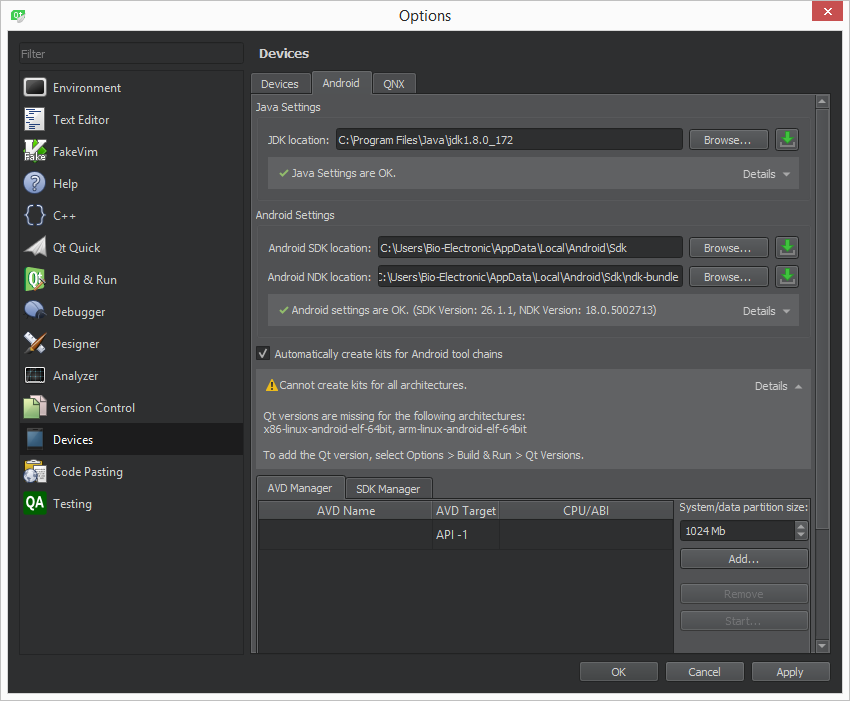
            0_1538654682772_noandroid4.png

            1 Reply Last reply
            0
            • CodeFreaksC Offline
              CodeFreaksC Offline
              CodeFreaks
              wrote on last edited by
              #17
              This post is deleted!
              1 Reply Last reply
              0
              • JKSHJ JKSH

                @CodeFreaks See https://stackoverflow.com/questions/48189272/qt-creator-android-error-platform-sdk-installed/48348201

                You might need to downgrade to JDK 8 and delete Qt Creator's config files.

                CodeFreaksC Offline
                CodeFreaksC Offline
                CodeFreaks
                wrote on last edited by
                #18
                This post is deleted!
                1 Reply Last reply
                0
                • CodeFreaksC Offline
                  CodeFreaksC Offline
                  CodeFreaks
                  wrote on last edited by CodeFreaks
                  #19

                  I followed all instructions and problem still exists with android development kits.
                  I really don't have any idea.
                  Isn't it supported even with those who have commercial license ?

                  Pablo J. RoginaP 1 Reply Last reply
                  0
                  • CodeFreaksC CodeFreaks

                    I followed all instructions and problem still exists with android development kits.
                    I really don't have any idea.
                    Isn't it supported even with those who have commercial license ?

                    Pablo J. RoginaP Offline
                    Pablo J. RoginaP Offline
                    Pablo J. Rogina
                    wrote on last edited by
                    #20

                    @CodeFreaks said in Missed Compiler/Tool/Platform:

                    Isn't it supported even with those who have commercial license ?

                    In that case, I think you need to contact Qt's customer support in other to engage them with your incident. This is a users forum actually.

                    Upvote the answer(s) that helped you solve the issue
                    Use "Topic Tools" button to mark your post as Solved
                    Add screenshots via postimage.org
                    Don't ask support requests via chat/PM. Please use the forum so others can benefit from the solution in the future

                    1 Reply Last reply
                    0
                    • ndt_mikeN Offline
                      ndt_mikeN Offline
                      ndt_mike
                      wrote on last edited by
                      #21

                      You need to install NDK 10 e. I had the same problem, yeah I know it's frustrating.

                      http://doc.qt.io/qt-5/androidgs.html

                      If you follow the instructions here regarding versions the system works, any deviation and you have issues like you are seeing now.

                      So I have it working and have

                      JDK 8.181
                      Android SDk 23.03 and 28.03 installed
                      Android NDK 10 e ( you have to install this without android studio, android studio installs a much more contemporary version)

                      I had the same problem that you have, saying everything is installed correctly but it's not working.

                      CodeFreaksC 1 Reply Last reply
                      1
                      • ndt_mikeN ndt_mike

                        You need to install NDK 10 e. I had the same problem, yeah I know it's frustrating.

                        http://doc.qt.io/qt-5/androidgs.html

                        If you follow the instructions here regarding versions the system works, any deviation and you have issues like you are seeing now.

                        So I have it working and have

                        JDK 8.181
                        Android SDk 23.03 and 28.03 installed
                        Android NDK 10 e ( you have to install this without android studio, android studio installs a much more contemporary version)

                        I had the same problem that you have, saying everything is installed correctly but it's not working.

                        CodeFreaksC Offline
                        CodeFreaksC Offline
                        CodeFreaks
                        wrote on last edited by CodeFreaks
                        #22

                        @ndt_mike
                        Thanks for reply.
                        I have following according to instruction:
                        JDK 8.181
                        Android SDk 25.2.5 and 28.03
                        Android NDK 10e
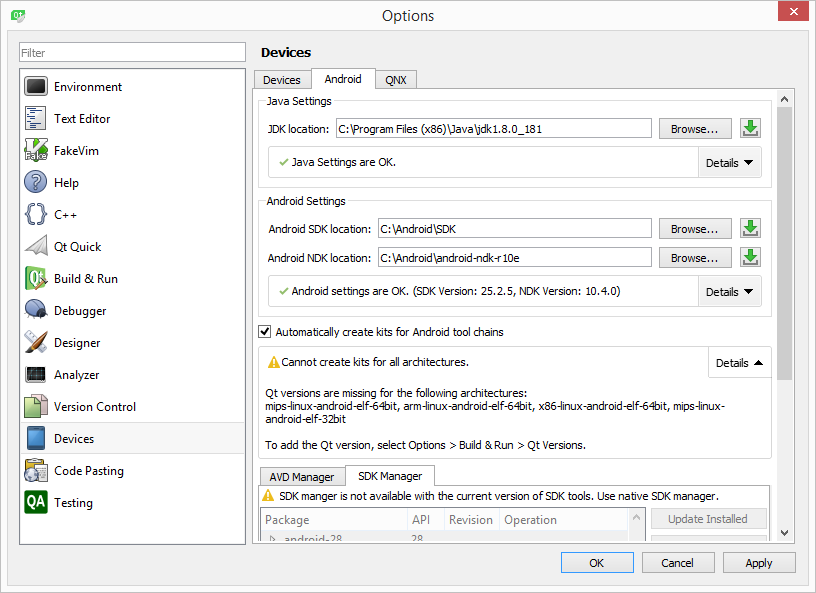
                        0_1539372523307_f5e75235-60b1-4a91-9c62-50b8a3d9ff10-image.png

                        The problem is not resolved yet.

                        the only thing that I should investigate is degrading my sdk but as mentioned in the instruction the last sdk should be compatible with the Qt Creator.

                        1 Reply Last reply
                        0
                        • SGaistS Offline
                          SGaistS Offline
                          SGaist
                          Lifetime Qt Champion
                          wrote on last edited by
                          #23

                          You have installed Qt for armv7 and x86 so it's normal that all these architectures are missing.

                          Interested in AI ? www.idiap.ch
                          Please read the Qt Code of Conduct - https://forum.qt.io/topic/113070/qt-code-of-conduct

                          CodeFreaksC 1 Reply Last reply
                          1
                          • SGaistS SGaist

                            You have installed Qt for armv7 and x86 so it's normal that all these architectures are missing.

                            CodeFreaksC Offline
                            CodeFreaksC Offline
                            CodeFreaks
                            wrote on last edited by CodeFreaks
                            #24

                            @SGaist
                            Thanks for reply.
                            is it possible to add tool chain for these architectures?
                            Please let me know what should I do?

                            1 Reply Last reply
                            0
                            • SGaistS Offline
                              SGaistS Offline
                              SGaist
                              Lifetime Qt Champion
                              wrote on last edited by
                              #25

                              Nothing special unless you want to use one of these architectures.

                              Interested in AI ? www.idiap.ch
                              Please read the Qt Code of Conduct - https://forum.qt.io/topic/113070/qt-code-of-conduct

                              CodeFreaksC 1 Reply Last reply
                              1
                              • SGaistS SGaist

                                Nothing special unless you want to use one of these architectures.

                                CodeFreaksC Offline
                                CodeFreaksC Offline
                                CodeFreaks
                                wrote on last edited by CodeFreaks
                                #26

                                @SGaist
                                how can I add tool chain for these architectures?

                                1 Reply Last reply
                                0
                                • SGaistS Offline
                                  SGaistS Offline
                                  SGaist
                                  Lifetime Qt Champion
                                  wrote on last edited by
                                  #27

                                  You don't need additional toolchains, the warning says that you are missing Qt version for these architectures. So if you want to build for all of them, then you'll have to build Qt yourself for all of them.

                                  Interested in AI ? www.idiap.ch
                                  Please read the Qt Code of Conduct - https://forum.qt.io/topic/113070/qt-code-of-conduct

                                  CodeFreaksC 1 Reply Last reply
                                  1
                                  • SGaistS SGaist

                                    You don't need additional toolchains, the warning says that you are missing Qt version for these architectures. So if you want to build for all of them, then you'll have to build Qt yourself for all of them.

                                    CodeFreaksC Offline
                                    CodeFreaksC Offline
                                    CodeFreaks
                                    wrote on last edited by
                                    #28

                                    @SGaist
                                    Thanks for reply.
                                    I've spent much time but still can't compile my program for android 6 & 8.
                                    Any android option and any related kits didn't add.
                                    I don't have any idea.
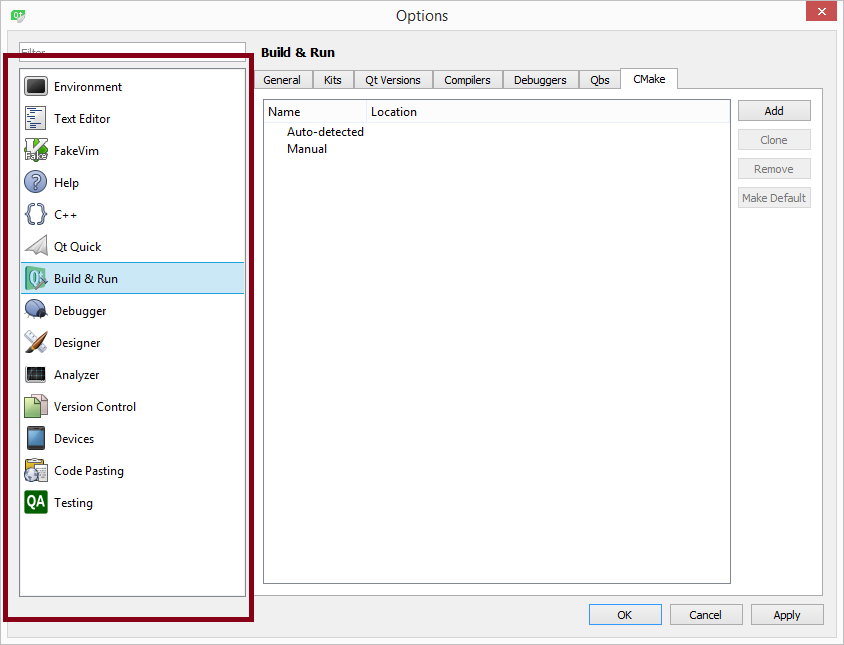
                                    0_1539445625492_1ba94b17-aa5f-46bd-abfe-e38c20637127-image.png

                                    1 Reply Last reply
                                    0
                                    • SGaistS Offline
                                      SGaistS Offline
                                      SGaist
                                      Lifetime Qt Champion
                                      wrote on last edited by
                                      #29

                                      That's the cmake panel so unless you are currently using cmake for your project, there's no problem here. If on the other hand you are using cmake, then you have to install it and if Qt Creator can't find it, then point it to your installed cmake.

                                      Interested in AI ? www.idiap.ch
                                      Please read the Qt Code of Conduct - https://forum.qt.io/topic/113070/qt-code-of-conduct

                                      CodeFreaksC 1 Reply Last reply
                                      0
                                      • SGaistS SGaist

                                        That's the cmake panel so unless you are currently using cmake for your project, there's no problem here. If on the other hand you are using cmake, then you have to install it and if Qt Creator can't find it, then point it to your installed cmake.

                                        CodeFreaksC Offline
                                        CodeFreaksC Offline
                                        CodeFreaks
                                        wrote on last edited by
                                        #30

                                        @SGaist
                                        I put the picture to show that android option is not added to the left side.
                                        I tried many instructions and still can't compile for android devices, after long time.

                                        1 Reply Last reply
                                        0
                                        • SGaistS Offline
                                          SGaistS Offline
                                          SGaist
                                          Lifetime Qt Champion
                                          wrote on last edited by
                                          #31

                                          Do you have any other errors in the Kit panel ?

                                          Interested in AI ? www.idiap.ch
                                          Please read the Qt Code of Conduct - https://forum.qt.io/topic/113070/qt-code-of-conduct

                                          CodeFreaksC 1 Reply Last reply
                                          0

                                          • Login

                                          • Login or register to search.
                                          • First post
                                            Last post
                                          0
                                          • Categories
                                          • Recent
                                          • Tags
                                          • Popular
                                          • Users
                                          • Groups
                                          • Search
                                          • Get Qt
                                          • Unsolved